
? Etched,一种全新的娱乐方式
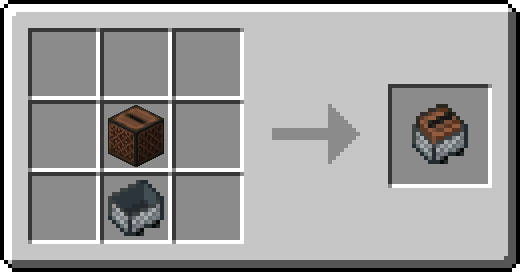
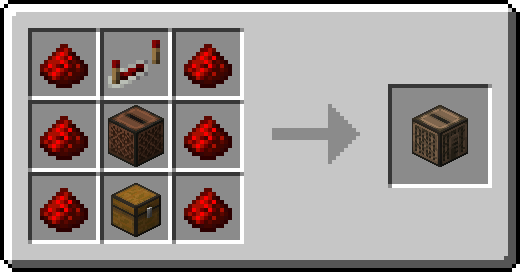
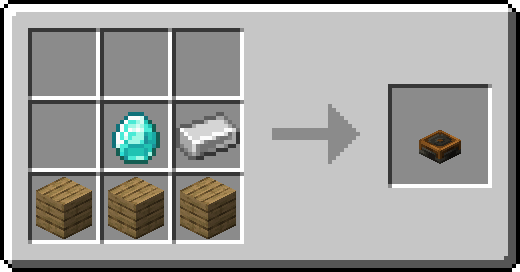
Etched 让你在 Minecraft 中体验播放自己音乐的全新方式!通过全新的 刻录台(Etching Table),你不仅可以创建完全自定义的唱片,Etched 还提供了多种播放所有唱片的新方法。新的 专辑唱片机(Album Jukebox) 允许你存储最多 9 张唱片,它们会按顺序循环播放;除非由红石供电,此时唱片机会暂停并重置到第一张唱片。唱片机矿车(Jukebox Minecart) 让你可以在铁轨上播放音乐,你可以使用漏斗向其中插入唱片,或者在歌曲结束后通过激活铁轨来重新播放!
? 特性:
- 为村民新增了一种吟游诗人职业,提供多种与音乐相关的交易。
- 提供了多种播放音乐的方式,例如唱片机矿车、专辑唱片机或收音机!你可以在旅途中播放歌曲、从广播电台实时收听,或者像专辑一样按顺序循环播放多首歌曲。
- 可以使用漏斗向唱片机中插入唱片!这是来自基岩版的同步功能。
- 使用刻录台制作你自己的定制唱片!提供一个 URL(支持 SoundCloud、MP3、WAV、OGG 和 Minecraft 音效事件)、一张空白唱片以及一个用于装饰唱片封面的标签。
? 如何制作唱片:
操作非常简单,只需将 空白音乐唱片(Blank Music Disc) 和 音乐标签(Music Label) 放入刻录台中即可(右键点击标签以自定义歌曲信息,在工作台中使用染料为其上色,并将两个染色后的音乐标签组合在一起以制作 复杂音乐标签 Complex Music Label)。准备好这些组件后,你就可以在组件槽下方选择标签的图案,让你的唱片看起来更漂亮,然后将你的歌曲 URL 输入上方的栏位中!Etched 目前支持指向以下内容的 URL:MP3 文件、WAV 文件、OGG 文件、SoundCloud 歌曲(无论订阅状态如何,GO+ 歌曲均不支持)、Bandcamp 歌曲 或 Minecraft 音效事件。
如何获取空白音乐唱片?
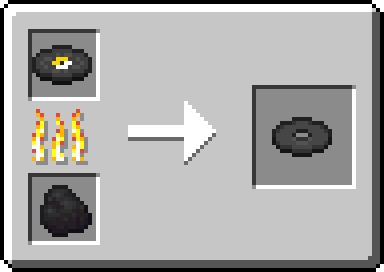
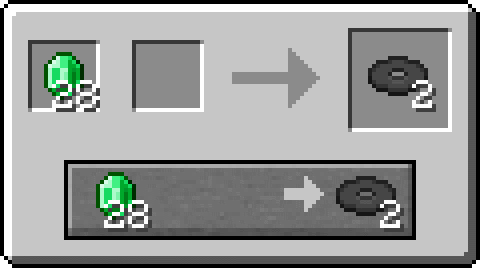
如果没有一定的挑战,这些唱片就失去了意义。要获得 空白音乐唱片,你可以熔炼原版 音乐唱片,或者在商人等级达到 2 级时与新的 吟游诗人(Bard) 进行交易。
? Etched, a new form of entertainment
Etched provides new ways to play your own music right in Minecraft! Not only can you create custom records with full customization with the new Etching Table, Etched also provides new ways to play all discs. The new Album Jukebox lets you store up to 9 records which will play in order and on repeat unless powered by redstone, which then it'll pause and reset to the first disc. The Jukebox Minecart lets you play music on the rails with the ability to insert records into it with hoppers or, if the song is ended, restart the song with an activator rail!
? Features:
- The new bard profession for villagers with various musical trades.
- New ways to play music such as the Jukebox Minecart, Album Jukebox, or Radio! Play songs on the go, live from a radio station, or multiple songs in order on repeat, just like an album.
- Insert records into jukeboxes with hoppers! A parity feature from Bedrock.
- Create your own custom records with the Etching Table! Provide a URL (supports SoundCloud, MP3, WAV, OGG, and Sound Events), a blank disc, and a label to decorate your disc.
? How to create a disc:
It's quite easy to do, simply insert a Blank Music Disc along with a Music Label (right click it to customize the song's info, color with dyes in a crafting table, and craft two dyed music labels together to create a Complex Music Label) and you'll be ready to create your first disc. Once you've got the necessary components, you can select the pattern of the label under the component slots to make your disc look pretty and the URL to your song goes in the bar above! Etched currently supports URLs that lead to an MP3 File, WAV File, OGG File, SoundCloud Song (GO+ songs are not supported, regardless of subscription status), Bandcamp Song, or a Minecraft Sound Event.
How do I obtain a Blank Music Disc?
These wouldn't be records without some sort of challenge. To get a Blank Music Disc, you can either smelt a vanilla Music Disc or trade with the new Bard at merchant level 2.

下载 Etched
需要联机服务器吗?
稳定流畅、一键部署,几分钟即可和朋友联机开服
最低仅需 8 元/月 即可畅快联机
下载 Etched
需要联机服务器吗?
稳定流畅、一键部署,几分钟即可和朋友联机开服
最低仅需 8 元/月 即可畅快联机
下载 Etched
需要联机服务器吗?
稳定流畅、一键部署,几分钟即可和朋友联机开服
最低仅需 8 元/月 即可畅快联机
下载 Etched
下载 Etched
下载 Etched
下载 Etched
- 添加对 Sophisticated Core 的支持
关于这个资源的讨论、问题反馈与使用心得
还没有讨论,来发第一帖吧
你是这个资源的作者?登录后可认领此资源。
相似资源
 模组

显示你正在注视的方块的信息。(适用于 Minecraft 1.16+ 的 Hwyla/Waila 分支)
 模组

可定制的鞘翅模组,支持装饰纹饰、旗帜图案等更多功能!
 模组
使用 JavaScript 编辑配方、添加自定义物品、编写世界事件!
 模组

查看物品与配方
 模组

原版世界生成优化模组
 模组
在游戏画面角落显示附近世界地形、玩家、生物和实体的地图。可创建路径点,帮助你找到标记过的位置。
评论 0
登录后参与评分
还没有评论,来抢沙发吧