
最近发生了什么事?(我退坑模组制作了)
由于大学、工作和私人事务繁多,我在过去几个月里找不到时间来更新我的模组,甚至无法回答问题或回复私信。因此,我认为暂时退出模组制作是最好的选择。
不幸的是,这意味着我不会很快将这个模组更新到更高版本的 Minecraft。
如果有人对源代码感兴趣,我(终于……)将所有内容发布到了 GitHub(参见 Source)。
欢迎继续开发此模组 / 将此模组整合到你想要的任何项目中。如果有任何问题,请随时联系我!
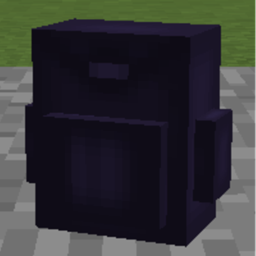
Expandable Backpacks 是一个小型模组,为游戏添加了可升级的背包!
首先
开始之前,你需要一些黑曜石皮革,它可以通过黑曜石、皮革和 2 根线合成。现在,将一块黑曜石皮革与箱子组合,即可得到你的第一个背包。
一些基础配方:
右键点击背包或使用“打开背包”键(默认为 'C')来打开背包。你会发现你的背包只有一个格子。但别担心,你可以通过在升级栏位中添加更多的黑曜石皮革来轻松增加更多格子。
在任何物品栏中将鼠标悬停在背包上并按住 Shift 键,你可以看到关于背包的大量有用信息。
护甲模型:
护甲模型 (1.0.1+)
背包槽位物品栏
(1.0.2+)
背包槽位物品栏是一种存储背包的新方式。这非常实用,因为你不需要浪费胸甲槽位或物品栏槽位来存放背包。只需按下“打开背包槽位物品栏”键(默认为 'X'),或在你的物品栏中使用“背包槽位按钮”来打开背包槽位物品栏。要访问其中的背包,请按“打开背包”键,或在你的物品栏中使用“打开背包按钮”。
如果你不喜欢这些按钮,可以在配置文件中禁用它们或更改其位置。
背包槽位物品栏:
升级物品栏
你可以通过点击第二个物品栏标签页来访问升级物品栏。
升级物品栏:
你可以在升级物品栏中进行很多操作:
1) 升级栏位:
此栏位只能放入黑曜石皮革。每放入一块黑曜石皮革,背包就会获得 1 个额外格子。最多可以放入 53 块黑曜石皮革(共 54 个格子,相当于原版大型箱子的容量)。
2) 重命名:
点击物品栏名称以聚焦它。现在你可以将背包重命名为任意名称。请注意,目前名称长度不能超过 32 个字符。
3) 隔间槽位:
隔间槽位可以填充各种隔间。隔间列表及其效果见下文。每个背包最多有 3 个隔间槽位。开始时仅解锁一个。要获得更多隔间槽位,需要在升级栏位中添加更多的黑曜石皮革(17 块黑曜石皮革解锁第二个槽位,35 块黑曜石皮革解锁第三个槽位)。
4) 染色槽位:
染色槽位可以放入任何原版染料。这样做后,背包将根据所选染料的顏色进行着色。
5) 隐私按钮:
如果按下隐私按钮,背包将在私有模式和公共模式之间切换。有关背包隐私的更多信息见下文。
截图:
隔间
隔间本质上是一些具有实用效果的背包升级。
当前隔间:
基础:基础隔间没有任何效果。它仅用于制作其他隔间。你可以用一块黑曜石皮革制作它。
灵魂绑定:如果你在背包中有此隔间的情况下死亡,你将保留背包及其中的所有物品。需要一颗下界之星。
拾取:如果物品已经在升级后的背包中至少出现过一次,拾取的物品会自动进入该背包。例如,如果你的背包中含有 1 组红石,当你拾取另一组红石时,红石会进入背包而不是你的物品栏。需要一个漏斗。
清空:Shift+右键点击容器方块,可将升级后的背包中的所有物品移动到该容器中。需要一个熔炉。
无限:允许你将其他背包放入升级后的背包中。这可以构建无限存储系统。需要一个钻石块。
焚毁:将你的背包变成一个便携式垃圾桶。背包中的物品会立即被销毁。使用此隔间时请小心!需要一个岩浆桶。
装甲:使升级后的背包具有更高的防护值(3 点护甲值,而非原来的 1/2 点)。需要一个铁胸甲。
交换:在物品栏中持有升级背包时,按下“交换快捷栏”键(默认为“V”),即可将快捷栏中的所有物品与背包前 9 个槽位中的所有物品进行交换。此操作不会交换背包本身,因此在交换时不建议将任何背包放在快捷栏中。需要一个金块。
防护:非背包拥有者尝试打开背包时会受到伤害并获得缓慢效果。升级背包的拥有者也会收到一条提示,告知有人试图打开其背包。
箭袋:使用弓射击时,会从背包中消耗箭矢而非物品栏中的箭矢,但你的物品栏中至少需要有一支箭。需要一个皮革。
末影:添加一个包含你末影箱物品栏的新物品栏标签页。需要一个末影箱。
发送:Shift+右键点击一个容器方块以选择目标位置。背包中的所有物品将被发送至该容器中。你必须处于同一维度,或者该容器方块必须位于主世界(目前)。需要一个发送控制器,可通过 4 颗末影之眼、4 个红石块和 1 个钻石块或下界之星合成。
合成:添加一个包含合成台图形界面的新物品栏标签页。需要一个工作台。
储罐:允许你存储液体。右键点击液体方块可将其存入背包。最多可存储同种液体的 8 桶。Shift+右键点击地面可放置液体。同时添加一个带有储罐图形界面的新物品栏标签页,显示已存储的液体,并允许你直接通过背包存取液体。需要一个铁块。
创造:尝试从背包中取出物品时,物品不会被移除。无法制作,只能通过指令或在创造模式中获得!
隔间:
背包隐私与命令
本模组还为游戏添加了背包隐私系统。
当你制作一个背包时,你将成为其拥有者。输入命令 /backpack addowner <玩家> 可将其他玩家添加到背包的拥有者列表中。你也可以通过输入 /backpack removeowner <玩家> 移除拥有者。在任何物品栏中将鼠标悬停在背包上并按住 Shift 键,即可查看拥有者的名称。拥有者名称也被用于模式系统。
每个背包有 2 种模式:
公开 - 公开意味着所有人都可以访问背包的物品栏以及升级物品栏。
私有 - 私有意味着只有拥有者可以访问背包的物品栏和升级物品栏。
你可以通过在升级物品栏中点击隐私按钮在这些模式之间切换。
除了 addowner 和 removeowner 之外,本模组还增加了另外 2 条命令。输入 /backpack whohasmybackpack 会在聊天栏中打印出所有持有你其中一个背包的在线玩家。此命令仅限管理员使用。
最后一条命令是 /backpack help,它会在聊天栏中打印出关于其他命令的所有重要信息。
待办事项
更新至 1.10+ 已在 1.0.3 中添加- 使“发送”隔间在其他维度中也能正常工作
为背包物品提供合适的盔甲模型已在 1.0.1 中添加- 用其他更酷的方式替换所有命令
为背包增加额外槽位已在 1.0.2 中添加- 使背包可放置
- 更多隔间(非常欢迎建议 <3)
合成已在 1.1 中添加储罐已在 1.1.5 中添加- 鞘翅
- 其他原版 GUI
常见问题解答
问:我可以在我的整合包中使用你的模组吗?
答:当然可以!
问:源代码在哪里?
答:我是个很糟糕的程序员,只是个 Java 新手。我认为你可能找不到对我的源代码有用的地方。
问:我可以在哪里提交建议或崩溃报告?
答:对于建议,请直接在评论区留言(非常欢迎建议 <3);对于崩溃报告,请使用 Issues 选项卡。谢谢!
问:Kann ich Vorschläge auch auf Deutsch schreiben?(我可以用德语写建议吗?)
答:Ja kannst du. ;)(当然可以。)
问:我能有一个想象中的饼干吗?
答:只要你留下友好的评论就可以。 :P
模组评测
感谢所有制作了模组评测的人!如果你也制作了评测,只需将链接发给我,我会把它放在描述中。<3
By MININMARTIN - Mods Para Minecraft (西班牙语)
What's going on lately? (I quit modding)
There is so much going on with university, work and private stuff so I couldn't find the time to update my mods or even answer questions and private messages in the past months and therefore I think it's better to quit modding for now.
This unfortunately means I'm not updating this mod to a newer Minecraft version anytime soon.
If someone is interested in the source code I (finally...) put everything on github (See Source)
Feel free to continue this mod / integrate this mod in whatever project you want. Don't hesitate to contact me if you have any questions!
Expandable Backpacks is a small mod which adds upgradeable backpacks to the game!
First Things First
To get started you will need some obsidian leather which can be crafted with obsidian, leather and 2 strings. Now combine one obsidian leather with a chest to get your first backpack.
Some Basic Recipes:
Rightclick with the backpack or use the "Open Backpack" key (the default for it is 'C') to open the backpack. You will see that your backpack only has 1 slot. But don't worry, you can easily add more slots to it by adding more obsidian leather in the upgrade slot within the upgrade inventory.
You can see a lot of usefull informations about your backpack by pressing shift while hovering over the backpack in any inventory.
Armor Model:
Armor Model (1.0.1+)
The Backpack Slot Inventory
(1.0.2+)
The backpack slot inventory is a new way to store your backpack. This is very usefull because you don't need to waste the chestplate slot or an inventory slot for your backpack. Simply press the "Open Backpack Slot Inventory" key (the default for it is 'X') or use the "Backpack Slot Button" in your inventory to open the backpack slot inventory. To access the backpack in there press the "Open Backpack" key or use the "Open Backpack Button" in your inventory.
If you don't like the Buttons you can disable them or change their position in your config file.
The Backpack Slot Inventory:
The Upgrade Inventory
You can access the upgrade inventory by clicking on the second inventory tab.
Upgrade Inventory:
You can do a lot of things within the upgrade inventory:
1) Upgrade Slot:
This slot can only be filled with obsidian leather. For each obsidian leather you put in this slot, the backpack will receive 1 extra slot. You can add up to 53 obsidian leather (54 slots. The size of a vanilla large chest) in it.
2) Rename:
Click on the inventory name to focus it. Now you can rename the backpack to anything you want. Keep in mind that the name cannot be longer then 32 chars at the moment.
3) Compartment Slots:
Compartment slots can be filled with various compartments. A list of compartments and their effects can be found below. There are a maximum of 3 compartment slots per backpack. Only one is unlocked at the beginning. To get more you will have to add more obsidian leather in the upgrade slot (17 obsidian leather unlocks the second slot and 35 obsidian leather unlocks the third slot).
4) Dye Slot:
The dye slot can be filled with any vanilla dye. If you do so, the backpack will be colored with the given dye color.
5) Privacy Button:
If you press the privacy button the backpack will be changed from private mode to public mode or vice versa. You can find more informations about backpack privacy below.
Screenshots:
Compartments
Compartments are basically upgrades with some usefull effects for your backpack.
Current compartments:
Basic: The basic compartment has no effect. It's only used to craft other compartments. You can craft it with one obsidian leather.
Soulbound: If you die while having a backpack with this compartment in your inventory you will keep the backpack with all items in it. Needs one nether star.
Pickup: Picked up items go automatically in the upgraded backpack if they are already at least once in it. For example if your backpack contains 1 redstone and you pick up another redstone the redstone will go in the backpack instead of in your inventory. Needs one hopper.
Empty: Shift-Rightclick an inventory block to move everything from the upgraded backpack in the inventory block. Needs one cauldron.
Infinite: Allows you to put other backpacks in the upgraded backpack. This can lead to an infinite storage system. Needs one diamond block.
Incinerate: Turns your backpack in a portable trash can. Items in the backpack will get destroyed immediately. Be careful with this compartment! Needs one lava bucket.
Armored: Gives the upgraded backpack a higher protection value (3 Armor Points instead of 1/2 Armor Point). Needs an iron chestplate.
Swap: Press the 'Swap Hotbar' key (the default for it is 'V') while having the upgraded backpack in your inventory to swap all items of your hotbar with all items of the backpack's first 9 slots. This doesn't swap backpacks so it's not recommended to have any backpacks in your hotbar while swaping. Needs one gold block.
Guarded: Players who are not owners of the backpack take damage and receive slowness if they try to open it. Owners of the upgraded backpack also receive a message that someone tried to open their backpack.
Quivered: Shooting with a bow, consumes arrows from the backpack instead of the inventory but you need at least one arrow in your inventory. Needs one leather.
Ender: Adds a new inventory tab with your ender chest inventory. Needs an ender chest.
Sending: Shift-Rightclick an inventory block to select a location. All items in the backpack will be sent to the inventory. You have to be in the same dimension or the inventory block has to be in the overworld (at the moment). Needs one sending controller which can be crafted with 4 ender eyes, 4 redstone blocks and 1 diamond block or nether star.
Crafting: Adds a new inventory tab with a crafting table gui. Needs a workbench.
Tank: Allows you to store liquids. Rigthclick a liquid block to store it in your backpack. You can store up to 8 buckets of the same kind. Shift-Rigthclick on the ground to place the liquid. Also adds a new inventory tab with a tank gui which shows the stored liquids and allows you to store/withdraw liquids directly through the backpack. Needs a block of iron.
Creative: Items in the backpack will not get removed if you try to take them out. Cannot be crafted and can only be received with commands or within the creative tab!
Compartments:
Backpack Privacy and Commands
This mod also adds a privacy system for the backpacks to the game.
If you craft a backpack you will become the owner of it. By typing the command /backpack addowner <player> you can add other players to the backpack's owner list. You can also remove owners by typing /backpack removeowner <player>. The names of the owners will be displayed by pressing shift while hovering over the backpack in any inventory. The owner names are also used by the mode system.
There are 2 modes for every backpack:
Public - Public means that everyone can access the backpack's inventory as well as the upgrade inventory.
Private - Private means that only owners can access the backpack's inventory and the upgrade inventory.
You can switch between these modes by pressing the privacy button in the upgrade inventory.
Besides addowner and removeowner this mod also adds in 2 more commands. By typing /backpack whohasmybackpack every online player who has one of your backpacks will be printed in the chat. This command can only be used by operators.
The last command is /backpack help which prints all important informations about the other commands in the chat.
TODO
Update to 1.10+ Added in 1.0.3- Make the 'sending' compartment functional in other dimensions
A decent armor model for the backpack itemAdded in 1.0.1- Replace all commands with something different/cooler
Make an extra slot for the backpackAdded in 1.0.2- Make the backpack placeable
- More compartments (suggestions are very welcome <3)
CraftingAdded in 1.1TankAdded in 1.1.5- Elytra
- Other vanilla GUIs
FAQ
Q: Can I use your mod in my modpack?
A: Sure!
Q: Where is the source code?
A: I'm a pretty bad coder and just a java newbie. I don't think you will find my source code somehow useful.
Q: Where can I post suggestions or crash reports?
A: For suggestions just use the comment section (suggestions are very welcome <3) and for crash reports use the issues tab. Thanks!
Q: Kann ich Vorschläge auch auf Deutsch schreiben?
A: Ja kannst du. ;)
Q: Can I have an imaginary cookie?
A: Only if you leave a nice comment. :P
Mod Reviews
Thanks to everyone who made a mod review! If you made one too just send me the link and I'll put it here in the description. <3
By MININMARTIN - Mods Para Minecraft (spanish)
下载 Expandable Backpacks
需要联机服务器吗?
稳定流畅、一键部署,几分钟即可和朋友联机开服
最低仅需 8 元/月 即可畅快联机
下载 Expandable Backpacks
需要联机服务器吗?
稳定流畅、一键部署,几分钟即可和朋友联机开服
最低仅需 8 元/月 即可畅快联机
下载 Expandable Backpacks
需要联机服务器吗?
稳定流畅、一键部署,几分钟即可和朋友联机开服
最低仅需 8 元/月 即可畅快联机
下载 Expandable Backpacks
需要联机服务器吗?
稳定流畅、一键部署,几分钟即可和朋友联机开服
最低仅需 8 元/月 即可畅快联机
下载 Expandable Backpacks
需要联机服务器吗?
稳定流畅、一键部署,几分钟即可和朋友联机开服
最低仅需 8 元/月 即可畅快联机
下载 Expandable Backpacks
需要联机服务器吗?
稳定流畅、一键部署,几分钟即可和朋友联机开服
最低仅需 8 元/月 即可畅快联机
下载 Expandable Backpacks
需要联机服务器吗?
稳定流畅、一键部署,几分钟即可和朋友联机开服
最低仅需 8 元/月 即可畅快联机
下载 Expandable Backpacks
需要联机服务器吗?
稳定流畅、一键部署,几分钟即可和朋友联机开服
最低仅需 8 元/月 即可畅快联机
下载 Expandable Backpacks
需要联机服务器吗?
稳定流畅、一键部署,几分钟即可和朋友联机开服
最低仅需 8 元/月 即可畅快联机
下载 Expandable Backpacks
需要联机服务器吗?
稳定流畅、一键部署,几分钟即可和朋友联机开服
最低仅需 8 元/月 即可畅快联机
- 如果背包拥有灵魂绑定隔间或 keepInventory 已启用,且玩家物品栏已满,则背包现在会在重生点掉落,而非死亡地点。
- 提亮了所有背包的纹理
关于这个资源的讨论、问题反馈与使用心得
还没有讨论,来发第一帖吧
你是这个资源的作者?登录后可认领此资源。
相似资源
 模组

可定制的鞘翅模组,支持装饰纹饰、旗帜图案等更多功能!
 模组

一个用于收集生物掉落物的多区块模组。
 模组
AE2:一款流行的自动化与存储模组
 模组

基于 GTCEu 1.12.2 的现代 GregTech
 模组

让你能够在世界中的任何位置定位结构。
 模组

为你的终界增添新生物群系、神秘仪式和全新生物
评论 0
登录后参与评分
还没有评论,来抢沙发吧