注意:我在 Reddit、FTB 论坛和 Minecraft 模组开发 Discord 上的用户名是 lucariomaster2。(更新于 2018 年 5 月 10 日)
Factory Tech 是一个技术类模组,专注于设计复杂的自动化系统。它添加了一些与其他技术模组相同的机器,但与之不同的是,Factory Tech 中的任何机器都不需要能源。相反,每台机器都有一份运行所需的零件列表,这些零件会逐渐磨损并需要更换。该模组力求成为一款 真正 的技术模组,其挑战主要源于创造性的工程设计,而非资源获取。
机器列表:
新增机器:
- 河床格栅:放置在河流中时会缓慢生成金属
- 圆锯:比普通方式更高效地将原木转化为木板
- 砂轮:用于磨尖零件和工具
- 金属切割机:将锭切割成精确的金属零件
- 伐木机:砍伐树木
- 矿石研磨机:将矿石研磨成粉末,使其产量翻倍
- 磁化器:对铁锭进行磁化处理
- 电炉:熔炼速度比普通熔炉更快,并包含一些独特的合成配方
- 离心机:将物质分离为其组成成分
Magnetic Centrifuge:一种用于提取铁和镍的专用离心机
坩埚:将物品熔化为液体
药水混合器:组合药水效果
电路雕刻机:在石英上蚀刻电路图案
采矿机:挖掘一个大洞,产出资源
生物分解器:击杀怪物以获取比正常更多的掉落物
流体钻机:从地下提取硫和丙烷
流体搅拌器:剧烈混合固体与液体
电镀机:提纯矿石粉尘,使产出翻倍
冰箱:将液体重新冻结为固体
压缩室:将便携式储罐填充为压缩流体
丙烷熔炉:使用丙烷罐进行极速冶炼
淬火炉:对机械部件进行淬火处理,延长其使用寿命
核心充电器:为能量核心充电以备后用
稳定台:稳定已充电的能量核心,使其安全可用
生物合成单元:使用能量核心生成怪物
生物干扰器:阻止附近怪物移动
负离子分散器:为玩家施加正面药水效果
特斯拉线圈:电击任何未穿戴全套链甲的附近生物
通用超充器:消耗能量核心,使相邻机器的速度翻倍
要开始体验 Factory Tech,请制作蓝图合集(Blueprint Collection),其中将介绍模组的所有内容。
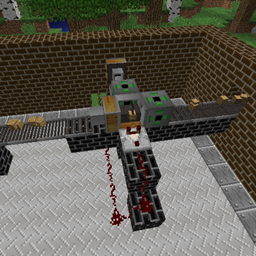
Factory Tech 为巧妙的自动化布局提供了巨大的潜力。这里展示了一个非常基础的木材采集工厂,采用手动输入方式,但你会发现,随着零件的生产和部署到所有机器中,你的自动化系统最终会相互交织在一起。
CraftTweaker 指南(略有过时):
锯木机、钻头研磨机以及其他简单的单输入/单输出机器。第一个参数是输出物,第二个是输入物,第三个表示该配方是否适用于带有石头部件的机器。要移除配方,请指定输出物。
mods.factorytech.ChopSaw.addRecipe(<minecraft:gold_nugget> * 9, <minecraft:gold_ingot>, true);
mods.factorytech.ChopSaw.removeRecipe(<minecraft:stick> * 3);
mods.factorytech.DrillGrinder.addRecipe(...);
mods.factorytech.MetalCutter.addRecipe(...);
mods.factorytech.Magnetizer.addRecipe(...);
mods.factorytech.ElectricFurnace.addRecipe(...);
mods.factorytech.Electroplater.addRecipe(...);
mods.factorytech.Grindstone.addRecipe(...);
淬火炉:添加时使用(输出物品,输入物品,时间单位为刻),移除时只需指定(输出物品)。
mods.factorytech.Temperer.addRecipe(<minecraft:leather>, <minecraft:rotten_flesh>, 60);
mods.factorytech.Temperer.removeRecipe(<minecraft:leather>);
离心机:第一个参数是输入物,随后三个参数是输出物,最后一个参数表示该配方是否适用于带有石头部件的机器。
mods.factorytech.Centrifuge.addRecipe(<minecraft:soul_sand>, <minecraft:blaze_powder>, <minecraft:sand.0>, <minecraft:coal.0>, false);
mods.factorytech.Centrifuge.removeRecipe(<minecraft:soul_sand>, <minecraft:blaze_powder>, <minecraft:sand.0>, <minecraft:coal.0>);
压缩室:添加时使用(输出物品,输入物品,输入流体),移除时只需指定(输出物品)。
mods.factorytech.CompressionChamber.addRecipe(<minecraft:bucket>, <minecraft:lava_bucket>, <liquid:lava> * 1000);
mods.factorytech.CompressionChamber.removeRecipe(<minecraft:lava_bucket>);
熔炉:添加时使用(输出流体,输入物品),移除时只需指定(输出流体)。
mods.factorytech.Crucible.addRecipe(<liquid:sulphur> * 50, <minecraft:blaze_powder>);
mods.factorytech.Crucible.removeRecipe(<liquid:sulphur> * 50);
冰箱:与熔炉相同,但操作方向相反。
搅拌器:(输入液体1,输入液体2,输入物品,输出流体,输出物品)。移除时指定(输出物品,输出流体)。除第一个输入液体外,其余参数均可设为 null。
mods.factorytech.Agitator.addRecipe(<liquid:water> * 1000, <liquid:lava> * 1000, <minecraft:dirt>, null, <minecraft:iron_ore>);
河流格栅:CraftTweaker 可用于添加或移除可能的产出物。语法为 (item, chance),其中 0 表示从不出现,1 表示总是出现。
mods.factorytech.rivergrate.addRecipe(<minecraft:sand>, 0.1);
如何配置机器部件的寿命:
机器部件的配置在 factorytech_maintenance.cfg 中进行。每个由冒号分隔的数字串代表一个部件的各项统计数据。例如:
S:motor=motor:6:0.35:1.3:0.95
第一个数字是机器中该部件可完成的最少操作次数。第二个数字(介于 0 和 1 之间)是当达到最少操作次数后部件损坏的概率。第三个数字表示损坏概率的增长系数;一旦达到最少操作次数,此后每次操作的损坏概率都会乘以该增长系数。第四个数字表示当部件损坏时,机器将其返还给玩家的概率。
常见问题解答 (FAQ):
问:我爱死这个模组了!我该如何支持它?
答:最好的方式就是让更多人知道它的存在。如果你是 YouTuber,可以考虑做一个专题介绍!
问:你会添加某种机器/物品/功能吗?
答:欢迎随时提出建议(我不会咬人),但我没有义务一定要加入它们。话虽如此,如果某个想法与模组契合度高、平衡性良好且我也喜欢,我非常有可能把它加入其中!
问:为什么现在部件只能堆叠到 4 个了?
答:为了防止你囤积一整箱的部件并将其用于自动化生产。请建立一条正规的补给线。这很有趣。我知道你想这么做。
问:我觉得 <machine> 在部件消耗方面不平衡。
答:平衡性是模组设计中的一个持续挑战。部件消耗速度的“魔法数值”设置得足够高,以迫使玩家进行自动化生产和分配,但又低到不至于让玩家为了维持工业运转而耗费大量资源。幸运的是,部件消耗的各个方面都可以在 factorytech_maintenance.cfg 中进行完全自定义配置。
问:你的纹理/精灵图/模型/其他视觉效果太烂了!
答:是的,我很清楚这一点。我是个程序员,不是像素艺术家。不过,如果你能帮我制作一些更好的素材,我会把你的名字写进模组的致谢名单里!
问:[Feature]/[Mechanic] 太不真实了!
答:是的,确实如此。虽然这是一个更接地气的科技模组,但我在认为必要的地方会进行一些创作上的自由发挥(例如电路制作)。关于机器不使用电力的具体问题,Factory Tech 采用了不同的平衡方式。你不需要将一堆机器连接到大型反应堆(tm),而是持续为它们提供所需的零件。如果要求机器同时需要零件和电力,会过于繁琐,因为你必须同时连接电源线与零件供应线。
问:制作步骤太多了!这比 GregTech 还糟糕!
答:建立自动化。这才是重点所在。
问:既然 Thermal Expansion 也能做同样的事而且更简单,我为什么要用这个模组?
答:既然这个模组能做 TE 能做的绝大部分事情且更具挑战性,那你为什么还要用 Thermal Expansion?各有所好;这个模组是为喜欢工程设计的玩家打造的。
问:你为什么有 3 个不同的互联网用户名?
答:“lucariomaster2” 来源于大约 2009 年,当时我首次注册我的 Minecraft 用户名。那时我还年轻又愚蠢,是个大宝可梦粉丝(这一点至今未变),而“lucariomaster”已被占用。此后它一直作为我在各个网站的首选用户名,因为它始终可用。“ProfessorLucario” 是我新的、不那么尴尬的 Minecraft 用户名,也反映了我的皮肤形象。“dalapo” 是我的 GitHub 用户名,选择它是考虑到未来使用与宝可梦相关的用户名可能不是个好主意。
问:你用哪些软件进行模组开发?
答:我用 Eclipse 编写代码,然后用 GIMP 制作纹理,用 Blender 进行建模。
已知问题:
- 许多机器没有动画效果(计划中)
- 许多我的纹理,尤其是装饰方块,相当难看(计划中)
- 平衡性可能失调(进行中)
关于 Modern Skyblock 3 的说明:
Modern Skyblock 3 是最受欢迎的包含 Factory Tech 的整合包,因此对许多人来说,这是他们初次接触该模组的经历。然而,它在整合包中的实现方式鼓励玩家单纯地刷遍所有机器以解锁其他加工选项,之后便不再使用。而这正是 Factory Tech 旨在反对的游戏风格,因此我认为其整合方式非常糟糕。因此,如果你对该模组的唯一体验来自 MSB3,我强烈建议你尝试独立游玩,或在一个更侧重自动化的整合包中体验。
Note: My username on reddit, the FTB forums, and the Minecraft Mod Development discord is lucariomaster2. (Updated May 10, 2018)
Factory Tech is a tech mod, centred around designing intricate automation setups. It adds some of the same machines as other tech mods, but it differs from them in that no machine in Factory Tech requires power. Instead, each machine has a list of parts that it needs to run, which gradually wear out and need replacing. It aims to be as close to a true tech mod as possible, in terms of making the challenge stem from creative engineering instead of resource acquisition.
List of machines:
Machines added:
- River Grate: Slowly generates metal when placed in a river
- Chop Saw: Converts logs into planks more efficiently than normal
- Grindstone: Sharpens parts and tools
- Metal Cutting Machine: Cuts ingots into precise metal parts
- Woodcutter: Chops down trees
- Drill Grinder: Grinds ores to dust to double their output
- Magnetizer: Magnetizes iron ingots
- Electric furnace: Smelts faster than a normal furnace and has a few unique recipes
- Centrifuge: Separates things into their components
- Magnetic Centrifuge: A specialized Centrifuge for extracting iron and nickel
- Crucible: Melts things into liquids
- Potion mixer: Combines potion effects
- Circuit scribe: Etches circuit patterns onto quartz
- Mining machine: Digs a large hole, outputting resources
- Mob disassembler: Kills monsters for more loot than normal
- Fluid drill: Extracts sulphur and propane from the Earth
- Fluid agitator: Vigorously mixes solids and liquids together
- Electroplater: Purifies ore dust, redoubling its output
- Refrigerator: Freezes liquids back into solids
- Compression chamber: Fills portable tanks with compressed fluid
- Propane furnace: Uses propane tanks to smelt extremely quickly
- Tempering Oven: Tempers mechanical parts to make them last longer
- Core charger: Charges energy cores for eventual use
- Stabilization table: Stabilizes charged energy cores to make them safe to use
- Biosynthesis unit: Uses energy cores to spawn mobs
- Mob disruptor: Stops nearby monsters from moving
- Negative ion disperser: Applies positive potion effects to players
- Tesla coil: Zaps any nearby creatures not wearing full chainmail
- Universal Supercharger: Consumes energy cores to double the speed of adjacent machines
To begin playing with Factory Tech, craft a Blueprint Collection, which will explain everything else in the mod.
Factory Tech has a lot of potential for clever setups. Here is a very basic woodcutting factory with manual inputs, but you will find that all of your automation will end up intertwined as parts are produced and deployed to all of your machines.
CraftTweaker guide (Slightly outdated):
Chop Saw, Drill Grinder, and other simple single input / single output machines. First argument is output, second is input, third is whether the recipe works in a machine with stone parts. To remove a recipe, specify the output.
mods.factorytech.ChopSaw.addRecipe(<minecraft:gold_nugget> * 9, <minecraft:gold_ingot>, true);
mods.factorytech.ChopSaw.removeRecipe(<minecraft:stick> * 3);
mods.factorytech.DrillGrinder.addRecipe(...);
mods.factorytech.MetalCutter.addRecipe(...);
mods.factorytech.Magnetizer.addRecipe(...);
mods.factorytech.ElectricFurnace.addRecipe(...);
mods.factorytech.Electroplater.addRecipe(...);
mods.factorytech.Grindstone.addRecipe(...);
Tempering Oven: (Output item, input item, time in ticks) to add; (output item) to remove.
mods.factorytech.Temperer.addRecipe(<minecraft:leather>, <minecraft:rotten_flesh>, 60);
mods.factorytech.Temperer.removeRecipe(<minecraft:leather>);
Centrifuge: First argument is input, second three are outputs, then whether the recipe works with stone parts.
mods.factorytech.Centrifuge.addRecipe(<minecraft:soul_sand>, <minecraft:blaze_powder>, <minecraft:sand.0>, <minecraft:coal.0>, false);
mods.factorytech.Centrifuge.removeRecipe(<minecraft:soul_sand>, <minecraft:blaze_powder>, <minecraft:sand.0>, <minecraft:coal.0>);
Compression Chamber: (Output item, input item, input fluid) to add; (output item) to remove.
mods.factorytech.CompressionChamber.addRecipe(<minecraft:bucket>, <minecraft:lava_bucket>, <liquid:lava> * 1000);
mods.factorytech.CompressionChamber.removeRecipe(<minecraft:lava_bucket>);
Crucible: (Output fluid, input item) to add; (output fluid) to remove.
mods.factorytech.Crucible.addRecipe(<liquid:sulphur> * 50, <minecraft:blaze_powder>);
mods.factorytech.Crucible.removeRecipe(<liquid:sulphur> * 50);
Refrigerator: Same as the Crucible but in reverse.
Agitator: (Input liquid 1, input liquid 2, Input item, output fluid, output item). (Output item, output fluid) to remove. All of these can be null except for the first input liquid.
mods.factorytech.Agitator.addRecipe(<liquid:water> * 1000, <liquid:lava> * 1000, <minecraft:dirt>, null, <minecraft:iron_ore>);
River Grate: CraftTweaker can be used to add or remove possible outputs. The syntax is (item, chance) with 0 being never and 1 being always.
mods.factorytech.rivergrate.addRecipe(<minecraft:sand>, 0.1);
How to configure machine part lifetimes:
Machine part configuration happens in factorytech_maintenance.cfg. Each string of numbers separated by colons represents the statistics for a part. For example:
S:motor=motor:6:0.35:1.3:0.95
The first number is the minimum number of operations in a machine that a part can complete. The second number is the chance (between 0 and 1) that the part will break once the minimum operations complete. The third number indicates the break chance increase; once the minimum operations complete, the break chance is multiplied by the increase every operation afterwards. The fourth number indicates the chance that the machine will give back a broken part once the part breaks.
FAQ:
Q: I love this mod! How can I support it?
A: The best way is to let people to know that it exists. If you're a Youtuber, consider doing a spotlight!
Q: Will you add x machine/item/feature?
A: Feel free to suggest things (I don't bite), but I have no obligation to include them. That being said, if it fits in well with the mod, is balanced, and I like it, I may very well add it!
Q: Why do parts only stack to 4 now?
A: So that you can't stockpile a double chest of them and use that as your automation. Set up a proper supply line. It's fun. You know you want to.
Q: I feel like <machine> is unbalanced in its part consumption.
A: Balance is an ongoing challenge in designing the mod. The magic number for part consumption speed is high enough to force the player to automate production and distribution, but low enough that the player isn't using a big chunk of their resources just to keep their industry running. Fortunately, every aspect of part consumption is fully configurable in factorytech_maintenance.cfg.
Q: Your textures/sprites/models/othervisuals suck!
A: Yes, I am well aware of that. I'm a coder, not a pixel artist. However, if you make me some better ones I'll put your name in the mod!
Q: [Feature]/[Mechanic] is so unrealistic!
A: Yes, yes it is. Although this is a more down-to-earth tech mod, I do take creative liberties (e.g. circuit crafting) where I deem necessary. On the specific topic of machines not using power, Factory Tech is balanced differently. Instead of needing to hook up a wall of machines to a Big Reactor (tm), you keep them supplied with the parts they need. Making machines require both parts and power would be too cumbersome since you would have to hook up both a power line and a part supply line.
Q: Everything has too many steps to make! This is worse than GregTech!
A: Set up automation. That's the whole point.
Q: Why would I use this thing instead of Thermal Expansion which does everything this does but is easier?
A: Why would you use Thermal Expansion instead of this mod which does most things TE does but is more challenging? Different strokes for different folks; this mod is designed for people who like engineering.
Q: Why do you have 3 different internet usernames?
A: "lucariomaster2" comes from circa 2009 when I first registered my MC username. I was young and foolish, a big Pokemon fan (that has not changed), and "lucariomaster" was taken. It's since become my go-to username for sites since it's always available. "ProfessorLucario" is my new, much-less-cringeworthy MC username that also reflects my skin. "dalapo", my GitHub name, was chosen since in the future having a Pokemon-related username might not be the best idea.
Q: What software do you use for modding?
A: I write code using Eclipse, and then I use GIMP for making textures and Blender for modeling.
Known issues:
- Many machines do not have animations (Planned)
- Many of my textures, especially for the decorative blocks, are fairly ugly (Planned)
- Balance may be out of whack (Ongoing)
A note on Modern Skyblock 3:
Modern Skyblock 3 is the most popular modpack that contains Factory Tech; thus, for many people it is their first experience. However, the way it was implemented into the pack encourages players to simply grind out every machine in order to unlock other processing options, after which it is never touched again. This is the exact playstyle that Factory Tech is designed to counter, and thus I feel like it was implemented very poorly. Thus, if your only experience with it is from MSB3, I highly encourage you to try it out standalone or in a more automation-focused pack.

 模组

 模组

 模组

 模组

 模组

 模组

评论 0
登录后参与评分
还没有评论,来抢沙发吧