
✨ Fast Pots 功能特性
选择快捷栏槽位 – 精确指定哪些槽位(1‑9)用于接收药水。根据你的游玩风格进行自定义。
按药水类型过滤 – 在治疗药水、增益药水(速度、抗火、生命恢复、力量)或两者之间进行选择。只有你需要的药水才会被移动。
自动替换物品 – 如果配置的快捷栏槽位中包含非药水物品,Fast Pots 可以自动将其替换为你背包中的药水(可选,可切换)。
简单的激活方式 – 只需按住 Shift 并将鼠标悬停在背包中的任意药水上,它便会立即移动到下一个你选定的可用快捷栏槽位中。
可调节的延迟 – 设置移动之间的延迟时间(10‑100 毫秒),以防止意外的快速转移。
可视化配置界面 – 使用 Minecraft 原生纹理显示你的快捷栏和背包网格。点击或拖拽以选择槽位并调整延迟 – 所有操作均在干净直观的界面中完成。
持久化配置 – 你的设置保存在 JSON 文件中并自动重新加载。
? 截图
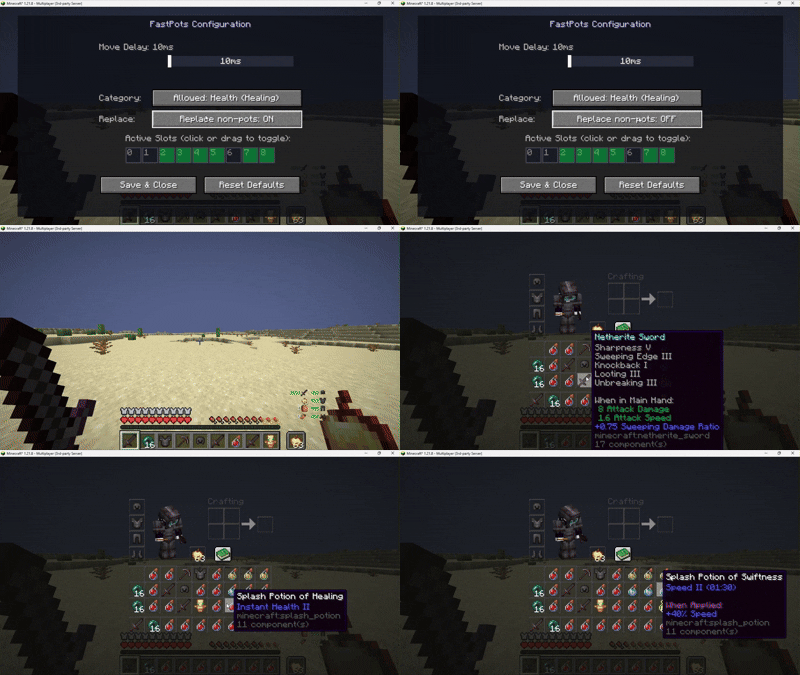
配置界面 – 带有绿色高亮选中槽位的快捷栏网格、延迟滑块以及药水类型切换按钮。
游戏内 – 通过按住 Shift 并悬停来移动药水,同时启用了自动替换功能。
? 依赖要求
Minecraft
Fabric Loader ≥0.18.4
Fabric API
Java 21
? 使用方法
安装模组并启动 Minecraft。
使用 F6(默认按键,可在控制设置中更改)打开配置界面。
选择你想要放置药水的快捷栏槽位(点击或拖拽)。
选择你要移动的药水类型:治疗、增益或两者。
可选地启用“替换非药水物品”以自动覆盖已配置快捷栏槽位中的无用物品。
如有需要,调整延迟时间。
在游戏内,按住 Shift 并将鼠标悬停在背包中符合条件的任意药水上 – 它将立即移动到你选定的下一个空闲快捷栏槽位中。
⚠️ 免责声明
本模组仅适用于客户端,不会修改游戏文件或网络数据包。然而,某些服务器可能会将自动化库存管理(如快速移动药水)视为不公平优势,从而在其规则中禁止。
请自行承担使用此模组的风险。我不对服务器管理员施加的任何封禁或其他制裁负责。在使用任何客户端修改之前,请务必查阅你所玩服务器的规则。
? Bug 报告与建议
请在 Discord 上私信我:
marcellesa
✨ Fast Pots Features
Select which hotbar slots – Choose exactly which slots (1‑9) should receive potions. Customize it to your playstyle.
Filter by potion type – Pick between healing potions, buffs (Speed, Fire Resistance, Regeneration, Strength), or both. Only the potions you want will be moved.
Auto‑replace items – If a configured hotbar slot contains a non‑potion item, Fast Pots can automatically replace it with a potion from your inventory (optional, toggleable).
Simple activation – Just hold Shift and hover over any potion in your inventory. It will instantly move to the next available hotbar slot you've selected.
Adjustable delay – Set a delay between moves (10‑100 ms) to prevent accidental rapid transfers.
Visual configuration screen – Uses Minecraft's native textures to display a grid of your hotbar and inventory. Click or drag to select slots and tweak the delay – all with a clean, intuitive interface.
Persistent config – Your settings are saved in a JSON file and reloaded automatically.
? Screenshots
Config screen – Hotbar grid with green overlays for selected slots, delay slider, potion type toggles.
In‑game – Moving potions by shift‑hovering, with auto‑replace active.
? Requirements
Minecraft
Fabric Loader ≥0.18.4
Fabric API
Java 21
? How to use
Install the mod and launch Minecraft.
Open the config screen with F6 (default key, changeable in Controls).
Select the hotbar slots where you want potions to go (click or drag).
Choose the potion types you want to move: Healing, Buffs, or Both.
Optionally enable "Replace non‑potion items" to automatically overwrite unwanted items in your configured hotbar slots.
Adjust the delay if needed.
In‑game, hold Shift and hover over any eligible potion in your inventory – it will instantly move to the next free hotbar slot you've selected.
⚠️ Disclaimer
This mod is client-side only and does not modify game files or network packets. However, some servers may consider automated inventory management (such as quick potion moving) as an unfair advantage and therefore forbidden by their rules.
Use this mod at your own risk. I am not responsible for any bans or other sanctions applied by server administrators. Always check the rules of the servers you play on before using any client-side modifications.
? Bug reports & suggestions
Send me dm discord:
marcellesa

下载 Fast Pot
下载 Fast Pot
下载 Fast Pot
下载 Fast Pot
需要联机服务器吗?
稳定流畅、一键部署,几分钟即可和朋友联机开服
最低仅需 8 元/月 即可畅快联机
下载 Fast Pot
下载 Fast Pot
下载 Fast Pot
暂无更新日志
关于这个资源的讨论、问题反馈与使用心得
还没有讨论,来发第一帖吧
你是这个资源的作者?登录后可认领此资源。
相似资源
 模组

可定制的鞘翅模组,支持装饰纹饰、旗帜图案等更多功能!
 模组

显示你正在注视的方块的信息。(适用于 Minecraft 1.16+ 的 Hwyla/Waila 分支)
 模组
使用 JavaScript 编辑配方、添加自定义物品、编写世界事件!
 模组

查看物品与配方
 模组
在游戏画面角落显示附近世界地形、玩家、生物和实体的地图。可创建路径点,帮助你找到标记过的位置。
 模组
AE2:一款流行的自动化与存储模组
评论 0
登录后参与评分
还没有评论,来抢沙发吧