
FFItemCreationTracker
物品会记住是谁制作的以及制作时间!打造一把剑,交给朋友,你的名字将永远留在上面。
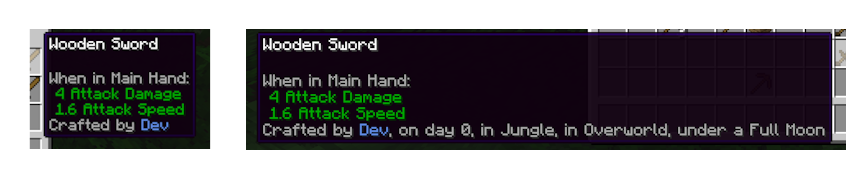 高级提示(即按住 Shift)会显示比名称更多的信息。描述中的所有部分都可以关闭显示。
工作原理
- 当你合成、熔炼、酿造、附魔、使用铁砧、钓鱼或从合成输出中取出物品时,该物品会被盖上你的名字和游戏中的日期印章。
- 悬停在物品上以查看制作者。按住 Shift 可以查看更多详情,例如它是在哪个维度制作的。
- 默认情况下,只有不可堆叠的物品(工具、武器、 armor 等)会被盖章,因此方块和食物仍然可以堆叠。
- 首位制作者优先。后续的制作不会覆盖印章,但其他修改过物品的玩家(例如在铁砧或附魔台上操作)会被列为“由...修改”。
- 药水也会被盖章,标注为加载酿造台的玩家。石切机和织布机的输出有各自的说明文字。
- 每位制作者的名字都有各自的颜色,且所有玩家看到颜色一致。

想在一个专为该模组设计的整合包中体验吗?试试我制作的 Minecraft: Classic+
配置
你可以调整:
- 哪些物品会被盖章,以及可堆叠物品和创造模式是否计入
- 是否记录其他修改物品的玩家,以及保留多少个名字
- 普通提示和 Shift 提示中显示哪些详情,以及它们是显示在一行还是列表中
- 可选额外信息:天气、深度和坐标(坐标还需要服务器允许获取)
- 自定义名字颜色
管理员还可以使用 /ffitemcreationtracker 命令来检查或设置手中物品的印章。
模组兼容性
- 自定义合成界面(如 Farmer's Delight 的烹饪锅)会在你取出结果时自动盖章,无需额外设置。
- 自动化合成器(如 Create 的机械合成器)不会盖章物品,因为没有玩家手动取出它们。
版本差异
FFItemCreationTracker 在所有支持的版本和加载器上表现一致。
对于数据包制作者
FFItemCreationTracker 没有数据包格式。其配置文件中的物品列表接受物品标签,因此你自己的数据包标签可以在其中使用。
对于模组开发者
其他模组可以为物品盖章、添加自己的制作来源和详情,并在写入前更改印章。点击侧边栏的 Wiki 链接查看 API 指南和示例。
为什么带有 FF 前缀?
FF 代表 Fyxe's Features!这是一种简洁的方式,方便在更改配置或创建整合包时轻松找到我的所有模组。属于 “FF” 系统的模组通常较小且不具侵入性。
反馈
如果你有任何改进建议、问题或疑虑,欢迎通过电子邮件联系我:FyxeINCFeedback@gmail.com
FFItemCreationTracker
Items remember who made them and when! Craft a sword, hand it to a friend, and your name stays on it forever.
An advanced tooltip (i.e. holding shift) shows more information than the name. All pieces of the description can be toggled off.
How it works
- When you craft, smelt, brew, enchant, use an anvil, fish, or take an item from a crafting output, it gets stamped with your name and the in-game day.
- Hover over the item to see who made it. Hold Shift for more, like the dimension it was made in.
- By default only unstackable items (tools, weapons, armor and the like) are stamped, so blocks and food still stack.
- The first maker wins. Later crafting doesn't overwrite the stamp, but other players who change the item (at an anvil or enchanting table, for example) are listed as "Modified by".
- Potions are stamped too, with the player who loaded the brewing stand. Stonecutter and loom outputs have their own wording.
- Each maker's name gets its own color, and everyone sees the same one.
Want to see the mod in a pack it was designed for? Check it out in my version of Minecraft: Classic+
Configuration
You can adjust:
- Which items get stamped, and whether stackable items and Creative mode count
- Whether other players who modify an item are remembered, and how many names are kept
- Which details show in the normal and Shift tooltips, and whether they sit on one line or a list
- Optional extras: weather, depth and coordinates (coordinates also need the server to allow them)
- Custom name colors
Operators also get /ffitemcreationtracker commands to check or set the stamp on a held item.
Mod compatibility
- Custom crafting screens (like Farmer's Delight's cooking pot) stamp items when you take the result, with no extra setup.
- Automatic crafters (like Create's mechanical crafter) don't stamp items, since no player took them out.
Version differences
FFItemCreationTracker works the same on every supported version and loader.
For datapack makers
FFItemCreationTracker doesn't have a datapack format. The config's item lists accept item tags, so your own datapack tags work there.
For mod developers
Other mods can stamp items, add their own creation sources and details, and change stamps before they're written. Click the Wiki link in the sidebar for the API guide and examples.
What's with the FF prefix?
It stands for Fyxe's Features! It's a clean way to easily find all of my mods when changing configs or creating packs. Mods that are a part of the "FF" system are usually smaller and unintrusive.
Feedback
If you have any ideas for improvements, questions, or concerns, I am open to communicating through email: FyxeINCFeedback@gmail.com

下载 FFItemCreationTracker
下载 FFItemCreationTracker
需要联机服务器吗?
稳定流畅、一键部署,几分钟即可和朋友联机开服
最低仅需 8 元/月 即可畅快联机
下载 FFItemCreationTracker
下载 FFItemCreationTracker
需要联机服务器吗?
稳定流畅、一键部署,几分钟即可和朋友联机开服
最低仅需 8 元/月 即可畅快联机
下载 FFItemCreationTracker
需要联机服务器吗?
稳定流畅、一键部署,几分钟即可和朋友联机开服
最低仅需 8 元/月 即可畅快联机
下载 FFItemCreationTracker
需要联机服务器吗?
稳定流畅、一键部署,几分钟即可和朋友联机开服
最低仅需 8 元/月 即可畅快联机
下载 FFItemCreationTracker
下载 FFItemCreationTracker
需要联机服务器吗?
稳定流畅、一键部署,几分钟即可和朋友联机开服
最低仅需 8 元/月 即可畅快联机
下载 FFItemCreationTracker
需要联机服务器吗?
稳定流畅、一键部署,几分钟即可和朋友联机开服
最低仅需 8 元/月 即可畅快联机
下载 FFItemCreationTracker
需要联机服务器吗?
稳定流畅、一键部署,几分钟即可和朋友联机开服
最低仅需 8 元/月 即可畅快联机
-
物品现在会记录是谁修改了它们。如果其他人对你的剑使用铁砧、附魔台或锻造台,提示框会在你的名字后添加“由 [名字] 修改”(默认在按住 Shift 时显示,可在客户端配置的 Show Modifiers 中设置)。
-
你可以通过服务器配置中的 Track Modifications 和 Max Modifiers 来关闭此功能或限制保留的名字数量(默认为 5 个)。
-
药水现在可以加盖印章:酿造好的药水会显示“由 [玩家名] 酿造”,即最后一次加载酿造台的玩家。
-
切石机生成的物品现在显示“由 [名字] 切割”,织布机旗帜显示“由 [名字] 编织”,而不是“由 [名字] 制作”。
-
修复了从熔炉、村民交易或铁砧取出的物品被错误标记为“由 [名字] 制作”的问题;现在分别正确显示为“由 [名字] 冶炼”、“由 [名字] 交易”和“由 [名字] 锻造”。
-
修复了通过 Shift+点击进行批量合成(如同时制作多艘船、床等)时,仅第一个物品会标记制作者的问题。
-
客户端配置文件现在列出了正确的默认值(Shift 显示时间、生物群系关闭、垂直布局)。游戏内行为无变化。
-
对于模组作者:
CreationStampEvent监听器抛出的异常现在会被记录日志,而不会导致玩家点击失效。 -
/ffitemcreationtracker stamp命令现在支持不带引号的 ID(如mymod:cooking),并且 Tab 补全会列出其他模组添加的来源。 -
命令消息现在支持翻译,且
/ffitemcreationtracker info命令会以 UTC 时间而非服务器所在时区显示时间。 -
如果客户端配置中的时间格式无效,提示框现在会回退到默认格式,而不是显示原始毫秒数。此外,当鼠标悬停在物品上时,提示框的计算开销也会减少。
-
移除了客户端配置中未使用的“Debug Logging”选项;服务器端配置保持不变。
关于这个资源的讨论、问题反馈与使用心得
还没有讨论,来发第一帖吧
你是这个资源的作者?登录后可认领此资源。
相似资源
 模组

可定制的鞘翅模组,支持装饰纹饰、旗帜图案等更多功能!
 模组

显示你正在注视的方块的信息。(适用于 Minecraft 1.16+ 的 Hwyla/Waila 分支)
 模组

查看物品与配方
 模组
在游戏画面角落显示附近世界地形、玩家、生物和实体的地图。可创建路径点,帮助你找到标记过的位置。
 模组
使用 JavaScript 编辑配方、添加自定义物品、编写世界事件!
 模组
添加区块认领和玩家组队功能,并与 Xaero's Minimap 和 World Map 集成
评论 0
登录后参与评分
还没有评论,来抢沙发吧