概述
Find Me 是一款用于存储、召唤和管理生物与载具的模组。
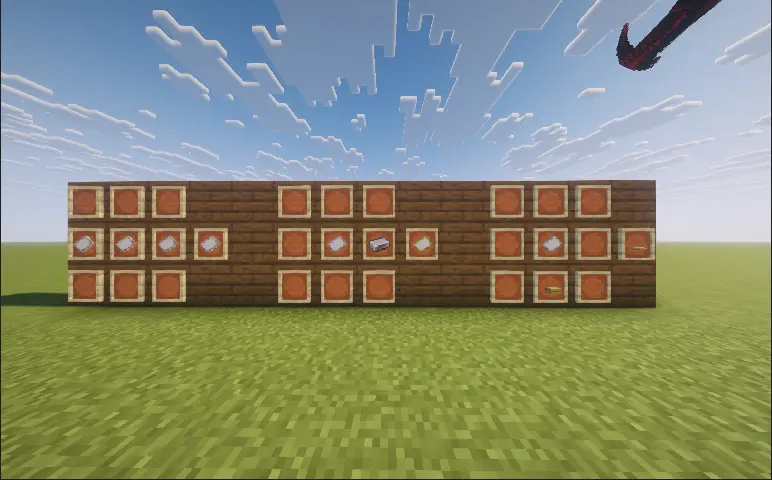
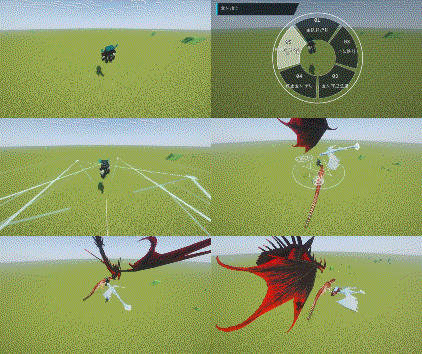
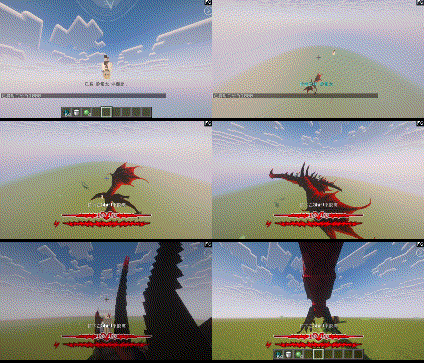
- 你可以使用 Find Me 注册来自原版 Minecraft 或其他模组的兼容坐骑和伙伴,然后通过径向菜单快速召唤、切换或召回它们。
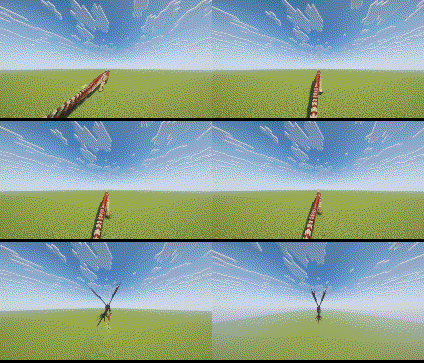
- 陆地、飞行和水生生物在召唤时采用不同的接近动画;
- 切换坐骑时,旧坐骑会离开,而新坐骑会主动接近;
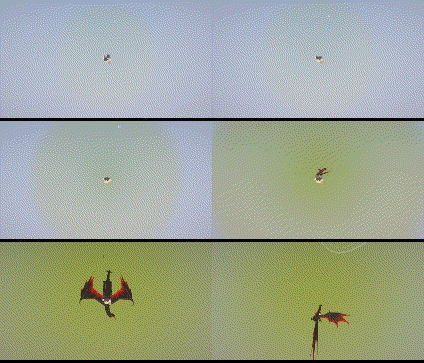
- 当玩家从高处坠落时,也可以呼叫坐骑进行空中救援。
主要功能
- 向单个生物或整个队伍下达跟随、等待、守卫、保护及攻击指令;
- 使用管理器(Manager)组织队伍、存储空间和径向菜单槽位;
- 将伙伴分配至巢穴(Nest),并设置其休息、漫游或守卫状态;
- 已注册的生灵在陷入濒危状态时将免受致命伤害。被存储的生物会随时间恢复生命值,而濒危状态的生物可以在巢穴内休养恢复;
- 每当玩家醒来时,有一定概率复活一名符合条件的死亡生物;
- 使用载具绑定器(Vehicle Binder)绑定支持的载具。航空类载具需要定位座椅(Locator Seat)来确定召唤时将使用哪个座位;
- 可选的友军伤害保护和伙伴方块保护可防止意外攻击及对你家园的破坏。
操作控制
- 右键点击符合条件的生物并使用“命名牌”(Name Paper)将其注册到 Find Me;
- 右键点击支持的载具并使用“载具绑定器”(Vehicle Binder)将其注册到 Find Me;
- 右键点击巢穴,然后从右侧列表中点击或拖拽生物以将其分配给该巢穴。
- R:按下以召唤或切换当前激活的坐骑。按住以打开坐骑轮盘。下落时也可触发救援;
- V:按下以召唤或切换当前激活的伙伴。按住以打开伙伴轮盘;
- G:打开 Find Me 管理器;
- 轮盘打开时,对准某生物并右键点击以打开其个人指令轮盘;
- 轮盘打开时,鼠标中键点击以访问整支队伍的指令。
指令系统
- 跟随我(Follow Me):生物跟随玩家。飞行生物将从空中跟随;
- 在此等候(Wait Here):生物停留在当前位置,停止跟随玩家;
- 向前移动(Move Forward):生物持续向前移动。再次按下相应的召唤键可将你传送至其当前位置,随后该生物将被存储;
- 移动到准星处(Move to Crosshair):生物移动至玩家准星指向的位置;
- 在此守卫(Guard Here):生物守卫指定区域并攻击附近的目标;
- 保护我(Protect Me):生物跟随并保护玩家,攻击任何威胁玩家的事物;
- 攻击目标(Attack Target):命令生物攻击玩家当前选中的目标;
- 着陆(Land):命令飞行生物寻找合适的降落地点;
- 骑乘回家(Ride Home):召唤分配至某个巢穴的坐骑,并让其载着玩家返回该巢穴;
- 传送(Teleport):打开 Waystones 目的地列表。选择目的地后,玩家及其当前坐骑将一同传送。需要安装 Waystones 模组;
- 停止动作(Stop Action):立即取消生物当前的指令;
- 队伍跟随(Team Follow):当前队伍中所有可用的生物跟随玩家;
- 队伍守卫(Team Guard):当前队伍中所有可用的生物守卫指定区域;
- 队伍保护(Team Protect):当前队伍中所有可用的生物保护玩家;
- 队伍攻击(Team Attack):当前队伍中所有可用的生物攻击指定目标;
- 存储队伍(Store Team):存储当前队伍中所有已部署的生物。
管理器与巢穴
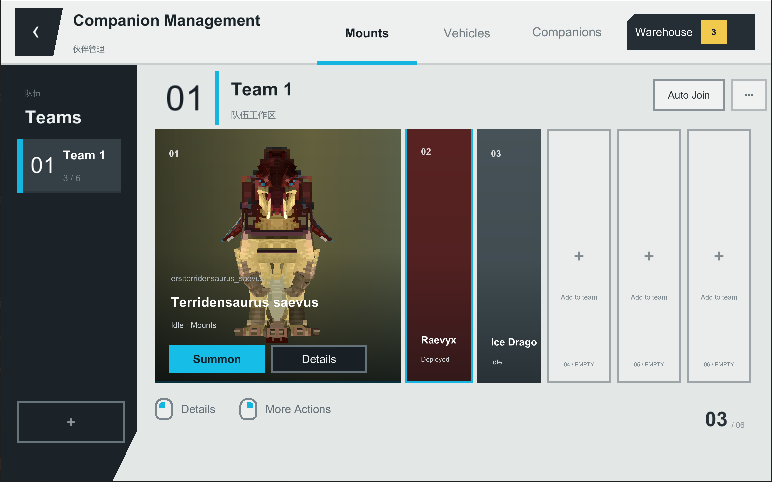
- 管理器允许你创建和组织队伍、搜索生物、移动存储成员、分配径向菜单槽位,以及检查模型、生命值、位置、当前状态和恢复记录。
- 每个巢穴都有各自的容量、漫游范围和最大活动边界。分配至巢穴的伙伴可以休息、漫游或协同守卫周边区域。
- 如果分配至巢穴的生物进入濒危状态,它将在生命值完全恢复后自动休养并重新出现。
玩家设置
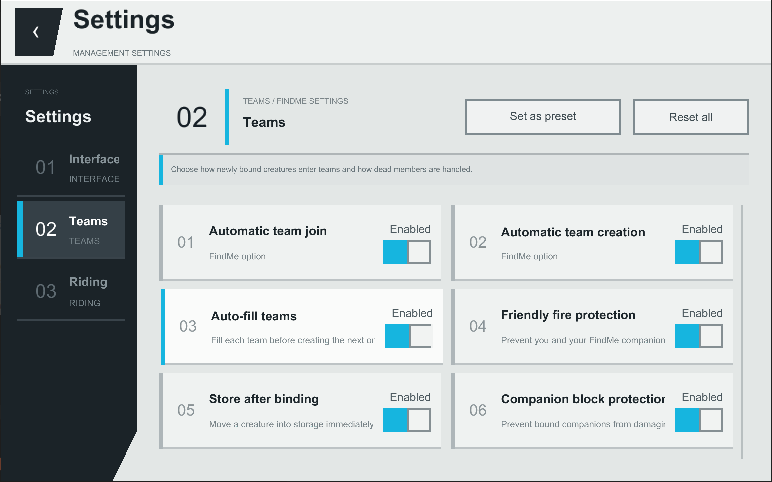
- 玩家可以配置召唤动画、生物声音、轮盘样式、界面动画、不透明度、字体、文本大小、伙伴状态 HUD、骑乘摄像机行为、自动队伍分配、部署限制、友军伤害保护以及伙伴方块保护。
- 服务器管理员可以配置召唤冷却时间、部署限制、救援高度、默认巢穴容量和活动范围、备份机制,以及睡眠复活概率和冷却时间。
命令
- /findme manage:打开管理器;
- /findme hud edit:编辑伙伴状态 HUD 的位置;
- /findme hud reset:重置 HUD 布局;
- /findme reload:重新加载生物兼容性预设。需要管理员权限;
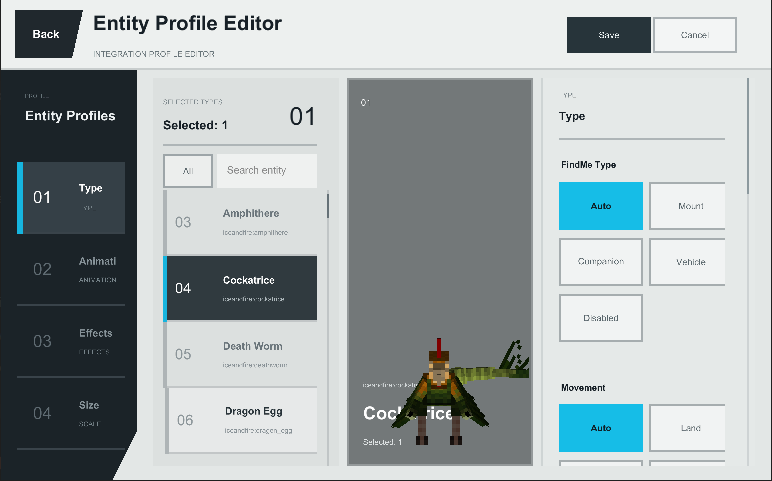
- /findme editor:打开可视化兼容性编辑器,可在其中配置生物类别、移动类型、绑定要求及其他兼容性数据;
- /findme tame:强制驯服准星下的生物或指定的生物。需要管理员权限。
模组兼容性
- Find Me 使用通用实体逻辑来支持大量原版和模组生物,并针对 Ice and Fire、Saint’s Dragons 以及部分其他模组提供了专门的兼容性处理。
- 不同模组在所有物归属、动画、飞行及骑乘的实现上差异巨大。整合包制作者可以使用内置编辑器与实体预设,为特定生物配置兼容性。
- 重要提示
- 客户端必须安装 ApricityUI 1.2.0 或更高版本。
- 在多人游戏中,Find Me 必须在服务器和每个客户端上都安装。
- 更新模组前,请正常退出世界并备份存档。
- 常见问题
- 为什么驯服的生物不会出现在径向菜单中?
- Find Me 不会自动注册已驯服的生物。使用 3 张纸合成“命名纸”,然后手持该物品右键点击生物即可。
- 如何召唤已注册的生物?
- 按住 R 打开坐骑轮盘,或按住 V 打开伙伴轮盘。移动鼠标选择目标生物,然后左键点击。
- 如何向单个生物或整个队伍下达指令?
- 打开伙伴轮盘,指向某只生物,右键点击以打开其个人指令轮盘。在伙伴轮盘内中键点击可打开当前队伍的指令轮盘。
- 为什么无法一次性召唤队伍中的所有伙伴?
- 只有满足部署条件的已注册伙伴才会响应。默认情况下,玩家一次最多可部署 2 名伙伴。此限制可在 G → 设置中进行调整。
- 为什么右键总是骑乘生物而不是喂食或打开其原始界面?
- 当前版本通常优先执行生物的原始右键交互。你也可以在玩家设置中勾选“优先原生骑乘交互”。如果问题依旧,请提交该生物的实体 ID 并附上最新的 latest.log 日志。
- 如何注册载具?
- “命名纸”用于生物。使用 1 张命名纸和 1 个铁锭合成“载具绑定书”,然后右键点击载具。部分载具可能需要专门的兼容性支持。报告问题时,请包含载具模组名称及实体 ID。
- 无法正常驯服的生物是否也能被注册?
- 整合包制作者和管理员可以使用
/findme editor 命令,配置相关的实体类别,并将其绑定要求设置为“忽略”。
- 如果生物死亡、变红或服务器意外关闭,该怎么办?
- 按 G 打开管理器,然后检查备份页面并恢复经过验证的备份。建议在执行此操作前先备份整个世界。
- 有 Fabric 版本吗?
- 目前暂无官方 Fabric 版本。待 Forge 版本更加完善后,计划进行移植。
- 如果游戏提示缺少依赖项或在启动期间崩溃,该怎么办?
- 当前版本需要 ApricityUI 1.2.0 或更高版本。报告启动问题时,请提供你的 Find Me 版本、ApricityUI 版本以及 latest.log 日志。
反馈与建议
如果你遇到问题或希望请求对某种生物添加兼容性支持,请在此提交 Issue:
作者说明
- Find Me 旨在确保来自各个模组的坐骑和伙伴不再被遗忘在世界某个角落,而是真正成为玩家旅途中的成员。
- 不同模组的生物实现方式差异巨大。感谢所有帮助测试模组并提供详细报告、日志和建议的用户。
Overview
Find Me is a mod for storing, summoning, and managing creatures and vehicles.
- You can register supported mounts and companions from vanilla Minecraft or other mods with Find Me, then quickly summon, switch, or recall them using radial wheels.
- Land, flying, and aquatic creatures use different approach animations when summoned;
- When switching mounts, the previous mount leaves while the new one actively approaches;
- When falling from a great height, players can also call a mount for an aerial rescue.
Main Features
- Issue follow, wait, guard, protect, and attack commands to individual creatures or entire teams;
- Use the Manager to organize teams, storage, and radial wheel slots;
- Assign companions to Nests and set them to rest, wander, or guard;
- Registered creatures are protected from fatal damage by entering a critical state. Stored creatures recover health over time, while critically injured creatures can recuperate inside a Nest;
- Whenever a player wakes up, there is a chance that one eligible dead creature will be revived;
- Bind supported vehicles using the Vehicle Binder. Aeronautics vehicles require a Locator Seat to determine which seat will be used when summoned;
- Optional friendly-fire protection and companion block protection prevent accidental attacks and damage to your home.
Controls
- Right-click an eligible creature with a “Name Paper” to register it with Find Me;
- Right-click a supported vehicle with a “Vehicle Binder” to register it with Find Me;
- Right-click a Nest, then click or drag creatures from the list on the right to assign them to it.
- R: Press to summon or switch the active mount. Hold to open the mount wheel. It can also trigger a rescue while falling;
- V: Press to summon or switch the active companion. Hold to open the companion wheel;
- G: Open the Find Me Manager;
- While the wheel is open, point at a creature and right-click to open its individual command wheel;
- Middle-click while the wheel is open to access commands for the entire team.
Command System
- Follow Me: The creature follows the player. Flying creatures will follow from the air;
- Wait Here: The creature remains at its current position and stops following the player;
- Move Forward: The creature continuously moves forward. Press the corresponding summon key again to teleport to its current location, after which the creature will be stored;
- Move to Crosshair: The creature moves to the location targeted by the player’s crosshair;
- Guard Here: The creature guards the designated area and attacks nearby hostile targets;
- Protect Me: The creature follows and protects the player, attacking anything that threatens them;
- Attack Target: Orders the creature to attack the target currently selected by the player;
- Land: Orders a flying creature to find a suitable landing location;
- Ride Home: Summons a mount assigned to a Nest and has it carry the player back to that Nest;
- Teleport: Opens the Waystones destination list. After selecting a destination, the player and their current mount will teleport together. Requires Waystones;
- Stop Action: Immediately cancels the creature’s current command;
- Team Follow: All available creatures in the current team follow the player;
- Team Guard: All available creatures in the current team guard the designated area;
- Team Protect: All available creatures in the current team protect the player;
- Team Attack: All available creatures in the current team attack the designated target;
- Store Team: Stores all currently deployed creatures in the current team.
Manager and Nests
- The Manager allows you to create and organize teams, search for creatures, move storage members, assign radial wheel slots, and inspect models, health, locations, current states, and recovery records.
- Each Nest has its own capacity, wandering range, and maximum activity boundary. Companions assigned to a Nest can rest, wander, or work together to defend the surrounding area.
- If a creature enters a critical state while assigned to a Nest, it will automatically recuperate and reappear once its health has been fully restored.
Player Settings
- Players can configure summon animations, creature sounds, wheel styles, interface animations, opacity, fonts, text size, the companion status HUD, riding camera behavior, automatic team assignment, deployment limits, friendly-fire protection, and companion block protection.
- Servers can configure summon cooldowns, deployment limits, rescue heights, default Nest capacity and activity ranges, backups, and sleep revival probability and cooldown.
Commands
- /findme manage: Opens the Manager;
- /findme hud edit: Edits the position of the companion status HUD;
- /findme hud reset: Resets the HUD layout;
- /findme reload: Reloads creature compatibility presets. Administrator permission required;
- /findme editor: Opens the visual compatibility editor, where creature categories, movement types, binding requirements, and other compatibility data can be configured;
- /findme tame: Force-tames the creature under the crosshair or a specified creature. Administrator permission required.
Mod Compatibility
- Find Me uses general-purpose entity logic to support many vanilla and modded creatures, with dedicated compatibility handling for Ice and Fire, Saint’s Dragons, and selected other mods.
- Ownership, animation, flight, and riding implementations differ greatly between mods. Modpack creators can use the built-in editor and entity presets to configure compatibility for individual creatures.
- Important Notes
- ApricityUI 1.2.0 or later must be installed on the client.
- For multiplayer, Find Me must be installed on both the server and every client.
- Before updating the mod, exit the world normally and keep a backup of your save.
- Frequently Asked Questions
- Why does a tamed creature not appear in the radial wheel?
- Find Me does not automatically register tamed creatures. Craft a “Name Paper” using 3 pieces of paper, then right-click the creature while holding it.
- How do I summon a registered creature?
- Hold R to open the mount wheel or hold V to open the companion wheel. Move the mouse to select a creature, then left-click.
- How do I issue commands to one creature or an entire team?
- Open the companion wheel, point at a creature, and right-click to open its individual command wheel. Middle-click within the companion wheel to open the command wheel for the current team.
- Why can’t I summon every companion in a team at once?
- Only registered companions that meet the deployment requirements will respond. By default, a player can deploy up to 2 companions at once. This can be adjusted under G → Settings.
- Why does right-clicking always mount a creature instead of feeding it or opening its original interface?
- The current version normally prioritizes the creature’s original right-click interaction. You can also check “Prioritize Native Mount Interaction” in the player settings. If the problem persists, please report the creature’s entity ID and attach your latest.log.
- How do I register a vehicle?
- Name Paper is used for creatures. Craft a “Vehicle Binder” using 1 Name Paper and 1 Iron Ingot, then right-click the vehicle. Some vehicles may require dedicated compatibility support. When reporting an issue, include the vehicle mod and entity ID.
- Can creatures that cannot normally be tamed still be registered?
- Modpack creators and administrators can use /findme editor, configure the relevant entity category, and set its binding requirement to “Ignore.”
- What should I do if a creature dies, turns red, or the server shuts down unexpectedly?
- Press G to open the Manager, then inspect the Backup page and restore a verified backup. It is recommended to back up the world before doing so.
- Is there a Fabric version?
- There is currently no official Fabric version. A port is planned after the Forge version is more complete.
- What should I do if the game reports a missing dependency or crashes during startup?
- The current version requires ApricityUI 1.2.0 or later. When reporting startup issues, include your Find Me version, ApricityUI version, and latest.log.
Feedback and Suggestions
If you encounter a problem or would like to request compatibility for a creature, please submit an issue here:
Author’s Note
- Find Me aims to ensure that mounts and companions from every mod are no longer forgotten somewhere in the world, but instead become genuine members of the player’s journey.
- Creature implementations vary greatly between mods. Thank you to everyone who helps test the mod and provides detailed reports, logs, and suggestions.


 模组
 模组

 模组
 模组

 模组
 模组

评论 0
登录后参与评分
还没有评论,来抢沙发吧