
固定等级
Linear Levels 的一个分支版本
你是否对附魔台附魔装备所需的经验值感到困扰?在等级 1 时,为需要 1 个等级的物品附魔所消耗的经验值,远少于你在等级 30 时进行同样操作所消耗的经验值。这是因为附魔消耗的是等级而非经验值。因此,为了解决这个问题,我倾向于让每个等级所需的经验值相同,这样我在等级 100 时为下界合金剑命名时,就不会觉得自己在白白浪费辛苦得来的经验值了。
关闭曲线模式时,你可以为每个等级设置固定的经验值需求。或者,开启曲线模式后,你可以根据个人喜好自定义一个升级曲线。
在使用原版或自定义曲线模式时,你还可以设置下一个等级所需经验值的上限。默认情况下此功能处于关闭状态,但若启用,上限设置为 107 点经验值(即从等级 29 升至 29 所需的经验值)。你可以根据需要调整此数值。启用后,在使用原版或自定义曲线模式时,所需经验值将不会超过该最大值。
现在,即使你在等级 100 时给剑命名,也不会觉得被剥夺了辛苦得来的经验值了。
如何配置
Fixed Levels 必须安装在服务器上。不过,它也可以安装在客户端,在这种情况下,像 EXP Counter 这样的模组会显示每个等级正确的经验值数量。
默认情况下,达到每个新等级所需的初始经验值为 30 点。但你可以根据需要将其更改为任意数值。
新功能!在 1.1 版本中,你现在可以使用命令来查询和设置配置选项。非常适合服务器管理员!
获取当前配置选项(无需权限)
/fixedlevels query [curveMode|baseXPForOneLevel|curveModeMultiplier]
设置配置选项。需要权限等级 4
/fixedlevels set [curveMode|baseXPForOneLevel|curveModeMultiplier] value
如果在客户端安装了该模组,你可以使用 Mod Menu 在单人游戏中配置设置。在你的专用服务器上,请修改 fixed-levels.json5 文件,或者权限等级为 4 的管理员可以使用上述命令。
曲线模式使用可配置的算法来计算升级曲线,而不是简单地每级提供固定的经验值。
{
	// 启用自定义经验等级。禁用则使用原版计算方式。
	"useCustomExpLevels": true,
	// 曲线模式的计算公式为:XPToNextLevel = (baseXPForOneLevel + (experienceLevel * curveModeMultiplier))。
	"curveMode": false,
	// 从等级 0 升到等级 1 所需的经验值。如果关闭曲线模式,此数值适用于所有等级。
	"baseXPForOneLevel": 30,
	// 用于曲线模式计算的乘数。
	"curveModeMultiplier": 2,
	// 启用后,限制原版和自定义曲线模式下下一个等级所需的经验值。
	"useExpCap": false,
	// 如果使用原版或自定义曲线模式,此设置决定了下一个等级所需的最大经验值。
	"maxExpForNextLevel": 107
}
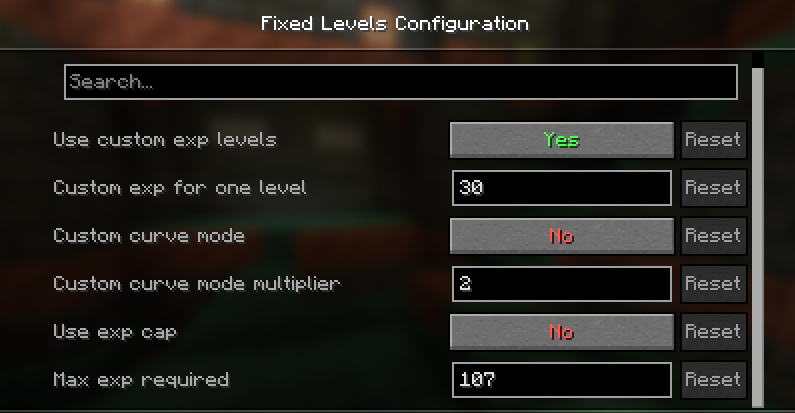
如果已安装 Mod Menu 和 Cloth Config API,并且在客户端安装了 Fixed Levels,你可以在图形界面中修改设置。
Fixed Levels
A fork of Linear Levels
Are you annoyed at how much EXP it costs to enchant gear at an anvil? To enchant something that costs 1 level, at level 1, you'll spend a lot less EXP than if you were at level 30. That's because it costs a certain number of levels to enchant, instead of EXP. So, to combat this, I prefer to make all levels require the same EXP, that way, I don't feel robbed when spending levels naming a Netherite Sword at level 100.
With curve mode off, you can set a specific amount of EXP required for every level. Or, with curve mode on, you can customize a curve that suits your preference if you want.
You can also set a max limit on how much exp is required for the next level when using vanilla or custom curve mode. By default, this is turned off, but is set for 107 exp, which is how much it takes to go from level 29 to level 30. You can adjust this however you want. When enabled, and using vanilla or custom curve, exp required will not exceed the max.
Go ahead, name that sword when you're level 100 and not feel cheated out of hard-earned EXP.
How to configure
Fixed Levels is required on the server. However, it can also be installed on the client, in which case mods like EXP Counter will show the correct amount of EXP per level.
By default the base experience to reach each new level takes 30 EXP. But you can set it to whatever you want.
New! With version 1.1, you can now use commands to query and set config options. Perfect for server OPs!
Get the current config options (no permissions required)
/fixedlevels query [curveMode|baseXPForOneLevel|curveModeMultiplier]
Set config options. Requires permission level 4
/fixedlevels set [curveMode|baseXPForOneLevel|curveModeMultiplier] value
If installed on the client, you can use Mod Menu to configure the settings in single player. On your dedicated server, modify the fixed-levels.json5 file or level 4 OPs can use the above commands.
Curve mode uses a configurable calculation to apply a curve to level up instead of just a flat EXP per level.
{
	// Enables custom exp levels. Disable to use vanilla calculations.
	"useCustomExpLevels": true,
	// Curve mode calculation is XPToNextLevel = (baseXPForOneLevel + (experienceLevel * curveModeMultiplier)).
	"curveMode": false,
	// The amount of exp to go from level 0 to level 1. If curve mode is off, this amount is for every level.
	"baseXPForOneLevel": 30,
	// The multiplier used in the curve mode calculation.
	"curveModeMultiplier": 2,
	// When enabled, limits the amount of exp needed for the next level for vanilla and custom curve mode.
	"useExpCap": false,
	// This sets the max amount of exp needed for the next level if using vanilla or custom curve mode.
	"maxExpForNextLevel": 107
}
If Mod Menu and Cloth Config API is installed and Fixed Levels is installed on your client, you can modify the settings in the GUI.

下载 Fixed Levels
需要联机服务器吗?
稳定流畅、一键部署,几分钟即可和朋友联机开服
最低仅需 8 元/月 即可畅快联机
下载 Fixed Levels
下载 Fixed Levels
需要联机服务器吗?
稳定流畅、一键部署,几分钟即可和朋友联机开服
最低仅需 8 元/月 即可畅快联机
下载 Fixed Levels
需要联机服务器吗?
稳定流畅、一键部署,几分钟即可和朋友联机开服
最低仅需 8 元/月 即可畅快联机
下载 Fixed Levels
下载 Fixed Levels
下载 Fixed Levels
下载 Fixed Levels
下载 Fixed Levels
- 移植至 Minecraft 26.1
关于这个资源的讨论、问题反馈与使用心得
还没有讨论,来发第一帖吧
你是这个资源的作者?登录后可认领此资源。
相似资源
 模组

显示你正在注视的方块的信息。(适用于 Minecraft 1.16+ 的 Hwyla/Waila 分支)
 模组

查看物品与配方
 模组
在游戏画面角落显示附近世界地形、玩家、生物和实体的地图。可创建路径点,帮助你找到标记过的位置。
 模组
使用 JavaScript 编辑配方、添加自定义物品、编写世界事件!
 模组
添加区块认领和玩家组队功能,并与 Xaero's Minimap 和 World Map 集成
 模组
添加全屏世界地图,显示你在世界中已探索的区域。与 Xaero's Minimap 搭配使用效果极佳。
评论 0
登录后参与评分
还没有评论,来抢沙发吧