
Flashcards
基本上就是闪卡,但内置于 Minecraft 中,让你可以在玩游戏的同时学习。
配置
 按下 H 键将打开上述配置菜单。在这里你可以设置每次提问之间的间隔分钟数,并开启/关闭该功能。当关闭时,你可以按下 G 键(在 1.21.6+ 版本中,此按键绑定可能与原版冲突)来按需触发提问。点击“编辑问题”按钮将打开下方的界面。
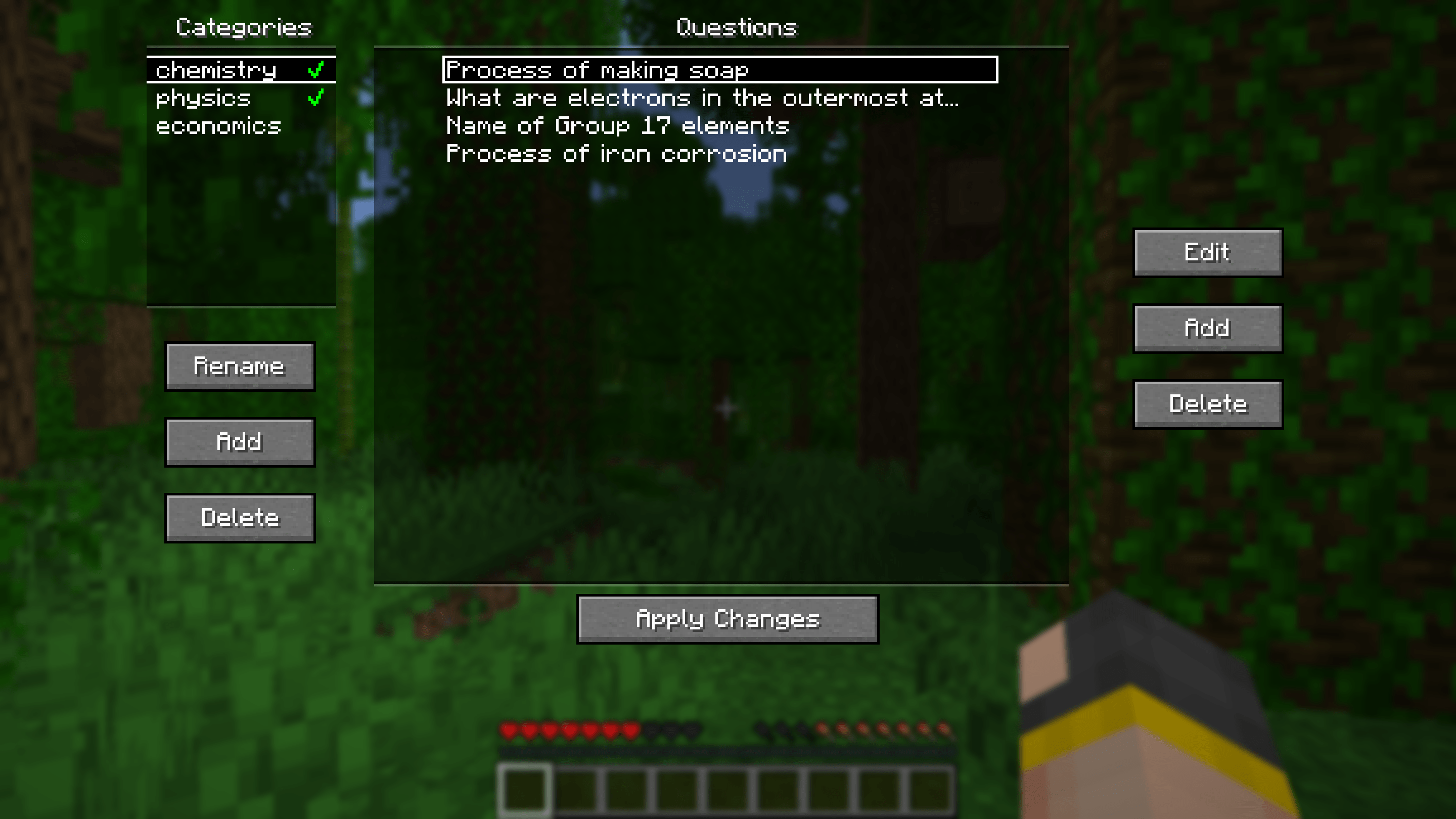
在这里你可以添加、编辑和删除问题。为了便于组织,问题可以划分为不同的类别。点击类别名称旁边的绿色对勾可启用或禁用该类别中的问题。
其他内容
附加配置

在主配置屏幕上按下“附加配置...”按钮将打开上述菜单。在这里,你可以通过命令设置回答正确/错误时的奖励/惩罚。默认情况下,未设置任何奖励或惩罚。你可以像上图那样执行简单的操作,也可以进行更复杂的设置。例如,你可以在数据包中创建一个战利品表,并使用战利品命令在每次答对问题时给予随机战利品。
为了方便起见,在 .minecraft/config/flashcards/flashcards-dp.zip 处提供了一个包含一些预设的默认数据包。要使用它,请将 ZIP 文件复制到世界的 datapacks 文件夹中。预设包括:
- function flashcards:presets/random-bad-effect
- function flashcards:presets/random-good-effect
- function flashcards:presets/random-bad-mob
- loot give @s loot flashcards:presets/random-bad-item
- loot give @s loot flashcards:presets/random-good-item
从 Anki 导入
将你的闪卡从 Anki 导出为纯 TXT 文件,不包含 HTML 和媒体引用。将导出的文件重命名为 "anki.txt" 并放入.minecraft/config/flashcards/questions/ 文件夹中。在启动时,模组会自动将该 TXT 文件转换为模组自己的 JSON 文件。只要每个 TXT 文件的名称中包含单词 "anki",你就可以一次性导入多个不同的 Anki 卡组。
如果你希望在导出中包含图片,请确保勾选“HTML and media references”。然后,从 Anki 的媒体文件夹 复制图片文件到
.minecraft/config/flashcards/media/。
从 CSV/TSV 导入
将你的 CSV/TSV 文件放入.minecraft/config/flashcards/questions/ 文件夹中。在启动时,模组会自动将这些文件转换为模组自己的 JSON 文件。格式如下:QUESTION_TEXT<seperator>ANSWER_TEXT<seperator>QUESTION_IMAGE_FILENAME
QUESTION_IMAGE_FILENAME 是可选的。将相应的图片复制到 .minecraft/config/flashcards/media/。
感谢 这个 Reddit 帖子提供了本模组的原始创意。
Flashcards
Basically flashcards but inside Minecraft so you can study while playing.
Configuration
Pressing the H key will open the config menu above. Here you can set the number of minutes between each question and toggle it on/off. When toggled off, you can press the G key (for 1.21.6+ this keybind may conflict with vanilla) to prompt a question on-demand. Pressing the "Edit Questions" button will open the screen below.
Here you can add, edit and delete questions. Questions can be seperated into different categories for organisational purposes. Clicking the green tick next to a category's name will enable/disable the questions in that category.
Other stuff
Additional Config
Pressing the "Additional Config..." button on the main config screen will open the menu above. Here you can set rewards/punishments for getting a question correct/wrong via commands. By default, there are no rewards/punishments set. You can do something simple like the image above or you can do something fancier. For example, you can create a loot table in a datapack and use the loot command to give you randomised loot each time you get a question correct.
For convenience, a default datapack with some presets is provided at .minecraft/config/flashcards/flashcards-dp.zip. To use it, copy the ZIP file into the datapacks folder of your world. The presets include:
- function flashcards:presets/random-bad-effect
- function flashcards:presets/random-good-effect
- function flashcards:presets/random-bad-mob
- loot give @s loot flashcards:presets/random-bad-item
- loot give @s loot flashcards:presets/random-good-item
Importing from Anki
Export your flashcards from Anki as a plain TXT file without HTML and media references. Rename the exported file to "anki.txt" and put it into the.minecraft/config/flashcards/questions/ folder. On startup, the mod will automatically convert that TXT file into the mod's own JSON files. You can import multiple different Anki decks at once as long as the word "anki" is in the name of each TXT file.
If you want to include images in your export, ensure "HTML and media references" is checked. Then, copy the image files from Anki's media folder into
.minecraft/config/flashcards/media/.
Importing from CSV/TSV
Place your CSV/TSV files into the.minecraft/config/flashcards/questions/ folder. On startup, the mod will automatically convert these files into the mod's own JSON files. The format is as follows:QUESTION_TEXT<seperator>ANSWER_TEXT<seperator>QUESTION_IMAGE_FILENAME
QUESTION_IMAGE_FILENAME is optional. Copy the corresponding images into .minecraft/config/flashcards/media/.
Credit to this Reddit post for the original idea of this mod.

下载 Flashcards
下载 Flashcards
下载 Flashcards
下载 Flashcards
下载 Flashcards
下载 Flashcards
下载 Flashcards
下载 Flashcards
下载 Flashcards
下载 Flashcards
使用原生文件对话框来选择图片。
在问题的添加/编辑界面中选择图片时,现在使用操作系统原生的文件选择器。
感谢 Mojang 切换到 SDL3 :D
关于这个资源的讨论、问题反馈与使用心得
还没有讨论,来发第一帖吧
你是这个资源的作者?登录后可认领此资源。
相似资源
 模组

显示你正在注视的方块的信息。(适用于 Minecraft 1.16+ 的 Hwyla/Waila 分支)
 模组

查看物品与配方
 模组
在游戏画面角落显示附近世界地形、玩家、生物和实体的地图。可创建路径点,帮助你找到标记过的位置。
 模组
使用 JavaScript 编辑配方、添加自定义物品、编写世界事件!
 模组
添加区块认领和玩家组队功能,并与 Xaero's Minimap 和 World Map 集成
 模组
添加全屏世界地图,显示你在世界中已探索的区域。与 Xaero's Minimap 搭配使用效果极佳。
评论 0
登录后参与评分
还没有评论,来抢沙发吧