
纯色方块
一款模组,用于生成一系列简单的彩色方块、透明方块和发光方块(全部可配置),适用于建造和创造项目。具有高度可配置性,支持调整色调、明度和饱和度的数量,以及最小/最大范围。
它是我另一款模组 Chisels & Bits 的理想伴侣:
(需要 1.5.1 或更高版本),允许你将这些彩色方块用作比特(bits)。
需要:Forge
常见问题解答
- 我可以在我的整合包中使用这个模组吗?
- 可以。
- 方块的纹理不是完全平面的,能更改吗?
- 我认为略带纹理的选项更符合 Minecraft 的风格,因此将其设为默认。不过,你可以通过模组配置界面使用多种选项,例如完美无瑕(无瑕疵)、石头或硬化粘土。如果提供的选项不符合你的喜好,你也可以通过资源包来更改纹理。
- 为什么我在合成工具中看不到任何方块?
- 请确保你的物品栏中有染料和圆石/玻璃/萤石。如果缺少其中任何一种,就无法进行合成。所有注册到矿物词典的染料都应可用。(如果找不到任何内容,请检查你的配置文件,有可能已更改了合成材料。)
- 我可以更改用于合成的方块吗?或者每次合成获得的方块数量?
- 当然可以,查看模组配置 GUI,在合成标签页中你可以更改每次合成的数量以及用于合成物品的方块。
- 为什么这个模组使用了这么多方块 ID?
- 此模组使用方块状态来生成与模组兼容的方块,这意味着其他模组可以检测并使用这些方块以实现高级功能,例如 Chisels & Bits、微方块或其他功能。它们也比基于方块实体(tile entity)的实现更轻量。我们努力确保为生成的色阶使用最少数量的方块 ID。
- 我可以增加或减少色阶吗?或者如果我只想要更亮的变体怎么办?
- 你可以使用配置界面更改色调(Hue)、明度(Value)和饱和度(Saturation)(HSV 色彩空间)的最小和最大范围,以及每个颜色维度的变体数量。建议在接受设置之前,在创造模式的测试世界中测试你的设置。
- 重要提示:你不应该在已经使用该模组的世界中更改设置,这样做会改变世界中已有方块的颜色。
合成工具配方:
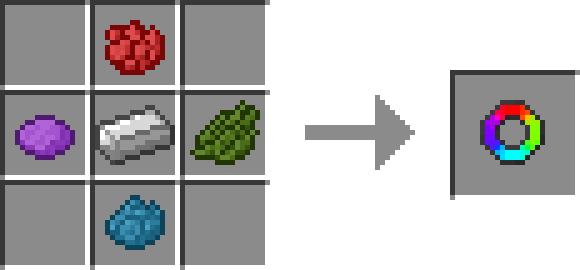
使用刚合成的物品后,只需在打开物品 GUI 时确保物品栏中有染料和圆石/玻璃/萤石即可合成物品。某些方块需要少量染料才能合成,因此尝试不同的染料以查看所有选项。
工作台辅助配方 - 版本 4.3+
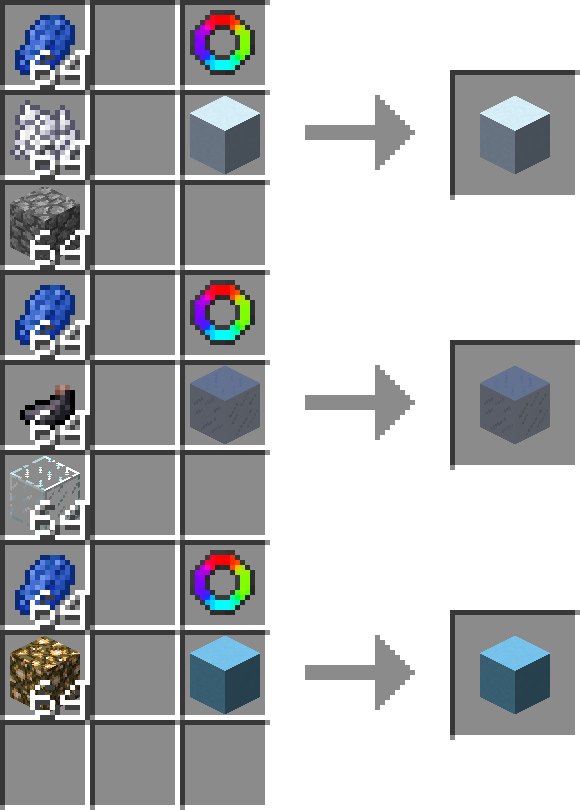
配方是非形状化的,你想要制作的更多数量的纯色方块 + 彩色方块合成器,以及任何所需的材料,只有材料会在合成中被消耗。
技术说明:
如果配置不当或你想拥有广泛的色阶范围,此模组可能会使用大量方块 ID,请注意这一点。
不使用任何方块实体,所有渲染均使用单个模型 + 纹理完成,这是为了确保模组兼容性。
Flat Colored Blocks
A mod that generates a selection of simple colored blocks, transparent blocks, and glowing blocks ( all configurable ) for use in building and creative projects. Highly configurable with settings to adjust number of hues, values, and saturation, as well as min/max ranges.
Makes a great companion to one of my other mods Chisels & Bits:
( requires 1.5.1 or better ) which allows you to use the colored blocks as bits.
Requries: Forge
Frequently Asked Questions
- Can I use this in my mod pack?
- Yes.
- The texture on the blocks isn't completely flat, can that be changed?
- I choose to make use a slightly textured option as the default since I think it fits better with MC. However, there a several options you can use the mod configuration screen, such as flawless ( no defects ), stone, or hardened clay. If the options available do not suit your tastes you can also change the textures using a resource pack.
- Why can't I see any blocks in the crafting tool?
- Make sure you have dyes and cobblestone/glass/glowstone in your inventory, if you are missing either then nothing will be craft-able. Any dyes registered with the ore dictionary should be usable. ( if you can't find anything, check your configs, its possible to change the crafting ingredient. )
- Can I change which blocks are used to craft them? or how many blocks I get per craft?
- Absolutely, check the mod config gui, in the crafting tab you can change how many per craft, and which block is used to craft the item.
- Why does this mod use so many block ids?
- This mod uses block states to generate mod compatible blocks, this means that other mods can detect and use these blocks for advanced features, such as chisels & bits, micro-blocks, or other features. They are also much more lightweight than a tile entity based implementation. Effort was made to ensure that the minimum required block ids were used for the generated shades.
- Can I increase or decreases the shades, or what if I only want brighter variations?
- You can use the configuration screen to change the minimum, and maximum range for Hue, Value, and Saturation ( HSV Color space. ), as well as the number of variations for each color dimension. It is recommended to test your settings in a creative test world before accepting your choice.
- Important Note: You should not change your settings in a world that is already using the mod, doing so will change the colors of the blocks already in the world.
Crafting Tool Recipe:
Using the item crafted you just need to have dyes and cobblestone/glass/glowstone in your inventory to craft items after opening the items gui. Some blocks require a few dyes to craft so try different dyes to see all the options.
Crafting Table Helper Recipe(s) - Version 4.3+
Recpie is Shapeless, Flat Colored Block You want to make more of + Colored Block Crafter, and any required ingredients, only the ingredients are consumed by crafting.
Technical Notes:
This mod can use a large number of block ids if configured wrongly or if you want to have a large range of shades, just be aware.
No tile entities are used and all rendering is done using a single model + texture, this is done to ensure mod compatibility.
下载 Flat Colored Blocks - 适用于 Forge
需要联机服务器吗?
稳定流畅、一键部署,几分钟即可和朋友联机开服
最低仅需 8 元/月 即可畅快联机
下载 Flat Colored Blocks - 适用于 Forge
需要联机服务器吗?
稳定流畅、一键部署,几分钟即可和朋友联机开服
最低仅需 8 元/月 即可畅快联机
下载 Flat Colored Blocks - 适用于 Forge
需要联机服务器吗?
稳定流畅、一键部署,几分钟即可和朋友联机开服
最低仅需 8 元/月 即可畅快联机
下载 Flat Colored Blocks - 适用于 Forge
需要联机服务器吗?
稳定流畅、一键部署,几分钟即可和朋友联机开服
最低仅需 8 元/月 即可畅快联机
下载 Flat Colored Blocks - 适用于 Forge
需要联机服务器吗?
稳定流畅、一键部署,几分钟即可和朋友联机开服
最低仅需 8 元/月 即可畅快联机
下载 Flat Colored Blocks - 适用于 Forge
需要联机服务器吗?
稳定流畅、一键部署,几分钟即可和朋友联机开服
最低仅需 8 元/月 即可畅快联机
下载 Flat Colored Blocks - 适用于 Forge
需要联机服务器吗?
稳定流畅、一键部署,几分钟即可和朋友联机开服
最低仅需 8 元/月 即可畅快联机
下载 Flat Colored Blocks - 适用于 Forge
需要联机服务器吗?
稳定流畅、一键部署,几分钟即可和朋友联机开服
最低仅需 8 元/月 即可畅快联机
下载 Flat Colored Blocks - 适用于 Forge
需要联机服务器吗?
稳定流畅、一键部署,几分钟即可和朋友联机开服
最低仅需 8 元/月 即可畅快联机
下载 Flat Colored Blocks - 适用于 Forge
需要联机服务器吗?
稳定流畅、一键部署,几分钟即可和朋友联机开服
最低仅需 8 元/月 即可畅快联机
关于这个资源的讨论、问题反馈与使用心得
还没有讨论,来发第一帖吧
你是这个资源的作者?登录后可认领此资源。
相似资源
 模组

可定制的鞘翅模组,支持装饰纹饰、旗帜图案等更多功能!
 模组

适用于 MC 1.18+ 的 Effekseer 加载器
 模组

新增 50+ 个独特生物群系,为你的世界增添新树木、花卉等更多元素!
 模组

基于 GTCEu 1.12.2 的现代 GregTech
 模组

添加睡袋和吊床,分别用于便携性和昼夜转换,同时不会设置新的出生点。共有16种颜色可选!
 模组

为你的终界增添新生物群系、神秘仪式和全新生物
评论 0
登录后参与评分
还没有评论,来抢沙发吧