FlatBedrock Xplosion's Edition
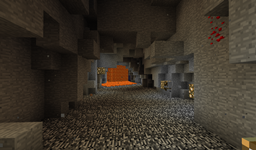
该模组默认会在主世界生成基岩层,并在下界平坦化两个基岩层。可以通过创建自定义 JSON 文件(见下文)轻松将其他维度添加到此列表中。大多数维度都应与此兼容。
1.9.4 版本也适用于 1.10
配置:
您可以配置在哪些维度中生成平坦的基岩层。导航至 /config/flatbedrock/dimensions/ 文件夹。默认情况下,其中应包含两个文件:overworld.json 和 nether.json。它们看起来应该像这样:
{
"dimID": 1,
"genTop": false,
"genBottom": true,
"retroGenTop": false,
"retroGenBottom": false,
"fillBlock": "minecraft:stone"
}
dimID 代表维度的数字 ID。在此例中,1 代表主世界。genTop 和 genBottom 需要 true 或 false 值。当为 true 时,表示需要在此处生成平坦层;当为 false 时,则不关心。关于 retroGenTop 和 retroGenBottom,将在下文进行解释。最后是 fillBlock。在这里指定应替换基岩的方块,对于主世界而言是 minecraft:stone。
添加模组维度(面向用户):
如果您安装了添加新维度的模组,您也可以确保其拥有美观的平坦基岩层。进入 config 文件夹并导航至 /flatbedrock/dimensions/ 文件夹。您可以创建一个新文件或复制其中一个默认文件,并将其命名为例如 twilightforrest.json。
{
"dimID": 7,
"genTop": false,
"genBottom": true,
"retroGenTop": false,
"retroGenBottom": false,
"fillBlock": "minecraft:stone"
}
只需编辑值为该维度所需的值即可完成。请注意,与主世界的唯一区别在于暮色森林的维度 ID 为 7。
在已存在的世界中生成平坦基岩层:
是的,可以将此平坦基岩层应用于已生成的世界。但请务必先备份!要在维度中启用回溯生成,请再次导航至 /config/flatbedrock/dimensions 文件夹。打开与您要编辑的维度对应的文件,并将 retroGenBottom 和 retroGenTop 的值更改为 true。重新打开您的世界,您应该会看到一层漂亮的平坦基岩。
添加模组维度(面向其他模组开发者):
其他维度也可以通过 IMC 消息指定,如下例所示:
NBTTagCompound compound = new NBTTagCompound();
compound.setString("fileName", "testDimension");
compound.setInteger("dimensionID", 555);
compound.setBoolean("generateFlatTop", true);
compound.setBoolean("generateFlatBottom", false);
compound.setString("fillBlock", "minecraft:end_stone");
FMLInterModComms.sendRuntimeMessage(Reference.MOD_ID, Reference.MOD_ID, "addDimension", compound);
MC 1.7:
推荐:
建议安装 UniversalCore 以获得额外的实用功能和特性(详见下文)
模组本身:
模组本身仅在主世界和下界(地板和天花板)生成平坦的基岩。玩家可以通过创建自定义 JSON 文件(见下方“添加模组维度”部分)将其他维度添加到该列表中。这应该适用于使用正常世界生成系统的绝大多数模组维度。注意:Mystcraft 维度对此不支持,但当其更新到 1.7.10 时,我将通过添加新的 Mystcraft 页面来为其添加兼容性。
使用 UniversalCore 时:
当您将 UniversalCore 与 FlatBedrock 一起使用时,FlatBedrock 将获得其完整的 VersionChecker 功能,并且也与 VersionChecker 模组兼容。UniversalCore 还将允许您回溯生成 Minecraft 世界(有关此内容的更多信息,请参阅“在现有世界中生成平坦基岩”)。我实际上建议使用 UniversalCore 配合 FlatBedrock,因为这是一个非常小巧且更偏向实用性的模组,我认为让它不依赖其他模组会比较好。您可以在此处获取 UniversalCore。
在现有世界中生成 FlatBedrock:
如果此模组与 UniversalCore 一起安装,这将提供一种方法,将您现有世界中的基岩重新生成为整齐的平坦层。在执行之前,请确保……然后您只需前往位于 config/flatbedrock/dimensions/ 的 dimensions 文件夹,选择与您要重新生成的维度对应的文件,并用您选择的文本编辑器打开它(尽管我建议 Mac 用户使用 TextWrangler,Windows 用户使用 Notepad++)。之后,您只需将 "retroGenBottom" 或 "retroGenTop" 更改为 true。完成后保存文件,然后重新打开您心爱的 Minecraft 世界,现在它应该拥有一层平坦的基岩了。
为模组玩家添加自定义维度(适用于模组玩家)
当某个模组添加了自定义维度并需要将其基岩层压平时,你只需前往 config/flatbedrock/dimensions 目录并创建一个新的 JSON 文件。该文件必须采用 JSON 格式,并应包含以下对象:"dimID" 维度 ID,"genTop" 是否应生成平坦的维度顶部(类似下界顶板),"genBottom" 是否应生成平坦的维度底部,"retroGenTop" 和 "retroGenBottom" 仅应在安装 UniversalCore 时使用,关于它们的更多信息见上文,以及 "fillBlock" 一个字符串值,表示用于替换基岩的方块 ID。你可以查看默认的 overworld.json 和 nether.json 文件以了解其用法。下面是一个模组化维度的使用示例 twilightforest.json:
{
"dimID": 7,
"genTop": false,
"genBottom": true,
"retroGenTop": false,
"retroGenBottom": false,
"fillBlock": "minecraft:stone"
}
注意:模组作者可能已在代码中完成此操作,因此在创建新的 JSON 文件之前请先运行 Minecraft,并检查是否已自动生成。
通过 IMC 消息为模组开发者添加自定义维度(适用于模组开发者):
模组开发者也可以通过发送 IMC 消息来将维度注册到生成列表中,例如 此处所示。
FlatBedrock Xplosion's Edition
This mod by default generates the bedrock layer from the overworld en both bedrock layers in the nether flat. Other dimensions can easily be added to this list by creating a custom JSON file (see below). Most dimensions should work with this.
The 1.9.4 version also works on 1.10
Config:
Which layers and in which dimensions you have a flat layer can be configured. Navigate to the /config/flatbedrock/dimensions/ folder. By default there should two files there: overworld.json and nether.json. They should look like this:
{
"dimID": 1,
"genTop": false,
"genBottom": true,
"retroGenTop": false,
"retroGenBottom": false,
"fillBlock": "minecraft:stone"
}
The dimID stands for the numerical ID of the dimension. 1 in this case being the overworld. The genTop and genBottom require a true or false value. When true it means that it needs to generate a flat layer there, when false it doesn't care. The retroGenTop and retroGenBottom will be explained below. Last is the fillBlock. Here you specify what block should replace the bedrock, for the overworld that is minecraft:stone.
Add a modded dimensions (for users):
If you have a mod installed that adds a new dimension, you can also make sure that it will get a nice flat bedrock layer. Go to the config folder and navigate to the /flatbedrock/dimensions/ folder. You create a new file or copy one of the defaults and name it eg twilightforrest.json.
{
"dimID": 7,
"genTop": false,
"genBottom": true,
"retroGenTop": false,
"retroGenBottom": false,
"fillBlock": "minecraft:stone"
}
Just edit the values to what is needed for that dimension and you're done. Note that the only difference here with the overworld is that the Twilight Forrest has a dimension ID of 7.
Generating a flat bedrock layer in an already existing world:
Yes, it is possible to apply this flat bedrock layer to an already generated world. But make sure you backup first! To enable the retroactive generation in a dimension you navigate (again) to the /config/flatbedrock/dimensions folder. Open the file that corresponds to the dimensions you want to edit. and change the retroGenBottom and retroGenTop values to true. Open your world again and you should see a nice flat bedrock layer.
Add a modded dimension (for other modders):
Other dimensions can also be specified by IMC messages like in this example:
NBTTagCompound compound = new NBTTagCompound();
compound.setString("fileName", "testDimension");
compound.setInteger("dimensionID", 555);
compound.setBoolean("generateFlatTop", true);
compound.setBoolean("generateFlatBottom", false);
compound.setString("fillBlock", "minecraft:end_stone");
FMLInterModComms.sendRuntimeMessage(Reference.MOD_ID, Reference.MOD_ID, "addDimension", compound);
MC 1.7:
Recommended:
It's recommended that you install UniversalCore for extra utilities and functionality (explained below)
The mod on its own:
the mod on its own simply generates the bedrock in the overworld and nether (floor and roof) flat. Other dimensions can be added to that list by the player itself by creating a custom JSON file (see below at "add modded dimensions"). This should work for most of the modded dimensions that use the normal system of world generation. note: Mystcraft dimensions don't work for this but when it updates to 1.7.10 I'll add compatibility for them by adding a new Mystcraft page.
When using UniversalCore:
When you use UniversalCore together with FlatBedrock, FlatBedrock will get it's full blown VersionChecker which is also compatible with the VersionChecker mod. UniversalCore will also allow you to retroactively generate your Minecraft worlds (read more about this at "generating flat bedrock in an existing world"). I actually recommend using FlatBedrock with UniversalCore because this is such a small and more utility mod I figured it would be nice to not be dependent on other mods. you can get UniversalCore here.
Generating FlatBedrock in an existing world:
If this mod is installed alongside UniversalCore, this will add a way to regenerate the bedrock in your existing world to a nice flat layer. before doing make sure that you Then you simply have to go to the dimensions folder, located at config/flatbedrock/dimensions/ and choose the the file that corresponds with the dimensions you want to regenerate and open it in a text editor of your choice (although I recommend using TextWrangler for mac and notepad++ for windows). after this you simple have to change either "retroGenBottom" or "retroGenTop" to true. When this is done you save the file and just reopen your beloved minecraft world but now it should have a flat bedrock layer.
Add modded dimensions (for users)
When a mod adds a custom dimensions and you to flatten it's bedrock you simply have to go to the config/flatbedrock/dimensions directory and create a new JSON file. The file has to be in the JSON format and should have following objects: "dimID" the dimension id, "genTop" wether the top of the dimension should be generated flat (like the nether roof), "genBottom" wether the bottom of the dimension should be generated flat, "retroGenTop" and "retroGenBottom" should only be used when UniversalCore is installed on you can find more about those above and the "fillBlock" a string value with the ID of the block that should be used for replacing the bedrock. you can look at the default overworld.json and nether.json files to look how it's used. Here is also an example of how it would be used by a modded dimension, twilightforest.json:
{
"dimID": 7,
"genTop": false,
"genBottom": true,
"retroGenTop": false,
"retroGenBottom": false,
"fillBlock": "minecraft:stone"
}
note: modders may have done this already in code so run minecraft first before creating a new JSON and look if it pops up.
Add modded dimension via IMC Messages (for modders):
modders can also send IMC Messages to register a dimension to the generation list like this.

 模组

 模组

 模组

 模组

 模组

 模组

评论 0
登录后参与评分
还没有评论,来抢沙发吧