
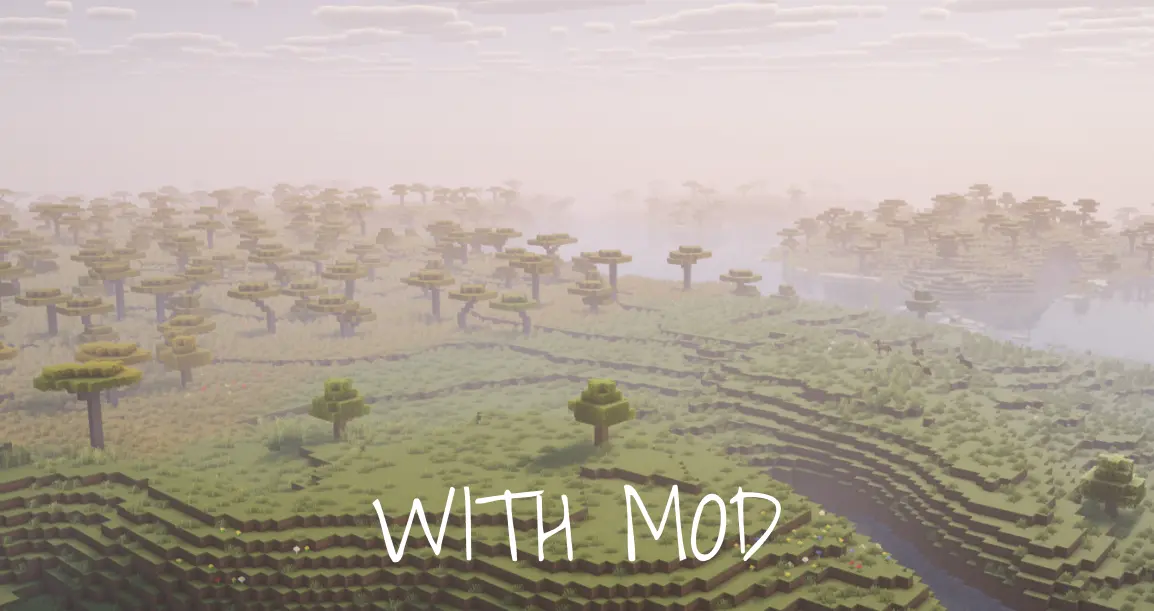
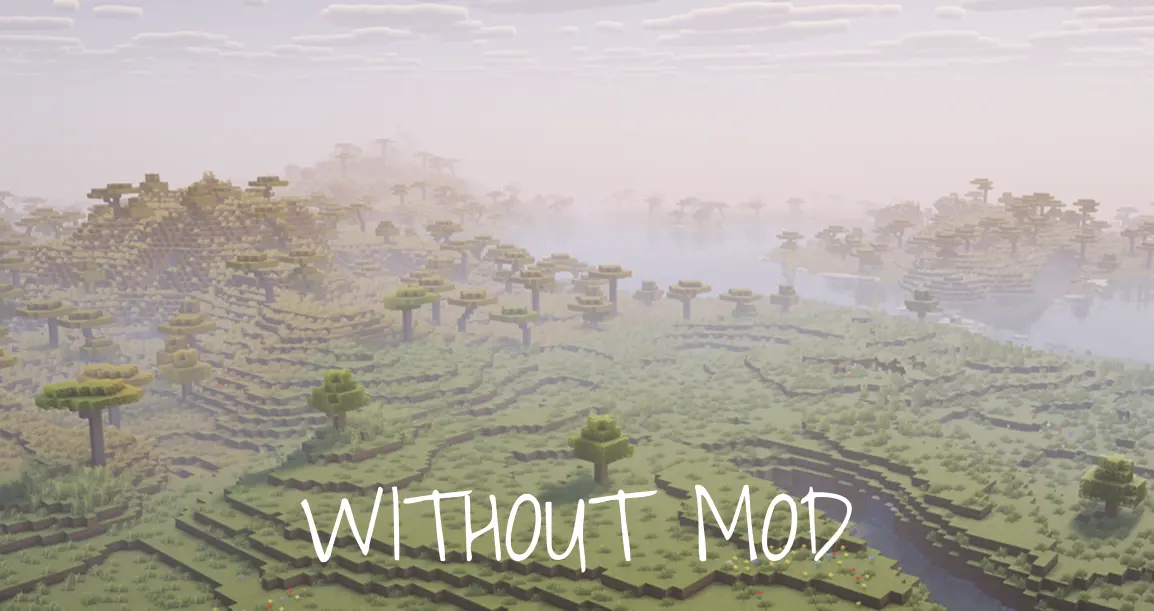
让稀树草原生成得平坦——像现实世界中的稀树草原一样,是宽阔、水平的平原——通过温和地降低原版散布在其中的山丘、穹顶、高原和破碎地形,同时保持世界的其余部分与原版完全一致。结果是开阔、可建造的草地,看起来仍然是自然生成的。
启用模组后
未启用模组时
在安装位置生成世界——在服务器上,或在单人游戏中。客户端安装是可选的;没有安装该模组的玩家可以正常加入并游戏。
依赖项: Fabric 需要 Fabric API 和 Architectury API。NeoForge 需要 Architectury API。Forge 不需要任何额外的依赖项。
免费用于任何整合包——无论是公开还是私有的整合包,无需许可。
功能说明
- 平坦的稀树草原——稀树草原生物群系变成接近水平的平原,海拔约 Y 70,非常适合建造基地、农场和各种建筑,而不是起伏不平的山丘。
- 处理山丘,而非切除——穹顶、高原以及风吹/破碎的地貌被平滑地降低到平地中。当稀树草原与高地相接时,会优雅地形成斜坡,永远不会出现人工悬崖或墙壁。
- 如果你喜欢高原,可以保留它们——其中一个选项保留稀树草原高原及其上的石质山峰的原版形状,而稀树草原的其他部分仍然被压平,并在短斜坡处与它们相接。
- 无缝的生物群系边界——效果通过使用原版放置生物群系的气候噪声,在生物群系边缘逐渐淡出,因此相邻的森林、沙漠和平原自然地融合在一起。
- 河流、湖泊和山谷保持自然——它们保留原版的形状和水源,因此平坦的稀树草原环绕着它们,而不是将它们切成干涸的沟渠。
- 树木、村庄和生物不受影响——金合欢树、村庄、动物和结构是在地形生成之后放置的,所以它们只是坐落在新的平坦地面上。没有任何东西被移除。
- 其他一切均为原版——海洋、山脉、洞穴、矿石以及所有非稀树草原生物群系都保持原版状态。
配置
config/flatsavanna.json 在世界首次生成时(单人游戏或服务器)写入。
flattenSavannaPlateau(默认true)——将其设置为false并重启游戏或服务器,以保留稀树草原高原的原版形状。
此选项适用于该游戏或服务器的每个世界。
详细信息
- 仅新区块——现有区块保持其形状;探索新土地或开始新世界即可看到平坦的稀树草原或更改后的选项。
- 轻量级——作为世界生成数据包分发,无运行时开销,可以随时添加或删除到世界中。
- 实验性设置屏幕——在某些版本中,Minecraft 在创建或打开世界时会显示“实验性设置”警告;只需点击继续即可。
- 不兼容 RiverInJungle 或 CliffTree for 26.3——它们替换了相同的原版地形高度文件,因此安装了其中任何一个时,只有其中一个更改生效。
- 与 CliffTree 一起使用——保留高原也会保留大多数 CliffTree 的稀树草原高原。
- 与大多数地形和生物群系模组协同工作良好,因为它只改变稀树草原土地的形状。
反馈
请在 Discord 上报告任何错误、错误或功能建议:
Nikrecs 的其他模组: Fields · Better Caravans
我推荐的其他模组。
Makes savannas generate flat — wide, level plains like real-world savannas — by gently lowering the hills, domes, plateaus and shattered terrain that vanilla scatters across them, while leaving the rest of the world exactly as vanilla. The result is open, buildable grassland that still looks naturally generated.
With mod
Without mod
Install where the world is generated — on the server, or in singleplayer. Client installation is optional; players without the mod can join and play normally.
Dependencies: Fabric needs Fabric API and Architectury API. NeoForge needs Architectury API. Forge needs no additional dependencies.
Free to use in any modpack — public or private, no permission needed.
What it does
- Flat savannas — savanna biomes become a near-level plain at about Y 70, perfect for bases, farms and builds, instead of rolling, bumpy hills.
- Hills handled, not cut — domes, plateaus and windswept/shattered relief are lowered smoothly into the flatland. Where a savanna meets higher ground it ramps up gracefully, never an artificial cliff or wall.
- Keep the plateaus if you like — one option leaves savanna plateaus and the stony peaks on them in their vanilla shape while the rest of the savanna is still flattened, meeting them in a short slope.
- Seamless biome borders — the effect fades out across the biome edge using the same climate noise vanilla uses to place biomes, so neighbouring forests, deserts and plains blend in naturally.
- Rivers, lakes and valleys stay natural — they keep their vanilla shape and water, so the flat savanna wraps around them instead of cutting them into dry trenches.
- Trees, villages and mobs untouched — acacias, villages, animals and structures are placed after terrain, so they simply sit on the new flat ground. Nothing is removed.
- Everything else is vanilla — oceans, mountains, caves, ores and every non-savanna biome stay exactly vanilla.
Configuration
config/flatsavanna.json is written on the first start, where the world is generated (singleplayer or the server).
flattenSavannaPlateau(defaulttrue) — set it tofalseand restart the game or server to keep savanna plateaus in their vanilla shape.
The option applies to every world of that game or server.
Details
- New chunks only — existing chunks keep their shape; explore into fresh land or start a new world to see flat savannas or a changed option.
- Lightweight — ships as worldgen data with no runtime overhead, and can be added to or removed from a world at any time.
- Experimental Settings screen — on some versions Minecraft shows an "Experimental Settings" warning when creating or opening a world; just hit Proceed.
- Not compatible with RiverInJungle or CliffTree for 26.3 — they replace the same vanilla terrain height file, so with either installed only one of the two changes applies.
- With CliffTree — keeping plateaus also keeps most of CliffTree's savanna plateaus.
- Plays nicely alongside most terrain and biome mods, since it only changes the shape of savanna land.
Feedback
Please report any bugs, errors, or feature suggestions on Discord:
More mods by Nikrecs: Fields · Better Caravans
My other mods that I recommend.

下载 FlatSavanna
下载 FlatSavanna
下载 FlatSavanna
下载 FlatSavanna
下载 FlatSavanna
下载 FlatSavanna
下载 FlatSavanna
下载 FlatSavanna
下载 FlatSavanna
下载 FlatSavanna
FlatSavanna 1.2.0
新增
- 在
config/flatsavanna.json(首次启动时生成)中添加了新选项flattenSavannaPlateau。将其设置为false并重启游戏或服务器:新生成的草原高原及其上隆起的石质山峰将保持原版形状,而其余草原部分则像之前一样被压平。平坦的草原会以一段短坡度与高原相接。
无变化
- 默认值
true下,高原的压平方式与 1.1.0 完全一致,因此除非你关闭该选项,否则不会有任何变化。 - 自 1.1.0 以来,未添加或移除任何 Minecraft 版本或加载器支持,依赖项或加载器要求也未发生变化。
已知行为
- 该选项适用于该游戏(单人模式)或该服务器的所有世界,且仅对新生成的区块生效。
- 搭配 CliffTree 使用时:其草原高原位于 1.21.1-26.2 版本中原版的位置,因此该选项也会保留它们。在 1.20.1 中,CliffTree 的内陆高原较少,部分草原区域也会保持原有形状。在 26.3 中,沿海地区会多出一些高原,这些高原会被压平。
- CliffTree for 26.3 和 RiverInJungle 均替换了与 FlatSavanna 相同的原版地形高度文件(overworld/offset)。安装其中任意一个时,仅有一个对该文件的修改会生效(与 1.1.0 情况相同)。
兼容性
- 需要在地形生成的地方(单人模式或服务器)安装,配置文件也需存在。Forge 版本的客户端文件允许未安装该模组的客户端加入服务器。
- Fabric 版本需要 Fabric API 和 Architectury API。NeoForge 版本需要 Architectury API。Forge 版本无需其他依赖。26.x 版本没有 Forge 文件。
| Minecraft | Fabric Loader | Fabric API | Architectury API | Forge | NeoForge |
|---|---|---|---|---|---|
| 1.19.2 | 0.14.9+ | 0.66.0+ | 6.6.92+ | 43.1.0+ | - |
| 1.20.1 | 0.14.21+ | 0.83.0+ | 9.2.14+ | 47.1.0+ | - |
| 1.21.1 | 0.15.11+ | 0.102.0+ | 13.0.11+ | 52.1.0+ | 21.1.1+ |
| 1.21.11 | 0.17.3+ | 0.139.4+ | 19.0.1+ | 61.1.0+ | 21.11.0-beta+ |
| 26.1.2 | 0.19.5+ | 0.154.0+ | 20.1.14+ | - | 26.1.2.99+ |
| 26.2 | 0.19.3+ | 0.154.0+ | 21.0.7+ | - | 26.2.0.40-beta+ |
| 26.3 | 0.19.5+ | 0.160.5+ | 22.0.1+ | - | 26.3.0.0-beta+ |
Architectury API 仅在 Fabric 和 NeoForge 上需要。
FlatSavanna 1.1.0
新增
- 新版本:Fabric 1.19.2、Forge 1.21.1、Forge 1.21.11。
修复
- Minecraft 26.3(Fabric 和 NeoForge):世界现在可以正常加载。在 1.0.0 版本中,Minecraft 26.3 会拒绝该模组的 WorldGen 文件,导致无法创建或打开任何世界(报错“Failed to load registries due to errors”)。26.3 版本现已拥有其新版 WorldGen 格式的独立文件副本,保留了相同的平坦稀树草原地形。
- Forge 1.21.1 和 1.21.11:创建或打开世界时不再被 Minecraft 的“Experimental Settings”警告阻断。如果世界自带数据包(位于 datapacks 文件夹中),仍会显示该警告,行为与 NeoForge 一致。针对旧自定义世界和已弃用设置的警告保持不变。
变更
- Fabric 现在除了需要 Fabric API 外,还需要 Architectury API。NeoForge 现在也需要 Architectury API。Forge 仅需自身依赖,无需额外模组。
- Fabric 26.1.2 现在要求 Fabric Loader 0.19.5 或更高版本:旧版加载器启动时会因当前版本的 Architectury API 导致游戏崩溃。
- 每个文件都声明了其确切的 Minecraft 版本号。
移除
- Minecraft 26.1(Fabric 和 NeoForge)。26.1.2 取代了 26.1 和 26.1.1。
未变
- 稀树草原生成于 Y 70 附近的近乎平坦的地形。其中的河流和山谷保留原版形状和水体。其他所有生物群系保持原版不变。
- 该模组仅对新生成的区块生效。
已知行为
- RiverInJungle 替换了相同的原版地形高度文件。同时安装这两个模组时,只有其中一个修改会生效,因此要么缺少丛林河流,要么缺少降低后的稀树草原丘陵(与 1.0.0 版本情况相同)。
兼容性
- 在世界生成端需要安装(单人游戏或服务器端)。没有安装该模组的 Forge 客户端仍可加入服务器。
| Minecraft | Fabric Loader | Fabric API | Architectury API | Forge | NeoForge |
|---|---|---|---|---|---|
| 1.19.2 | 0.14.9+ | 0.66.0+1.19.2 | 6.6.92+ (6.x) | 43.1.0+, below 44 | – |
| 1.20.1 | 0.14.21+ | 0.83.0+1.20.1 | 9.2.14+ (9.x) | 47.1.0+, below 48 | – |
| 1.21.1 | 0.15.11+ | 0.102.0+1.21.1 | 13.0.11+ (13.x) | 52.1.0+, below 53 | 21.1.1+, below 21.2 |
| 1.21.11 | 0.17.3+ | 0.139.4+1.21.11 | 19.0.1+ (19.x) | 61.1.0+, below 62 | 21.11.0-beta+, below 21.12 |
| 26.1.2 | 0.19.5+ | 0.154.0+26.1.2 | 20.1.14+ (20.x) | – | 26.1.2.99+, below 26.2 |
| 26.2 | 0.19.3+ | 0.154.0+26.2 | 21.0.7+ (21.x) | – | 26.2.0.40-beta+, below 26.3 |
| 26.3 | 0.19.5+ | 0.160.5+26.3 | 22.0.1+ (22.x) | – | 26.3.0.0-beta+, below 26.4 |
Architectury API 仅在 Fabric 和 NeoForge 上必需。
关于这个资源的讨论、问题反馈与使用心得
还没有讨论,来发第一帖吧
你是这个资源的作者?登录后可认领此资源。
相似资源
 模组

原版世界生成优化模组
 模组
在游戏画面角落显示附近世界地形、玩家、生物和实体的地图。可创建路径点,帮助你找到标记过的位置。
 模组

新增 50+ 个独特生物群系,为你的世界增添新树木、花卉等更多元素!
 模组
添加全屏世界地图,显示你在世界中已探索的区域。与 Xaero's Minimap 搭配使用效果极佳。
 模组

基于 GTCEu 1.12.2 的现代 GregTech
 模组

让你能够在世界中的任何位置定位结构。
评论 0
登录后参与评分
还没有评论,来抢沙发吧