Focus Revolution
为 Iris 光影提供手动对焦控制
Focus Revolution 是一款 Minecraft 客户端模组,允许你手动控制 Iris 光影的景深对焦距离。它专为直播、电影制作(machinima)、过场动画录制和截图设计。
通常情况下,光影包会自动将焦点对准屏幕中心附近的物体。这在常规游戏中表现良好,但在拍摄时可能会造成不便,因为当你移动准星时,焦点可能会发生变化。Focus Revolution 让你能够掌控对焦,平滑地将焦点移动到你想要的位置,并在完成后恢复自动对焦。
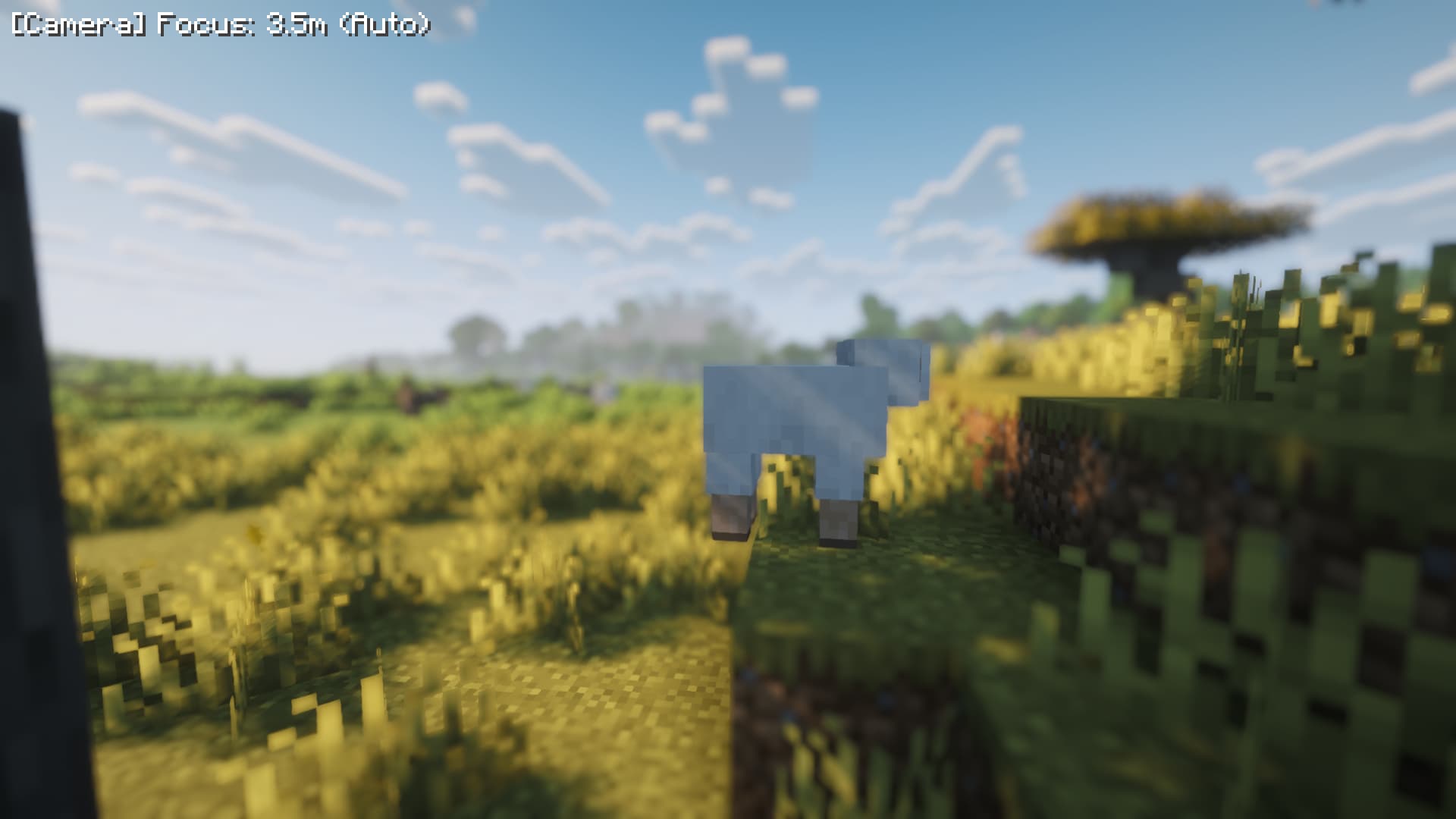
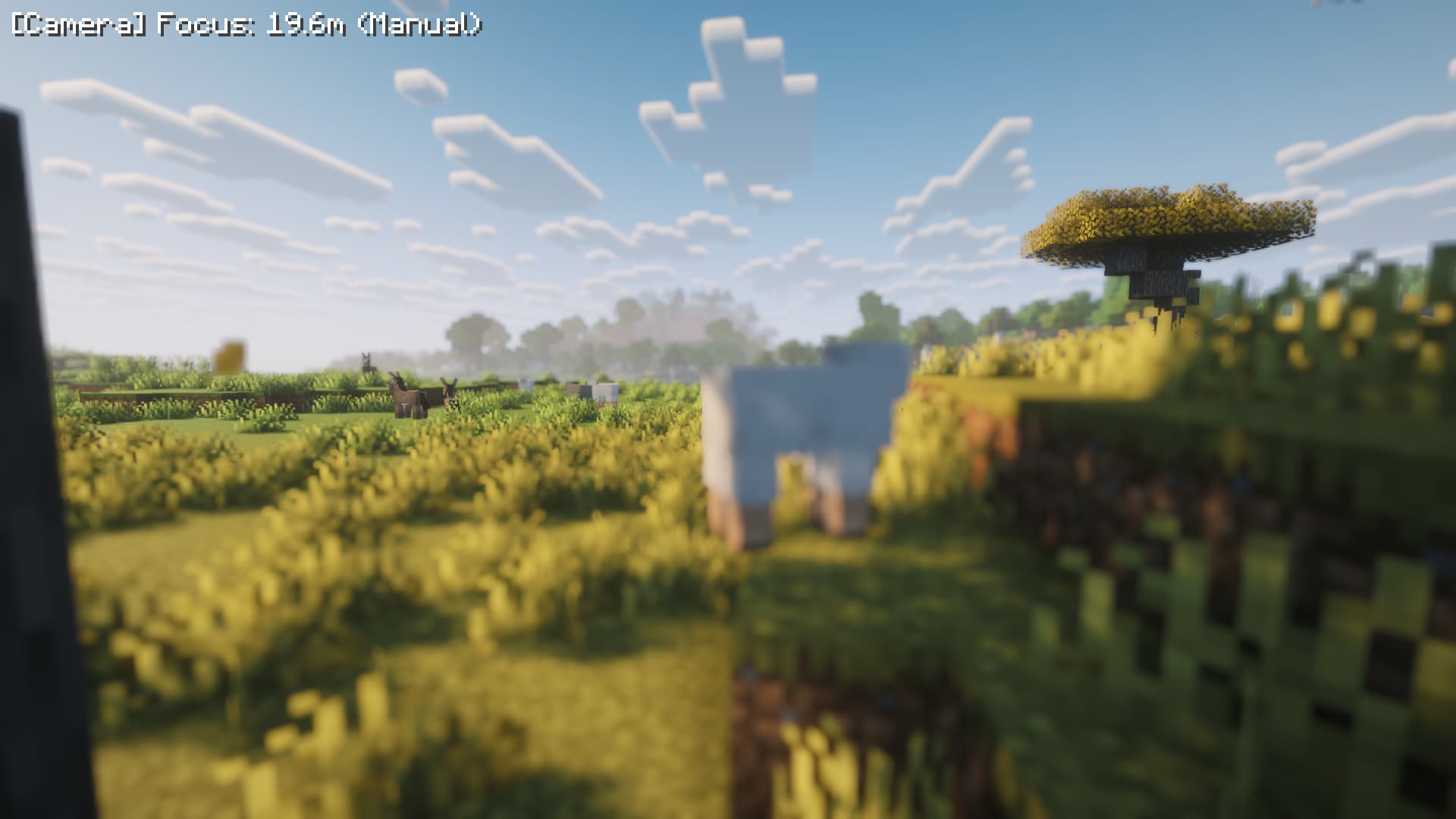 使用 Complementary Reimagined 拍摄
功能特性
| 功能 |
描述 |
| 手动对焦推拉 |
通过按键使焦点变近或变远。按住按键可平滑移动焦点。 |
| 自动/手动切换 |
切换到手动模式会保留光影当前的焦点位置,防止视觉上的突然跳跃。切回自动模式则让光影重新控制焦点。 |
| 平滑焦点移动 |
焦点会逐渐移向目标位置,而不是瞬间改变,从而产生更自然的镜头效果。 |
| 无限远锁定 |
将焦点移动到超过最大距离的位置,可将焦点锁定在无限远,适用于远景场景。 |
| 屏幕上显示焦点信息 |
左上角的小 HUD 会显示当前焦点距离和对焦模式。它会淡出消失,也可以设置为始终可见。 |
| 安全失败处理 |
如果没有激活的光影包或 Iris 版本不兼容,该功能会自动禁用并显示原因。不会导致客户端崩溃。 |
| 可配置设置 |
调整焦点步进大小、平滑度、HUD 行为、最大距离以及是否在启动时恢复上次焦点状态。 |
要求
| 项目 |
要求 |
| Minecraft |
26.1, 26.1.1, 26.1.2, 或 26.2 |
| 加载器 |
Fabric Loader 0.19.0 或更高版本 |
| 必需模组 |
Fabric API |
| 必需模组 |
Iris 1.11.0 或更高版本 |
| 必需模组 |
Sodium |
Focus Revolution 仅限客户端。请勿安装在服务器上。仅在你用于游玩或录制的 Minecraft 客户端中安装。
光影包设置
Focus Revolution 需要一个启用景深(depth of field)的光影包。该光影包还必须使用其自动对焦模式。
Complementary Reimagined
建议为 Complementary Reimagined 设置以下参数:
-
打开光影设置。
-
打开 Camera Settings(相机设置)。
-
打开 World Blur Settings(世界模糊设置)。
-
将 WORLD_BLUR 设置为 2 (Depth Of Field)。
-
将 WB_DOF_FOCUS 设置为 0 (Auto)。
其他光影包如果其景深功能使用自动对焦,也可能以相同方式工作。如果某个光影包设置为固定的单点对焦或手动对焦模式,它可能会忽略 Focus Revolution 的焦点值。
安装
-
为 Minecraft 26.1.x 或 26.2 安装 Fabric Loader。
-
下载 Fabric API、Sodium、Iris 和 Focus Revolution。
-
将相应的 .jar 文件放入你的 Minecraft mods 文件夹。
-
使用 Fabric 配置文件启动 Minecraft。
-
在 Iris 中启用一个光影包,并按照上述说明配置其景深设置。
控制键
所有控制键都可以在 Options → Controls → Focus Revolution(选项 → 控制 → Focus Revolution)中更改。默认控制键如下:
| 操作 |
默认按键 |
描述 |
| 切换自动/手动 |
F6 |
在自动对焦和手动对焦之间切换。切换到手动时会保留当前焦点。 |
| 焦点变近 |
[ |
使焦点变近。按住 Shift 可进行大步长移动。 |
| 焦点变远 |
] |
使焦点变远。按住 Shift 可进行大步长移动。 |
| 切换 HUD 常显 |
未绑定 |
使焦点显示始终保持可见,而不是淡出。 |
| 切换自动读取反馈 |
未绑定 |
更改在使用自动模式时焦点显示的更新频率。 |
[ 和 ] 键的物理位置和显示名称取决于你的键盘布局。如果默认按键不方便,请从控制菜单中重新绑定它们。
在手动模式下,HUD 会显示如下信息:
[Camera] Focus: 5.2m (Manual)
当焦点锁定在无限远时,距离显示为 ∞。
在自动模式下按下对焦键不会改变焦点。HUD 可能会出现以便你检查当前状态,但误触按键不会破坏录制内容。
配置
首次启动带有该模组的游戏时,会创建一个名为 config/focus_revolution.json 的配置文件。大多数用户可以直接使用游戏内控制,无需编辑此文件。如果你要编辑它,请先关闭 Minecraft。
| 设置项 |
描述 |
fineStep |
正常操作下每次按键移动的焦点距离。默认为 0.1 米。 |
coarseStep |
按住 Shift 时每次按键移动的焦点距离。默认为 1.0 米。 |
lerpTau |
焦点移动的平滑度。数值越小移动越快;数值越大移动越慢。值为 0 时焦点会瞬间改变。 |
maxDistance |
最大手动对焦距离。默认为 512 米。超过此距离会将焦点锁定在无限远。 |
hudFadeSeconds |
焦点改变后 HUD 保持可见的时间。默认为 3 秒。 |
hudAlwaysOn |
设置为 true 可使焦点显示始终保持可见。 |
autoReadbackEveryFrame |
设置为 true 可在每一帧更新自动模式的显示。默认设置性能开销较低,适合大多数用户。 |
restoreOnLaunch |
设置为 true 可在启动 Minecraft 时恢复上次的模式和焦点距离。 |
上次使用的模式和焦点距离会在游戏退出时自动保存。
故障排除
如果焦点没有变化,首先请检查 Iris 和 Sodium 是否已正确安装,并且有光影包处于激活状态。然后确认景深(Depth of Field)功能已启用,且该光影包正在使用自动对焦模式。
如果焦点仍然无响应,可能是该光影包不支持 Focus Revolution 所使用的自动对焦方式。请检查该光影包是否提供固定对焦或手动对焦选项,并在可用时切换为自动对焦。
如果缺少所需环境或环境不兼容,Focus Revolution 将自行禁用并显示原因。若出现此情况,请检查 Minecraft、Fabric Loader、Fabric API、Iris 和 Sodium 的版本。
许可证
Focus Revolution 基于 MIT 许可证发布。
Focus Revolution
Manual focus control for Iris shaders
Focus Revolution is a client-side Minecraft mod that lets you control the depth-of-field focus of Iris shaders manually. It is designed for streaming, machinima, cinematic recordings, and screenshots.
Shader packs normally focus automatically on whatever is near the center of the screen. This works well during regular gameplay, but it can be inconvenient when filming because the focus may change as you move the crosshair. Focus Revolution lets you take control of the focus, move it smoothly to the position you want, and return to automatic focus when you are finished.
Shot with Complementary Reimagined
Features
| Feature |
Description |
| Manual focus pulls |
Move the focus nearer or farther with a key. Hold the key to move the focus smoothly. |
| Auto / Manual toggle |
Switching to Manual keeps the shader's current focus position, preventing a sudden visual jump. Switching back lets the shader control the focus again. |
| Smooth focus movement |
Focus gradually moves toward the target instead of changing instantly, creating a more natural lens-like effect. |
| Infinity lock |
Move beyond the maximum distance to lock the focus at infinity for distant scenes. |
| On-screen focus display |
A small HUD in the top-left corner shows the current focus distance and mode. It fades out automatically and can be set to remain visible. |
| Safe failure behavior |
If no shader pack is active or the Iris version is incompatible, the feature disables itself and shows the reason. It does not crash the client. |
| Configurable settings |
Adjust focus step sizes, smoothing, HUD behavior, maximum distance, and whether the last focus state is restored on launch. |
Requirements
| Item |
Requirement |
| Minecraft |
26.1, 26.1.1, 26.1.2, or 26.2 |
| Mod loader |
Fabric Loader 0.19.0 or newer |
| Required mod |
Fabric API |
| Required mod |
Iris 1.11.0 or newer |
| Required mod |
Sodium |
Focus Revolution is client-side only. Do not install it on a server. Install it only in the Minecraft client that you use to play or record.
Shader pack setup
Focus Revolution requires a shader pack with depth of field enabled. The shader pack must also use its automatic focus mode.
Complementary Reimagined
The following settings are recommended for Complementary Reimagined:
-
Open the shader settings.
-
Open Camera Settings.
-
Open World Blur Settings.
-
Set WORLD_BLUR to 2 (Depth Of Field).
-
Set WB_DOF_FOCUS to 0 (Auto).
Other shader packs may work in the same way if their depth-of-field feature uses automatic focus. If a shader pack is set to its own fixed-focus or manual-focus mode, it may ignore Focus Revolution's focus value.
Installation
-
Install Fabric Loader for Minecraft 26.1.x or 26.2.
-
Download Fabric API, Sodium, Iris, and Focus Revolution.
-
Place the corresponding .jar files in your Minecraft mods folder.
-
Launch Minecraft using the Fabric profile.
-
Enable a shader pack in Iris and configure its depth-of-field settings as described above.
Controls
All controls can be changed under Options → Controls → Focus Revolution. The default controls are:
| Action |
Default key |
Description |
| Toggle Auto / Manual |
F6 |
Switch between automatic and manual focus. The current focus is kept when switching to Manual. |
| Focus nearer |
[ |
Move the focus closer. Hold Shift for coarse steps. |
| Focus farther |
] |
Move the focus farther away. Hold Shift for coarse steps. |
| Toggle HUD Always-On |
Unbound |
Keep the focus display permanently visible instead of letting it fade. |
| Toggle Auto Read-back |
Unbound |
Change how often the focus display updates while using Auto mode. |
The physical location and displayed name of the [ and ] keys depend on your keyboard layout. If the default keys are inconvenient, rebind them from the Controls menu.
In Manual mode, the HUD displays information such as:
[Camera] Focus: 5.2m (Manual)
When focus is locked at infinity, the distance is shown as ∞.
Pressing the focus keys while in Auto mode does not change the focus. The HUD may appear so that you can check the current state, but accidental key presses will not spoil a recording.
Configuration
A configuration file named config/focus_revolution.json is created the first time the game starts with the mod installed. Most users can use the in-game controls without editing this file. If you edit it, close Minecraft first.
| Setting |
Description |
fineStep |
Focus distance moved per keypress during normal operation. The default is 0.1 metres. |
coarseStep |
Focus distance moved per keypress while holding Shift. The default is 1.0 metre. |
lerpTau |
Focus movement smoothness. Smaller values move faster; larger values move more slowly. A value of 0 changes focus instantly. |
maxDistance |
Maximum manual focus distance. The default is 512 metres. Moving beyond this distance locks focus at infinity. |
hudFadeSeconds |
How long the HUD remains visible after a focus change. The default is 3 seconds. |
hudAlwaysOn |
Set to true to keep the focus display permanently visible. |
autoReadbackEveryFrame |
Set to true to update the Auto-mode display every frame. The default setting is lighter on performance and is suitable for most users. |
restoreOnLaunch |
Set to true to restore the previous mode and focus distance when Minecraft starts. |
The last mode and focus distance are saved automatically when the game exits.
Troubleshooting
If the focus does not change, first check that Iris and Sodium are installed correctly and that a shader pack is active. Then confirm that depth of field is enabled and that the shader pack is using automatic focus.
If the focus still does not respond, the shader pack may not support the automatic-focus method used by Focus Revolution. Check whether the shader pack has a fixed-focus or manual-focus option, and switch it to automatic focus if available.
If the required environment is missing or incompatible, Focus Revolution disables itself and displays the reason. Check the versions of Minecraft, Fabric Loader, Fabric API, Iris, and Sodium if this happens.
License
Focus Revolution is released under the MIT License.


 模组
 模组

 模组

 模组

 模组

 模组
评论 0
登录后参与评分
还没有评论,来抢沙发吧