FogTools
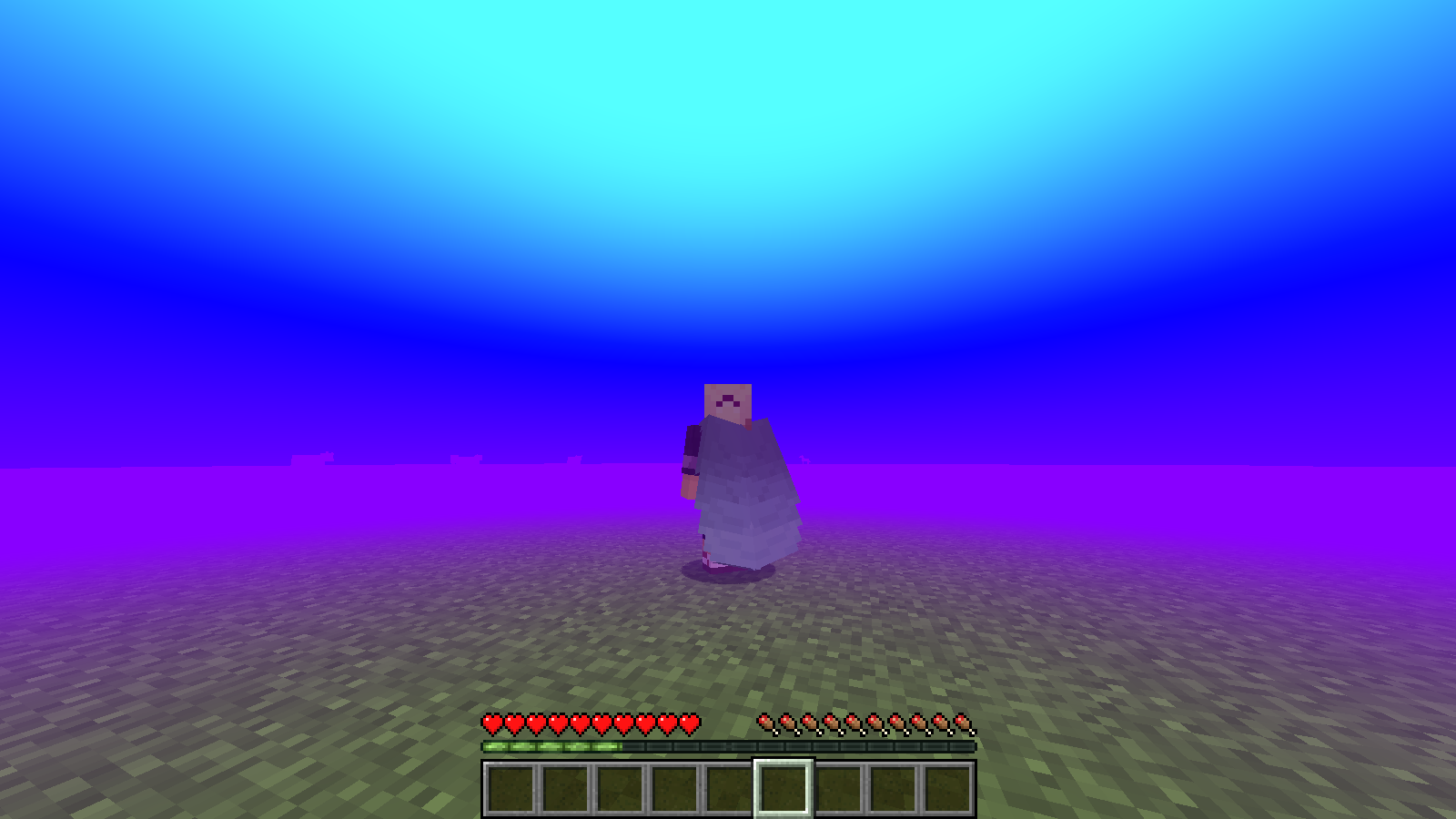
FogTools 让你能够使用颜色、渐变、动画颜色和极光来创建自定义雾效和天空。你可以使用命令或一个实时更新的可视化编辑器。
该模组为 100% 客户端端:只需安装在你的客户端上,即可在单人游戏和任何服务器中生效。要将雾效发送给其他玩家(@a、特定玩家、全服生物群系雾效和极光),请在你的 Paper 服务器上安装 FogTools Plugin。
1.5.1 新增内容
- 生物群系极光:为任意生物群系赋予专属极光。当你进入该生物群系时极光出现,离开时逐渐消失。
- 现在生物群系可以拥有 雾效、极光或两者兼具
- Forge 支持:1.20.1, 1.20.4
- NeoForge 支持:1.20.1, 1.20.4, 1.21.1, 1.21.4, 1.21.5, 1.21.8, 1.21.11, 26.2
- 更好的编辑器性能:修复了打开编辑器时的帧率下降问题(1.21.8, 1.21.11 和 26.2)
1.5 新增内容
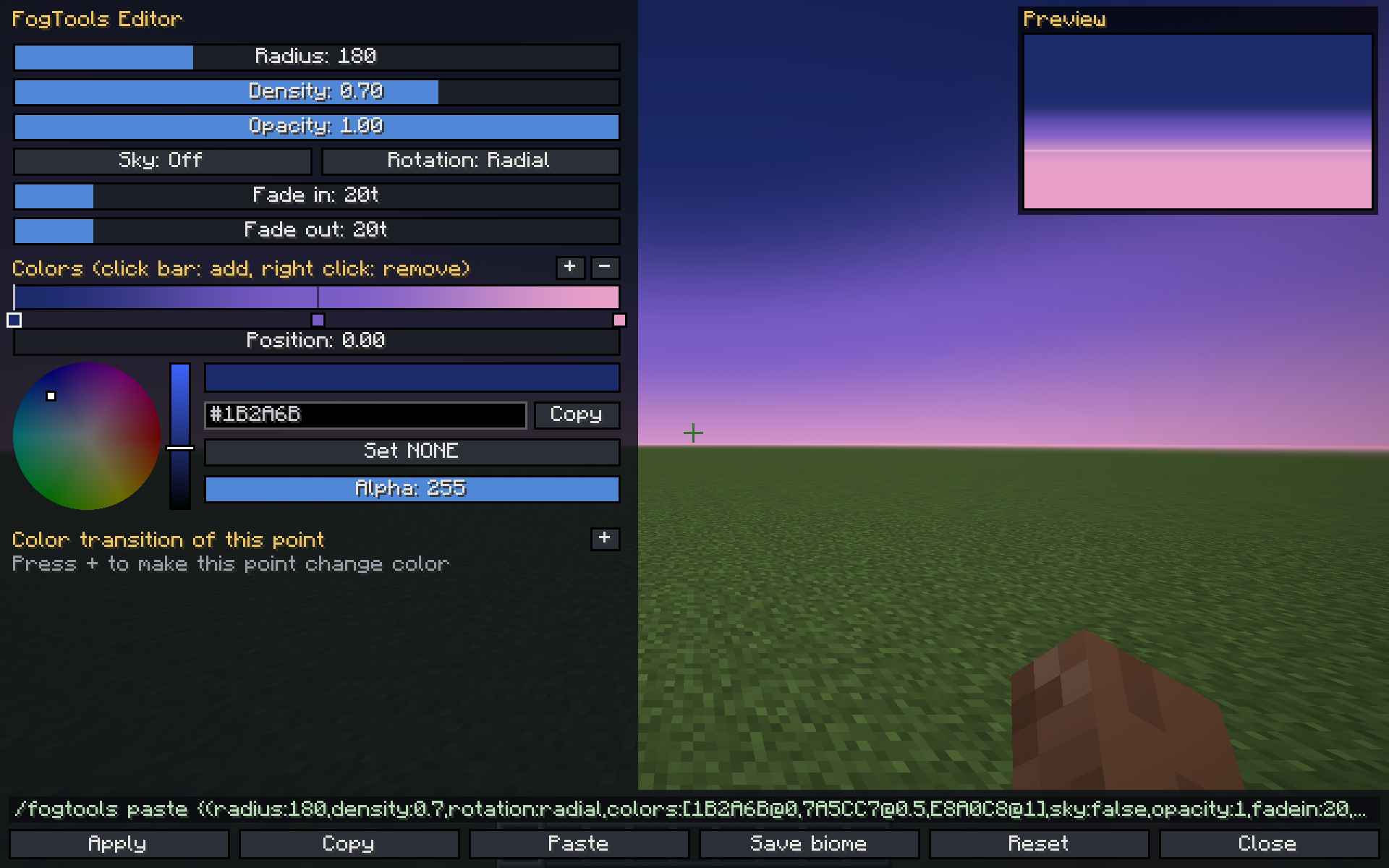
- 可视化编辑器(GUI),带有颜色轮盘、实时预览和按键绑定(默认为 G)
- 支持任意数量的颜色渐变,每个颜色都可以放置在色带上的任意位置
- 自定义旋转:将渐变倾斜至任意角度(例如对角线天空的 45 度角)
- 动画颜色:任意颜色点都可以循环播放多种颜色,每种颜色拥有独立的计时
- 半透明颜色
NONE:在雾效中留下空隙,使原始天空得以显露
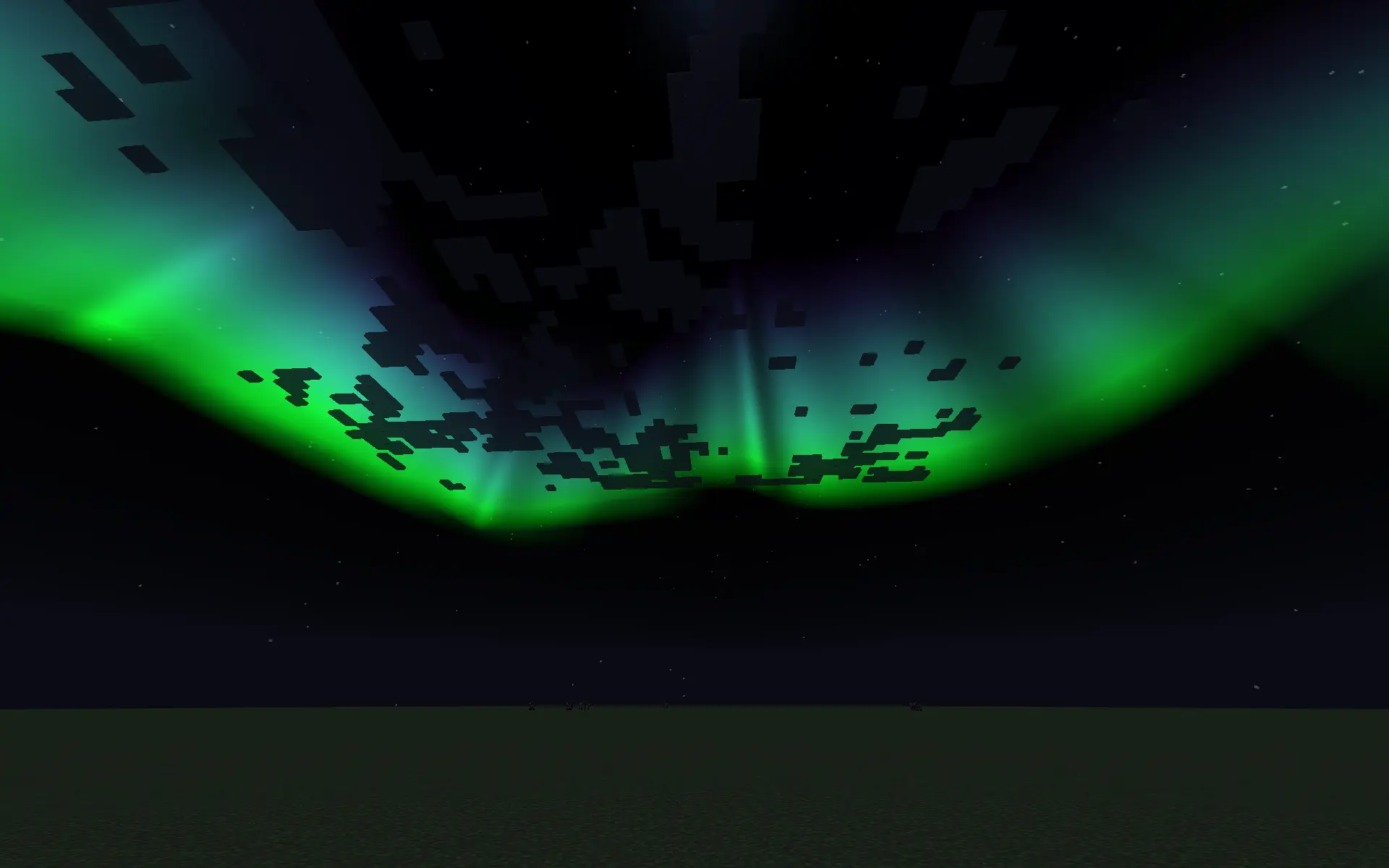
- 极光:天空中的动画帷幕,支持自定义颜色、高度、强度和速度
- 平滑过渡:在雾效、生物群系雾效和极光之间切换时更加平滑,即使淡入淡出过程被中断也能保持流畅
- 复制和粘贴:通过
/fogtools copy 和 /fogtools paste 以文本形式复制和粘贴雾效(支持从剪贴板读取)
- 修复了客户端生物群系雾效命令
- 更平滑的颜色渲染:减少色带现象,消除像素化渐变
- 聊天消息仅在 创造模式 下显示(错误信息始终显示)
- 新版本:26.2
支持版本
| 加载器 |
版本 |
| Fabric |
1.20.1 - 1.20.4 - 1.21.1 - 1.21.4 - 1.21.5 - 1.21.8 - 1.21.11 - 26.2 |
| Forge |
1.20.1 - 1.20.4 |
| NeoForge |
1.20.1 - 1.20.4 - 1.21.1 - 1.21.4 - 1.21.5 - 1.21.8 - 1.21.11 - 26.2 |
可视化编辑器
按 G(可在 Controls > FogTools 中更改)或运行 /fogtools editor。
- 使用滑块调整 半径、密度、不透明度、天空、旋转、淡入和淡出
- 色带:左键单击添加颜色,拖动移动颜色,右键单击移除颜色
- 颜色轮盘,包含亮度、Alpha 值、HEX 字段以及
NONE(半透明)选项
- 按住 Ctrl+C 或右键单击可 复制所选颜色的 HEX 值
- 动画颜色:选择一个颜色点并按
+ 添加它将循环播放的其他颜色,每种颜色都有独立的刻数时间
- 实时预览:编辑器背后的世界会实时显示你的雾效
- 编辑器会自动生成
/fogtools paste 命令。点击它即可复制。
- 按钮:Apply(应用)、Copy(复制)、Paste(粘贴)、Save to biome(保存至生物群系)、Reset(重置)、Close(关闭)。未应用直接关闭将恢复之前的雾效。
- 方向键用于调整上次使用的滑块(按住 Shift 加速 x10)
命令
所有命令均为客户端端。淡入淡出时间单位为刻(20 刻 = 1 秒)。
雾效
| 命令 |
描述 |
/fogtools set <radius> <density> <color> <sky> <opacity> <fadeIn> <fadeOut> |
单色雾效 |
/fogtools gradient set <rotation> <radius> <density> <top> <center> <bottom> <sky> <opacity> <fadeIn> <fadeOut> |
三色渐变雾效 |
/fogtools paste [fog] |
从文本应用雾效。若无文本,则读取剪贴板。 |
/fogtools copy |
将当前雾效复制到剪贴板 |
/fogtools clear |
平滑移除自定义雾效 |
/fogtools editor |
打开可视化编辑器 |
极光
| 命令 |
描述 |
/fogtools aurora set <colors> [height] [intensity] [speed] [fadeIn] [fadeOut] |
创建极光。颜色之后的参数均为可选。 |
/fogtools aurora paste [aurora] |
从文本或剪贴板应用极光 |
/fogtools aurora copy |
复制当前极光 |
/fogtools aurora clear |
移除极光 |
colors:用 + 连接且无空格,例如 GREEN+AQUA+PURPLE(最多 8 种颜色)height:0 到 80(极光在天空中起始的高度)intensity:0 到 1speed:0 到 10
极好在夜间观察。
生物群系雾效和极光
| 命令 |
描述 |
/fogtools biome set <biome> <radius> <density> <color> <sky> <opacity> <fadeIn> <fadeOut> |
生物群系的单色雾效 |
/fogtools biome gradient <biome> <rotation> <radius> <density> <top> <center> <bottom> <sky> <opacity> <fadeIn> <fadeOut> |
生物群系的渐变雾效 |
/fogtools biome paste <biome> [fog] |
粘贴生物群系的雾效 |
/fogtools biome clear <biome> |
移除生物群系的雾效 |
/fogtools biome aurora set <biome> <colors> [height] [intensity] [speed] [fadeIn] [fadeOut] |
生物群系的极光 |
/fogtools biome aurora paste <biome> [aurora] |
粘贴生物群系的极光 |
/fogtools biome aurora clear <biome> |
移除生物群系的极光 |
/fogtools biome list |
列出所有拥有雾效或极光的生物群系 |
/fogtools biome current |
显示你当前所在的生物群系 |
生物群系雾效和极光保存在 config/fogtools-biome-fogs.json 中,并在你穿梭于不同生物群系时淡入淡出。一个生物群系可以拥有雾效、极光或两者兼具。
优先级:
- 雾:编辑器预览 > 自定义雾(命令或服务器)> 生物群系雾。如果存在生物群系雾,运行
/fogtools clear 将恢复为生物群系雾。
- 极光:自定义极光(命令或服务器)> 生物群系极光。如果存在生物群系极光,运行
/fogtools aurora clear 将恢复为生物群系极光。
参数
| 参数 |
值 |
radius |
雾的起始距离 |
density |
0 到 1 |
color |
颜色名称(如 RED、GOLD、AQUA...)、HEX 色值如 FF5500、带透明度的 HEX 色值如 80FF5500,或 NONE |
sky |
true 表示同时为天空着色,false 表示仅对雾着色 |
opacity |
0 到 1 |
rotation |
radial(径向)、lineal(线性)或 custom<角度>(例如 custom45) |
旋转:
radial:渐变从顶部到底部lineal:渐变从左到右custom:倾斜渐变。0 与 radial 相同,45 为对角线方向,90 为从一侧到另一侧,180 为上下颠倒。
粘贴格式
雾气可以以单行文本的形式分享。编辑器以及 /fogtools copy 命令会自动生成该格式。
{(radius:200,density:0.8,rotation:custom[45],colors:[RED@0,PURPLE:40>CYAN:40@0.5,NONE@1],sky:false,opacity:1,fadein:40,fadeout:40)}
colors:一个 COLOR@position 列表,其中 position 的范围从 0 到 1。如果未指定位置,颜色将均匀分布:[RED,WHITE,BLUE]。- 动画颜色:
PURPLE:40>CYAN:40@0.5 会从紫色循环过渡到青色再返回,每步耗时 40 刻。
- Minecraft 聊天栏仅允许 256 个字符。对于较长的雾气配置,复制文本并运行
/fogtools paste 不带参数 以从剪贴板粘贴。
示例
/fogtools set 100 1 GOLD true 0.6 40 40

/fogtools gradient set lineal 100 1 AQUA RED PURPLE true 0.5 50 50

/fogtools gradient set radial 100 1 GOLD ORANGE BLACK false 1 50 50

/fogtools gradient set custom45 150 0.8 PINK NONE BLUE true 1 40 40

/fogtools aurora set GREEN+AQUA+PURPLE

/fogtools aurora set PINK+PURPLE+BLUE 30 0.8 2 60 60

/fogtools biome aurora set minecraft:snowy_plains GREEN+AQUA+PURPLE

/fogtools paste {(radius:200,density:0.8,rotation:radial,colors:[RED@0,NONE@0.5,BLUE@1],sky:false,opacity:1,fadein:40,fadeout:40)}
服务端插件
FogTools Plugin 适用于 Paper 1.20.1 - 26.2:
- 将雾、渐变、叠加雾和极光发送到
@a 或指定玩家
- 服务端生物群系雾与生物群系极光,包括自定义和数据包生成的生物群系(只需输入准确的生物群系 ID)
- 玩家需要安装 FogTools 模组才能看到这些雾效和极光
兼容性
- 兼容 Sodium 及大多数其他模组
- 不兼容光影(如 BSL、Complementary 等)
FogTools
FogTools lets you create custom fog and skies with colors, gradients, animated colors and auroras. You can use commands or a visual editor that updates live.
The mod is 100% client-side: install it on your client and it works in singleplayer and on any server. To send fogs to other players (@a, specific players, server-wide biome fogs and auroras), use the FogTools Plugin on your Paper server.
What's new in 1.5.1
- Biome auroras: give any biome its own aurora. It appears when you enter the biome and fades out when you leave.
- A biome can now have a fog, an aurora or both
- Forge support: 1.20.1, 1.20.4
- NeoForge support: 1.20.1, 1.20.4, 1.21.1, 1.21.4, 1.21.5, 1.21.8, 1.21.11, 26.2
- Better editor performance: fixed the FPS drop while the editor is open (1.21.8, 1.21.11 and 26.2)
What's new in 1.5
- Visual editor (GUI) with a color wheel, a live preview and a keybind (G by default)
- Gradients with any number of colors, each placed where you want on the color bar
- Custom rotation: tilt the gradient to any angle (for example 45 degrees for a diagonal sky)
- Animated colors: any color point can loop through several colors, each with its own timing
- Translucent color
NONE: leaves gaps in the fog so the original sky shows through
- Auroras: animated curtains in the sky, with custom colors, height, intensity and speed
- Smooth transitions between fogs, biome fogs and auroras, even when a fade is interrupted
- Copy and paste fogs as text with
/fogtools copy and /fogtools paste (works from the clipboard)
- Fixed client biome fog commands
- Smoother color rendering: less banding and no pixelated gradients
- Chat messages only show in creative mode (errors are always shown)
- New version: 26.2
Supported versions
| Loader |
Versions |
| Fabric |
1.20.1 - 1.20.4 - 1.21.1 - 1.21.4 - 1.21.5 - 1.21.8 - 1.21.11 - 26.2 |
| Forge |
1.20.1 - 1.20.4 |
| NeoForge |
1.20.1 - 1.20.4 - 1.21.1 - 1.21.4 - 1.21.5 - 1.21.8 - 1.21.11 - 26.2 |
Visual editor
Press G (can be changed in Controls > FogTools) or run /fogtools editor.
- Change radius, density, opacity, sky, rotation, fade in and fade out with sliders
- Color bar: left click to add a color, drag to move it, right click to remove it
- Color wheel with brightness, alpha, a HEX field and a
NONE (translucent) option
- Copy the HEX of the selected color with Ctrl+C or right click
- Animated colors: select a color point and press
+ to add colors it will loop through, each with its own time in ticks
- Live preview: the world behind the editor shows your fog in real time
- The editor builds the
/fogtools paste command for you. Click it to copy it.
- Buttons: Apply, Copy, Paste, Save to biome, Reset, Close. Closing without applying brings back your previous fog.
- Arrow keys adjust the last slider you used (hold Shift for x10)
Commands
All commands are client-side. Fade times are in ticks (20 ticks = 1 second).
Fog
| Command |
Description |
/fogtools set <radius> <density> <color> <sky> <opacity> <fadeIn> <fadeOut> |
Single-color fog |
/fogtools gradient set <rotation> <radius> <density> <top> <center> <bottom> <sky> <opacity> <fadeIn> <fadeOut> |
3-color gradient fog |
/fogtools paste [fog] |
Applies a fog from text. Without text, it reads your clipboard. |
/fogtools copy |
Copies the current fog to your clipboard |
/fogtools clear |
Removes your custom fog with a smooth fade |
/fogtools editor |
Opens the visual editor |
Auroras
| Command |
Description |
/fogtools aurora set <colors> [height] [intensity] [speed] [fadeIn] [fadeOut] |
Creates an aurora. Everything after the colors is optional. |
/fogtools aurora paste [aurora] |
Applies an aurora from text or from the clipboard |
/fogtools aurora copy |
Copies the current aurora |
/fogtools aurora clear |
Removes the aurora |
colors: joined with + and no spaces, for example GREEN+AQUA+PURPLE (up to 8 colors)height: 0 to 80 (how high in the sky the aurora starts)intensity: 0 to 1speed: 0 to 10
Auroras are easiest to see at night.
Biome fogs and auroras
| Command |
Description |
/fogtools biome set <biome> <radius> <density> <color> <sky> <opacity> <fadeIn> <fadeOut> |
Single-color fog for a biome |
/fogtools biome gradient <biome> <rotation> <radius> <density> <top> <center> <bottom> <sky> <opacity> <fadeIn> <fadeOut> |
Gradient fog for a biome |
/fogtools biome paste <biome> [fog] |
Pasted fog for a biome |
/fogtools biome clear <biome> |
Removes a biome's fog |
/fogtools biome aurora set <biome> <colors> [height] [intensity] [speed] [fadeIn] [fadeOut] |
Aurora for a biome |
/fogtools biome aurora paste <biome> [aurora] |
Pasted aurora for a biome |
/fogtools biome aurora clear <biome> |
Removes a biome's aurora |
/fogtools biome list |
Lists every biome with a fog or an aurora |
/fogtools biome current |
Shows the biome you are standing in |
Biome fogs and auroras are saved in config/fogtools-biome-fogs.json and fade in and out as you walk between biomes. A biome can have a fog, an aurora or both.
Priority:
- Fog: editor preview > custom fog (commands or server) > biome fog. Running
/fogtools clear goes back to the biome fog if there is one.
- Aurora: custom aurora (commands or server) > biome aurora. Running
/fogtools aurora clear goes back to the biome aurora if there is one.
Arguments
| Argument |
Values |
radius |
How far the fog starts |
density |
0 to 1 |
color |
A color name (RED, GOLD, AQUA...), a HEX like FF5500, a HEX with alpha like 80FF5500, or NONE |
sky |
true to also color the sky, false for the fog only |
opacity |
0 to 1 |
rotation |
radial, lineal or custom<degrees> (for example custom45) |
Rotation:
radial: the gradient goes from top to bottomlineal: the gradient goes from left to rightcustom: tilts the gradient. 0 is the same as radial, 45 is diagonal, 90 is side to side and 180 is upside down.
Paste format
Fogs can be shared as a single line of text. The editor and /fogtools copy create it for you.
{(radius:200,density:0.8,rotation:custom[45],colors:[RED@0,PURPLE:40>CYAN:40@0.5,NONE@1],sky:false,opacity:1,fadein:40,fadeout:40)}
colors: a list of COLOR@position, with the position from 0 to 1. Without positions, the colors are spread evenly: [RED,WHITE,BLUE].- Animated color:
PURPLE:40>CYAN:40@0.5 loops from purple to cyan and back, 40 ticks per step.
- Minecraft chat only allows 256 characters. For long fogs, copy the text and run
/fogtools paste without arguments to paste it from your clipboard.
Examples
/fogtools set 100 1 GOLD true 0.6 40 40

/fogtools gradient set lineal 100 1 AQUA RED PURPLE true 0.5 50 50

/fogtools gradient set radial 100 1 GOLD ORANGE BLACK false 1 50 50

/fogtools gradient set custom45 150 0.8 PINK NONE BLUE true 1 40 40

/fogtools aurora set GREEN+AQUA+PURPLE

/fogtools aurora set PINK+PURPLE+BLUE 30 0.8 2 60 60

/fogtools biome aurora set minecraft:snowy_plains GREEN+AQUA+PURPLE

/fogtools paste {(radius:200,density:0.8,rotation:radial,colors:[RED@0,NONE@0.5,BLUE@1],sky:false,opacity:1,fadein:40,fadeout:40)}
Server plugin
FogTools Plugin for Paper 1.20.1 - 26.2:
- Send fogs, gradients, pasted fogs and auroras to
@a or to specific players
- Server-side biome fogs and biome auroras, including custom and datapack biomes (just type the exact biome id)
- Players need the FogTools mod installed to see the fogs and auroras
Compatibility
- Compatible with Sodium and most other mods
- Not compatible with shaders (BSL, Complementary, etc.)


 模组

 模组

 模组
 模组
 模组
 模组
评论 0
登录后参与评分
还没有评论,来抢沙发吧