? 更新已无限期暂停
由于我无法在本地测试该模组使用的修复方法在新版 Minecraft 中是否仍然有效,该模组暂时不再提供支持。您仍可使用 ForceGL20 的最新版本在 Minecraft 1.17.x - 1.20.x 版本中游玩,但该模组不支持任何更高版本。
新版 Minecraft 的可能替代方案:
尽管我不再亲自参与该模组的开发,但仍欢迎向该模组的仓库提交拉取请求(Pull Request)。我未来可能会回来继续更新 ForceGL20,届时此页面部分将被移除。
⚠️ 免责声明
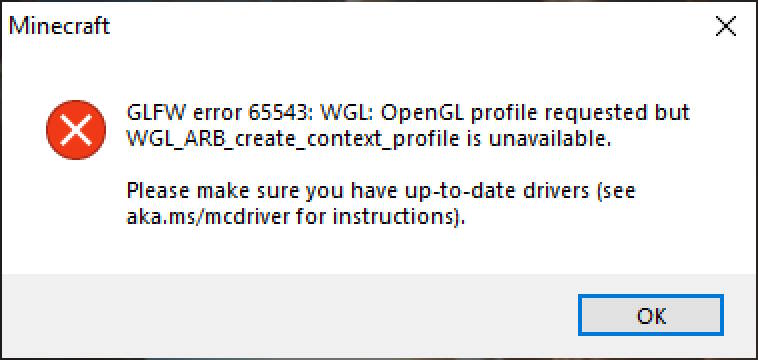
该模组仅修复 GLFW 错误代码 65543;它不能解决任何其他错误代码!如果您在启动 Minecraft 时看到以下消息,该模组可能可以解决您的问题:
话虽如此,请至少阅读一次下方的模组描述,以便了解该模组为何能解决您的游戏问题。
ForceGL20
ForceGL20 是一个通过强制游戏使用 OpenGL 2.0,使旧电脑能够运行新版 Minecraft 的模组。
为什么?
自 Minecraft 1.17 起,游戏所需的 OpenGL 版本已从 2.0 提升至 3.2。然而,一些旧电脑上的显卡并不支持 OpenGL 3.2,导致部分玩家无法启动游戏。
此 Minecraft 模组将所需的 OpenGL 版本降低回 2.0,正如 Minecraft 1.17 之前的情况一样。因此,如果您的电脑能流畅运行 Minecraft 1.16,但在运行 Minecraft 1.17 时遇到问题,那么这个模组就是为您准备的。
但它真的有用吗?
强制游戏在较旧的 OpenGL 环境下运行并未出现重大故障。但请注意,安装此模组意味着您正在以不受支持的方式运行游戏,因此可能会与其他模组或资源包产生意外问题。
此外,如果 Minecraft 在未来的更新中开始使用您的电脑无法运行的新 OpenGL 特性,该模组将毫无用处。一旦这种“创可贴”式解决方案失效,我将停止对该模组的支持。
虽然您可以自由使用该模组来运行新版 Minecraft,但请尽快考虑升级至更新的显卡。
我发现了问题!
鉴于上述声明(即您正在以不受支持的方式运行游戏),我无法为您提供该模组可能出现问题的技术支持。该模组的唯一目的是更改 OpenGL 版本,它不会对游戏代码应用其他任何修复。
它不起作用!
请检查您在启动游戏时是否确实遇到了 GLFW 错误代码 65543(确切数字)。如果该数字哪怕只相差 1,那就是一个完全不同的错误,超出了该模组的处理范围。
? Updates Halted Indefinitely
As I can no longer locally test if the fix method used by this mod is still effective in newer Minecraft versions, the mod will be unsupported for the time being. You can still play Minecraft versions 1.17.x - 1.20.x using the latest version of ForceGL20, but the mod is not supported in any newer versions.
Possible alternatives for newer Minecraft releases:
Even though I am not personally working on the mod anymore, pull requests to the mod's repository are still welcomed. I may come back to updating ForceGL20 in the future, and this section of the page will be removed when I decide to do so.
⚠️ Disclaimer
This mod only fixes GLFW error 65543; it will NOT work for any other error codes! If you are getting this message when you launch Minecraft, this mod may resolve your issue:
With that said, please read the mod's description below at least once, so that you understand why this mod may fix your issue with the game.
ForceGL20
ForceGL20 is a mod that allows running newer versions of Minecraft on old computers by forcing the game to use OpenGL 2.0.
Why?
Since Minecraft 1.17, the game's required OpenGL version was updated from 2.0 to 3.2. However, some graphic cards on old computers do not support OpenGL 3.2, making the game unable to launch for some players.
This Minecraft mod lowers the required OpenGL version to 2.0, just like how it was prior to Minecraft 1.17. So, if your computer can play Minecraft 1.16 fine but has issues running Minecraft 1.17, this mod is for you.
But does it work?
There have been no major issues with forcing the game to run on older OpenGL. However, note that you are forcing the game to run in an unsupported way by installing this mod, so there might be unexpected issues with other mods or resource packs.
In addition, this mod would be useless if Minecraft starts using new OpenGL features that your computer can't run in a future update. I will discontinue the support for this mod as soon as this band-aid solution stops working.
While you are free to use this mod to run newer versions of Minecraft, please do consider upgrading to a newer graphic card as soon as possible.
I found an issue!
Due to the statement above (that you are running the game in an unsupported way ), I cannot provide support for issues you may experience in this mod. This mod's only purpose is to change the OpenGL version and it does not apply any other fixes to the game's code.
It doesn't work!
Please check that you are getting GLFW error 65543 (this exact number) when you launch the game. If that number differs even by 1, it is an entirely different error that's out of this mod's scope.

 模组

 模组

 模组

 模组

 模组

 模组
评论 0
登录后参与评分
还没有评论,来抢沙发吧