是否曾精心布置了一处自定义装饰,稍微转头一看,却发现整个场景瞬间消失?没错。就是那个问题。已修复。
一个小型客户端模组,防止盔甲架和物品展示框因渲染剔除而凭空消失。安装后,忘记这个 Bug 的存在吧。
仅客户端模组,适用于 1.21.1 至 1.21.11
这意味着什么?
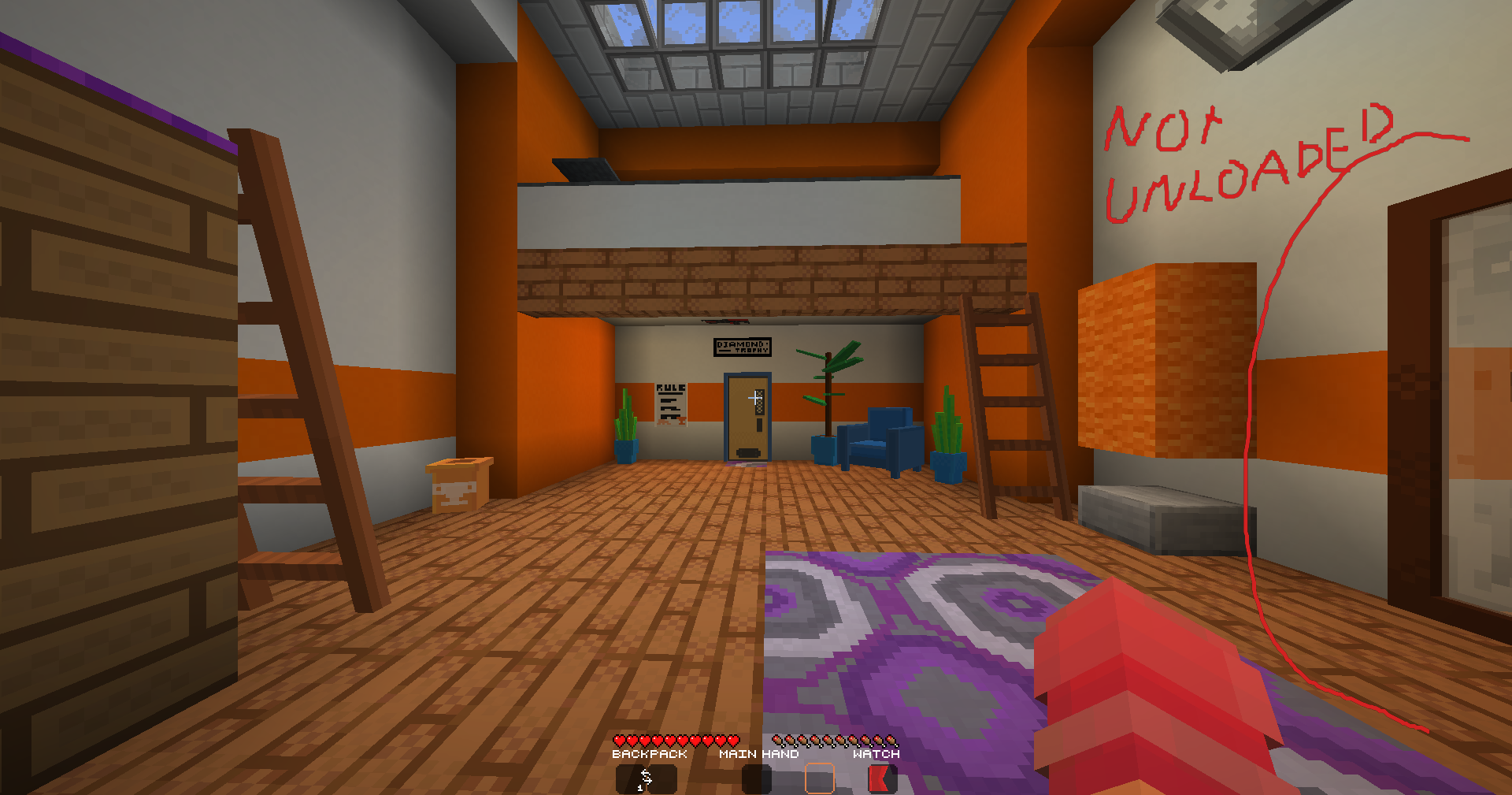
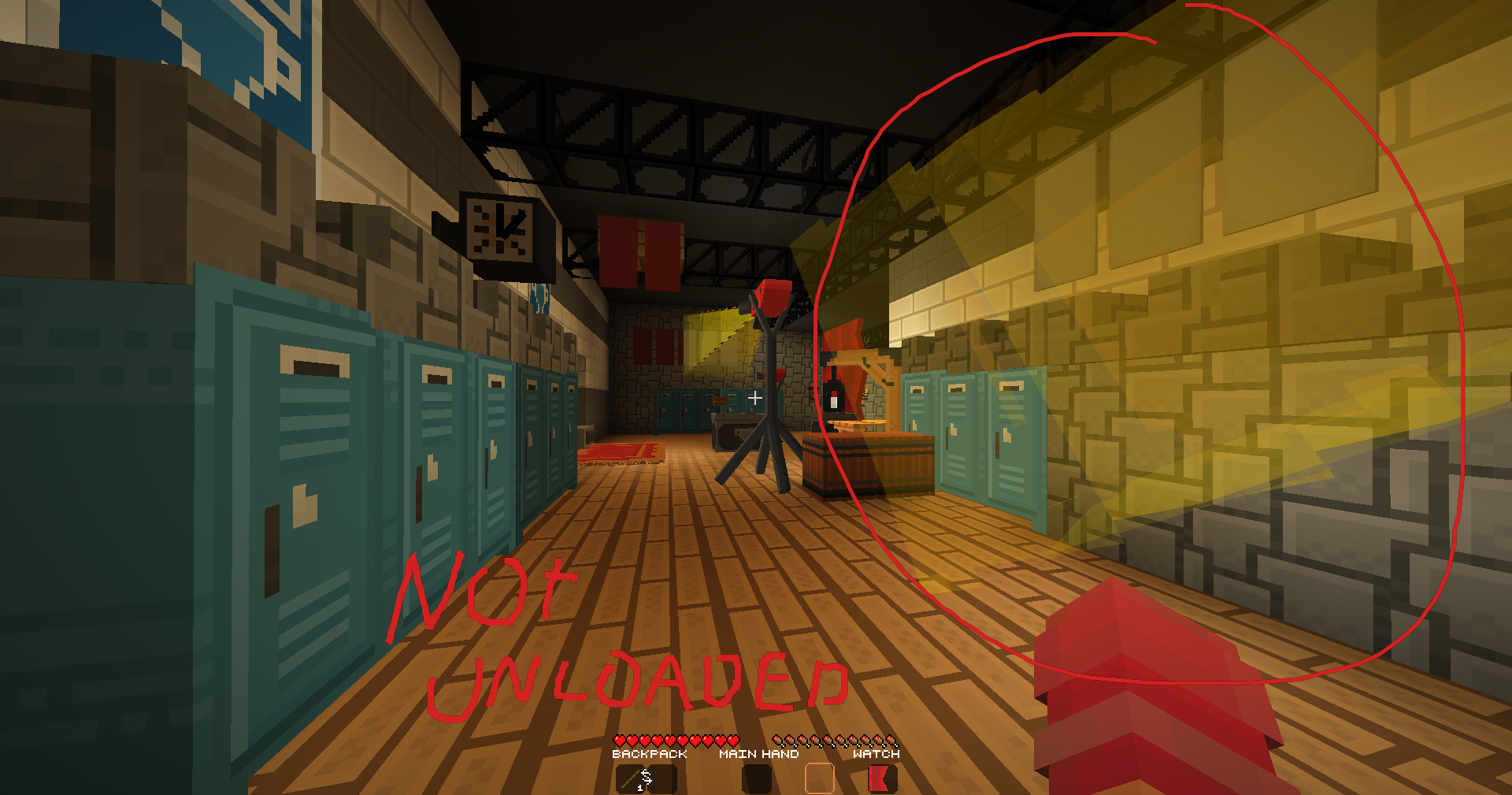
Minecraft 根据碰撞箱决定渲染内容,而非你实际看到的内容
- 盔甲架的碰撞箱很小。其上方的模型可能巨大无比,但游戏并不在意这一点
- 一旦这个小方框滑出屏幕边缘,整个装饰就会消失
- 它明明还在视野中,却消失了
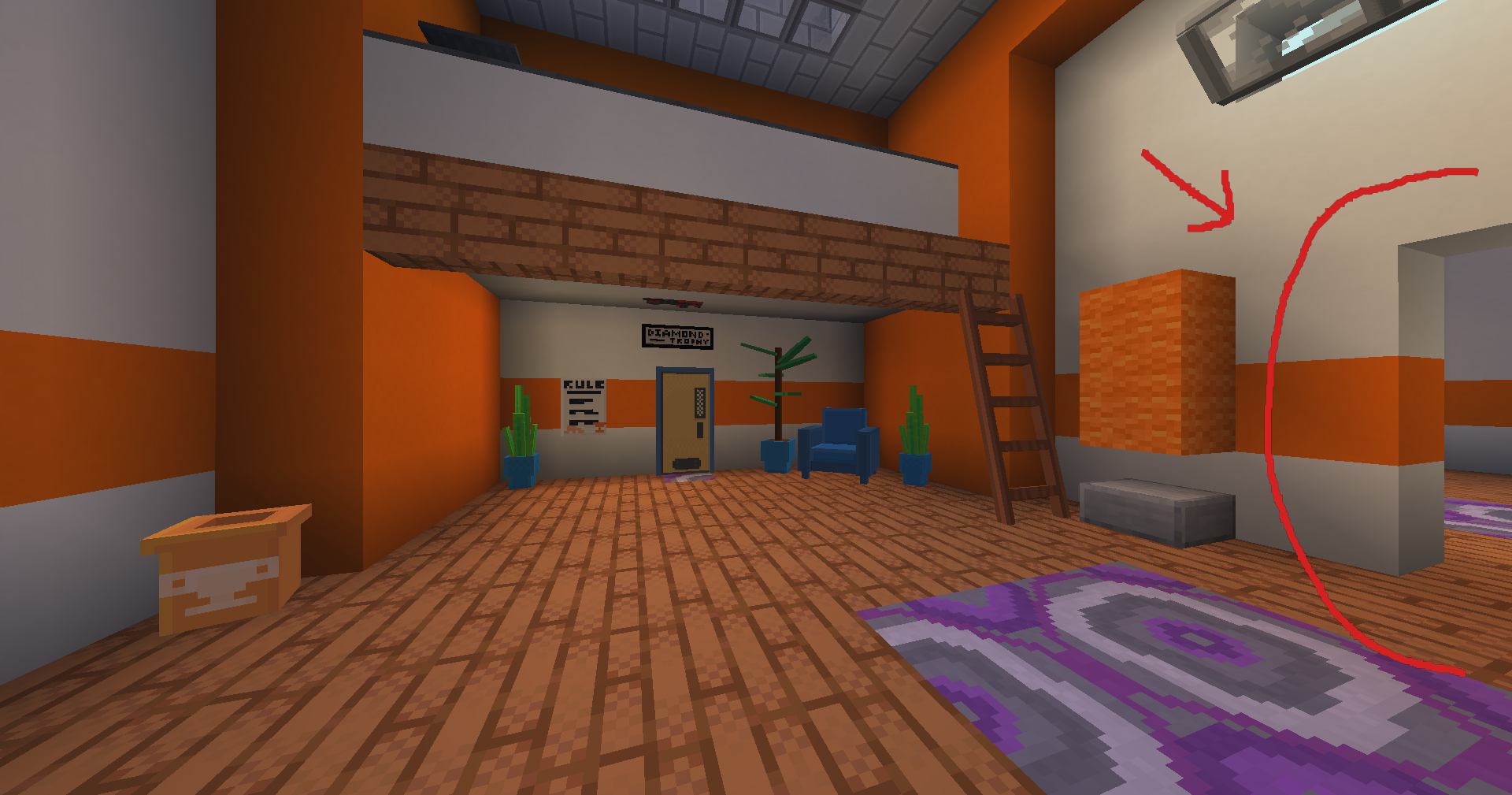
它对家具和墙面装饰影响最大
- ItemsAdder 和 Oraxen 家具 ?
- 用作墙面装饰的物品展示框 ?️
- 基本上任何骑在盔甲架上的大型资源包模型 ?
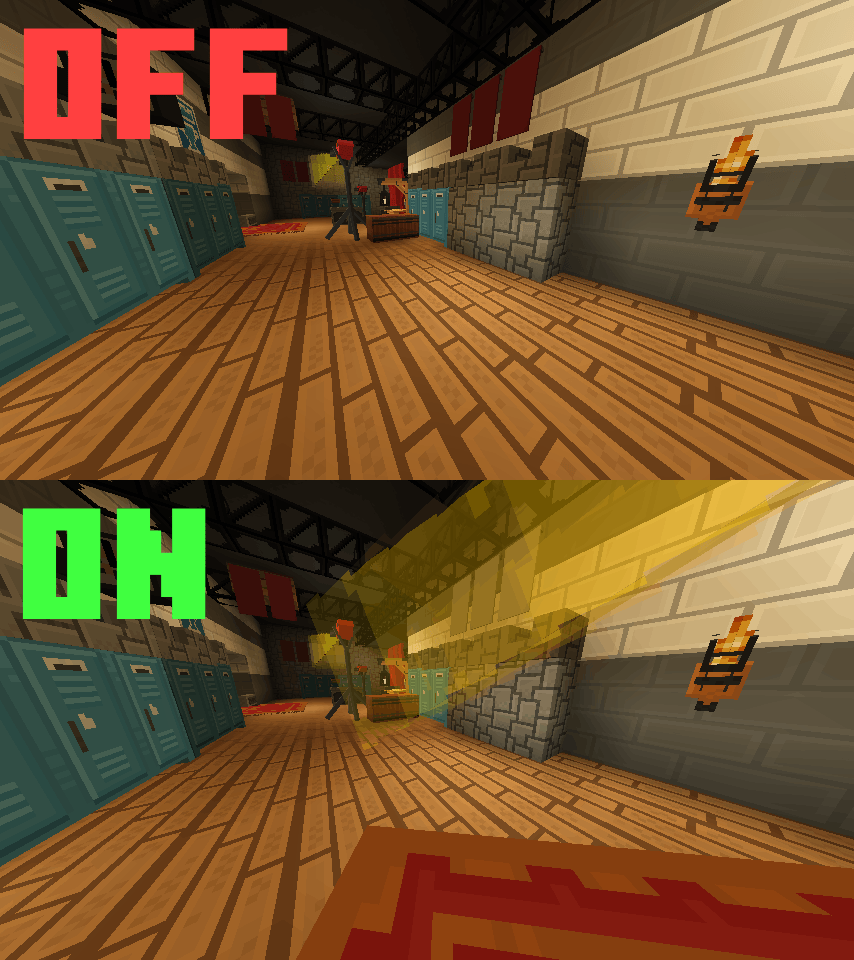
ForceRender 只是告诉渲染器停止剔除
- 在配置的距离内,盔甲架和物品展示框始终会被渲染。
- 走远后,原版剔除机制重新接管,因此不会浪费资源去渲染你根本看不到的实体
所有内容均可调节,没有任何强制设置(懂的都懂)
- 主开关:如果你不想卸载模组,可以将其关闭
- 自行设置距离,默认为 5 格
- 盔甲架和物品展示框拥有独立的开关,按需关闭即可
安装说明
大约需要一分钟(甚至更短)
- 从 获取 Fabric Loader
- 从 获取 Fabric API,此为必需项
- 从 获取 Mod Menu,从 获取 Cloth Config,这两个模组用于运行设置界面
- 将 forcerender jar 文件放入你的 mods 文件夹
就是这样。?
(如果你完全不知道自己在做什么,可能会花更长时间)
适用于 Minecraft 1.21.1 至 1.21.11
配置
打开 Mod Menu,找到 ForceRender,点击 Settings
| 选项 |
默认值 |
功能 |
| Enabled |
On |
模组的总开关 |
| Render Distance |
5 blocks |
强制渲染此范围内的所有内容 |
| Affect Armor Stands |
On |
修复盔甲架的剔除问题 |
| Affect Item Frames |
On |
修复普通和发光物品展示框的剔除问题 |
常见问题
服务器需要安装此模组吗?
它会严重降低我的 FPS 吗?
- 只有在你配置距离内的实体才会受到影响,超出该范围的实体仍按原版方式进行剔除
- 如果担心性能问题,可以降低距离。这就是滑块的作用
它与 Display Entities(显示实体)兼容吗?
- 不兼容。本模组仅针对
ArmorStandEntity 和 AbstractDecorationEntity
- 显示实体使用不同的渲染器,因此不在本模组挂钩的范围内
它与 Sodium 或 Iris 兼容吗?
许可证
ForceRender 采用 MIT 许可证。先说简短版,再说无聊的长篇大论。
简短版
- 拿走代码,用它构建你想要的任何东西,包括商业用途
- 只需保留版权声明
- 署名非必需,但看到署名总是很愉快
长篇大论
MIT 允许你自由使用、修改和重新分发代码。唯一条件是,任何实质性复制的源代码都必须附带版权声明和许可文本。
由 ReimaginedPixel 制作
Ever built a nice custom decoration, turned your head slightly, and watched the whole thing blink out of existence? Yeah. That one. Fixed.
Tiny client side mod that stops armor stands and item frames from getting yoinked from existence. Drop it in and forget this bug exists.
Client side mod only, from 1.21.1 to 1.21.11
What does this mean?
Minecraft decides what to render using the hitbox, not what you actually see
- An armor stand has a tiny hitbox. The model on top of it can be enormous, the game does not care
- The second that little box slips off the edge of your screen, the entire decoration disappears
- It is still clearly in view. It is just gone
It hits furniture and wall decor the hardest
- ItemsAdder and Oraxen furniture ?
- Item frames used as wall decorations ?️
- Basically any big resource pack model riding on an armor stand ?
ForceRender just tells the renderer to knock it off
- Inside your configured distance, armor stands and item frames always render.
- Walk away, and vanilla culling takes back over, so nothing is wasted on entities you cannot see anyway
Everything is tunable, nothing is forced on you (get it?)
- Master toggle if you want to flip it off without uninstalling
- Set the distance yourself, default is 5 blocks
- Armor stands and item frames have separate switches, turn off whichever you do not need
Installation
It takes about a minute (or less)
- Grab the Fabric Loader from
- Grab the Fabric API from , this one is required
- Grab Mod Menu from and Cloth Config from , these two run the settings screen
- Drop the forcerender jar into your mods folder
That is genuinely it. ?
(might take longer if you have no idea what you are doing)
Works on Minecraft 1.21.1 to 1.21.11
Config
Open Mod Menu, find ForceRender, hit Settings
- Everything is in one screen, there is not much to get lost in
| Option |
Default |
What it does |
| Enabled |
On |
Master toggle for the whole mod |
| Render Distance |
5 blocks |
Force render anything inside this range |
| Affect Armor Stands |
On |
Fix culling for armor stands |
| Affect Item Frames |
On |
Fix culling for item frames, normal and glow |
FAQ
Does the server need this mod?
- No. Fully client side, install it wherever you want
Will it tank my FPS?
- Only entities inside your configured distance get touched, everything beyond that culls exactly like vanilla
- If you are worried, lower the distance. That is what the slider is for
Does it work with Display Entities?
- No. This targets
ArmorStandEntity and AbstractDecorationEntity only
- Display entities go through a different renderer, so they are outside what this mod hooks
Does it work with Sodium or Iris?
- Yes, both. Tested and fine
License
ForceRender is MIT licensed. Short version first, boring version after.
The short version
- Take the code, build whatever you want with it, commercial use included
- Just keep the copyright notice attached
- Credit is not required, but it is always nice to see
The boring version
MIT lets you use, modify and redistribute the code freely. The one condition is that the copyright notice and license text travel with any substantial copy of the source.
Made by ReimaginedPixel


 模组

 模组

 模组
 模组
 模组
 模组
评论 0
登录后参与评分
还没有评论,来抢沙发吧