

这是什么?
FoxNap 是一款简单的“原版增强”模组,用于向 Minecraft 添加自定义音乐唱片。
- 与仅使用 资源包 能实现的效果不同,通过 FoxNap 添加的音乐唱片不会覆盖原版音乐唱片。
- 与类似的模组相比,FoxNap 允许你:
- 添加任意数量的音乐唱片
- 添加 任何 你想要的音乐
- 在同一服务器上使用与其他玩家 不同 的音乐
- 在生存模式中通过 新的村民职业 获取所有音乐唱片(计划提供用于修改爬行者/宝箱战利品表的实用工具)
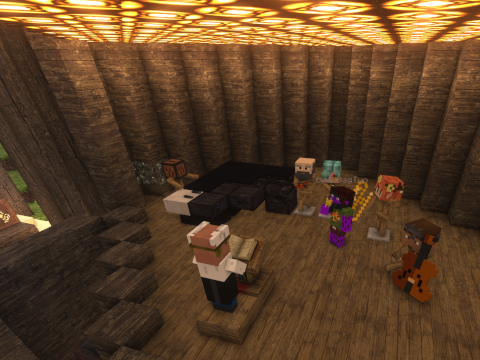
FoxNap 还添加了你可以像山羊角一样演奏的自定义乐器,赋予你举办“现场音乐”表演的创作自由。
安装与自定义
本模组预打包了七张新音乐唱片:
- 四首曲目由 PM Music 演奏,来自 Lud 和 Schlatts Musical Emporium
所有这些曲目均根据 此处 指定的条款获得许可(我通过此仓库和模组以兼容的 知识共享署名-相同方式共享 4.0 许可证 重新分发它们)。
如果这个内置播放列表符合你的口味,且你没有添加其他内容的打算,那么恭喜你!这很简单!这是一个 Fabric 模组,支持 1.19+ 版本,并且仅依赖 Fabric API,因此只需下载 适合你实例的构建文件放入 mods 文件夹,启动游戏,然后 去寻找一个村庄。
但如果你对自定义感兴趣,请继续阅读:
资源包生成器
如果你认为手动转换 mp3 文件和手工编辑 JSON 并不有趣,本项目提供了一种替代方案,即一个独立且便携的资源包生成器。
安装
- 从 发布页面 下载与你操作系统和模组版本匹配的可执行文件。
- 根据你的操作系统和安全设置,你可能需要显式地使资源包生成器具备可执行权限(在 *nix 系统上,你可以从终端运行
chmod u+x /path/to/FoxNapRPG,或在大多数文件管理器中进入属性设置)。
生成资源和数据包
将生成器可执行文件放在一个空文件夹中,然后将你想转换为唱片的任何音乐移入该文件夹。没有包含曲目数量的限制,并且它们不需要预先转换为 Ogg。唯一的要求是文件必须能够被
ffmpeg 解码。
小贴士: 如果你的音乐文件包含 元数据,标题和艺术家 名称将被自动提取,任何专辑封面也将用于帮助生成音乐唱片纹理。
准备好后,只需双击 FoxNapRPG 可执行文件。可能会弹出一个终端窗口显示资源包创建的进度,转眼间你就应该在当前目录中看到一些新文件:
FoxNapRP.zip是包含所有转换后的歌曲和音乐唱片纹理的资源包,你可以将其放入 Minecraft 的resourcepacks文件夹FoxNapDP.zip是定义曲目本身所有属性的数据包。你需要将此包放入任何你想在其中使用音乐的世界的datapacks文件夹中(关于多人游戏的说明见下文)。foxnap.yaml需要放入你的 Minecraftconfig文件夹。这告诉游戏为你启用多少张音乐唱片。
高级选项:命令行选项
你也可以从命令行运行生成器,这将为你提供许多额外的自定义选项,例如设置搜索音乐的目录或保存生成的资源包和模组配置的位置。
更多详情,请运行:
$ ./FoxNapRPG --help
在你保存生成器可执行文件的文件夹中。
关于多人游戏?
在服务器上玩时,服务器端的数据包和配置文件将决定:
- 每首歌曲的播放时长
- 播放每张唱片时唱片机输出的红石信号强度
- 从指挥家那里可用的曲目数量
但这是 每个玩家 的资源包和配置文件控制:
- 每张唱片播放的歌曲
- 每张唱片的外观(和描述)
- 哪些唱片显示为“占位符”唱片
具体来说:
- 如果服务器指定的唱片数量多于你在配置中指定的数量,你将看到一些带有占位符 纹理和声音文件的唱片
- 如果你的资源包中的唱片多于服务器上设置的唱片,那么你共享游戏中的部分曲目将不可用
- 某些音乐唱片可能在歌曲结束后继续无声播放,而有些可能会被切断
不过,除了唱片数量之外,没有任何理由阻止每位玩家联机时拥有一个长度相似的自定义歌曲播放列表!
获取唱片 及其他内容
既然你已经将这些自定义唱片注册到了游戏中,你该如何实际获得它们呢?
除了命令(例如 /give @s foxnap:track_1)和创造模式之外,获取 FoxNap 唱片的唯一途径是与 The Maestro 进行交易。这是一个以唱片机为工作站的新型村民(注意
The Maestro 目前不会自然生成,但该功能已在计划中)。

The Maestro 会高价收购 tonewood——即稀有木材类型的去皮方块——山羊角和非 FoxNap 唱片,并向你出售各种可演奏的乐器(其纹理改编自经典的 mxTune 模组), alongside 你的自定义音乐唱片。
禁用 The Maestro
如果你不希望 将 The Maestro 添加到你游戏中(并希望以其他方式获取音乐唱片,例如通过数据包),你可以通过编辑
foxnap.yaml 配置文件 并添加以下行来禁用此部分模组:
enable_maestro: false
Fox Nap Vanilla
随着 Minecraft 1.21 的发布,音乐唱片现在完全由数据驱动!因此,Fox Nap 资源包生成器生成的资源和数据包与原版游戏完全兼容。详细信息请参阅 维基页面。
贡献
发现 bug?有建议或问题?想要贡献新功能或增强? 提交一个 Issue!
许可证与致谢
本仓库中的所有代码均受 GPLv3 许可保护。
FoxNap 资源包生成器 (FoxNapRPG) 的构建版本包含了
ffmpeg 的二进制文件,该软件根据
GNU 宽通用公共许可证 (LGPL) 第 2.1 版
或更高版本授权,并包含根据
GNU 通用公共许可证 (GPL) 第 2 版
或更高版本授权的组件。
除非另有说明,本仓库中的所有资产均根据 Creative Commons Attribution-ShareAlike 4.0 License 分发。
乐器图标取自 @AeronicaMC 的模组 mxTune。
乐器声音 courtesy of Philharmonia 的 声音样本库。
非常感谢 @FoundationGames,他的出色模组 Sandwichable 的代码易于理解和借鉴;同样感谢 Modding by Kaupenjoe 提供的出色且详细的 Minecraft 模组教程,特别是 他关于添加自定义村民职业的教程。
还要向 @Siphalor 和 Reddit 上的 jSdCool 致敬,他们参与了 这次讨论,关于如何将非模组外部库添加到 Fabric 模组中。将 SnakeYAML 库添加到模组中本不应如此困难。


What is This?
FoxNap is a simple "Vanilla Plus" mod for adding custom music discs to Minecraft.
- Unlike what you can achieve with resource packs alone music discs added via FoxNap do not overwrite the vanilla music discs.
- Unlike similar mods, FoxNap allows you to:
- add as many or as few music discs as you want
- add whatever music you want
- use different music than other players on the same server
- obtain all music discs in survival, via a new villager profession (utilities for modifying creeper / treasure chest loot tables are planned)
FoxNap also adds custom musical instruments that you can play like goat horns, giving you the creative freedom to stage "live music" performances.
Setup and Customization
This mod comes pre-bundled with seven new music discs:
- Four tracks performed by PM Music from Lud and Schlatts Musical Emporium
all of which are permissively licensed under the terms specified here (I am redistributing them via this repo and mod under the compatible Creative Commons Attribution-ShareAlike 4.0 License).
If this built-in playlist sounds like your jam, and you have no desire to add anything else, then congrats! This is easy! This is a Fabric mod with builds for 1.19+ and depends only on the Fabric API, so just download the appropriate build to your instance's mods folder, start the game, and go find a village.
But if you're interested in some customization, read on:
Resource Pack Generator
If manually converting mp3s and hand-editing JSON isn't your idea of a fun time, this project provides an alternative in the form of a stand-alone and portable resource pack generator.
Installation
- Download the executable from the release page that matches your operating system and your version of the mod.
- Depending on your operating system and security settings, you may need
to explicitly make the resource pack generator executable (on *nix systems,
you can do this from a terminal by running
chmod u+x /path/to/FoxNapRPGor by going into Properties in most file managers).
Generating Resource and Data Packs
Place the generator executable in an empty folder, then move any music you
want to turn into records into that folder. There is no limit to the
number of tracks you can include, and they do not need to be pre-converted
to Ogg. The only requirement is that
the files have to be
decodable by ffmpeg.
Pro Tip: if your music files include metadata, the title and artist name will get automatically extracted, and any album art will be used to help generate the music disc texture.
When you're ready, simply double-click the FoxNapRPG executable. A terminal window may pop
up showing progress of the resource pack creation, and before you know it you should have some
new files in your current directory:
FoxNapRP.zipis the resource pack containing all your converted songs and music disc textures, and you can throw that into your MinecraftresourcepacksfolderFoxNapDP.zipis the datapack that defines all the properties of the tracks themselves. You'll need to put this pack into thedatapacksfolder of any world where you want to use your music (see note below about multiplayer).foxnap.yamlneeds to go into your Minecraftconfigfolder. This tells the game how many music discs to enable for you.
Advanced Options: Command-Line Options
You can also run the generator from the command-line, which will give you access to a bunch of additional customization options, such as setting the directories to search for music or the locations the generated resource pack and mod config should be saved.
For further details, run:
$ ./FoxNapRPG --help
from the folder where you saved the generator executable.
What About Multiplayer?
When playing on a server, it's the server's datapacks and config file that will dictate:
- how long each song will play
- the redstone signal strength coming out of jukeboxes playing each disc
- the number of tracks available from the Maestro
but it's each player's resource pack and config file that will control:
- the songs that each disc will play
- the appearance (and description) of each disc
- which discs show up as "placeholder" records
Explicitly:
- if the server has a greater number of discs specified than both what you've specified in your config, some discs will show up for you with placeholder textures and sound files
- if you have more discs in your resource pack than are set on the server, then not all tracks will be available in your shared game
- some music discs may continue silently after a song ends, and some might cut off
Beyond the number of discs, though, there's no reason why every player can't come online with a completely custom playlist of songs with similar lengths!
Obtaining Records and More!
So now that you've registered these custom records to the game, how do you actually get them?
Outside of commands (e.g. /give @s foxnap:track_1) and Creative Mode, the sole way to obtain
FoxNap records is by trading with The Maestro, a new villager who has a Jukebox as a job site
(note
that The Maestro does not currently spawn naturally, but this feature is planned).
The Maestro will pay top dollar for tonewood--stripped blocks of rare wood types--goat horns and non-FoxNap records and sells, alongside your custom music discs, a wide variety of playable musical instruments (with textures adopted from the classic mxTune mod).
Disabling The Maestro
If you'd prefer not to add The Maestro to your game (and would like to obtain your music discs
in some other way, such as a datapack), you can disable this part of the mod by editing your
foxnap.yaml config file and adding the following line:
enable_maestro: false
Fox Nap Vanilla
With the release of Minecraft 1.21, music discs are now entirely data-driven! As such, the resource and datapacks generated by the Fox Nap Resource Pack Generator are entirely compatible with the vanilla game. Details can be found on the wiki.
Contributing
Find a bug? Have a suggestion or a question? Want to contribute a new feature or enhancement? Open an issue!
License and Acknowledgements
All code in this repository is licensed under GPLv3.
Builds of the FoxNap Resource Pack Generator (FoxNapRPG) include binaries of
ffmpeg which is licensed under
the GNU Lesser General Public License (LGPL) version 2.1
or later and incorporates components licensed under
the GNU General Public License (GPL) version 2
or later.
All assets in this repository are distributed under the Creative Commons Attribution-ShareAlike 4.0 License unless otherwise stated.
Instrument icons are taken from the mod mxTune by @AeronicaMC.
Instrument sounds are courtesy of Philharmonia's sound sample library.
Many thanks to @FoundationGames for making the code of his awesome Sandwichable mod so easy to understand and learn from, and similarly to Modding by Kaupenjoe for his awesome and detailed tutorials on Minecraft modding, in this case his tutorial for adding a custom villager profession.
Also shouting out @Siphalor and Reddit's jSdCool for this conversation on adding non-mod external libraries to a Fabric mod. It should not have been this hard to add the SnakeYAML library to a mod.

下载 Fox Nap
需要联机服务器吗?
稳定流畅、一键部署,几分钟即可和朋友联机开服
最低仅需 8 元/月 即可畅快联机
下载 Fox Nap
需要联机服务器吗?
稳定流畅、一键部署,几分钟即可和朋友联机开服
最低仅需 8 元/月 即可畅快联机
下载 Fox Nap
需要联机服务器吗?
稳定流畅、一键部署,几分钟即可和朋友联机开服
最低仅需 8 元/月 即可畅快联机
下载 Fox Nap
需要联机服务器吗?
稳定流畅、一键部署,几分钟即可和朋友联机开服
最低仅需 8 元/月 即可畅快联机
下载 Fox Nap
下载 Fox Nap
需要联机服务器吗?
稳定流畅、一键部署,几分钟即可和朋友联机开服
最低仅需 8 元/月 即可畅快联机
下载 Fox Nap
需要联机服务器吗?
稳定流畅、一键部署,几分钟即可和朋友联机开服
最低仅需 8 元/月 即可畅快联机
下载 Fox Nap
需要联机服务器吗?
稳定流畅、一键部署,几分钟即可和朋友联机开服
最低仅需 8 元/月 即可畅快联机
下载 Fox Nap
需要联机服务器吗?
稳定流畅、一键部署,几分钟即可和朋友联机开服
最低仅需 8 元/月 即可畅快联机
下载 Fox Nap
需要联机服务器吗?
稳定流畅、一键部署,几分钟即可和朋友联机开服
最低仅需 8 元/月 即可畅快联机
这是一个关键的热修复补丁,用于解决当将 n_discs 设置为大于 7 的任意值时,玩家无法创建新世界的问题。据我所知,此问题仅影响该模组在 Minecraft 26.1 版本中的情况。
请注意,使用超过 64 张音乐唱片(在其配置文件中覆盖隐藏的 max_discs 设置)的玩家仍会遇到此问题。
资源包生成器没有任何更改,因此您可以继续使用适用于 v0.3.0 版本 的资源包生成器。
关于这个资源的讨论、问题反馈与使用心得
还没有讨论,来发第一帖吧
你是这个资源的作者?登录后可认领此资源。
相似资源
 模组

可定制的鞘翅模组,支持装饰纹饰、旗帜图案等更多功能!
 模组

适用于 MC 1.18+ 的 Effekseer 加载器
 模组

新增 50+ 个独特生物群系,为你的世界增添新树木、花卉等更多元素!
 模组

基于 GTCEu 1.12.2 的现代 GregTech
 模组

添加睡袋和吊床,分别用于便携性和昼夜转换,同时不会设置新的出生点。共有16种颜色可选!
 模组

为你的终界增添新生物群系、神秘仪式和全新生物
评论 0
登录后参与评分
还没有评论,来抢沙发吧