
Fresco
一款基于 NeoForge 的 Minecraft 1.21.1 内容模组,构建于 Pigmentum 画布 API 之上。Fresco 提供了一套类似画笔的工具——包括画笔、印章、喷漆罐和抹布——让玩家可以在任何方块表面上进行绘画、复制、喷涂和混合像素。
前置要求
- Minecraft 1.21.1
- NeoForge 21.1.228+
- Pigmentum 0.5.6.9beta+
物品
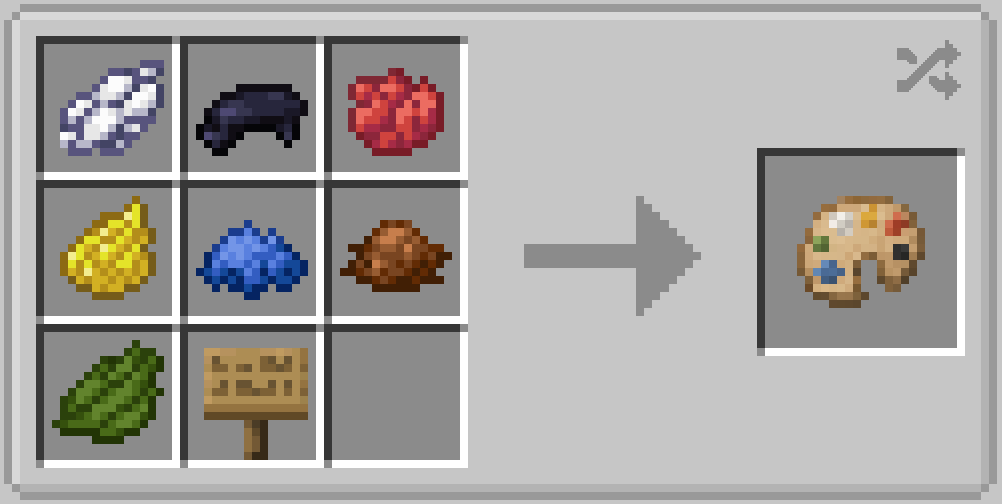
调色板 (Palette)
从世界中选取颜色。将调色板置于副手时,按下选取键即可捕获准星下方的像素颜色。调色板存储单个 ARGB 颜色,并可作为其他工具的颜色来源。
合成表:
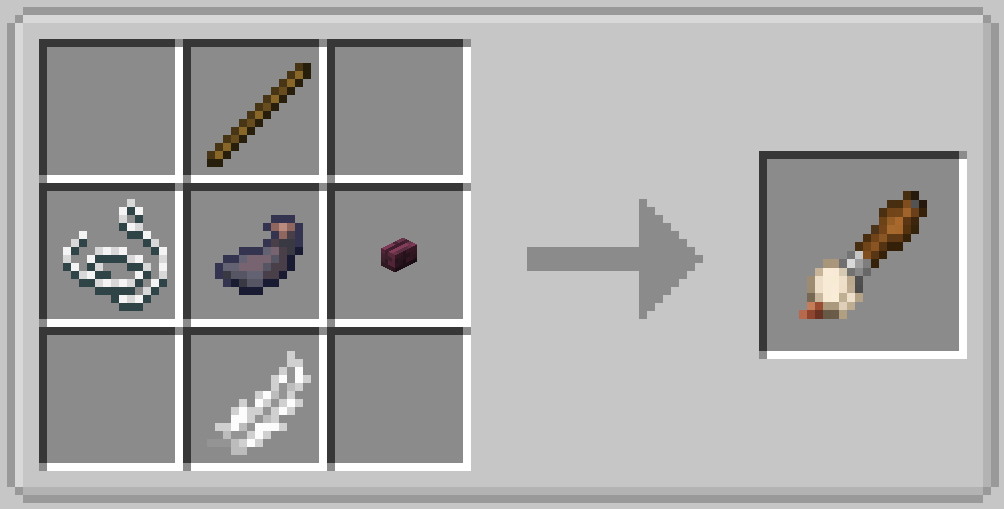
画笔 (Paintbrush)
一种圆形画笔,使用副手物品中的颜色进行绘制:
- 染料物品 → 该染料的对应颜色
- 墨囊 (Ink Sac) → 黑色
- 调色板 → 调色板中存储的颜色
- 其他 / 空 → 白色
按住 Shift + 右键可打开配置界面,调整画笔大小、不透明度和混合模式(覆盖 / 添加 / 相乘 / 擦除)。
合成表:
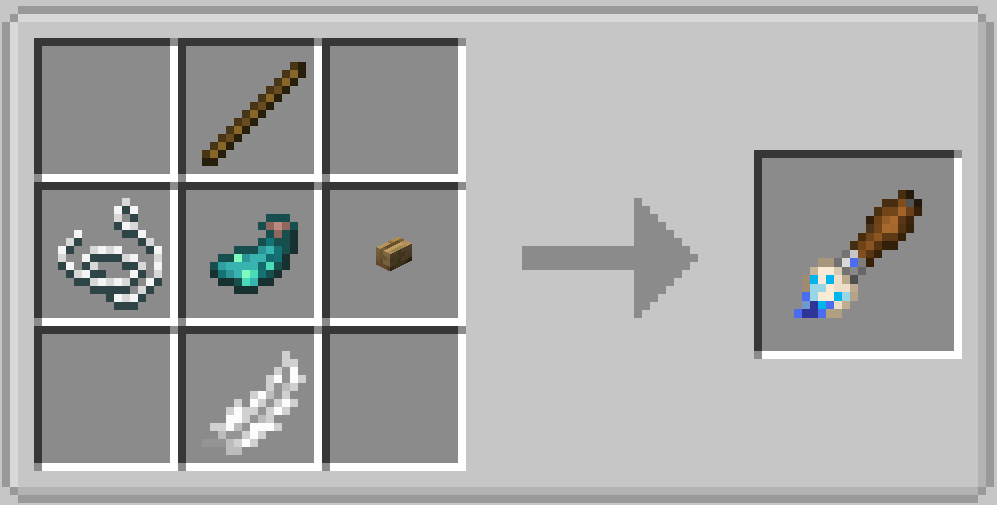
发光画笔 (Glow Paintbrush)
继承了自定义画笔的圆形图案和配置界面,但会额外为每个绘制的像素写入一层发光效果。发光管线(BlendFunction → CanvasImageProvider → CanvasPixelRenderer)以全亮度渲染,产生自发的夜间发光效果。
合成表:
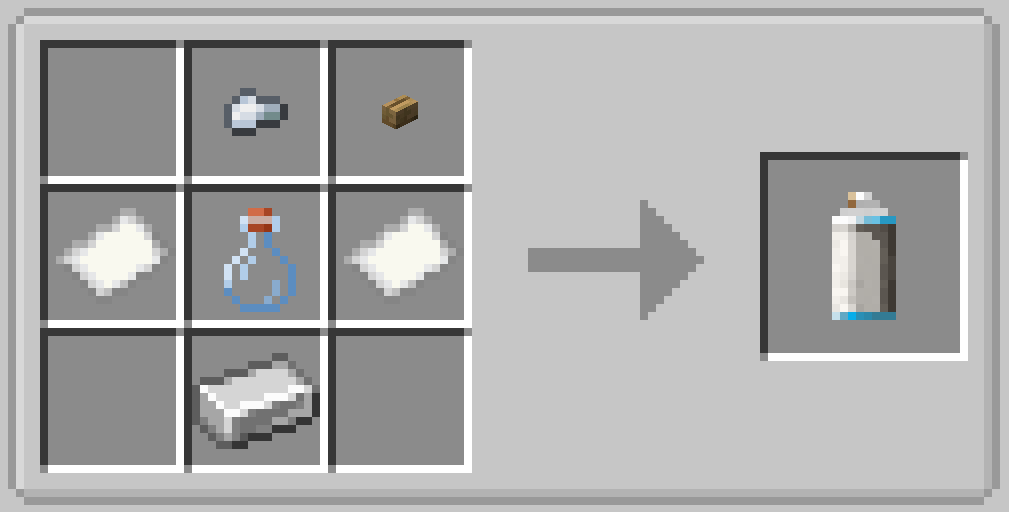
喷漆罐 (Spray Can)
一种带有可调节羽化效果的圆形喷漆刷,支持调整密度(随机跳过像素)、不透明度和尺寸。混合模式固定为 添加。喷漆尺寸随距离增加而增大,不透明度随之降低(距离目标 1 格 → 尺寸 ×1.0,距离 4 格 → 尺寸 ×1.5 / 不透明度 ×0.5)。
在副手持染料时右键点击可为喷漆罐着色。着色后,被密度跳过的像素将填充为着色颜色的亮度变体,而不是留空。着色染料存储在喷漆罐的内部容器中,并可被取出。
按住 Shift + 右键可打开配置界面。
合成表:
印章 (Stamp)
从画布面复制像素数据并将其替换到其他地方。有两种模式,通过在空气中按住 Shift + 右键切换:
- 默认模式 — 仅复制画布像素数据
- 背景模式 — 捕获方块表面纹理 + 叠加画布像素
按住 Shift + 右键点击方块以存储像素。存储的面部图像会被保留(非破坏性),并且可以多次放置。通过合成印章来清除存储的数据。
合成表:
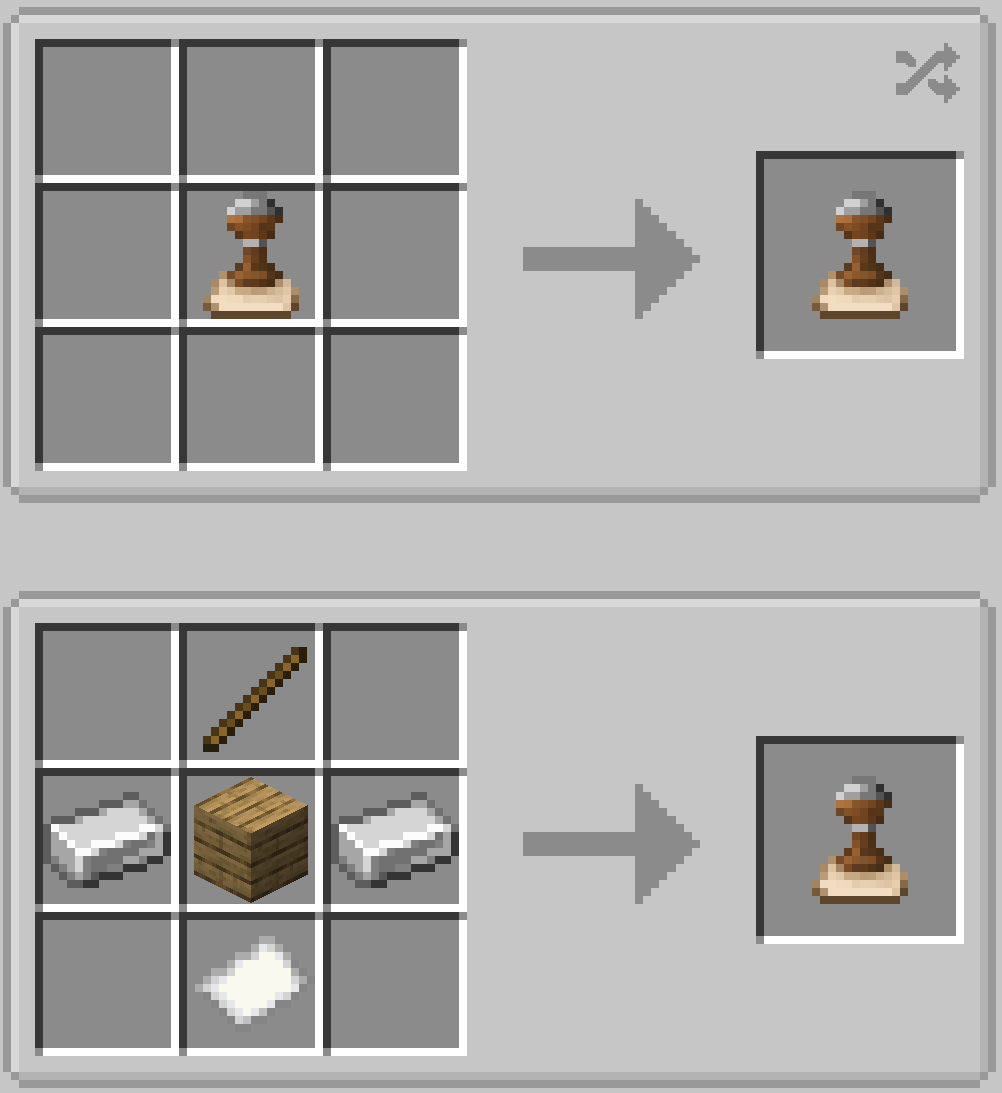
抹布 (Cloth)
一种用于混合的抹布——就像在纸上涂抹炭笔一样。将其拖动经过已绘制的画布可以柔化边缘并将相邻颜色融合在一起。随着使用,抹布会沾染它所接触到的每种颜色,逐渐弄脏自己。污渍越多,它在你混合时产生的色调影响就越大。
按住 Shift + 右键可打开配置界面(尺寸、不透明度、羽化、重置色调)。
合成表:
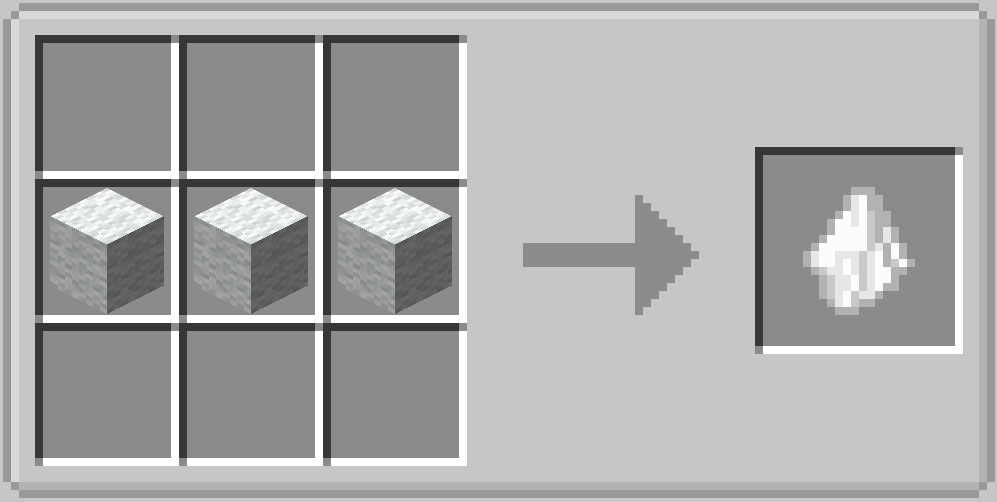
1.0.4 新增物品
橡皮擦 (Eraser)
擦除颜料——就像真正的橡皮擦,但用于你的画布。右键并拖动经过已绘制区域使其淡化。像素保留其颜色,但随着每次操作变得越来越透明。它作为一种圆形画笔工作,支持调整大小、强度和边缘柔和度。
按住 Shift + 右键打开配置界面(尺寸、不透明度、羽化)。
合成表:
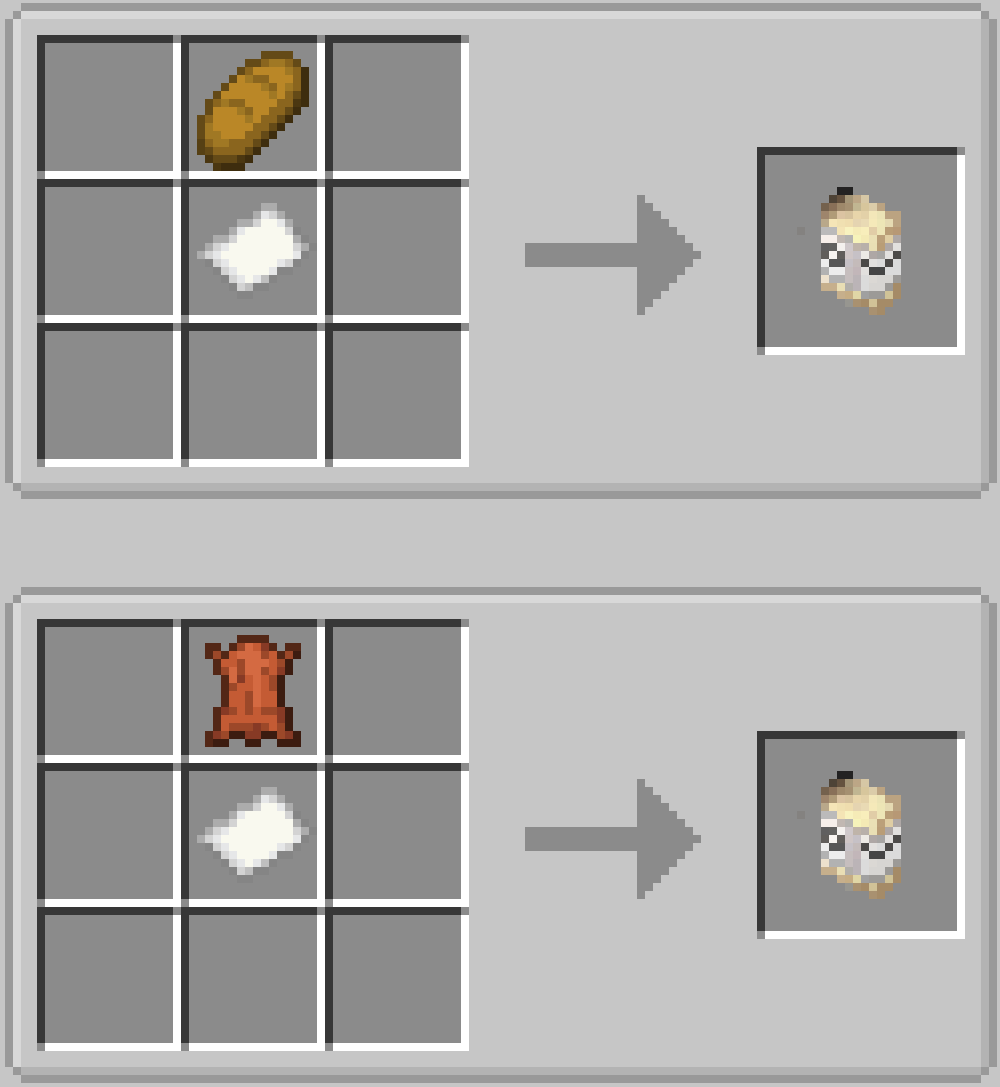
刮刀 (Scraper)
画家的调色刀。从副手获取颜色并以三角形笔触铺设。当你在已绘制区域上拖动时,刀具会拾取底层颜色——就像在真实画布上涂抹湿油漆一样。你施加的压力越大(厚度越高),刀具自身的颜色受底层影响就越小。
按住 Shift + 右键打开配置界面,调整刀片尺寸、厚度(拾取颜色的难易程度)以及在绘画时锁定三角形的角度。
按住 Shift + 右键打开包含尺寸、厚度和角度模式控制的配置界面。
合成表:
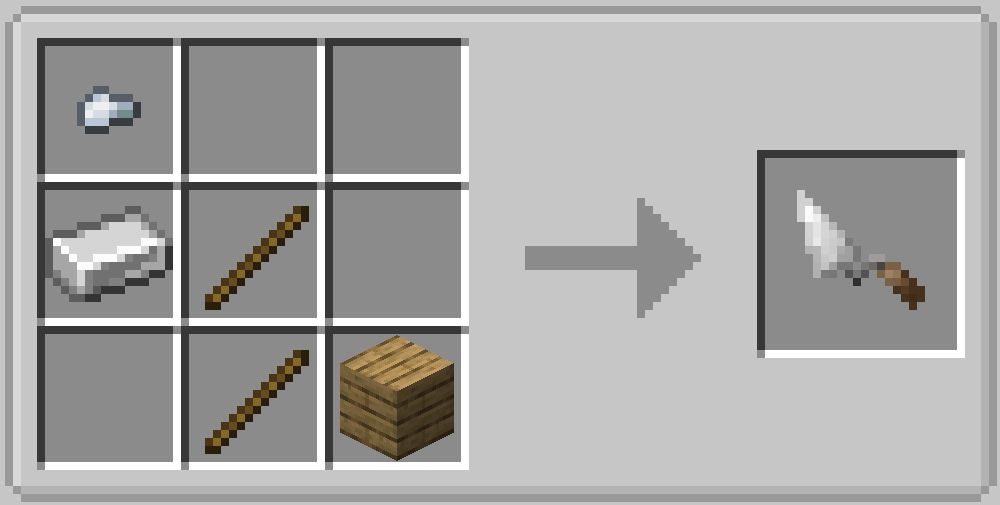
依赖项
- Pigmentum — 底层的画布 API,支持在方块表面上进行绘画
许可证
MIT Lisence
Fresco
A NeoForge content mod for Minecraft 1.21.1, built on top of the Pigmentum canvas API. Fresco adds a set of brush-like tools — paintbrushes, stamps, spray cans, and cloths — that let players paint, copy, spray, and blend pixels on any block surface.
Requirements
- Minecraft 1.21.1
- NeoForge 21.1.228+
- Pigmentum 0.5.6.9beta+
Items
Palette
Pick a color from the world. With the palette in your offhand, press the pick-key to grab the pixel color under your crosshair. The palette stores a single ARGB color and can be used by other tools as a color source.
Recipe:
Paintbrush
A circular brush that paints with the color from your offhand item:
- Dye items → that dye's color
- Ink Sac → black
- Palette → the palette's stored color
- Other / empty → white
Shift + right-click opens a config screen where you can adjust brush size, opacity, and blend mode (overwrite / add / multiply / erase).
Recipe:
Glow Paintbrush
Inherits the Custom Paintbrush's circular pattern and config screen, but additionally writes a glow effect layer to every painted pixel. The glow pipeline (BlendFunction → CanvasImageProvider → CanvasPixelRenderer) renders with full brightness, producing an emissive night-glow effect.
Recipe:
Spray Can
A circular spray brush with adjustable feather, density (random pixel skipping), opacity, and size. Blend mode is fixed to add. The spray size increases and opacity decreases based on distance from the target (1 block → ×1.0 size, 4 blocks → ×1.5 size / ×0.5 opacity).
Right-click with a dye in your offhand to tint the spray can. When tinted, density-skipped pixels are filled with a brightness-varied version of the tint color instead of being empty. The tinted dye is stored in the spray can's internal container and can be retrieved.
Shift + right-click opens the config screen.
Recipe:
Stamp
Copies pixel data from a canvas face and replaces it elsewhere. Two modes, toggled by shift + right-click on air:
- Default — copies only the canvas pixel data
- Background — captures the block face texture + overlays canvas pixels
Shift + right-click a block to store pixels. The stored face is preserved (non-destructive) and can be placed multiple times. Craft stamps to clear stored data.
Recipe:
Cloth
A blending cloth — like smudging charcoal on paper. Drag it over painted canvas to soften edges and blend adjacent colors together. As you use it, the cloth picks up a bit of every color it touches, gradually staining itself. The more stained it gets, the more it tints everything you blend.
Shift + right-click opens the config screen (size, opacity, feather, reset tint).
Recipe:
New items on 1.0.4
Eraser
Erases paint — like a real eraser, but for your canvas. Right-click and drag over painted areas to fade them out. The pixels keep their color, only becoming more and more transparent with each pass. Works as a circular brush with adjustable size, strength, and edge softness.
Shift + right-click to open the config screen (size, opacity, feather).
Recipes:
Scraper
A painter's palette knife. Picks up color from your offhand and lays it down in a triangular stroke. As you drag over already-painted areas, the knife picks up the underlying color — like smearing wet paint on a real canvas. The harder you press (higher thickness), the less the knife's own color is affected by what's underneath.
Shift + right-click opens the config screen where you can adjust blade size, thickness (how easily it picks up color), and lock the triangle's angle as you paint.
Shift + right-click opens a config screen with size, thickness, and angle mode controls.
Recipe:
Dependencies
- Pigmentum — the underlying canvas API that enables painting on block surfaces
License
MIT Lisence

下载 Fresco
下载 Fresco
下载 Fresco
下载 Fresco
下载 Fresco
下载 Fresco
下载 Fresco
下载 Fresco
下载 Fresco
下载 Fresco
更新日志
关于这个资源的讨论、问题反馈与使用心得
还没有讨论,来发第一帖吧
你是这个资源的作者?登录后可认领此资源。
相似资源
 模组

可定制的鞘翅模组,支持装饰纹饰、旗帜图案等更多功能!
 模组

适用于 MC 1.18+ 的 Effekseer 加载器
 模组

新增 50+ 个独特生物群系,为你的世界增添新树木、花卉等更多元素!
 模组

基于 GTCEu 1.12.2 的现代 GregTech
 模组

添加睡袋和吊床,分别用于便携性和昼夜转换,同时不会设置新的出生点。共有16种颜色可选!
 模组

为你的终界增添新生物群系、神秘仪式和全新生物
评论 0
登录后参与评分
还没有评论,来抢沙发吧