这是对 Immersive Portal Gun 模组的修改版,拥有大量新功能并进行了品牌重塑!
Gateway Core(网关核心)
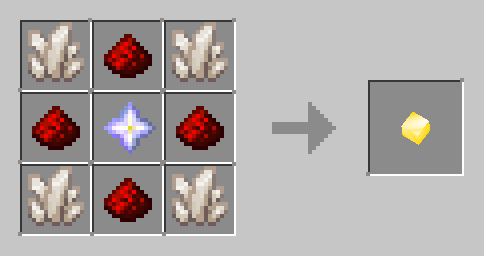
模组的核心,是一个基础物品,包含创建 Gateways 所需的所有数据。
核心存储的数据如下:
- Gateway Code(网关代码):一个标识哪些 Gateways 将相互链接的数字。具有相同 Gateway Code 的 Gateways 会相互覆盖并链接。如果设置为 0,当在玩家背包中时将随机化。可以使用
/core code <code> 进行修改
- Colors(颜色):Gateways 的颜色,采用十六进制格式(例如 ffffff 或 ffd700)。可以使用
/core color1/color2 <hex> 进行修改
- Gravity Transform(重力变换):Gateways 是否会变换重力。如果启用,需要重力 API 的分支版本(只需在 Modrinth 上搜索即可,任意版本均可用)。可以使用
/core gravity true/false 进行修改
- Allowed Blocks(允许放置的方块):Gateways 可以放置的方块列表。如果为空,则所有实心方块均被视为有效。要查看允许的方块,请使用
/core blocks list。要添加方块,请使用 /core blocks add <block>。要移除方块,请使用 /core blocks remove <block>。
- Entity Pickup(实体拾取):Gateway Gun 是否可以抓取实体。可以使用
/core pickup true/false 进行修改。
- Size(大小):确定 Gateways 以方块为单位的大小。可以使用
/core width/height <size> 进行修改。
- Side(侧面):确定可以在哪些侧面放置。如果留空,两侧都可以放置;如果指定了特定值,则只能在该侧面放置。可以使用
/core side NONE/ONE/TWO 进行修改。
Gateway Gun(熵公司手持式量子网关枪,或称 ECHQ 枪)
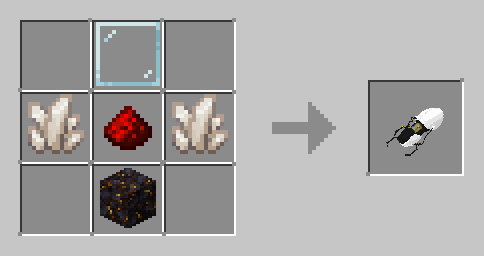
一种用于放置 Gateways 的手持工具。如果没有安装 Gateway Core,它将无法执行任何操作——要安装 Gateway Core,请在主手持有枪,副手持有核心,然后按下 Swap Core(交换核心)键绑定(默认为 G)将核心插入枪中。要从枪中取出核心,请在持有枪的状态下按下 Swap Core 键绑定。一旦枪装有核心,使用攻击键绑定将放置第一个 Gateway,而使用交互键绑定将放置第二个 Gateway。如果核心的 Side 已设置,则枪只能放置指定的 Gateway,并且将始终使用攻击键绑定。按下 Clear Gateways(清除网关)键绑定(默认为 R)将关闭枪所放置的 Gateways。如果核心允许实体拾取,按下 Grab Entity(抓取实体)键绑定(默认为 V)将抓取目标实体,或者丢弃当前持有的实体。
Gategrid(熵公司量子网关控制网格)
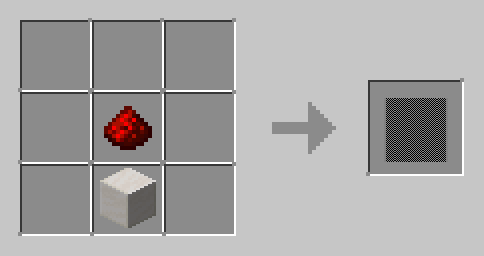
注意合成配方是无形状的。
Gategrid 允许对 Gateway 放置进行红石自动化。与 Gateway Gun 类似,Gategrid 需要 Gateway Core 才能工作。在持有 Gateway Core 时与 Gategrid 交互会将核心放入 Gategrid;如果 Gategrid 已有核心,则会将其取出。当 Gategrid 接收到红石信号时,如果它有核心,则会放置指定的 Gateway 侧面(如果未指定,默认为第二个)。当红石信号关闭时,Gateway 将关闭。
Weighted Cube(配重方块)
配重方块是一种受重力影响且可以被推动的实体,外观略小于普通方块。它对大多数类型的伤害免疫,但如果受到 kill、虚空、火焰或熔岩伤害则会死亡。它的主要用途是被 Gateway Gun 拾取并放置在压力板上。可以使用 /cube <block> 召唤,其中 block 是标识符,如 "minecraft:dirt",或者使用 Cube Dispenser(方块分配器)。
Cube Dispenser(方块分配器)
方块分配器是一个可以通过红石激活以生成配重方块的方块。在持有方块时与分配器交互会将该方块设置为生成的配重方块类型。激活时,如果存在之前的方块,它会先将其杀死,然后生成一个新的。如果方块死亡且分配器处于通电状态,它将生成一个新的。
Quantum Field(量子场)
量子场是一种像玻璃板一样的方块,没有碰撞体积。当被触碰时,玩家背包中的所有 Gateway Gun 都会清除其传送门,但前提是量子场未被红石供电。
其他功能
Air resistance(空气阻力):使用 /airResistance,你可以更改所有实体的水平空气阻力。默认值为 90,但可以设置在 -1000 到 1000 之间的任意值。
Clearing Gateways(清除网关):/cleargateways 命令可以与命令方块一起使用来销毁 Gateways。语法为 /cleargateways <code> <side>,其中 code 是要清除的 Gatecode,side 是要清除的侧面(可以是 ONE、TWO 或 BOTH)。
使用 Mod Menu 进行配置。
Static Gateway Rendering(静态网关渲染):使用静态纹理而非渲染层来渲染 Gateways。仅建议在叠加层显示有问题时推荐此选项。
Static Quantum Field Rendering(静态量子场渲染):与 Static Gateway Rendering 相同,但适用于量子场。
Credits(鸣谢):
Portal gun model(传送枪模型):SirBenet on Sketchfab -
Portal shader(传送光影):iChun from Portal Gun mod, modified(源自 Portal Gun 模组,经修改)-
An edit of the Immersive Portal Gun mod with lots of new features and a rebranding!
Gateway Core
The heart of the mod, it is a basic item that contains all the data needed to create Gateways.
The data that the core stores is as follows:
- Gateway Code: A number that identifies which Gateways will link. Gateways with the same Gateway Code will overwrite and link with each other. If set to 0, will be randomized when in the player's inventory. Can be modified with
/core code <code>
- Colors: The colors of the Gateways, in hex format (eg. ffffff or ffd700). Can be modified with
/core color1/color2 <hex>
- Gravity Transform: Whether the Gateways will transform gravity. Requires a fork of gravity api (just search it on Modrinth, any should work) if enabled. Can be modified with
/core gravity true/false
- Allowed Blocks: A list of blocks the Gateways can be placed on. If empty, all solid blocks are considered valid. To view the allowed blocks, use
/core blocks list. To add a block, use /core blocks add <block>. To remove a block, use /core blocks remove <block>.
- Entity Pickup: Whether the Gateway Gun can grab entities. Can be modified with
/core pickup true/false.
- Size: Determines the size of the Gateways in blocks. Can be modified with
/core width/height <size>.
- Side: Determines which side(s) can be placed. If blank, both sides can be placed, but if specified then only that side can be placed. Can be modified with
/core side NONE/ONE/TWO.
Gateway Gun (Entropy Corps Handheld Quantum Gateway Gun, or ECHQ gun)
A handheld tool used to place Gateways. Does nothing without a Gateway Core installed - to install a Gateway Core, hold the gun in the main hand and the core in the offhand, then press the Swap Core keybind (default G) to insert the core into the gun. To take the core out of the gun, press the Swap Core keybind while holding the gun. Once the gun has a core, using the attack keybind will place the first Gateway, while using the interact keybind will place the second Gateway. If the core's side is set, then the gun will only be able to place the specified Gateway and it will always use the attack keybind. Pressing the Clear Gateways keybind (default R) will close the gateways the gun placed. If the core allows for entity pickup, pressing the Grab Entity keybind (default V) will grab the targeted entity, or drop the currently held entity.
Gategrid (Entropy Corps Quantum Gateway Control Grid)
Note the crafting recipe is shapeless.
The Gategrid allows for redstone automation of Gateway placement. Much like the Gateway Gun, the Gategrid requires a Gateway Core to function. Interacting with the Gategrid while holding a Gateway Core will place the core into the Gategrid, or if the Gategrid has a core it will take it out. When the Gategrid receives a redstone signal, if it has a core then it will place the specified Gateway side (defaulting to the second if none is specified). When the redstone signal is turned off, the Gateway will close.
Weighted Cube
The weighted cube is an entity that is affected by gravity and can be pushed around, and looks like a slightly smaller block. It is immune to most types of damage, but will die if it is damage by kill, void, fire, or lava damage. It's main purpose is to be picked up by the Gateway Gun to be placed on pressure plates. Can be summoned using /cube <block>, where the block is an identifier such as "minecraft:dirt", or using a Cube Dispenser.
Cube Dispenser
The cube dispenser is a block that can be activated with redstone to spawn a weighted cube. Interacting with the dispenser while holding a block will set the cube to that block. When activated, it will kill the previous cube if it exists, then spawn a new one. If the cube dies and the dispenser is powered, it will spawn a new one.
Quantum Field
The Quantum Field is a glass pane-like block with no collision. When touched, all Gateway guns in the player's inventory will clear their portals, but only if the field is not being powered by redstone.
Other stuff
Air resistance: Using /airResistance, you can change the horizontal air resistance for all entities. Default is 90, but can be set to anywhere from -1000 to 1000.
Clearing Gateways: The /cleargateways command can be used with command blocks to kill Gateways. The syntax is /cleargateways <code> <side> where code is the Gatecode to clear, and the side is which side to clear (can be ONE, TWO, or BOTH).
Configuration using Mod Menu.
Static Gateway Rendering: Renders Gateways with a static texture rather than a render layer. Only recommended if there are issues with the overlay not showing.
Static Quantum Field Rendering: Same as Static Gateway Rendering but with the Quantum Fields.
Credits:
Portal gun model: SirBenet on Sketchfab -
Portal shader: iChun from Portal Gun mod, modified -


 模组

 模组

 模组

 模组
 模组

 模组
评论 0
登录后参与评分
还没有评论,来抢沙发吧