Gugle 的地毯模组扩展


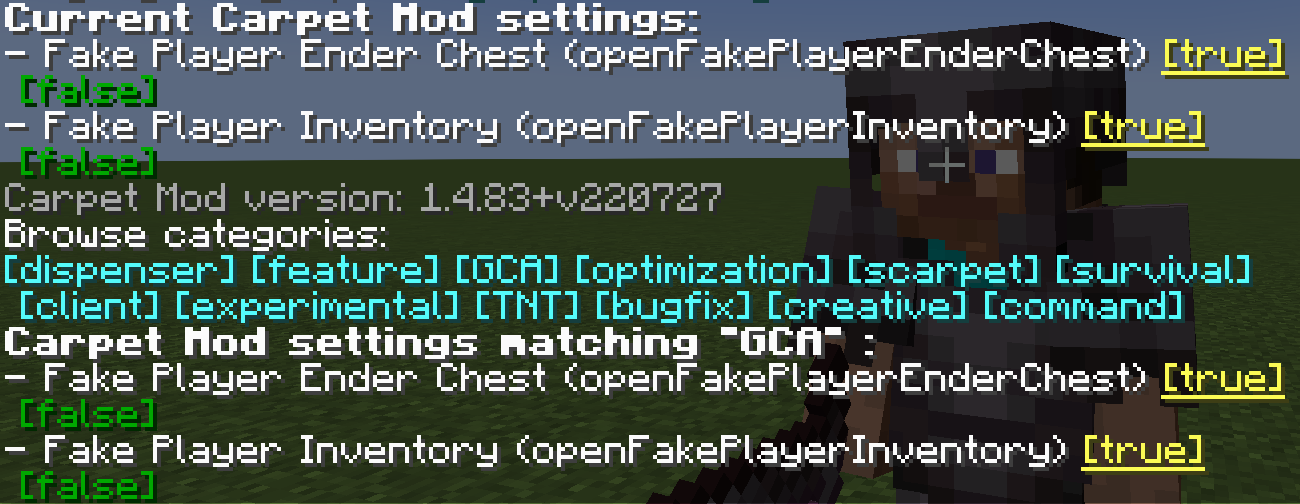
GCA
注意:
若要在 NeoForge 配合 Sinytra Connector 运行 GCA,请从 NeoForge Sinytra 兼容版本 下载所需的兼容插件。
如果你需要适用于 Minecraft 1.13 的 GCA,请点击此处。
gcaPageSize
设置 GCA 列表页面每页显示的条目数量
- 类型:
int
- 默认值:
8
- 选项:任意正整数
- 分类:
GCA
/carpet [setDefault] gcaPageSize 10
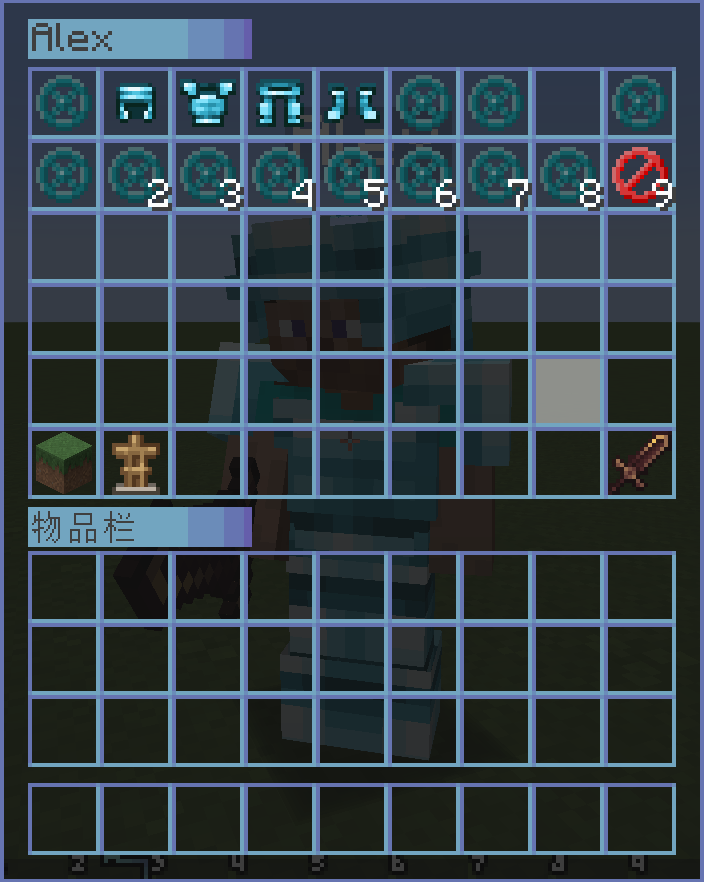
openFakePlayerInventory
允许玩家打开假人(Fake Player)的物品栏
- 类型:
boolean
- 默认值:
false
- 选项:
true, false
- 分类:
GCA, BOT
/carpet [setDefault] openFakePlayerInventory true
用法:右键点击假人以打开其物品栏
openRealPlayerInventory
允许玩家打开真实玩家的物品栏
- 类型:
String
- 默认值:
false
- 选项:
true, false, ops, 0, 1, 2, 3, 4
- 分类:
GCA, experimental
/carpet [setDefault] openRealPlayerInventory true
/carpet [setDefault] openRealPlayerInventory ops
用法:右键点击其他真实玩家以打开其物品栏,需要相应的权限等级
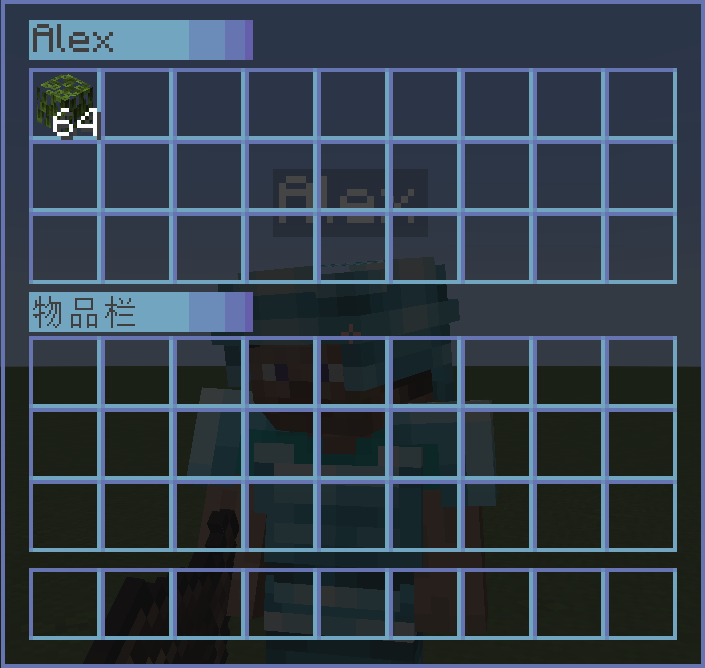
openFakePlayerEnderChest
允许玩家打开假人的末影箱
- 类型:
String
- 默认值:
false
- 选项:
ender_chest, true, false
- 分类:
GCA, BOT
/carpet [setDefault] openFakePlayerEnderChest true
/carpet [setDefault] openFakePlayerEnderChest ender_chest
用法:潜行(按住 Shift)+ 右键点击假人以打开其末影箱
fakePlayerResident
退出关卡时保留假人
- 类型:
boolean
- 默认值:
false
- 选项:
true, false
- 分类:
GCA, BOT
/carpet [setDefault] fakePlayerResident true
fakePlayerReloadAction
退出关卡时保留假人的动作状态
- 类型:
boolean
- 默认值:
true
- 选项:
true, false
- 分类:
GCA, BOT
/carpet [setDefault] fakePlayerReloadAction false
fakePlayerAutoRespawn
使假人在死亡后自动重生
- 类型:
String
- 默认值:
false
- 选项:
spawn, death, setting, false
- 分类:
GCA, BOT, experimental
spawn: 在出生点重生。
death: 在死亡位置重生。
setting: 在机器人列表中存储的位置重生。如果假人不在机器人列表中,将使用 death 模式。
/carpet [setDefault] fakePlayerAutoRespawn <spawn|death|setting>
fakePlayerAutoReplenishment
使假人自动补充物品
- 类型:
boolean
- 默认值:
false
- 选项:
true, false
- 分类:
GCA, BOT
/carpet [setDefault] fakePlayerAutoReplenishment true
fakePlayerAutoReplenishmentFormShulkerBox
使假人自动从潜影盒中补充物品
- 类型:
boolean
- 默认值:
false
- 选项:
true, false
- 分类:
GCA, BOT
/carpet [setDefault] fakePlayerAutoReplenishmentFormShulkerBox true
fakePlayerAutoFish
使假人自动钓鱼。当鱼钩钓到鱼时,会自动收回并再次抛竿。
- 类型:
boolean
- 默认值:
false
- 选项:
true, false
- 分类:
GCA, BOT
/carpet [setDefault] fakePlayerAutoFish true
用法:让假人手握鱼竿,并使用 /player <name> use 开始钓鱼。假人将自动完成收回和抛竿操作。
fakePlayerAutoReplaceTool
使假人自动替换几乎损坏的工具
- 类型:
String
- 默认值:
false
- 选项:
true, false, keep
- 分类:
GCA, BOT
true: 拥有经验修补附魔的工具将保持 10 点耐久;其他工具将在损坏后自动替换。
keep: 所有工具都将保持 10 点耐久。
/carpet [setDefault] fakePlayerAutoReplaceTool <true|keep>
fakePlayerToolDamagedNotification
当假人的工具损坏或补货失败时,广播全服消息(可能导致消息刷屏)
- 类型:
boolean
- 默认值:
false
- 选项:
true, false
- 分类:
GCA, BOT
/carpet [setDefault] fakePlayerToolDamagedNotification true
fakePlayerPrefixName
假人名称前缀
- 类型:
String
- 默认值:
#none
- 选项:
#none, bot_
- 分类:
GCA, BOT
/carpet [setDefault] fakePlayerPrefixName bot_
/carpet [setDefault] fakePlayerPrefixName #none
fakePlayerSuffixName
假人名称后缀
- 类型:
String
- 默认值:
#none
- 选项:
#none, _fake
- 分类:
GCA, BOT
/carpet [setDefault] fakePlayerSuffixName _fake
/carpet [setDefault] fakePlayerSuffixName #none
fakePlayerForceOfflineUUID
强制假人使用离线 UUID(需启用 allowSpawningOfflinePlayers)
- 类型:
boolean
- 默认值:
false
- 选项:
true, false
- 分类:
GCA, BOT
/carpet [setDefault] fakePlayerForceOfflineUUID true
禁用此功能需要清除 usercache.json 并重启服务器/客户端,以便切换回在线 UUID。
commandBot
用于保存、加载和分组假人的机器人管理菜单
- 类型:
String
- 默认值:
ops
- 选项:
ops, 0, 1, 2, 3, 4, true, false
- 分类:
GCA, BOT, command
/carpet [setDefault] commandBot ops
命令用法:
/bot                                    # 显示已保存的机器人列表
/bot list [page]                        # 显示带分页的机器人列表
/bot add <player> <desc>                # 保存当前在线的假人(包括位置、动作等)
/bot load <player>                      # 加载已保存的假人
/bot remove <player>                    # 删除已保存的假人
/bot group                              # 显示机器人分组列表
/bot group create <name>                # 创建机器人分组
/bot group remove <name>                # 删除机器人分组
/bot group add <bot> <group>            # 将机器人添加到分组
/bot group load <group>                 # 加载分组中的所有机器人
/bot group unload <group>               # 卸载分组中的所有机器人
/bot group info <group>                 # 查看分组详情
/bot group generated <name> <count> [load]  # 批量生成机器人并进行分组
机器人控制器
使用 /bot controller 自定义假人额外控制面板上的按钮。按钮可以全局配置,也可以针对单个假人进行配置。当两者使用相同的槽位时,单个假人的设置会覆盖全局设置。
可用槽位为 3 到 26。点击按钮会使用目标假人的名称运行配置的 /player <player> <action> 命令,因此 <action> 应仅包含玩家名称之后的部分。例如,attack continuous 会执行 /player <player> attack continuous。
命令用法:
/bot controller                                             # 显示全局按钮列表
/bot controller list [player]                               # 显示全局按钮或特定玩家的有效按钮
/bot controller global set <slot> <desc> <action>           # 设置全局按钮
/bot controller global clear <slot>                         # 清空槽位中的全局按钮
/bot controller global clear all                            # 清空所有全局按钮
/bot controller player <player> set <slot> <desc> <action>  # 为单个假人设置按钮
/bot controller player <player> clear <slot>                # 清除单个假人的一个按钮
/bot controller player <player> clear all                   # 清除单个假人的所有按钮
示例:
/bot controller global set 3 "Continuous Attack" attack continuous
/bot controller player Steve set 4 "Continuous Use" use continuous
启用 openFakePlayerInventory 或 openFakePlayerEnderChest,然后潜行并右键点击假人以打开额外控制面板。当启用假人的末影箱时,控制按钮会显示在其内容上方。包含空格且需作为描述使用的按钮必须用双引号括起来。
commandBotAction
用于添加/移除动作以及设置机器人启动动作的机器人动作管理菜单
- 类型:
String
- 默认值:
ops
- 选项:
ops, 0, 1, 2, 3, 4, true, false
- 分类:
GCA, BOT, command
/carpet [setDefault] commandBotAction ops
命令用法:
/bot action <bot>                       # 查看机器人的动作列表
/bot action <bot> add <action>          # 向机器人添加动作
/bot action <bot> remove <id>           # 从机器人移除动作
/bot action <bot> startup set <action>  # 设置机器人的启动动作
/bot action <bot> startup clear         # 清除机器人的启动动作
commandTodo
支持添加、移除和标记完成的任务管理菜单
- 类型:
String
- 默认值:
ops
- 选项:
ops, 0, 1, 2, 3, 4, true, false
- 分类:
GCA, command
/carpet [setDefault] commandTodo ops
命令用法:
/todo                           # 显示任务列表
/todo list [page]               # 显示带分页的任务列表
/todo add <desc>                # 添加新任务项
/todo remove <id>               # 移除任务项
/todo success <id> [true/false] # 标记任务为已完成/未完成
commandHere
快速向所有玩家广播当前位置并为自身添加发光效果
- 类型:
String
- 默认值:
ops
- 选项:
ops, 0, 1, 2, 3, 4, true, false
- 分类:
GCA, command
- 条件:仅在未加载 CarpetAmsAddition 时生效
/carpet [setDefault] commandHere ops
命令用法:
/here   # 广播你的坐标,显示当前维度及转换后的坐标
        # 同时输出与 Xaero's Minimap 兼容的路径点格式
commandWhereis
快速定位玩家并为目标添加发光效果
- 类型:
String
- 默认值:
ops
- 选项:
ops, 0, 1, 2, 3, 4, true, false
- 分类:
GCA, command
/carpet [setDefault] commandWhereis ops
命令用法:
/whereis <player>   # 查询指定玩家的位置
/vris <player>      # 别名,功能相同
commandLoc
用于保存、查看和删除地点坐标的地点管理菜单
- 类型:
String
- 默认值:
ops
- 选项:
ops, 0, 1, 2, 3, 4, true, false
- 分类:
GCA, command
/carpet [setDefault] commandLoc ops
指令用法:
/loc                    # 显示地点列表
/loc list [page]        # 分页显示地点
/loc add <desc>         # 在当前位置添加地点
/loc remove <id>        # 移除指定地点
/loc info <id>          # 查看地点详情(包含维度转换后的坐标)
commandWlist
白名单管理,允许获得授权的普通玩家管理白名单
- 类型:
boolean
- 默认值:
false
- 选项:
true, false
- 分类:
GCA, command
/carpet [setDefault] commandWlist true
指令用法:
/wlist                              # 显示当前白名单
/wlist add <player>                 # 将玩家加入白名单
/wlist remove <player>              # 从白名单中移除玩家
/wlist permission add <player>      # 授予玩家白名单管理权限(仅限 OP)
/wlist permission remove <player>   # 撤销玩家的白名单管理权限(仅限 OP)
commandBlist
黑名单管理
- 类型:
boolean
- 默认值:
false
- 选项:
true, false
- 分类:
GCA, command
/carpet [setDefault] commandBlist true
/blist
commandSop
简易获取 OP 权限
- 类型:
boolean
- 默认值:
false
- 选项:
true, false
- 分类:
GCA, command
/carpet [setDefault] commandSop true
/sop
commandSeed
设置 /seed 指令所需的权限等级
- 类型:
String
- 默认值:
vanilla
- 选项:
vanilla, true, false, ops, 0, 1, 2, 3, 4
- 分类:
GCA, command
/carpet [setDefault] commandSeed ops
/carpet [setDefault] commandSeed 0
betterFenceGatePlacement
使放置的栅栏门保持与点击的栅栏门相同的方块状态
- 类型:
boolean
- 默认值:
false
- 选项:
true, false
- 分类:
GCA
/carpet [setDefault] betterFenceGatePlacement true
betterWoodStrip
仅允许名称中包含“Strip”(去皮)的斧头对原木进行去皮操作
- 类型:
boolean
- 默认值:
false
- 选项:
true, false
- 分类:
GCA
/carpet [setDefault] betterWoodStrip true
betterSignInteraction
右键点击告示牌时,使其附着的方块进行交互
- 类型:
boolean
- 默认值:
false
- 选项:
true, false
- 分类:
GCA
/carpet [setDefault] betterSignInteraction true
betterItemFrameInteraction
右键点击物品展示框时,使其附着的方块进行交互
- 类型:
boolean
- 默认值:
false
- 选项:
true, false
- 分类:
GCA
/carpet [setDefault] betterItemFrameInteraction true
betterQuickCrafting
快速合成期间保留背包中的物品
- 类型:
boolean
- 默认值:
false
- 选项:
true, false
- 分类:
GCA, experimental
/carpet [setDefault] betterQuickCrafting true
simpleInGameCalculator
简易游戏内计算器
- 类型:
boolean
- 默认值:
false
- 选项:
true, false
- 分类:
GCA
/carpet [setDefault] simpleInGameCalculator true
fastPingFriend
快速 ping 好友
- 类型:
boolean
- 默认值:
false
- 选项:
true, false
- 分类:
GCA
/carpet [setDefault] fastPingFriend true
qnmdLC
设置 LC 值的高度参数
- 类型:
int
- 默认值:
-1
- 分类:
GCA, experimental
/carpet [setDefault] qnmdLC 64
/carpet [setDefault] qnmdLC -1
fixedEndCrystalSync
修复末影水晶同步问题
- 类型:
boolean
- 默认值:
false
- 选项:
true, false
- 分类:
GCA, experimental
/carpet [setDefault] fixedEndCrystalSync true
welcomePlayer
欢迎玩家
- 类型:
boolean
- 默认值:
false
- 选项:
true, false
- 分类:
GCA
/carpet [setDefault] welcomePlayer true
详细欢迎消息配置指南
wanderingTraderSpawnFailedWarning
流浪商人生成失败警告
- 类型:
boolean
- 默认值:
false
- 选项:
true, false
- 分类:
GCA, experimental
/carpet [setDefault] wanderingTraderSpawnFailedWarning true
wanderingTraderSpawnRemind
流浪商人生成提醒
- 类型:
boolean
- 默认值:
false
- 选项:
true, false
- 分类:
GCA, experimental
/carpet [setDefault] wanderingTraderSpawnRemind true
commandTransfer
/transfer 指令
- 类型:
boolean
- 默认值:
false
- 选项:
true, false
- 分类:
GCA, command
- 条件:需要 Minecraft >= 1.21
/carpet [setDefault] commandTransfer true
/transfer <server> [port]
commandTick
修复 Carpet 的 /tick 指令权限
- 类型:
String
- 默认值:
3
- 选项:
true, false, ops, 0, 1, 2, 3, 4
- 分类:
GCA, command, experimental
- 条件:需要 Minecraft >= 1.20.3
/carpet [setDefault] commandTick 3
fakePlayerLocatorBar
在定位栏上显示假人位置
- 类型:
boolean
- 默认值:
true
- 选项:
true, false
- 分类:
GCA, command, BOT
- 条件:需要 Minecraft >= 1.21.6
/carpet [setDefault] fakePlayerLocatorBar true
Gugle's Carpet Addition
GCA
Note:
To run GCA on NeoForge with Sinytra Connector, download the required compatibility plugin from the NeoForge Sinytra compatibility release.
If you need GCA for Minecraft 1.13, please click here.
gcaPageSize
Set the number of entries per page on GCA list pages
- Type:
int
- Default:
8
- Options: Any positive integer
- Categories:
GCA
/carpet [setDefault] gcaPageSize 10
openFakePlayerInventory
Allow player to open the fake player's inventory
- Type:
boolean
- Default:
false
- Options:
true, false
- Categories:
GCA, BOT
/carpet [setDefault] openFakePlayerInventory true
Usage: Right-click on a fake player to open their inventory
openRealPlayerInventory
Allow player to open the real player's inventory
- Type:
String
- Default:
false
- Options:
true, false, ops, 0, 1, 2, 3, 4
- Categories:
GCA, experimental
/carpet [setDefault] openRealPlayerInventory true
/carpet [setDefault] openRealPlayerInventory ops
Usage: Right-click on other real players to open their inventory, requires appropriate permission level
openFakePlayerEnderChest
Allow player to open the fake player's ender chest
- Type:
String
- Default:
false
- Options:
ender_chest, true, false
- Categories:
GCA, BOT
/carpet [setDefault] openFakePlayerEnderChest true
/carpet [setDefault] openFakePlayerEnderChest ender_chest
Usage: Sneak (hold Shift) + right-click on a fake player to open their ender chest
fakePlayerResident
Keep the fake player when exiting the level
- Type:
boolean
- Default:
false
- Options:
true, false
- Categories:
GCA, BOT
/carpet [setDefault] fakePlayerResident true
fakePlayerReloadAction
Keep the fake player action when exiting the level
- Type:
boolean
- Default:
true
- Options:
true, false
- Categories:
GCA, BOT
/carpet [setDefault] fakePlayerReloadAction false
fakePlayerAutoRespawn
Make the fake player automatically respawn after death
- Type:
String
- Default:
false
- Options:
spawn, death, setting, false
- Categories:
GCA, BOT, experimental
spawn: Respawning at the spawn point.
death: Respawning at the death location.
setting: Respawning at the location stored in the bot list. If the fake player is not in the bot list, the death mode will be used.
/carpet [setDefault] fakePlayerAutoRespawn <spawn|death|setting>
fakePlayerAutoReplenishment
Make fake player to auto replenishment
- Type:
boolean
- Default:
false
- Options:
true, false
- Categories:
GCA, BOT
/carpet [setDefault] fakePlayerAutoReplenishment true
fakePlayerAutoReplenishmentFormShulkerBox
Make fake player to auto replenishment from shulker box
- Type:
boolean
- Default:
false
- Options:
true, false
- Categories:
GCA, BOT
/carpet [setDefault] fakePlayerAutoReplenishmentFormShulkerBox true
fakePlayerAutoFish
Make fake player to auto fish. When the fishing hook catches a fish, it will automatically reel in and cast again.
- Type:
boolean
- Default:
false
- Options:
true, false
- Categories:
GCA, BOT
/carpet [setDefault] fakePlayerAutoFish true
Usage: Let the fake player hold a fishing rod and use /player <name> use to start fishing. The fake player will automatically complete the reel-in and cast operations.
fakePlayerAutoReplaceTool
Make fake player to auto replace almost damaged tool
- Type:
String
- Default:
false
- Options:
true, false, keep
- Categories:
GCA, BOT
true: Tools with Mending will keep 10 durability; other tools will automatically be replaced after they break.
keep: All tools will keep 10 durability.
/carpet [setDefault] fakePlayerAutoReplaceTool <true|keep>
fakePlayerToolDamagedNotification
Broadcast a server-wide message when a fake player's tool breaks or when restocking fails (May cause message spam)
- Type:
boolean
- Default:
false
- Options:
true, false
- Categories:
GCA, BOT
/carpet [setDefault] fakePlayerToolDamagedNotification true
fakePlayerPrefixName
Fake Player Prefix Name
- Type:
String
- Default:
#none
- Options:
#none, bot_
- Categories:
GCA, BOT
/carpet [setDefault] fakePlayerPrefixName bot_
/carpet [setDefault] fakePlayerPrefixName #none
fakePlayerSuffixName
Fake Player Suffix Name
- Type:
String
- Default:
#none
- Options:
#none, _fake
- Categories:
GCA, BOT
/carpet [setDefault] fakePlayerSuffixName _fake
/carpet [setDefault] fakePlayerSuffixName #none
fakePlayerForceOfflineUUID
Force fake players to use offline UUIDs (requires allowSpawningOfflinePlayers enabled)
- Type:
boolean
- Default:
false
- Options:
true, false
- Categories:
GCA, BOT
/carpet [setDefault] fakePlayerForceOfflineUUID true
Disabling this feature requires clearing usercache.json and restarting the server/client to switch back to online UUIDs.
commandBot
A Bot Management Menu for saving, loading, and grouping fake players
- Type:
String
- Default:
ops
- Options:
ops, 0, 1, 2, 3, 4, true, false
- Categories:
GCA, BOT, command
/carpet [setDefault] commandBot ops
Command Usage:
/bot                                    # Show saved bot list
/bot list [page]                        # Show bot list with pagination
/bot add <player> <desc>                # Save current online fake player (including position, actions, etc.)
/bot load <player>                      # Load saved fake player
/bot remove <player>                    # Delete saved fake player
/bot group                              # Show bot group list
/bot group create <name>                # Create bot group
/bot group remove <name>                # Delete bot group
/bot group add <bot> <group>            # Add bot to group
/bot group load <group>                 # Load all bots in group
/bot group unload <group>               # Unload all bots in group
/bot group info <group>                 # View group details
/bot group generated <name> <count> [load]  # Batch generate bots and group them
Bot Controller
Use /bot controller to customize buttons on a fake player's extra control panel. Buttons can be configured globally or for an individual fake player. An individual setting overrides the global setting when both use the same slot.
Slots 3 through 26 are available. Clicking a button runs the configured /player <player> <action> command using the target fake player's name, so <action> should contain only the part after the player name. For example, attack continuous runs /player <player> attack continuous.
Command Usage:
/bot controller                                             # Show the global button list
/bot controller list [player]                               # Show global buttons or the effective buttons for a player
/bot controller global set <slot> <desc> <action>           # Set a global button
/bot controller global clear <slot>                         # Clear a global button from a slot
/bot controller global clear all                            # Clear all global buttons
/bot controller player <player> set <slot> <desc> <action>  # Set a button for one fake player
/bot controller player <player> clear <slot>                # Clear one button for a fake player
/bot controller player <player> clear all                   # Clear all buttons for a fake player
Examples:
/bot controller global set 3 "Continuous Attack" attack continuous
/bot controller player Steve set 4 "Continuous Use" use continuous
Enable openFakePlayerInventory or openFakePlayerEnderChest, then sneak and right-click a fake player to open the extra control panel. When the fake player's ender chest is enabled, the control buttons appear above its contents. Button descriptions containing spaces must be enclosed in double quotes.
commandBotAction
A Bot Action Management Menu for adding/removing actions and setting startup actions for bots
- Type:
String
- Default:
ops
- Options:
ops, 0, 1, 2, 3, 4, true, false
- Categories:
GCA, BOT, command
/carpet [setDefault] commandBotAction ops
Command Usage:
/bot action <bot>                       # View bot's action list
/bot action <bot> add <action>          # Add action to bot
/bot action <bot> remove <id>           # Remove action from bot
/bot action <bot> startup set <action>  # Set bot's startup action
/bot action <bot> startup clear         # Clear bot's startup actions
commandTodo
A Todo Management Menu with support for adding, removing, and marking completion
- Type:
String
- Default:
ops
- Options:
ops, 0, 1, 2, 3, 4, true, false
- Categories:
GCA, command
/carpet [setDefault] commandTodo ops
Command Usage:
/todo                           # Show todo list
/todo list [page]               # Show todo list with pagination
/todo add <desc>                # Add new todo item
/todo remove <id>               # Remove todo item
/todo success <id> [true/false] # Mark todo as done/undone
commandHere
Quickly broadcast your current position to all players and add glowing effect to yourself
- Type:
String
- Default:
ops
- Options:
ops, 0, 1, 2, 3, 4, true, false
- Categories:
GCA, command
- Conditions: Only works when CarpetAmsAddition is NOT loaded
/carpet [setDefault] commandHere ops
Command Usage:
/here   # Broadcast your coordinates, showing current dimension and converted coordinates
        # Also outputs Xaero's Minimap compatible waypoint format
commandWhereis
Quickly locate players and add glowing effect to target
- Type:
String
- Default:
ops
- Options:
ops, 0, 1, 2, 3, 4, true, false
- Categories:
GCA, command
/carpet [setDefault] commandWhereis ops
Command Usage:
/whereis <player>   # Query specified player's location
/vris <player>      # Alias, same function
commandLoc
A Location Management Menu for saving, viewing, and deleting location points
- Type:
String
- Default:
ops
- Options:
ops, 0, 1, 2, 3, 4, true, false
- Categories:
GCA, command
/carpet [setDefault] commandLoc ops
Command Usage:
/loc                    # Show location list
/loc list [page]        # Show locations with pagination
/loc add <desc>         # Add location at current position
/loc remove <id>        # Remove specified location
/loc info <id>          # View location details (including dimension converted coordinates)
commandWlist
Whitelist Management, allows authorized regular players to manage the whitelist
- Type:
boolean
- Default:
false
- Options:
true, false
- Categories:
GCA, command
/carpet [setDefault] commandWlist true
Command Usage:
/wlist                              # Show current whitelist
/wlist add <player>                 # Add player to whitelist
/wlist remove <player>              # Remove player from whitelist
/wlist permission add <player>      # Grant player whitelist management permission (OP only)
/wlist permission remove <player>   # Revoke player's whitelist management permission (OP only)
commandBlist
Banned List Management
- Type:
boolean
- Default:
false
- Options:
true, false
- Categories:
GCA, command
/carpet [setDefault] commandBlist true
/blist
commandSop
Simple op get
- Type:
boolean
- Default:
false
- Options:
true, false
- Categories:
GCA, command
/carpet [setDefault] commandSop true
/sop
commandSeed
Sets the required permission level for the /seed command
- Type:
String
- Default:
vanilla
- Options:
vanilla, true, false, ops, 0, 1, 2, 3, 4
- Categories:
GCA, command
/carpet [setDefault] commandSeed ops
/carpet [setDefault] commandSeed 0
betterFenceGatePlacement
Make the placed fence gate have the same block status as the fence gate you clicked
- Type:
boolean
- Default:
false
- Options:
true, false
- Categories:
GCA
/carpet [setDefault] betterFenceGatePlacement true
betterWoodStrip
Only the axe with "Strip" in its name is allowed to peel logs
- Type:
boolean
- Default:
false
- Options:
true, false
- Categories:
GCA
/carpet [setDefault] betterWoodStrip true
betterSignInteraction
Make the block attached to the sign interact when you right-click it
- Type:
boolean
- Default:
false
- Options:
true, false
- Categories:
GCA
/carpet [setDefault] betterSignInteraction true
betterItemFrameInteraction
Make the block attached to the ItemFrame interact when you right-click it
- Type:
boolean
- Default:
false
- Options:
true, false
- Categories:
GCA
/carpet [setDefault] betterItemFrameInteraction true
betterQuickCrafting
Keep an item in the inventory during quick crafting
- Type:
boolean
- Default:
false
- Options:
true, false
- Categories:
GCA, experimental
/carpet [setDefault] betterQuickCrafting true
simpleInGameCalculator
Simple In-Game Calculator
- Type:
boolean
- Default:
false
- Options:
true, false
- Categories:
GCA
/carpet [setDefault] simpleInGameCalculator true
fastPingFriend
Fast ping friend
- Type:
boolean
- Default:
false
- Options:
true, false
- Categories:
GCA
/carpet [setDefault] fastPingFriend true
qnmdLC
What is the height value for setting the LC value
- Type:
int
- Default:
-1
- Categories:
GCA, experimental
/carpet [setDefault] qnmdLC 64
/carpet [setDefault] qnmdLC -1
fixedEndCrystalSync
Fixed End Crystal Sync
- Type:
boolean
- Default:
false
- Options:
true, false
- Categories:
GCA, experimental
/carpet [setDefault] fixedEndCrystalSync true
welcomePlayer
Welcome Player
- Type:
boolean
- Default:
false
- Options:
true, false
- Categories:
GCA
/carpet [setDefault] welcomePlayer true
Detailed welcome message configuration guide
wanderingTraderSpawnFailedWarning
Wandering Trader Spawn Failed Warning
- Type:
boolean
- Default:
false
- Options:
true, false
- Categories:
GCA, experimental
/carpet [setDefault] wanderingTraderSpawnFailedWarning true
wanderingTraderSpawnRemind
Wandering Trader Spawn Remind
- Type:
boolean
- Default:
false
- Options:
true, false
- Categories:
GCA, experimental
/carpet [setDefault] wanderingTraderSpawnRemind true
commandTransfer
/transfer command
- Type:
boolean
- Default:
false
- Options:
true, false
- Categories:
GCA, command
- Conditions: Requires Minecraft >= 1.21
/carpet [setDefault] commandTransfer true
/transfer <server> [port]
commandTick
Fix Carpet's /tick command permission
- Type:
String
- Default:
3
- Options:
true, false, ops, 0, 1, 2, 3, 4
- Categories:
GCA, command, experimental
- Conditions: Requires Minecraft >= 1.20.3
/carpet [setDefault] commandTick 3
fakePlayerLocatorBar
Display Fake Player Positions On The Locator Bar
- Type:
boolean
- Default:
true
- Options:
true, false
- Categories:
GCA, command, BOT
- Conditions: Requires Minecraft >= 1.21.6
/carpet [setDefault] fakePlayerLocatorBar true


 模组

 模组

 模组
 模组
 模组
 模组
评论 0
登录后参与评分
还没有评论,来抢沙发吧