Good Farming
为 Beta 1.7.3 版本添加和调整的内容,让耕种变得更加轻松。
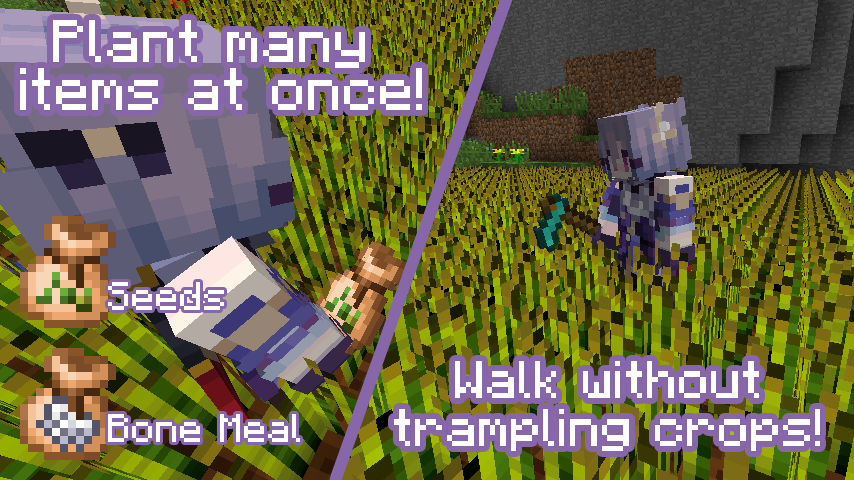
添加了种子袋(Seed Bag),可储存最多 512 个种子或骨粉,通过在方块上方右键点击种子袋,可以在 7×5×7 范围内的农田里种植作物。种子袋的交互距离比普通物品更远(5 格)。一个种子袋只能容纳一种类型的物品,且无法通过其他方式清空,只能通过使用它来消耗。拾取到的种子会自动进入背包中已含有至少一颗种子的种子袋内。
其他调整包括:
- 削弱了踩踏农作物的效果,复刻了现代版本中的行为,即需要从高处以坠落方式才能踩踏农作物。
- 防止在对完全成熟的小麦和无法生长的树苗使用骨粉时消耗骨粉(不影响模组方块)
- 如果拥有种子,右键点击作物即可快速重新种植。将自动使用从收获的作物中得到的种子、背包中的种子以及背包中种子袋里的种子。
物品
种子袋
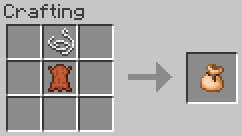
1x 线 + 1x 皮革(形状合成)→ 1x 种子袋。容量为 512 个种子。
种子袋 + 种子
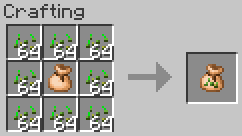
1x 种子袋 + 任意数量的种子(无序合成)用于填充种子袋。最多 512 个种子。
种子袋 + 骨粉
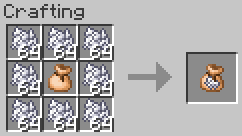
1x 种子袋 + 任意数量的骨粉(无序合成)用于填充种子袋。最多 512 份骨粉。
兼容性
本模组目前没有已知的主要兼容性问题。设计上,对模组方块的生效功能需要通过添加数据包条目来实现;详见 数据包格式。
本模组明确支持 Always More Items。
前置依赖
推荐安装
配置
如果在安装了 Mod Menu Babric 的情况下,可以在游戏内配置本模组,或者在 .minecraft/config/good-farming/good-farming.yml 中进行配置。
# 如果启用,只有在跳跃时才会踩踏农田,行走时不会
tramplingNerfEnabled: true

# 防止在对完全成熟的小麦和无法生长的树苗使用骨粉时消耗骨粉(不影响模组方块)
bonemealWastageFixEnabled: true

# 允许通过右键点击重新种植作物(如果你拥有种子)
quickReplantingEnabled: true

# 使用种子袋种植种子的水平半径,单位为格
seedBagPlantLateralRadius: 3

# 使用种子袋种植种子的垂直半径,单位为格
seedBagPlantVerticalRadius: 2

# 使用种子袋的有效距离,单位为格
seedBagThrowRange: 5.0

# 种子袋的最大存储种子数量
seedBagCapacity: 512

# 拾取种子时自动将其放入背包中的种子袋内
seedBagAutoPickupEnabled: true

# 在快捷栏和背包中显示种子袋内的种子数量
seedBagOverlayEnabled: true
数据包格式
种子类型
可以放置在种子袋中的种子类型通过 good-farming:seed_types 命名空间下的数据包提供。例如,data/good-farming/good-farming/seed_types/bone_meal.json:
{
  "item": {
    "id": "minecraft:dye",
    "damage": 15
  },
  "textureId": "good-farming:item/seed_bag_bone_meal",
  "plantOnBlocks": [
    {
      "id": "minecraft:wheat"
    },
    {
      "id": "minecraft:sapling"
    },
    {
      "tag": "good-farming:crops"
    },
    {
      "tag": "good-farming:saplings"
    }
  ]
}
- item: 描述可放入种子袋中的物品的对象。种子放置将使用此物品的行为;如果它是一个标签(tag),则使用该标签中游戏加载的第一个物品。
- id: 物品的 ID。如果未指定 tag,则必须指定此项。
- tag: 要使用的物品标签。如果未指定 id,则必须指定此项。
- damage: (可选)如果指定了 id,则是用于匹配的物品耐久值。留空或设置为 -1 以匹配所有耐久值。
- textureId: (可选)当种子袋中包含这些种子时,种子袋所使用的纹理的资源 ID。如果未指定纹理,则回退到空的种子袋纹理。
- plantOnBlocks: (可选)种子将尝试种植的方块列表。如果未指定,它们将被种植在物品类可以使用的任何方块上。
- id: 要使用的方块的 ID。如果未指定 tag,则必须指定此项。
- tag: 要使用的方块标签。如果未指定 id,则必须指定此项。
- meta: (可选)如果指定了 id,则是用于匹配的方块的元数据值。留空或设置为 -1 以匹配所有元数据值。
模组可以通过在 data/$modId/good-farming/seed_types 中放置相应的 JSON 文件来提供自己的种子类型。Good Farming 还提供了与 stapi-datagen 配合进行种子类型数据生成的 API:
SeedTypeProvider。
请参阅 GoodFarmingSeedTypeProvider.kt
获取示例。
作物类型
可以通过右键点击快速收获的作物种子类型通过数据包在 good-farming:crop_types 命名空间中提供。例如,data/good-farming/good-farming/crop_types/wheat.json:
{
  "crops": [
    {
      "id": "minecraft:wheat",
      "meta": 7
    }
  ],
  "seeds": [
    {
      "id": "minecraft:wheat_seeds",
      "damage": -1
    }
  ]
}
- crops: 可以通过右键点击快速收获的方块列表。
- id: 要使用的方块的 ID。如果未指定 tag,则必须指定此项。
- tag: 要使用的方块标签。如果未指定 id,则必须指定此项。
- meta: (可选)如果指定了 id,则是用于匹配的方块的元数据值。留空或设置为 -1 以匹配所有元数据值。
- seeds: (可选)当方块被快速收获时可以重新种植的物品种列表。当方块被破坏时,会从其掉落物中搜索一个此类物品,然后将该物品在同一位置重新种植。如果未找到,则会搜索玩家的手、快捷栏和背包中的匹配种子或包含种子的匹配种子袋;以最先找到的为准。
- id: 物品的 ID。如果未指定 tag,则必须指定此项。
- tag: 要使用的物品标签。如果未指定 id,则必须指定此项。
- damage: (可选)如果指定了 id,则是用于匹配的物品耐久值。留空或设置为 -1 以匹配所有耐久值。
模组可以通过在 data/$modId/good-farming/crop_types 中放置相应的 JSON 文件来提供自己的作物类型。Good Farming 还提供了与 stapi-datagen 配合进行作物类型数据生成的 API:
CropTypeProvider。
请参阅 GoodFarmingCropTypeProvider.kt
获取示例。
StationAPI 中的数据包
请注意,StationAPI 目前不支持加载模组之外的数据包。如果你作为玩家或服务器管理员想要修改内置的种子类型,你可以通过将你的数据包包装在一个模组中来实现:
- 为你的数据包创建一个文件夹,例如
example-pack。
- 将你的 JSON 文件放置在
example-pack/data/example-pack/good-farming/seed_types 或
example-pack/data/example-pack/good-farming/crop_types 中。
- 在根目录放置一个
fabric.mod.json
(规范) 文件,内容如下:
{
  "schemaVersion": 1,
  "id": "example-pack",
  "version": "1.0.0",
  "name": "Example Pack for Good Farming",
  "description": "Your own changes to Good Farming's data here!"
}
注意,name 和 description 在技术上虽然是可选的,但如果未设置,Mod Menu 将会崩溃。
- 压缩数据包文件夹的内容。即 zip 文件的根目录应包含
fabric.mod.json 和 data。
- 将 zip 文件重命名为
.jar,例如 example-pack.jar。
- 将 jar 文件放入你的
mods 文件夹中,例如 .minecraft/mods/example-pack.jar。
- 重启游戏。
许可证
本模组遵循 MIT 许可证。
Good Farming
Beta 1.7.3 additions and tweaks to make farming easier.
Adds a Seed Bag, which stores up to 512 Seeds or Bone Meal, and plants on farmland in a 7×5×7 area by right-clicking
it on top of a block. The bag can also be used from further away than regular items (5 blocks). A Seed Bag can only hold
one type of item, and cannot be emptied other than by using it. Seeds picked up will automatically go into Seed Bags in
your inventory that already contain at least one seed.
Other tweaks include:
- Nerfs crop trampling, replicating the behaviour of modern versions where you need to fall from a height to trample
the crops instead.
- Prevents consuming Bone Meal when used on fully grown wheat and saplings that can't grow (doesn't affect modded
blocks)
- Quick replanting by right-clicking on crops if you have the seeds. Will automatically use the seeds from the harvested
crop, seeds from your inventory, and seeds from Seed Bags in your inventory.
Items
Seed Bag
1x String + 1x Leather (shaped) → 1x Seed bag. Holds 512 seeds.
Seed Bag + Seeds
1x Seed Bag + any amount of Seeds (shapeless) to fill the Seed Bag. Up to 512 Seeds.
Seed Bag + Bone Meal
1x Seed Bag + any amount of Bone Meal (shapeless) to fill the Seed Bag. Up to 512 Bone Meal.
Compatibility
This mod has no known major compatibility issues. Functionality on modded blocks by design isn't effective without
adding datapack entries; see Datapack format.
The mod adds explicit compatibility with Always More Items.
Requirements
Recommended
Configuration
The mod's configuration can be configured in-game (if Mod Menu Babric is
installed) or in .minecraft/config/good-farming/good-farming.yml.
# If enabled, farmland is only trampled when jumping, not walking
tramplingNerfEnabled: true

# Prevents consuming Bone Meal when used on fully grown wheat
# and saplings that can't grow (doesn't affect modded blocks)
bonemealWastageFixEnabled: true

# Allow replanting crops with right-click (if you have the seeds)
quickReplantingEnabled: true

# The lateral radius, in blocks, to plant seeds with the Seed Bag
seedBagPlantLateralRadius: 3

# The vertical radius, in blocks, to plant seeds with the Seed Bag
seedBagPlantVerticalRadius: 2

# The range, in blocks, that the Seed Bag can be used from
seedBagThrowRange: 5.0

# The maximum number of seeds the Seed Bag can store
seedBagCapacity: 512

# Automatically put seeds into Seed Bags in your inventory when picked up
seedBagAutoPickupEnabled: true

# Displays the amount of seeds in the Seed Bag in the hotbar and inventory
seedBagOverlayEnabled: true
Datapack format
Seed types
The types of seeds that can be placed in a Seed Bag are provided via datapacks in the good-farming:seed_types
namespace. For example, data/good-farming/good-farming/seed_types/bone_meal.json:
{
  "item": {
    "id": "minecraft:dye",
    "damage": 15
  },
  "textureId": "good-farming:item/seed_bag_bone_meal",
  "plantOnBlocks": [
    {
      "id": "minecraft:wheat"
    },
    {
      "id": "minecraft:sapling"
    },
    {
      "tag": "good-farming:crops"
    },
    {
      "tag": "good-farming:saplings"
    }
  ]
}
- item: Object describing the item that can be placed in the Seed Bag. Seed placement will use the behaviour of
this item, or if it's a tag, the first item loaded by the game in that tag.
- id: The ID of the item. Must be specified if tag is not.
- tag: The item tag to use. Must be specified if id is not.
- damage: (optional) If id is specified, the damage value of the item to match. Leave blank or set to -1 to
match all damage values.
- textureId: (optional) The resource ID of the texture to use for the Seed Bag when it contains these seeds. If a
texture isn't specified, it will fall back to the empty Seed Bag texture.
- plantOnBlocks: (optional) List of blocks that seeds will attempt to be planted on. If not specified, they will
be planted on any block that the item's class can use.
- id: The ID of the block to use. Must be specified if tag is not.
- tag: The block tag to use. Must be specified if id is not.
- meta: (optional) If id is specified, the meta value of the block to match. Leave blank or set to -1 to
match all meta values.
Mods can provide their own seed types by placing the corresponding JSON files in data/$modId/good-farming/seed_types.
Good Farming also provides an API for datagenning seed types with
stapi-datagen:
SeedTypeProvider.
See GoodFarmingSeedTypeProvider.kt
for an example.
Crop types
The types of seeds that can be quick-harvested by right-clicking are provided via datapacks in the
good-farming:crop_types namespace. For example, data/good-farming/good-farming/crop_types/wheat.json:
{
  "crops": [
    {
      "id": "minecraft:wheat",
      "meta": 7
    }
  ],
  "seeds": [
    {
      "id": "minecraft:wheat_seeds",
      "damage": -1
    }
  ]
}
- crops: List of blocks that can be quick-harvested by right-clicking.
- id: The ID of the block to use. Must be specified if tag is not.
- tag: The block tag to use. Must be specified if id is not.
- meta: (optional) If id is specified, the meta value of the block to match. Leave blank or set to -1 to
match all meta values.
- seeds: (optional) List of items that can be replanted here when the block is quick-harvested. When the block is
broken, its drops will be searched for one of these items, and then that item will be replanted in the same spot. If
it isn't found, then the player's hand, hotbar, and inventory are searched for matching seeds or a matching Seed Bag
containing the seeds; whichever is found first.
- id: The ID of the item. Must be specified if tag is not.
- tag: The item tag to use. Must be specified if id is not.
- damage: (optional) If id is specified, the damage value of the item to match. Leave blank or set to -1 to
match all damage values.
Mods can provide their own crop types by placing the corresponding JSON files in data/$modId/good-farming/crop_types.
Good Farming also provides an API for datagenning crop types with
stapi-datagen:
CropTypeProvider.
See GoodFarmingCropTypeProvider.kt
for an example.
Datapacks in StationAPI
Note that StationAPI currently doesn't support loading datapacks outside of mods. If you as a player or server admin
would like to modify the built-in seed types, you can do this by wrapping your datapack in a mod:
- Create a folder for your datapack, e.g.
example-pack.
- Place your JSON files in
example-pack/data/example-pack/good-farming/seed_types or
example-pack/data/example-pack/good-farming/crop_types.
- Place a
fabric.mod.json
(spec) file in the root with the following
contents:
{
  "schemaVersion": 1,
  "id": "example-pack",
  "version": "1.0.0",
  "name": "Example Pack for Good Farming",
  "description": "Your own changes to Good Farming's data here!"
}
Note that name and description are technically optional, but Mod Menu will crash if they're not set.
- Zip the contents of the datapack's folder. i.e. the root of the zip should contain
fabric.mod.json and data.
- Rename the zip to
.jar, e.g. example-pack.jar.
- Place the jar in your
mods folder, e.g. .minecraft/mods/example-pack.jar.
- Restart the game.
License
This mod is licensed under the MIT license.


 模组

 模组

 模组
 模组

 模组
 模组
评论 0
登录后参与评分
还没有评论,来抢沙发吧