
Gray’s Veins:自定义矿石视觉效果
Gray’s Veins 是一款客户端侧的 Fabric 模组,允许你通过轮廓、动画、发光效果以及针对每种矿石的控制来自定义矿石可见性纹理。
Gray’s Veins 不会强制对所有矿石应用同一种样式,而是让你选择每种矿石的可见程度。你可以使用一个全局设置来配置所有支持的矿石,也可以切换到自定义模式并单独调整每种矿石。
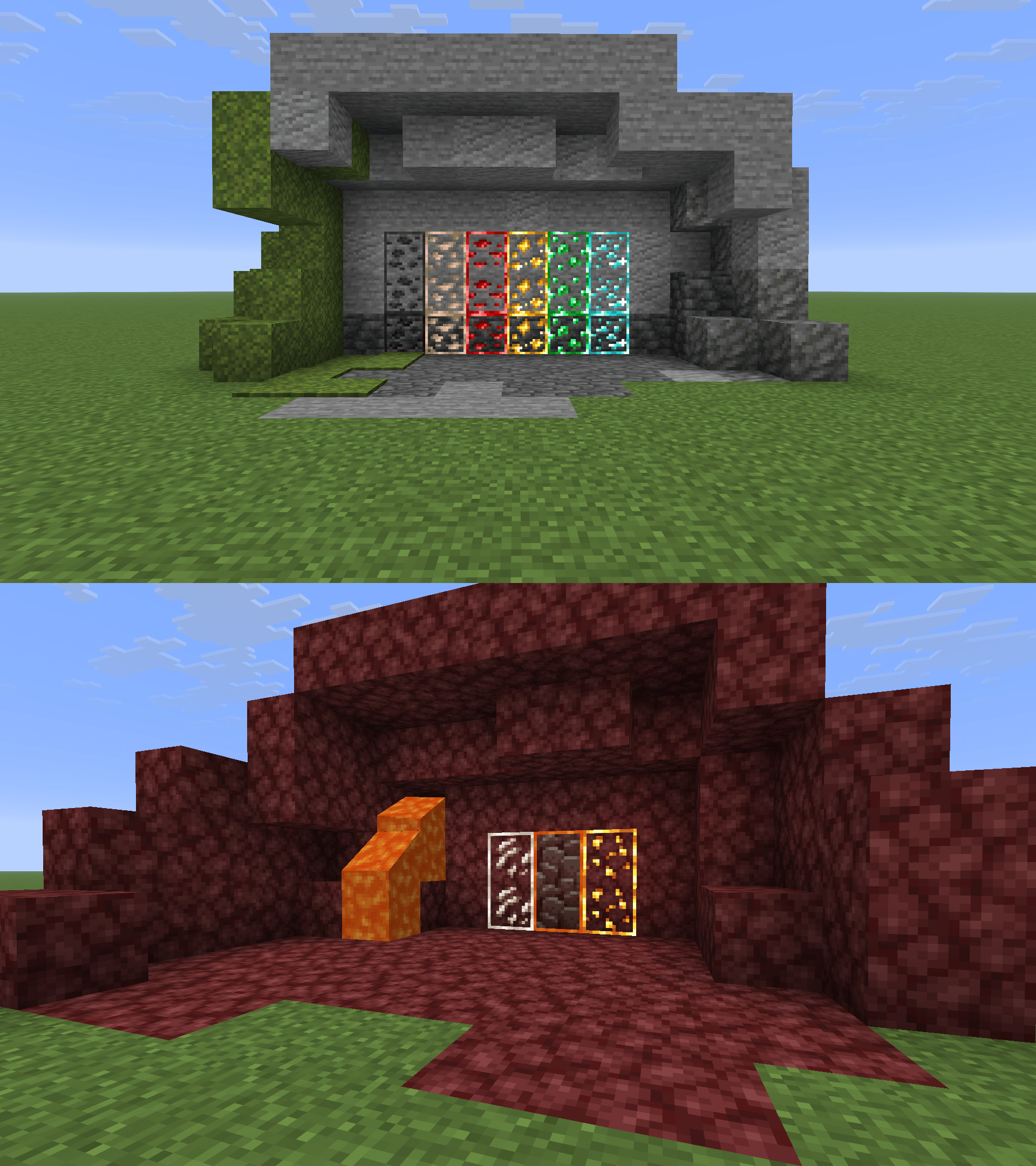
功能
- 可切换的矿石轮廓
- 可切换的动画矿石纹理
- 可切换的发光/自发光风格纹理
- 发光强度滑块
- 用于快速设置的 All(全部) 模式
- 用于单矿控制的 Custom(自定义) 模式
- Gold Ore(金矿石) 和 Nether Gold Ore(下界金矿石) 的独立设置
- Ancient Debris(远古残骸)提供 Blue Netherite(蓝下界合金)选项
- 当生成的资源包未启用时,游戏内警告提示
- Mod Menu 支持
支持的矿石
Gray’s Veins 目前支持以下矿石:
- Coal Ore(煤矿石)
- Iron Ore(铁矿石)
- Copper Ore(铜矿石)
- Gold Ore(金矿石)
- Nether Gold Ore(下界金矿石)
- Redstone Ore(红石矿石)
- Emerald Ore(绿宝石矿石)
- Lapis Ore(青金石矿石)
- Diamond Ore(钻石矿石)
- Nether Quartz Ore(下界石英矿石)
- Ancient Debris(远古残骸)
- Gilded Blackstone(镶金黑石)
工作原理
Gray’s Veins 会根据你的设置生成一个资源包。
更改设置后:
- 通过 Mod Menu 打开 Gray’s Veins 的设置界面。
- 选择 All(全部) 或 Custom(自定义) 模式。
- 调整轮廓、动画、发光效果和发光强度。
- 点击 Apply Textures(应用纹理)。
- 确保在资源包列表中启用 Gray’s Veins Generated。
如果生成的资源包未启用,Gray’s Veins 会在配置屏幕中发出警告。
重要提示:启用 Continuity 资源包
Gray’s Veins 需要 Continuity 来实现连接纹理和发光/自发光效果。
安装 Continuity 后,请确保在 Minecraft 的资源包菜单中启用了 Continuity 内置的资源包。除非 Continuity 的资源包处于激活状态,否则 Gray’s Veins 可能无法正确显示连接轮廓或发光效果。
Blue Netherite(蓝下界合金)
Ancient Debris(远古残骸)有一个额外的 Blue Netherite(蓝下界合金) 选项。
启用后,Ancient Debris 将使用蓝色视觉风格,使其更容易被发现。
由于该样式配合发光效果最佳,因此启用 Blue Netherite 会自动强制开启发光效果。
推荐搭配
Gray’s Veins 与以下模组配合效果最佳:
- Fabric API
- Mod Menu
- Continuity — 用于实现连接纹理和发光/自发光效果
如果你希望获得类似连接纹理资源包的连接轮廓效果,推荐使用 Continuity。
致谢
本模组使用的纹理资产归功于:
- gitq — 基础矿石纹理资产
- ThatCuteOne — Blue Netherite(蓝下界合金)相关资产
Gray’s Veins 模组、配置系统、生成的资源包工作流、用户界面及发布打包由 GrayscaleRGB 负责。
部分纹理资产归其原始创作者所有。如果你是资产创作者并希望调整署名或修改资产,请联系我。
注意事项
如果发光效果或连接轮廓不起作用,请检查是否已安装 Continuity 并已启用其资源包。
发光效果使用的是当前的自发光矿石资产,其中包括带边框的矿石像素。因此,启用发光效果也会同时保持轮廓启用状态。轮廓功能可以在不启用发光的情况下单独使用。
这是一个仅客户端的视觉模组。它不会改变矿石生成、战利品表、挖掘行为或服务器端的游戏玩法。
该模组旨在使矿石更易于观察,同时保留外观的可配置性。
Gray’s Veins: Customizable Ore Visuals
Gray’s Veins is a client-side Fabric mod that lets you customize ore visibility textures using outlines, animation, glow, and per-ore controls.
Instead of forcing one ore style on everything, Gray’s Veins lets you choose how visible each ore should be. Use one global setup for all supported ores, or switch to custom mode and tune each ore individually.
Features
- Toggleable ore outlines
- Toggleable animated ore textures
- Toggleable glow/emissive-style textures
- Glow strength slider
- Global All mode for quick setup
- Custom mode for per-ore control
- Separate settings for Gold Ore and Nether Gold Ore
- Blue Netherite option for Ancient Debris
- In-game warning when the generated resource pack is not enabled
- Mod Menu support
Supported Ores
Gray’s Veins currently supports:
- Coal Ore
- Iron Ore
- Copper Ore
- Gold Ore
- Nether Gold Ore
- Redstone Ore
- Emerald Ore
- Lapis Ore
- Diamond Ore
- Nether Quartz Ore
- Ancient Debris
- Gilded Blackstone
How It Works
Gray’s Veins generates a resource pack based on your settings.
After changing settings:
- Open Gray’s Veins settings through Mod Menu.
- Choose All or Custom mode.
- Adjust outlines, animation, glow, and glow strength.
- Click Apply Textures.
- Make sure Gray’s Veins Generated is enabled in Resource Packs.
If the generated resource pack is not enabled, Gray’s Veins will warn you in the config screen.
Important: Enable Continuity Resource Packs
Gray’s Veins requires Continuity for connected textures and glow/emissive effects.
After installing Continuity, make sure Continuity’s built-in resource packs are enabled in Minecraft’s Resource Packs menu. Gray’s Veins may not show connected outlines or glow correctly unless Continuity’s resource packs are active.
Blue Netherite
Ancient Debris has an extra Blue Netherite option.
When enabled, Ancient Debris uses a blue visual style to make it much easier to spot.
Blue Netherite automatically forces glow on because the style looks best with glow enabled.
Recommended With
Gray’s Veins works best with:
- Fabric API
- Mod Menu
- Continuity — required for connected textures and glow/emissive effects
Continuity is recommended if you want connected outline effects similar to connected texture resource packs.
Credits
Texture assets used in this mod are credited to:
- gitq — base ore texture assets
- ThatCuteOne — Blue Netherite asset(s)
Gray’s Veins mod, config system, generated resource pack workflow, UI, and release packaging by GrayscaleRGB.
Some texture assets are credited to their original creators. If you are an asset creator and want credit adjusted or an asset changed, please contact me.
Notes
If glow or connected outlines are not working, check that Continuity is installed and its resource packs are enabled.
Glow uses the current emissive ore assets, which include framed ore pixels. Because of that, enabling Glow also keeps Outline enabled. Outlines can still be used without Glow.
This is a client-side visual mod. It does not change ore generation, loot tables, mining behavior, or server gameplay.
It is designed to make ores easier to see while still keeping the look configurable.
 模组

 模组

 模组
 模组

 模组
 模组
评论 0
登录后参与评分
还没有评论,来抢沙发吧