
这个模组最初是 Gany's End 中的一个简单功能,但应广大玩家的要求,我决定将其作为独立的模组发布。
本模组新增内容:
-原版生物/动物头颅
-Thermal Foundation 头颅
-暮色森林 (Twilight Forest) 生物头颅
-Natura 生物头颅
-神秘时代 (Thaumcraft) 生物头颅
-原始生物 (Primitive Mobs) 头颅
-盖亚法典 (Grimoire of Gaia) 头颅
-激光、苦力怕、机器人、恐龙、太空骑手等生物的头颅
-Minecraft 名人头颅作为地牢战利品
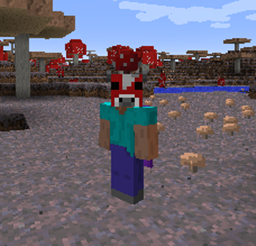
-本模组添加的所有头颅均可佩戴!
-MOBS(怪物)!在世界中寻找你最喜欢的模组作者/YouTuber/主播/朋友化身的怪物!不过要小心,它们并不喜欢你!(我也不能怪它们,看看你自己吧)。配置文件中添加的任何名字也会在世界上生成!
当然,你可以随时使用配置文件来移除或添加名人列表中的名字。
你还可以通过制作玩家头颅并在其下方放置 2 个粘土块来制作玩家雕像!!!
建议:
欢迎提供任何建议!如果你认为本模组缺少某些功能(如模组支持、新的配置选项等),请随时提出请求。
常见问题:
问:Headcrumbs 的头颅能稳定神秘时代的注魔祭坛吗?
答:可以!
问:匠魂 (Tinker's Construct) 的斩首机制会影响 Headcrumbs 的头颅掉落率吗?
答:会的!
整合包:
你可以在任何公开或私有的整合包中使用此模组。无需征求许可,你已经获得了授权。
只要通过第三方模组进行修改并保持本模组文件完整,你也可以随意修改本模组的任何机制(如合成配方、矿物字典名称等)。
添加/移除头颅:
由于我注意到一些人在使用配置文件添加和移除头颅时遇到困难,因此我决定为此编写一份快速教程!
正确安装模组后,启动 Minecraft(废话)。
在主菜单中,点击“模组”按钮。
这将打开一个包含所有已安装模组名称列表的菜单。在该列表中找到 Headcrumbs 并点击它!
列表底部会出现“Config”按钮,点击它以打开下一个菜单。
现在你会看到只有两个按钮,点击“heads”按钮来添加/移除头颅。“general”按钮用于其他模组设置,例如关闭头颅掉落、控制掉落稀有度、是否在苦力怕击杀时掉落等。我也建议你查看一下 :)
一旦你点击了“heads”按钮,就会显示类别列表。你将用户名添加到哪个类别并不重要,我只是因为默认列表很长才这样设置的,我认为这样拆分会更容易。在游戏中,你添加名字的类别没有任何区别。在本教程中,我选择了“others”类别。
现在你点击了一个类别,就会看到该类别中当前的名字列表。要移除名字,请点击该名字旁边的红色“X”按钮。
要添加名字,请点击最底部的“+”按钮。
输入的用户名必须完全一致(注意大小写!!!),这样就完成了!如果你想添加或移除更多用户名,只需重复上一步。完成后点击“完成”按钮,它将带你回到主菜单。你可能需要重启 Minecraft 才能使更改生效。
针对模组开发者和高级用户:
如果你希望在你的模组中使用本模组的头颅,并且你知道如何使用反射:
ganymedes01.headcrumbs.utils.HeadUtils.createHeadFor(EntityPlayer player)
或者
ganymedes01.headcrumbs.utils.HeadUtils.createHeadFor(String username)
将返回一个包含一个指定玩家头颅的 ItemStack。请随意使用它们。
This mod used to be a simple feature from Gany's End but by popular demand I decided to release it as a separate mod.
What the mod adds:
-Vanilla mobs/animals heads
-Thermal Foundation
-Twilight Forrest mobs heads
-Natura mobs heads
-Thaumcraft mobs heads
-Primitive Mobs heads
-Grimoire of Gaia heads
-Laser Creeper Robot Dino Riders From Space heads
-Minecraft celebrities heads as dungeon loot
-All of the heads added by this mod are wearable!
-MOBS! Find your favourite modder/youtuber/streamer/friend as a mob in the world! But careful, they don't like you! (and I don't blame them, look at yourself). Any names added to the config file will also spawn in the world!
You can, of course, remove and add names to the celebrities list at any time using the configs!
You can also make player statues by crafting a player head with 2 clay blocks underneath it!!!
Suggestions:
Suggestions are always welcome! Feel free to request features you feel this mod is lacking (mod support, new config options, etc)
Frequently asked questions:
Q: Can Headcrumbs's heads stabilise Thaumcraft's infusion?
A: Yes, they can!
Q: Does the beheading aspect from Tinker's Construct influence on the head drop rate of Headcrumbs?
A: Yes, it does!
Modpacks:
You can use this in any pack public or private. Don't ask for permission, you already have it.
You are also allowed to modify the mechanics of this mod in any way you want (recipes, ore dictionary names and etc), as long as it's done by a third party mod and keeping this mod file intact.
Adding/Removing heads:
Since I've noticed some people are having difficulties adding and removing heads using the config file, I decided to write a quick tutorial for it!
With the mod properly installed, load up minecraft (duh).
In the main mene, click the Mods button.
It will open up a menu with a list of names of all the mods you have installed. Find Headcrumbs on that list and click on it!
The Config button will show up on the bottom of the list, click on it to open the next menu.
Now you'll see just two buttons, click on the "heads" buttons to add/remove heads. The "general" buttons is for other settings of the mod such as turning off heads drops, controlling how rare they are, if they should drop when mobs are killed by charged creepers and so on. I recommend checking it out too :)
Once you click on the heads buttons a list of categories will show up, It doesn't matter which category you add your usernames to, I only have it setup that way because the default list was pretty big, so I thought it would be easier to split it up. It makes absolutely no difference, when in game, the category that you add your names to. In this tutorial I've chosen the "others" category.
Now that you clicked on a category you'll see the list of names currently in that category. To remove a name click on the red "X" button besides that name.
To add a name click on the bottom-most "+" button.
Type in the username exactly as they are (capitals matter!!!) and you're done! If you want to add or remove more usernames just repeat the previous step. When you're done click the done button and it will take you back to the main menu. You might need to restart minecraft in order to your changes to take effect.
For modders and advanced users:
If you'd like to use this mods heads with your mod and you know how to use reflection:
ganymedes01.headcrumbs.utils.HeadUtils.createHeadFor(EntityPlayer player)
or
ganymedes01.headcrumbs.utils.HeadUtils.createHeadFor(String username)
will return an ItemStack containing one head of the passed player. Feel free to use them anyway you'd like.
下载 Headcrumbs
下载 Headcrumbs
下载 Headcrumbs
下载 Headcrumbs
下载 Headcrumbs
下载 Headcrumbs
下载 Headcrumbs
下载 Headcrumbs
下载 Headcrumbs
下载 Headcrumbs
修复了头部在 3D 中不渲染的问题
关于这个资源的讨论、问题反馈与使用心得
还没有讨论,来发第一帖吧
你是这个资源的作者?登录后可认领此资源。
相似资源
 模组

可定制的鞘翅模组,支持装饰纹饰、旗帜图案等更多功能!
 模组

适用于 MC 1.18+ 的 Effekseer 加载器
 模组

新增 50+ 个独特生物群系,为你的世界增添新树木、花卉等更多元素!
 模组

基于 GTCEu 1.12.2 的现代 GregTech
 模组

添加睡袋和吊床,分别用于便携性和昼夜转换,同时不会设置新的出生点。共有16种颜色可选!
 模组

为你的终界增添新生物群系、神秘仪式和全新生物
评论 0
登录后参与评分
还没有评论,来抢沙发吧