Hísëa(昆雅语意为“有雾的”)是一款为 ArdaCraft 项目开发的模组。它添加了会生成雾气的方块,除非玩家将其手持,否则这些方块对用户是不可见的。这些方块没有碰撞体积,这意味着玩家可以在建筑中添加有趣的细节,如瀑布水雾、热水浴产生的蒸汽以及雾气,而不会干扰探索或沉浸感。
可以通过按住 Ctrl + 右键来配置由这些方块生成的雾气的各个方面:
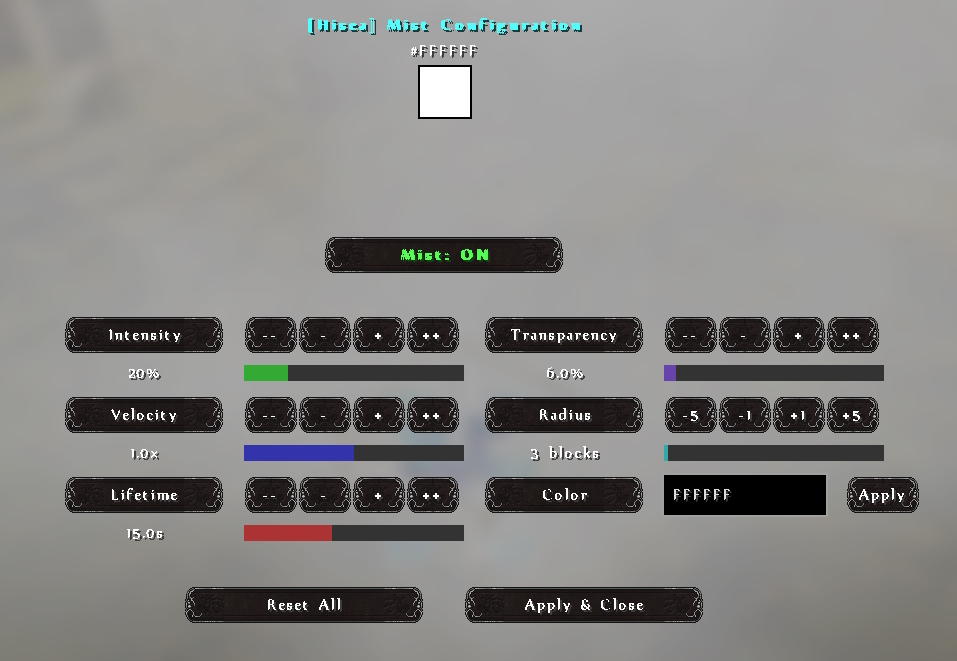
更详细的说明见下文。
Hísëa 使用说明
强度 (0-50%)
说明:控制雾气的浓稠程度。数值越高,雾气越浓密、越可见。在最大值时,雾气变得非常明显,并产生浓厚的雾效。
代码层面:缩放生成粒子的数量和大小。内部存储为浮点数 (0.0-5.0),其中:
- UI 中每 10% = 代码中的 1.0
- 同时影响粒子缩放和生成率
- 影响粒子生命周期计算
速度 (0-200%)
说明:决定雾气粒子的移动速度。低值会产生静止、悬浮的雾气。高值会产生流动、飘动的雾气,在空间中更剧烈地移动。
代码层面:存储为浮点数 (0.0-2.0) 并直接乘以运动值:
 .setMotion(
      velocityMultiplier == 0 ? 0 : (world.getRandom().nextFloat() * 0.01f) * Math.signum(offsetX) * velocityMultiplier,
      velocityMultiplier == 0 ? 0 : (world.getRandom().nextFloat() * 0.005f) * velocityMultiplier, // 垂直方向较慢
      velocityMultiplier == 0 ? 0 : (world.getRandom().nextFloat() * 0.01f) * Math.signum(offsetZ) * velocityMultiplier
  )
生命周期 (5-30 秒)
说明:控制雾气粒子在消失前保持可见的时间长度。较长的生命周期会产生更持久的雾气效果,而较短的生命周期会产生更短暂、飘逸的效果。
代码层面:以刻(ticks)为单位存储 (100-600),其中:
- 每秒 = 20 刻(Minecraft 每秒运行 20 刻)
- 直接在粒子构建器中使用:
.setLifetime(lifetime)
颜色 (RGB)
说明:设置雾气粒子的颜色。可用于创建氛围效果,如彩色雾、魔法雾、毒云、不同温度的蒸汽等。
代码层面:存储为标准 RGB 整数 (0x000000 到 0xFFFFFF):
.setColorData(ColorParticleData.create(particleColor).build())
透明度 (0-100%)
说明:控制雾气的半透明程度。较低的值会使雾气呈现半透明、幽灵般的效果,几乎不遮挡视线。较高的值会产生更不透明的雾气,可以隐藏其后的元素。
代码层面:存储为浮点数 (0.0-1.0) 并用于透明度渐变计算:
  .setTransparencyData(
      GenericParticleData.create(0.001f, 0.7f * customTransparency, 0f)
      .setEasing(Easing.EXPO_OUT, Easing.SINE_OUT)
      .build()
  )
这会创建一个平滑的淡入/淡出效果,峰值可见度由该设置控制。
半径 (1-100 方块)
说明:决定雾气从源方块扩散的距离。较大的半径会产生覆盖更多区域的雾,而较小的半径会产生集中的云团。
代码层面:存储为整数并用于缩放粒子位置偏移量:
  double radiusScale = customRadius / 3.0; // 缩放因子,3 为默认半径
  double scaledOffsetX = offsetX * radiusScale;
  double scaledOffsetZ = offsetZ * radiusScale;
启用 (开/关)
说明:简单的开关,用于在不移除方块的情况下开启或关闭雾气发射。适用于暂时禁用效果或在不同场景之间切换。
代码层面:存储为布尔值,并在生成任何粒子之前进行检查:
  if (cachedEnabled != null && !cachedEnabled) {
      // 用户已禁用方块
      return;
  }
技术实现备注
- 客户端-服务器同步:所有设置都存储在服务器的方块实体中,并同步给连接的客户端
- 持久性:设置保存至世界的 NBT 数据,以便在服务器重启后恢复
- 效率:粒子使用可见性检查和优化,以最小化对性能的影响
- 上次使用的设置:放置新方块时,模组会记住你上次使用的设置
该模组由 Divined(Discord 上的 .divined)为 ArdaCraft 开发。非常感谢 Effective 的开发团队提供的帮助。
项目图标致谢 Instagram 上的 kameh.space。
Hísëa (Quenya for 'misty') is a mod developed for the ArdaCraft project. It adds fog-generating blocks which are invisible to the user unless they hold the block in their hand. These blocks do not have collision, meaning that players can add interesting details to their builds like waterfall mist, steam from hot baths, and fog without interfering with exploration or immersion.
Various aspects of the fog generated by these blocks can be configured with ctrl+right click:
More detailed instructions can be found below.
Hísëa Instructions
Intensity (0-50%)
Explanation: Controls how thick the mist appears. Higher values create denser, more visible mist. At maximum values, the mist becomes very noticeable and creates a thick fog effect.
Code wise: Scales the number and size of particles generated. Internally stored as a float (0.0-5.0) where:
- Each 10% in UI = 1.0 in code
- Affects both particle scale and spawn rate
- Influences particle lifetime calculation
Velocity (0-200%)
Explanation: Determines how fast the mist particles move. Low values create still, hanging mist. Higher values create flowing, drifting mist that moves more dramatically through the space.
Code wise: Stored as a float (0.0-2.0) and directly multiplied with the motion values:
 .setMotion(
      velocityMultiplier == 0 ? 0 : (world.getRandom().nextFloat() * 0.01f) * Math.signum(offsetX) * velocityMultiplier,
      velocityMultiplier == 0 ? 0 : (world.getRandom().nextFloat() * 0.005f) * velocityMultiplier, // Slower vertical
      velocityMultiplier == 0 ? 0 : (world.getRandom().nextFloat() * 0.01f) * Math.signum(offsetZ) * velocityMultiplier
  )
Lifetime (5-30 seconds)
Explanation: Controls how long mist particles remain visible before fading away. Longer lifetimes create a more persistent mist effect, while shorter lifetimes create a more ephemeral, wispy effect.
Code wise: Stored as ticks (100-600) where:
- Each second = 20 ticks (Minecraft runs at 20 ticks per second)
- Directly used in the particle builder:
.setLifetime(lifetime)
Color (RGB)
Explanation: Sets the color of the mist particles. Can be used to create atmospheric effects like colored fog, magical mist, toxic clouds, steam with different temperatures, etc.
Code wise: Stored as a standard RGB integer (0x000000 to 0xFFFFFF):
.setColorData(ColorParticleData.create(particleColor).build())
Transparency (0-100%)
Explanation: Controls how see-through the mist appears. Lower values make translucent, ghostly mist that barely obscures the view. Higher values create more opaque mist that can hide elements behind it.
Code-wise: Stored as a float (0.0-1.0) and used in transparency gradient calculation:
  .setTransparencyData(
      GenericParticleData.create(0.001f, 0.7f * customTransparency, 0f)
      .setEasing(Easing.EXPO_OUT, Easing.SINE_OUT)
      .build()
  )
This creates a smooth fade-in/fade-out effect with the peak visibility controlled by this setting.
Radius (1-100 blocks)
Explanation: Determines how far the mist spreads from the source block. Larger radius creates fog that covers more area, while smaller radius creates concentrated clouds.
Code wise: Stored as an integer and used to scale particle position offsets:
  double radiusScale = customRadius / 3.0; // Scale factor where 3 is the default radius
  double scaledOffsetX = offsetX * radiusScale;
  double scaledOffsetZ = offsetZ * radiusScale;
Enabled (On/Off)
Explanation: Simple toggle to turn mist emission on or off without removing the block. Useful for temporarily disabling effects or switching between different scenes.
Code wise: Stored as a boolean and checked before spawning any particles:
  if (cachedEnabled != null && !cachedEnabled) {
      // Block has been disabled by the user
      return;
  }
Technical Implementation Notes
- Client-Server Sync: All settings are stored on the server in the block entity and synced to connected clients
- Persistence: Settings are saved to the world's NBT data for restoration after server restarts
- Efficiency: Particles use visibility checks and optimizations to minimize performance impact
- Last Used Settings: The mod remembers your last used settings when placing new blocks
The mod was developed for ArdaCraft by Divined (.divined on Discord). Many thanks to the devs of Effective for their assistance.
Project icon credit to kameh.space on Instagram.


 模组

 模组

 模组

 模组

 模组

 模组

评论 0
登录后参与评分
还没有评论,来抢沙发吧