Hudify - CustomHud 的 Spotify 集成
在你的 HUD 上显示 Spotify 信息,并使用游戏内按键控制音乐。
安装
你需要创建一个 Spotify 开发者应用才能使用此模组。
简而言之,这样做对所有人都更方便。由于 Spotify API 的速率限制是按应用而非按用户计算的,
如果每个人都有自己的应用,Hudify 就可以更频繁地轮询 API,而无需担心触发速率限制。
这使得 Hudify 能够显示更准确的信息,且不同步的风险大大降低。
注意:播放控制功能受限于 Spotify Premium 订阅,这不在我的控制范围内。
即使没有订阅,CustomHud 变量也能正常工作。
安装步骤:
- 根据 Spotify 文档 中“创建应用”部分的说明创建一个 Spotify 应用。
- 将应用名称和描述设置为你想要的任何内容
- 将重定向 URI (Redirect URI) 设置为
http://localhost:8001/callback。
- 从你新创建的应用中获取你的 Client ID(客户端 ID)
- 通过 ModMenu 或在
.minecraft/config/hudify.json 中手动编辑配置文件,将你的 Client ID 放入 Hudify 的配置中。
- 按下 Hudify 的任意按键进行初始化,即可完成设置!无需像文档提示的那样请求访问令牌,因为 Hudify 会自动处理这部分。
要卸载时,请务必在 断开该应用的连接。
这个过程非常简单,只需约 5 分钟,且不花费任何费用,也不需要 Premium 订阅。如果你仍然不感兴趣,我建议你尝试模组 Blockify,它不需要经过此流程。
请参阅 GitHub 页面 查看所添加的 CustomHud 变量列表。这是你在 HUD 上显示信息的方式。
示例 CustomHud 配置
=if: sp_track=
{sp_track}
{sp_album}
{sp_artists}
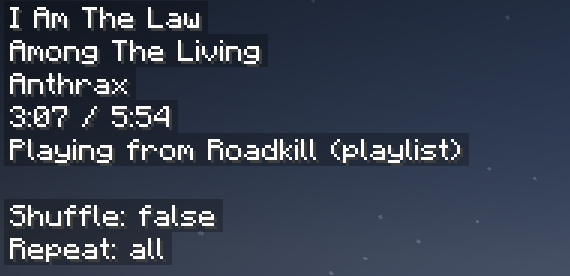
{sp_progress} / {sp_duration}
{{sp_context_name, "正在从 {sp_context_name} ({sp_context_type}) 播放"}}

随机播放: {sp_shuffle}
重复播放: {sp_repeat}

{{sp_message, "{sp_msg} {sp_msg_dur}"}}
=endif=
上述配置生成的 HUD 如下:
致谢: 衷心感谢 erruqie 的 Blockify 和 Jakob 的 CustomHud,他们的出色工作使这一切成为可能,没有他们就不可能有这个项目。
免责声明: 本项目与 Spotify、Blockify 或 CustomHud 无关,也未得到它们的认可。
关于更新的说明
我对 Minecraft 感到有些疲惫,更新项目的优先级也因此降低了。我在设计时考虑了向前兼容性,因此旧版项目很有可能在新版本的 MC 上正常运行。如果无法运行,而你确实想要更新版本,请在链接的 Discord 服务器上联系 Lightningtow,我会为你更新。
小贴士:如果你喜欢 Hudify 的播放控制按键绑定,并希望它们在整个电脑上都能使用,请查看 Microsoft PowerToys。你可以使用键盘管理器将未使用的键重新绑定为下一曲、上一曲和播放/暂停媒体。
Hudify - A Spotify integration for CustomHud
Display your Spotify info on your hud and control your music using ingame keybinds.
Requires MidnightLib and version 4.0+ of CustomHud. Please read the installation instructions below!
Installation
You'll need to create a Spotify developer app to use this mod.
Why? In short, because it's easier for everyone. Since Spotify's API ratelimits are per app, not per user,
if everyone has their own app, Hudify can poll the API much more frequently without worrying about hitting ratelimits.
This allows Hudify to display far more accurate info, with much less risk of getting desynchronized.
Note: Playback controls are locked behind a Spotify Premium subscription, which is out of my control.
The CustomHud variables work fine without a subscription.
Installation instructions:
- Create a Spotify app according to the "Create an App" section in Spotify's docs.
- Set your app name and description to anything you want
- Set your Redirect URI to
http://localhost:8001/callback.
- Get your Client ID from your newly created app
- Put your Client ID in Hudify's config via ModMenu, or by manually editing
.minecraft/config/hudify.json.
- Press a Hudify keybind to initialize, and that's it!. No need to request an access token like the docs prompt you to, because Hudify takes care of that for you.
To uninstall, also be sure to also disconnect the app from
This process is very easy, only takes ~5 minutes, and does not cost any money nor require a Premium subscription. If you're still not interested, I suggest you try the mod Blockify, which doesn't require this process.
See the GitHub page for a list of CustomHud variables added. This is how you display the info on your hud.
Example CustomHud Config
=if: sp_track=
{sp_track}
{sp_album}
{sp_artists}
{sp_progress} / {sp_duration}
{{sp_context_name, "Playing from {sp_context_name} ({sp_context_type})"}}

Shuffle: {sp_shuffle}
Repeat: {sp_repeat}

{{sp_message, "{sp_msg} {sp_msg_dur}"}}
=endif=
The config above produced this HUD:
Credit: A huge thank you to erruqie's Blockify and Jakob's CustomHud for their fantastic work, this wouldn't have been possible without them.
Disclaimer: This project is not affiliated with or endorsed by Spotify, Blockify, or CustomHud.
Note about updates
I've been getting burnt from Minecraft, and updating my projects has fallen lower on my priority list. I designed them with forward compatibility in mind, so there's a good chance the old project version will work on newer MC versions. If that doesn't work, and you really want an updated version, poke Lightningtow on the linked discord server, and I'll get it updated for you
Pro tip: if you like the Hudify playback control keybinds, and want them to work everywhere on your computer, check out Microsoft PowerToys. You can use Keyboard Manager to rebind unused keys to Next Track, Previous Track, and Play/Pause Media.


 模组

 模组

 模组

 模组
 模组
 模组

评论 0
登录后参与评分
还没有评论,来抢沙发吧