Hysk Tooltips 项目概述

- legendary-tooltips+Assembled-Legendary-Tooltips-resourcepacks 仅支持版本:26.2 1.20.1 Forge
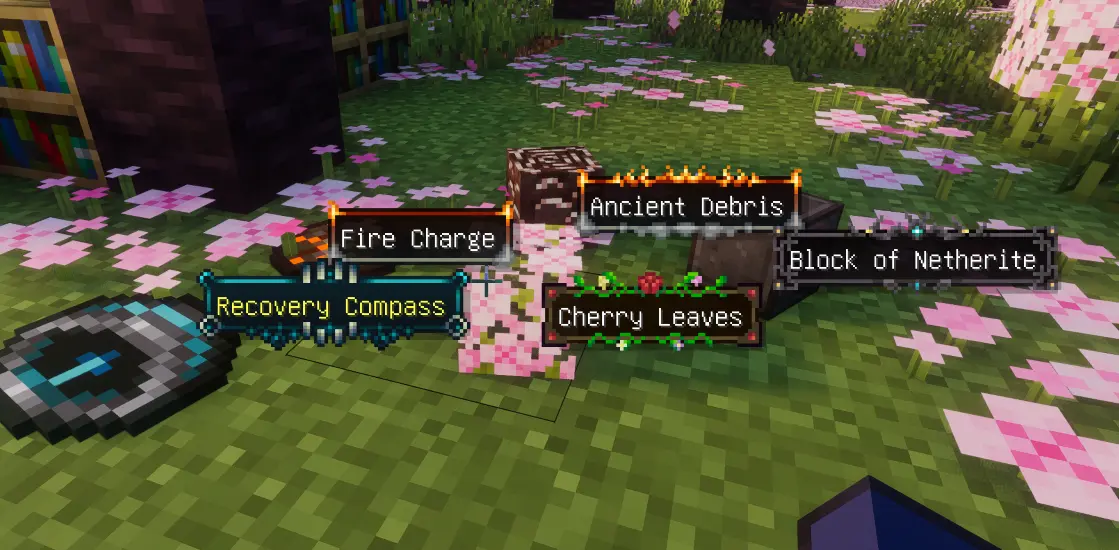
Hysk Tooltips 是一款 Fabric 客户端模组,当你注视地上的掉落物品时,会在屏幕中央显示原版物品提示框。它提供了广泛的自定义选项,包括位置偏移、锚点、显示延迟等,并能自动适配 Obscure Tooltips 和 Enhanced Tooltips 的华丽渲染风格。本模组在 Deepseek 的协助下开发,是 Qing Xin Heng Yue Time-Space Server 的公益模组。
- 制作者: YkinLing
- 辅助 AI: Deepseek
- QQ 群: 783492491(用于获取源代码)
项目结构
以下是该模组的所有源代码及相关配置文件的列表:
| 文件 |
描述 |
ModConfig.java |
使用 Cloth Config API 定义的配置类,包含所有可调整选项。 |
ModMenuIntegration.java |
将配置界面与 Mod Menu 集成,允许玩家通过 Mod Menu 打开配置界面。 |
ExampleMixin.java |
Mixin 示例类(实际上未使用),演示 Mixin 注入。 |
HudTooltipPicker.java |
核心逻辑类:负责投射射线以检测掉落物品、处理注视延迟、跟踪物品状态以及维护多物品模式。 |
HudTooltipRenderer.java |
实现 HudRenderCallback,根据当前模式(单物品/多物品/强制)渲染提示框,并自动检测是否安装了 Obscure Tooltips 以切换渲染风格。 |
Hysktooltips.java |
模组主入口点(ModInitializer),仅输出初始化日志。 |
HysktooltipsClient.java |
客户端初始化入口:注册配置、HUD 渲染回调、键位绑定(强制显示键)以及监听键位状态变化。 |
HysktooltipsDataGenerator.java |
数据生成入口(未使用)。 |
en_us.json |
英文语言文件。 |
zh_cn.json |
中文语言文件。 |
fabric.mod.json |
Fabric 模组元数据文件,定义模组 ID、版本、入口点、依赖项等。 |
hysk-tooltips.mixins.json |
Mixin 配置文件,声明所使用的 Mixin 类。 |
README_CN.md / README_EN.md |
中文和英文用户文档。 |
核心功能
- 基本显示:当玩家的准星指向一个掉落物品(
ItemEntity)时,物品提示框会显示在可配置的屏幕位置上。
- 位置自定义:通过
tooltipXOffset、tooltipYOffset 和 anchor 设置,你可以自由调整提示框相对于屏幕中心的偏移量和锚点。
- 注视延迟:启用
enableDelay 并设置 delayTimeMs 以防止提示框闪烁。
- 跟随模式:当
followEnabled 开启时,提示框会跟随屏幕上物品的移动,并且在移开视线后仍可停留一段时间(followDelayMs)。
- 多物品支持:启用
multiItemEnabled 可同时显示最多 5 个物品提示框,每个提示框独立管理其自身的注视延迟和消失延迟(multiItemDelayMs、multiItemDisappearDelayMs)。
- 超范围提示框:启用
superRangeEnabled 允许在潜行状态下注视远处的掉落物品(距离由 superRangeDistance 设置,默认为 128 格)。在强制模式下,距离限制也会被忽略。
- 避免重叠:启用
avoidOverlap 可在多物品模式下自动重新定位多个提示框(径向搜索),以防止它们重叠。
- 强制显示模式:按下配置的键(默认为左 Shift)可强制显示附近掉落物品的提示框。行为受
shiftEnabled 和 shiftRequiresTarget 控制,并且受 forceMaxItems(最接近视线的物品,默认 15 个)限制。
- 自动适配增强提示框模组:如果安装了 Obscure Tooltips 或 Enhanced Tooltips,提示框会自动使用它们的增强样式(渐变、动画、粒子效果等);否则,将回退到原版样式。
配置选项详解
ModConfig 类中的字段对应以下选项(可以直接在 config/hysk-tooltips.json 中编辑,或通过 Mod Menu 界面修改):
| 选项 |
类型 |
默认值 |
描述 |
enabled |
boolean |
true |
是否启用该模组。 |
tooltipYOffset |
int (-100~100) |
0 |
提示框的垂直偏移量(像素,正值向下移动)。 |
tooltipXOffset |
int (-100~100) |
0 |
提示框的水平偏移量(像素,正值向右移动)。 |
anchor |
enum |
TOP_LEFT |
提示框相对于屏幕中心的锚点(左上、右上、左下、右下)。 |
enableDelay |
boolean |
true |
是否启用注视延迟。 |
delayTimeMs |
int (0~2000) |
200 |
在单项模式下,注视物品后显示其提示框前需要等待的毫秒数。 |
followEnabled |
boolean |
true |
是否启用跟随模式。 |
followDelayMs |
int (0~2000) |
200 |
在跟随模式下,移开视线后提示框保持显示的时长(毫秒)。 |
multiItemEnabled |
boolean |
false |
是否启用多物品提示框(需先启用跟随模式)。 |
multiItemDelayMs |
int (0~2000) |
200 |
在多物品模式下,注视物品后显示其提示框前需要等待的毫秒数。 |
multiItemDisappearDelayMs |
int (0~10000) |
5000 |
在多物品模式下,移开视线后提示框保持显示的时长(毫秒)。 |
shiftEnabled |
boolean |
true |
是否启用 Shift 强制模式。 |
shiftRequiresTarget |
boolean |
true |
在强制模式下,按下 Shift 显示附近所有物品提示框前,是否必须先注视某个物品。 |
superRangeEnabled |
boolean |
false |
是否启用超范围提示框。 |
superRangeDistance |
int (16~256) |
128 |
在超范围模式下潜行时,可注视掉落物的最大距离(以方块为单位)。 |
avoidOverlap |
boolean |
false |
是否启用提示框重叠避免功能(仅限多物品模式)。 |
forceMaxItems |
int (2~50) |
15 |
强制模式下显示的最大掉落物数量,根据与视角方向的接近程度进行选择。 |
兼容性说明:提示框增强模组与多物品模式
Obscure Tooltips 多物品图标消失问题
症状
当同时启用 Hysk Tooltips 的多物品模式(multiItemEnabled = true)和 Obscure Tooltips 时,物品提示框中的某些图标(例如附魔图标、耐久度条)可能会消失,或者动画(如粒子效果)无法正常工作。然而,在单项模式下,所有图标和动画均能正常显示。
原因分析
Obscure Tooltips 内部为当前渲染的提示框维护一个 TooltipState 对象,其中包含动画时间(timeInSeconds)等其他状态信息。该状态会随时间累积以实现平滑动画(例如旋转图标、粒子发射)。关键点在于:只要连续渲染相同的物品堆叠(ItemStack),就会复用同一个 TooltipState,从而使动画时间持续增加。
- 单项模式:Hysk Tooltips 每帧仅渲染一个物品(当前锁定的掉落物)。由于物品不发生变化,Obscure Tooltips 始终看到相同的
ItemStack,因此复用相同的 TooltipState,动画时间累积,图标显示正常。
- 多物品模式:Hysk Tooltips 每帧渲染多个不同的物品。对于每个物品,Obscure Tooltips 都会创建一个新的
TooltipState(因为物品不同),导致每个物品的动画时间每帧都重置为零。这会导致图标“消失”或动画无法正常播放(例如粒子仅闪烁一帧)。
结论
在不修改 Obscure Tooltips 本身的情况下,Hysk Tooltips 无法完美支持 Obscure Tooltips 的多物品模式。Obscure Tooltips 本质上是为单提示框渲染设计的;其状态复用依赖于物品相同,且缺乏同时管理多个独立提示框状态的能力。要完全支持多物品模式,必须对 Obscure Tooltips 进行修改(例如,为每个物品维护一个 TooltipState 映射表)。作为调用方,Hysk Tooltips 无法绕过这一限制。
建议
- 如果您希望使用 Obscure Tooltips 的全部效果,建议禁用多物品模式(
multiItemEnabled = false)或仅使用单项模式。
- 如果您仍想体验多物品提示框,可以考虑暂时禁用 Obscure Tooltips,或者接受部分图标缺失的情况(提示框文本仍将正确显示)。
Enhanced Tooltips 支持
Hysk Tooltips 在使用 Enhanced Tooltips 时完全支持多物品模式。Enhanced Tooltips 设计时就具备正确渲染多个独立提示框的支持;它为每个物品堆叠维护单独的状态,即使同时出现多个提示框,也能确保平滑的动画、图标和效果正确显示。
您可以安全地启用 multiItemEnabled = true 并与 Enhanced Tooltips 配合使用,享受完整的视觉增强效果,而不会出现图标消失或动画中断的问题。这使得 Enhanced Tooltips 成为希望将提示框增强模组与 Hysk Tooltips 多物品功能一起使用的玩家的首选。
依赖项
- 必需:Minecraft 1.21.11,Fabric Loader >=0.18.4,Fabric API。
- 可选:
- Cloth Config API:提供配置界面。
- Mod Menu:允许在游戏中轻松访问配置界面。
- Obscure Tooltips:增强提示框渲染样式(注意与多物品模式的兼容性问题)。
- Enhanced Tooltips:增强提示框渲染样式(与多物品模式完全兼容)。
许可证
BSD 2
Hysk Tooltips Project Overview
- legendary-tooltips+Assembled-Legendary-Tooltips-resourcepacks Supported version only: 26.2 1.20.1 Forge
Hysk Tooltips is a Fabric client-side mod that displays the vanilla item tooltip near the center of the screen when you look at a dropped item on the ground. It offers extensive customization options including position offset, anchor point, display delay, and automatically adapts to the fancy rendering styles of Obscure Tooltips and Enhanced Tooltips. This mod was developed with the assistance of Deepseek and is a public welfare mod for the Qing Xin Heng Yue Time-Space Server.
- Producer: YkinLing
- Auxiliary AI: Deepseek
- QQ Group: 783492491 (For obtaining the source code)
Project Structure
Below is a list of all source code and related configuration files of this mod:
| File |
Description |
ModConfig.java |
Configuration class defined using Cloth Config API, containing all adjustable options. |
ModMenuIntegration.java |
Integrates the config screen with Mod Menu, allowing players to open the configuration screen via Mod Menu. |
ExampleMixin.java |
Example Mixin class (not actually used), demonstrating Mixin injection. |
HudTooltipPicker.java |
Core logic class: responsible for raycasting dropped items, handling look delay, tracking item states, and maintaining multi-item mode. |
HudTooltipRenderer.java |
Implements HudRenderCallback, renders tooltips according to current mode (single/multi/forced), and automatically detects the presence of Obscure Tooltips to switch rendering styles. |
Hysktooltips.java |
Mod main entry point (ModInitializer), only outputs initialization logs. |
HysktooltipsClient.java |
Client initialization entry: registers configuration, HUD rendering callback, key binding (force show key), and listens for key state changes. |
HysktooltipsDataGenerator.java |
Data generation entry (unused). |
en_us.json |
English language file. |
zh_cn.json |
Chinese language file. |
fabric.mod.json |
Fabric mod metadata file, defining mod ID, version, entrypoints, dependencies, etc. |
hysk-tooltips.mixins.json |
Mixin configuration file, declaring the Mixin classes used. |
README_CN.md / README_EN.md |
User documentation in Chinese and English. |
Core Features
- Basic Display: When the player's crosshair points at a dropped item (
ItemEntity), the item tooltip is shown at a configurable screen position.
- Position Customization: Via
tooltipXOffset, tooltipYOffset and anchor settings, you can freely adjust the tooltip's offset and anchor relative to the screen center.
- Look Delay: Enable
enableDelay and set delayTimeMs to prevent the tooltip from flickering.
- Follow Mode: When
followEnabled is on, the tooltip follows the item's movement on screen and can linger after looking away (followDelayMs).
- Multi-Item Support: Enable
multiItemEnabled to display up to 5 item tooltips simultaneously, each independently managing its own look delay and disappear delay (multiItemDelayMs, multiItemDisappearDelayMs).
- Super Range Tooltips: Enable
superRangeEnabled to allow looking at distant dropped items while sneaking (distance set by superRangeDistance, default 128 blocks). In force mode, distance limit is also ignored.
- Avoid Overlap: Enable
avoidOverlap to automatically reposition multiple tooltips (radial search) to prevent overlapping in multi-item mode.
- Force Display Mode: Press the configured key (default Left Shift) to forcibly show tooltips for nearby dropped items. Behavior controlled by
shiftEnabled and shiftRequiresTarget, and limited by forceMaxItems (closest to your view, default 15).
- Automatic Tooltip Enhancement Mods Adaptation: If Obscure Tooltips or Enhanced Tooltips is installed, the tooltips automatically use their enhanced styles (gradients, animations, particles, etc.); otherwise, they fall back to the vanilla style.
Configuration Options Explained
The fields in the ModConfig class correspond to the following options (can be edited directly in config/hysk-tooltips.json or via the Mod Menu interface):
| Option |
Type |
Default |
Description |
enabled |
boolean |
true |
Whether the mod is enabled. |
tooltipYOffset |
int (-100~100) |
0 |
Vertical offset of the tooltip (pixels, positive moves down). |
tooltipXOffset |
int (-100~100) |
0 |
Horizontal offset of the tooltip (pixels, positive moves right). |
anchor |
enum |
TOP_LEFT |
Anchor point of the tooltip relative to screen center (Top Left, Top Right, Bottom Left, Bottom Right). |
enableDelay |
boolean |
true |
Whether to enable look delay. |
delayTimeMs |
int (0~2000) |
200 |
In single-item mode, how many milliseconds to wait after looking at an item before showing its tooltip. |
followEnabled |
boolean |
true |
Whether to enable follow mode. |
followDelayMs |
int (0~2000) |
200 |
In follow mode, how long the tooltip remains after looking away (milliseconds). |
multiItemEnabled |
boolean |
false |
Whether to enable multi-item tooltips (requires follow mode to be enabled). |
multiItemDelayMs |
int (0~2000) |
200 |
In multi-item mode, how many milliseconds to wait after looking at an item before showing its tooltip. |
multiItemDisappearDelayMs |
int (0~10000) |
5000 |
In multi-item mode, how long the tooltip remains after looking away (milliseconds). |
shiftEnabled |
boolean |
true |
Whether to enable Shift force mode. |
shiftRequiresTarget |
boolean |
true |
In force mode, whether you must first look at an item before pressing Shift to show all nearby item tooltips. |
superRangeEnabled |
boolean |
false |
Whether to enable super range tooltips. |
superRangeDistance |
int (16~256) |
128 |
Maximum distance (in blocks) to look at dropped items while sneaking in super range mode. |
avoidOverlap |
boolean |
false |
Whether to enable tooltip overlap avoidance (multi-item mode only). |
forceMaxItems |
int (2~50) |
15 |
Maximum number of dropped items shown in force mode, selected by proximity to view direction. |
Compatibility Note: Tooltip Enhancement Mods and Multi-Item Mode
Obscure Tooltips Multi-Item Icon Disappearance Issue
Symptom
When both Hysk Tooltips' multi-item mode (multiItemEnabled = true) and Obscure Tooltips are enabled, some icons in the item tooltips (e.g., enchantment icons, durability bars) may disappear, or animations (like particles) may not work correctly. However, in single-item mode, all icons and animations work normally.
Cause Analysis
Obscure Tooltips internally maintains a TooltipState object for the currently rendered tooltip, which includes animation time (timeInSeconds) and other state information. This state accumulates over time to enable smooth animations (e.g., rotating icons, particle emission). The key point is: as long as the same item stack (ItemStack) is rendered consecutively, the same TooltipState is reused, allowing the animation time to increase continuously.
- Single-item mode: Hysk Tooltips renders only one item per frame (the currently targeted dropped item). Since the item does not change, Obscure Tooltips always sees the same
ItemStack, thus the same TooltipState is reused, animation time accumulates, and icons display normally.
- Multi-item mode: Hysk Tooltips renders multiple different items per frame. For each item, Obscure Tooltips creates a new
TooltipState (because the items are different), causing each item's animation time to reset to zero every frame. This results in icons "disappearing" or animations failing to play properly (e.g., particles only flicker for one frame).
Conclusion
Hysk Tooltips cannot perfectly support multi-item mode with Obscure Tooltips without modifying Obscure Tooltips itself. Obscure Tooltips is inherently designed for single-tooltip rendering; its state reuse relies on the item being the same, and it lacks the ability to manage multiple independent tooltip states simultaneously. To fully support multi-item mode, Obscure Tooltips would need to be changed (e.g., maintain a map of TooltipState per item). As a caller, Hysk Tooltips cannot bypass this limitation.
Recommendations
- If you wish to use the full effects of Obscure Tooltips, it is recommended to disable multi-item mode (
multiItemEnabled = false) or use only single-item mode.
- If you still want to experience multi-item tooltips, you may consider temporarily disabling Obscure Tooltips, or accept that some icons will be missing (the tooltip text will still display correctly).
Enhanced Tooltips Support
Hysk Tooltips fully supports multi-item mode when used with Enhanced Tooltips. Enhanced Tooltips is designed with proper support for rendering multiple independent tooltips simultaneously; it maintains separate state for each item stack, allowing smooth animations, icons, and effects to display correctly even when several tooltips appear at once.
You can safely enable multiItemEnabled = true alongside Enhanced Tooltips and enjoy the full visual enhancement without any icon disappearance or animation interruption. This makes Enhanced Tooltips the recommended choice for players who wish to use a tooltip enhancement mod together with Hysk Tooltips' multi-item features.
Dependencies
- Required: Minecraft 1.21.11, Fabric Loader >=0.18.4, Fabric API.
- Optional:
- Cloth Config API: Provides the configuration screen.
- Mod Menu: Allows easy access to the configuration screen in-game.
- Obscure Tooltips: Enhances tooltip rendering styles (note the compatibility issue with multi-item mode).
- Enhanced Tooltips: Enhances tooltip rendering styles (fully compatible with multi-item mode).
License
BSD 2


 模组

 模组

 模组
 模组

 模组
 模组
评论 0
登录后参与评分
还没有评论,来抢沙发吧