
交互管理器
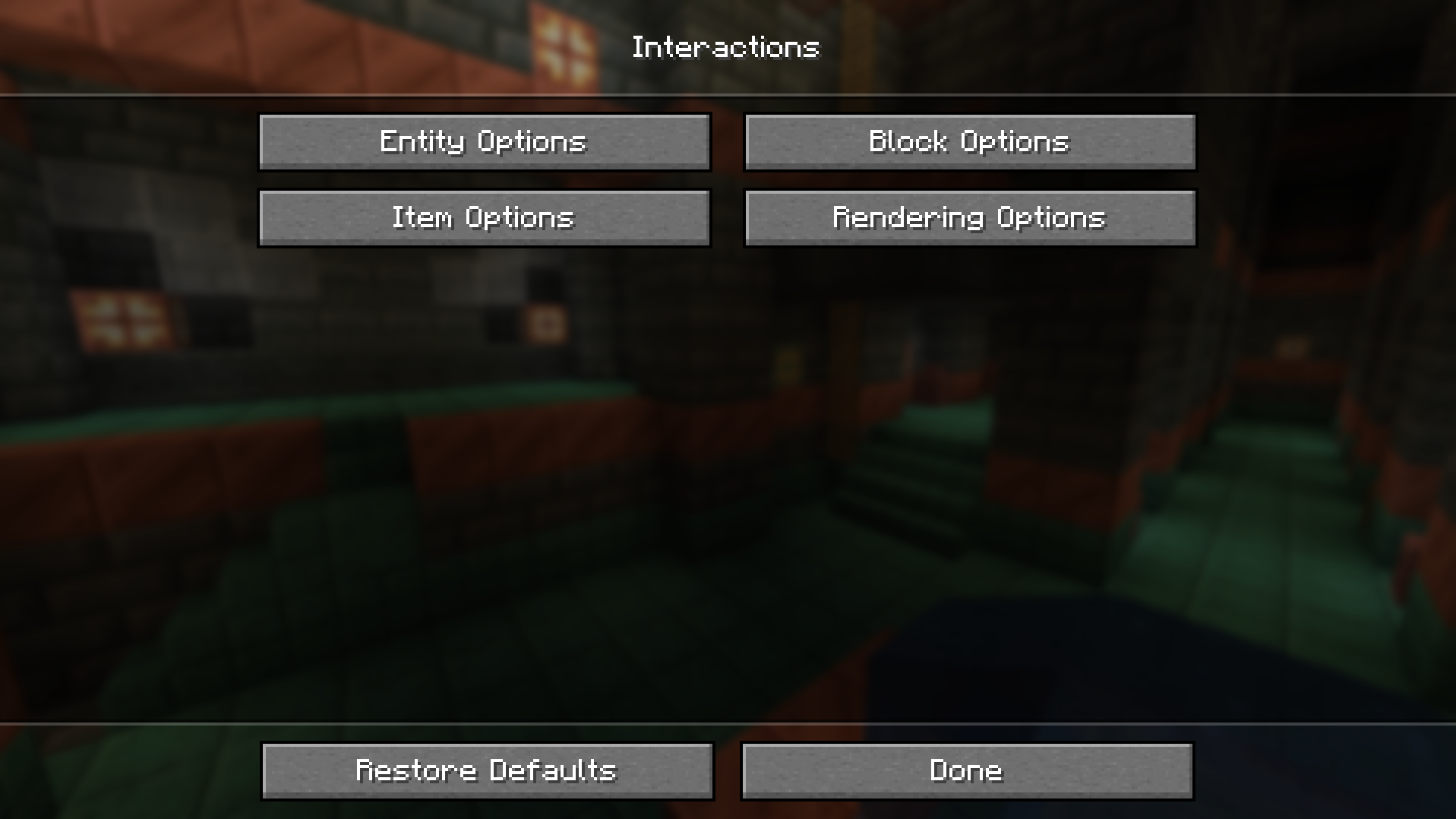
Interaction Manager 是一个客户端模组,允许你切换某些方块、物品和生物之间的交互行为。 本模组旨在简化玩家体验,因为一些原版功能可能会让人感到繁琐或多余。 默认情况下,会保留原版的行为逻辑。
实体选项
- 攻击玩家
- 攻击敌对生物
- 攻击被动生物
- 攻击村民
- 攻击载具
- 攻击宠物
- 横扫之刃保护
- 与生物交互
- 村民交易
- 实体禁止列表(被禁止列表中的实体无法被攻击)
方块选项
- 破坏方块
- 放置方块
- 打开(方块)GUI
- 开门
- 替换方块(使用副手物品)
- 方块禁止列表(被禁止列表中的方块无法被破坏)
物品选项
- 铲子生成路径
- 斧头去皮
- 允许进食
- 允许饮用药水
- 丢弃物品
- 锁定快捷栏
- 物品交互
- 搜索并选择物品
- 切换在方块上或“空中”(即非方块位置)进行交互的状态
渲染选项/其他
- 绘制受保护的生物
- 绘制受保护的方块
- 添加 (
Interactions) 按钮 - 在模组选项中渲染物品
- 动画显示方块替换
- 绘制被禁止的方块放置
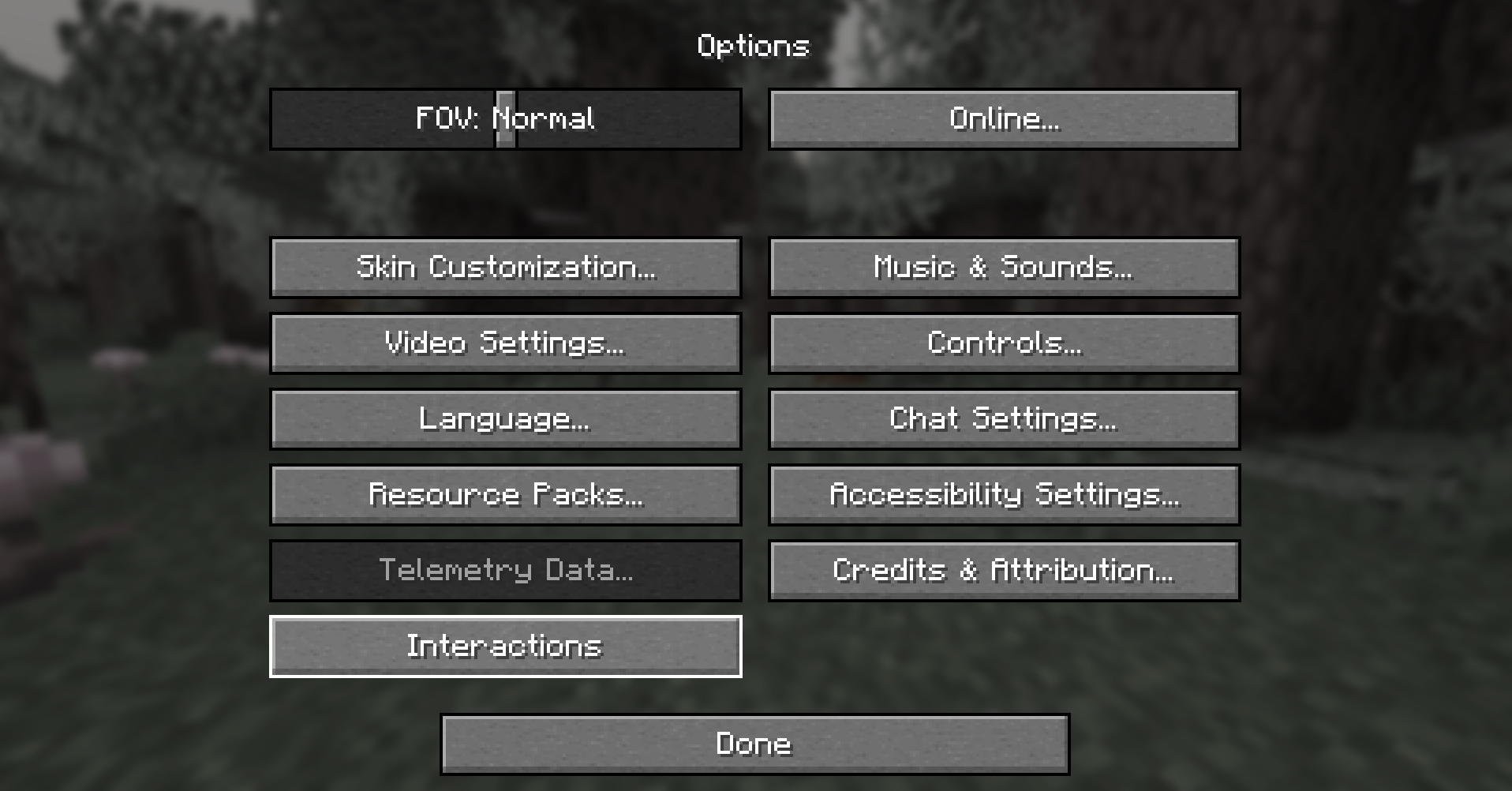
这些选项可以在游戏内的 Interactions 菜单中轻松找到。
要访问它们,请前往 Options>Interactions。
如果安装了 Mod Menu,默认情况下 Interactions 按钮是隐藏的。设置可以通过 Mod Menu 访问。
如果在安装了 Mod Menu 的情况下想显示 Interacions 按钮,请参阅 配置部分。
显示图片
配置
展开配置信息
如果你不打算更改更高级的选项,可以跳过本节。
与玩家行为相关的选项(方块和生物交互)可以在游戏内选项菜单中访问。
配置文件允许进行更精细的调整,但并非必须编辑。
它位于 config/interactionmanager.json。
它以 JSON 格式存储,易于阅读和修改。
目前,所有配置选项都可以通过游戏内菜单访问。
查看更新日志
建议和问题
如果你有任何建议或遇到任何问题,请在 问题追踪器 上创建一个新的工单。如果问题是漏洞或崩溃,请附带游戏日志以及如何复现问题的描述。
致谢与归属
特别感谢 EvarikaArkana 提供了大量反馈和建议。
查看 他们的模组,它与 Interaction Manager 完全兼容。
配置灵感来源于 Mod Menu
搜索功能灵感来源于 JustEnoughItems 和 Alessandro Bahgat Shehata
Interaction Manager
Interaction Manager is a client side mod allowing you to toggle certain block, item and mob interactions. This mod aims to streamline the player experience, as some may find many vanilla features annoying or unnecessary. By default, vanilla behavior is preserved.
Entity Options
- Attacking players
- Attacking hostile mobs
- Attacking passive mobs
- Attacking villagers
- Attacking vehicles
- Attacking pets
- Sweeping-edge protection
- Interacting with mobs
- Villager trading
- Entity deny list (Deny listed entities can't be attacked)
Block Options
- Breaking blocks
- Placing blocks
- Opening (block) GUIs
- Opening doors
- Replacing blocks (with offhand)
- Block deny list (Deny listed blocks can't be broken)
Item Options
- Shovels creating paths
- Axes striping
- Allow eating
- Allow drinking potions
- Dropping items
- Locking hot bar
- Item interactions
- Search for an item and select it
- Toggle interacting with it on blocks or 'in the air,' as in not on blocks
Rendering Options/Misc
- Drawing Protected Mobs
- Draw Protected Blocks
- Add (
Interactions) Button - Render items, in mod options
- Animate block replace
- Draw denied block placement
These options are easily found in the in game Interactions menu.
To access them, go to Options>Interactions
If Mod Menu is installed, by default the Interactions button is hidden. And the settings can be accessed using Mod Menu.
To show the Interacions button if Mod Menu is installed see the Config Section.
Show Image
Config
Expand Configuration Information
If you don't intend to change more advanced options, feel free to skip this section.
Options related to player behavior (block and mob interactions) are accessible in the in game options menu.
The configuration file allows for more fine-tuning and isn't strictly necessary to edit.
It's located in config/interactionmanager.json.
It's stored in JSON, which is straightforward to read and modify.
Currently, all config options are accessible through the in-game menu.
See Change Log
Suggestions and Issues
If you have any suggestions or run into some issues please create a new ticket on the Issue Tracker. If the issue is a bug or a crash please include game logs alongside a description of how to reproduce the issue.
Credits and Attribution
Special thanks to EvarikaArkana for a lot of feedback and ideas.
Checkout their Mod, it's fully compatible with Interaction Manager.
Config inspired by Mod Menu
Search inspired by JustEnoughItems and Alessandro Bahgat Shehata

下载 Interaction Manager
需要联机服务器吗?
稳定流畅、一键部署,几分钟即可和朋友联机开服
最低仅需 8 元/月 即可畅快联机
下载 Interaction Manager
下载 Interaction Manager
下载 Interaction Manager
下载 Interaction Manager
下载 Interaction Manager
下载 Interaction Manager
下载 Interaction Manager
下载 Interaction Manager
下载 Interaction Manager
暂无更新日志
关于这个资源的讨论、问题反馈与使用心得
还没有讨论,来发第一帖吧
你是这个资源的作者?登录后可认领此资源。
相似资源
 模组

显示你正在注视的方块的信息。(适用于 Minecraft 1.16+ 的 Hwyla/Waila 分支)
 模组

查看物品与配方
 模组
在游戏画面角落显示附近世界地形、玩家、生物和实体的地图。可创建路径点,帮助你找到标记过的位置。
 模组
使用 JavaScript 编辑配方、添加自定义物品、编写世界事件!
 模组
添加区块认领和玩家组队功能,并与 Xaero's Minimap 和 World Map 集成
 模组
添加全屏世界地图,显示你在世界中已探索的区域。与 Xaero's Minimap 搭配使用效果极佳。
评论 0
登录后参与评分
还没有评论,来抢沙发吧