
☕ 支持我的工作
如果您想支持我以及我的项目,欢迎请我喝杯咖啡!
1.1.3 以上版本的图形界面 (GUI)
- 首先,您需要在设置中为 GUI 设置一个按键绑定,然后打开它。
- 请注意,GUI 是在 1.1.3 版本中添加的,低于该版本仍使用命令系统。
如何设置
- 打开 Minecraft 并导航至 设置 > 控制 > 按键绑定,或者打开 GUI 并从中切换。
- 搜索 InventoryCleaner 并设置一个按键绑定以启用或禁用模组。
- 使用分配的按键绑定来切换模组的开关;只有当模组处于开启状态时才会执行投掷操作。
Inventory Cleaner
Inventory Cleaner 是一个有用的模组,可自动化从您的物品栏中丢弃垃圾和无用物品的任务。它提供了一种便捷的解决方案,以保持物品栏的整洁和有序。
- 您可以通过进入 选项/控制/按键绑定 来开启或关闭此模组。
功能
- 可切换的清理功能: 启用或禁用 InventoryCleaner 以清理您的物品栏。
- 自动打开物品栏: 在投掷物品时自动打开物品栏,这更适合多人服务器。(适用于 1.1.3 以上版本)
- 添加物品到投掷列表: 使用命令将物品添加到 InventoryCleaner 激活时将投掷的物品列表中。
- 从投掷列表中移除物品: 使用命令从投掷列表中移除物品。
命令
- /ic additem <item> (用于向投掷列表添加物品)对于包含空格的项目(如 Iron sword),您应使用下划线代替(iron_sword)。
- /ic delitem <item> (用于从投掷列表中删除物品)
- /ic lockslot
(锁定某个槽位,防止模组投掷该槽位中的物品) - /ic unlockslot
(解锁被锁定的槽位) - /ic list (列出投掷列表中的所有物品以及所有被锁定的槽位)
- /ic config save <name> (将当前的投掷列表和锁定槽位保存为具有指定名称的配置)
- /ic config load <name> (加载具有指定名称的已保存配置)
- /ic delay seconds <秒数> (设置投掷物品之间的延迟时间)
- /ic mode WHITELIST:不会投掷列表中的物品。
- /ic mode BLACKLIST:会投掷列表中的物品。
配置
- 模组使用配置文件 (inventorycleaner.properties) 来存储要投掷的物品列表,该文件位于 config 文件夹中。
贡献
欢迎提交 Issue 或 Pull Request 以修复错误或改进模组。
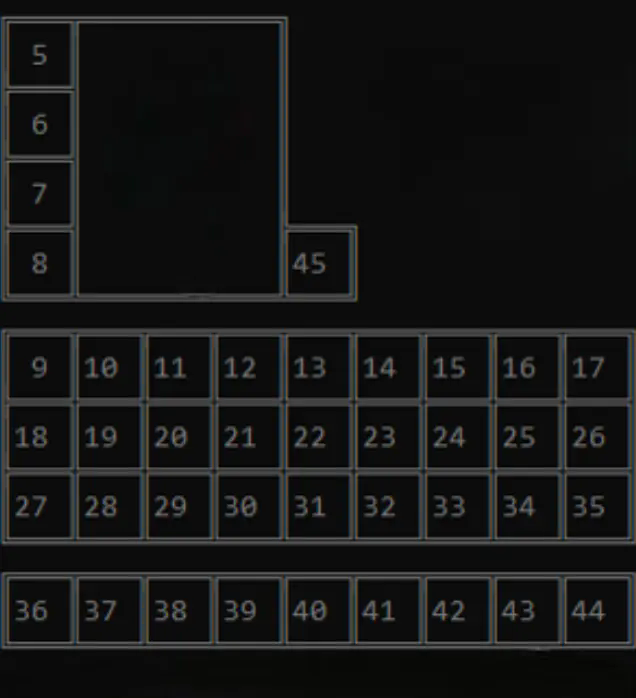
以下是槽位 ID 说明
☕ Support My Work
If you would like to support me and my projects, feel free to buy me a coffee!
Gui for versions above 1.1.3
- First u will need to set a keybind in the settings for the gui then open it
- Note that the gui was added in 1.1.3 versions below still use command system
How to set up
- Open Minecraft and navigate to Settings > Controls > Key Bindings or open the gui and toggle it from there.
- Search for InventoryCleaner and set a keybind to toggle the mod on and off.
- Use the assigned keybind to toggle the mod on it will only throw if the mod is on
Inventory Cleaner
Inventory Cleaner is a useful mod that automates the task of throwing away junk and useless items from your inventory. It provides a convenient solution for keeping your inventory clean and organized.
- You can turn the mod on and off by going in options/controls/keybinds.
Features
-
Toggleable Cleaning: Enable or disable the InventoryCleaner to clean your inventory.
-
Inventory open Will automatically open the inventory when throwing items better for multiplayer servers. version above 1.1.3
-
Add Items to Throw List: Use commands to add items to the list of items that will be thrown when the InventoryCleaner is active.
-
Remove Items from Throw List Remove items from the throw list using commands.
Commands
- /ic additem <item> (for adding an item to throw list) for items with spaces like Iron sword you should use _ (iron_sword).
- /ic delitem <item> (for deleting items from throw list)
- /ic lockslot
(to lock a slot so it wont throw the item from that slot) - /ic unlockslot
(to unlock the locked slot) - /ic list (lists all items in the throw list and all locked slots)
- /ic config save <name> (saves the current throw list and locked slots as a configuration with the given name)
- /ic config load <name> (loads a saved configuration with the given name)
- /ic delay seconds < (the delay betwen items to throw)
- /ic mode WHITELIST: it wont throw the items in the list.
- /ic mode BLACKLSIT: it will throw the items in the list.
Configuration
- The mod uses a configuration file (inventorycleaner.properties) to store the list of items to throw which can be found in the config folder.
Contributing
Feel free to open issues or pull requests for bug fixes or improvements.
Here are the slot ids

下载 InventoryCleaner
下载 InventoryCleaner
下载 InventoryCleaner
需要联机服务器吗?
稳定流畅、一键部署,几分钟即可和朋友联机开服
最低仅需 8 元/月 即可畅快联机
下载 InventoryCleaner
需要联机服务器吗?
稳定流畅、一键部署,几分钟即可和朋友联机开服
最低仅需 8 元/月 即可畅快联机
下载 InventoryCleaner
需要联机服务器吗?
稳定流畅、一键部署,几分钟即可和朋友联机开服
最低仅需 8 元/月 即可畅快联机
下载 InventoryCleaner
需要联机服务器吗?
稳定流畅、一键部署,几分钟即可和朋友联机开服
最低仅需 8 元/月 即可畅快联机
下载 InventoryCleaner
下载 InventoryCleaner
需要联机服务器吗?
稳定流畅、一键部署,几分钟即可和朋友联机开服
最低仅需 8 元/月 即可畅快联机
下载 InventoryCleaner
需要联机服务器吗?
稳定流畅、一键部署,几分钟即可和朋友联机开服
最低仅需 8 元/月 即可畅快联机
下载 InventoryCleaner
需要联机服务器吗?
稳定流畅、一键部署,几分钟即可和朋友联机开服
最低仅需 8 元/月 即可畅快联机
- 更新至 26.3
关于这个资源的讨论、问题反馈与使用心得
还没有讨论,来发第一帖吧
你是这个资源的作者?登录后可认领此资源。
相似资源
 模组

可定制的鞘翅模组,支持装饰纹饰、旗帜图案等更多功能!
 模组

一个用于收集生物掉落物的多区块模组。
 模组

显示你正在注视的方块的信息。(适用于 Minecraft 1.16+ 的 Hwyla/Waila 分支)
 模组
使用 JavaScript 编辑配方、添加自定义物品、编写世界事件!
 模组

查看物品与配方
 模组
在游戏画面角落显示附近世界地形、玩家、生物和实体的地图。可创建路径点,帮助你找到标记过的位置。
评论 0
登录后参与评分
还没有评论,来抢沙发吧