
InvSearch - Minecraft 储物搜索
在耐心耗尽之前,找到你基地里的任何物品。
InvSearch 是一款完全基于客户端的 Minecraft 储物搜索模组,支持 Fabric 和 NeoForge。它会对你的箱子进行索引、分组存储的物品、显示每个结果的位置,并帮助你直接走向正确的容器。它在单人游戏和多玩家服务器上均可运行,无需服务器安装任何内容。它包含一个游戏内储物 GUI 和一个由 Minecraft 直接托管的嵌入式 Web 仪表板,因此你可以在不运行单独 Web 应用程序的情况下搜索你的储物箱。
功能介绍
大型基地很有趣,直到每个箱子都变成神秘盒子。InvSearch 将你的储物室变成一个可搜索的库存网络。打开基地周围的储物箱,让模组构建其本地客户端索引,然后通过物品名称、附魔或组件数据进行搜索,查看所有物品的存储位置。
储物仪表板
嵌入式仪表板显示分组的存储物品、物品数量、排序控件以及当前索引的箱子总数。你可以按字母顺序或数量对存储物品进行排序,然后选择一个物品来检查其位置。
游戏内储物 GUI
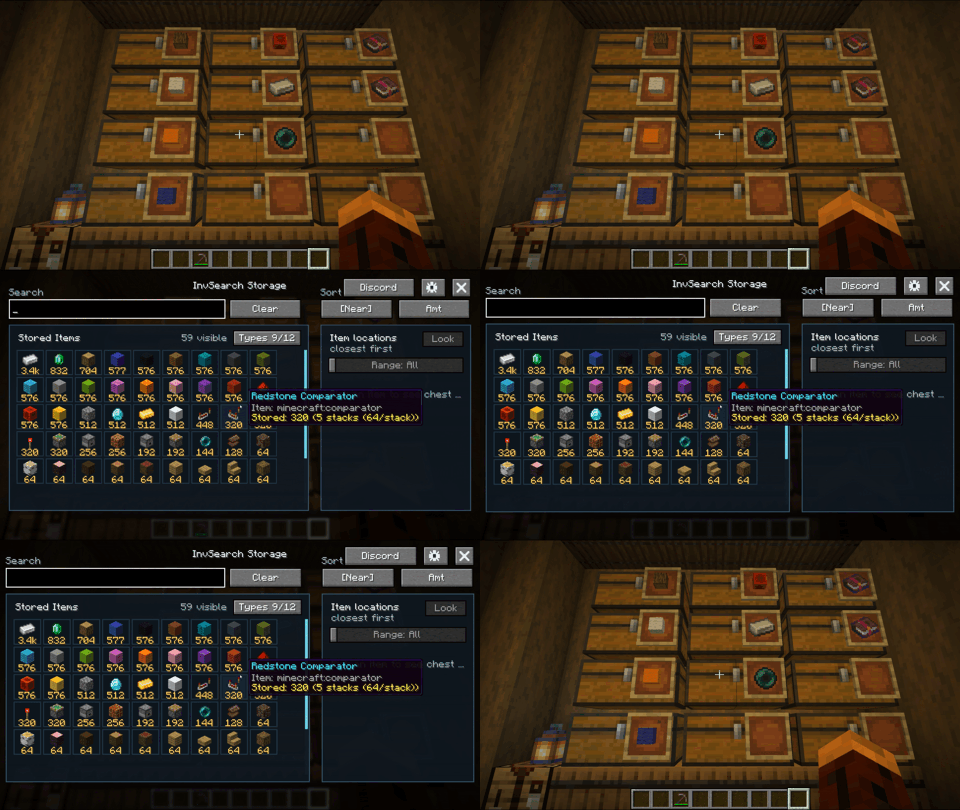
InvSearch 还包含一个 Minecraft 客户端 GUI,让你无需退出游戏即可浏览储物箱。使用默认的 I 热键或 /InvS gui 命令打开它,然后搜索物品、点击结果、检查箱子位置、使用定位、调整设置,并直接从模组界面打开社区 Discord。
在搜索框中输入仍然可以执行广泛搜索。点击存储的物品会切换到精确物品高亮显示,因此搜索 stone 可以显示所有匹配的存储物品,然后点击 Stone 只会高亮实际包含 Stone 的箱子。当相关时,附魔和基于组件的变体保持分离。
GUI 会在你重新打开时记住活动的搜索或选定的物品。设置菜单还包括“存储物品”范围滑块,这样当你想要查看储物箱的本地视图时,存储物品网格可以仅显示来自玩家附近索引箱子的物品。
(
精确箱子位置
选择物品会打开其位置列表。InvSearch 显示箱子位置、与玩家的距离、存储的数量(如果相关则显示附魔详情),以及针对该箱子的“定位”操作。
位置面板包括用于限制可见位置的范围滑块、世界内的高亮显示,以及按距离划分的定位条标记。“Look”按钮会将你的玩家转向所选目标,使其更容易被发现。
高亮显示与定位条
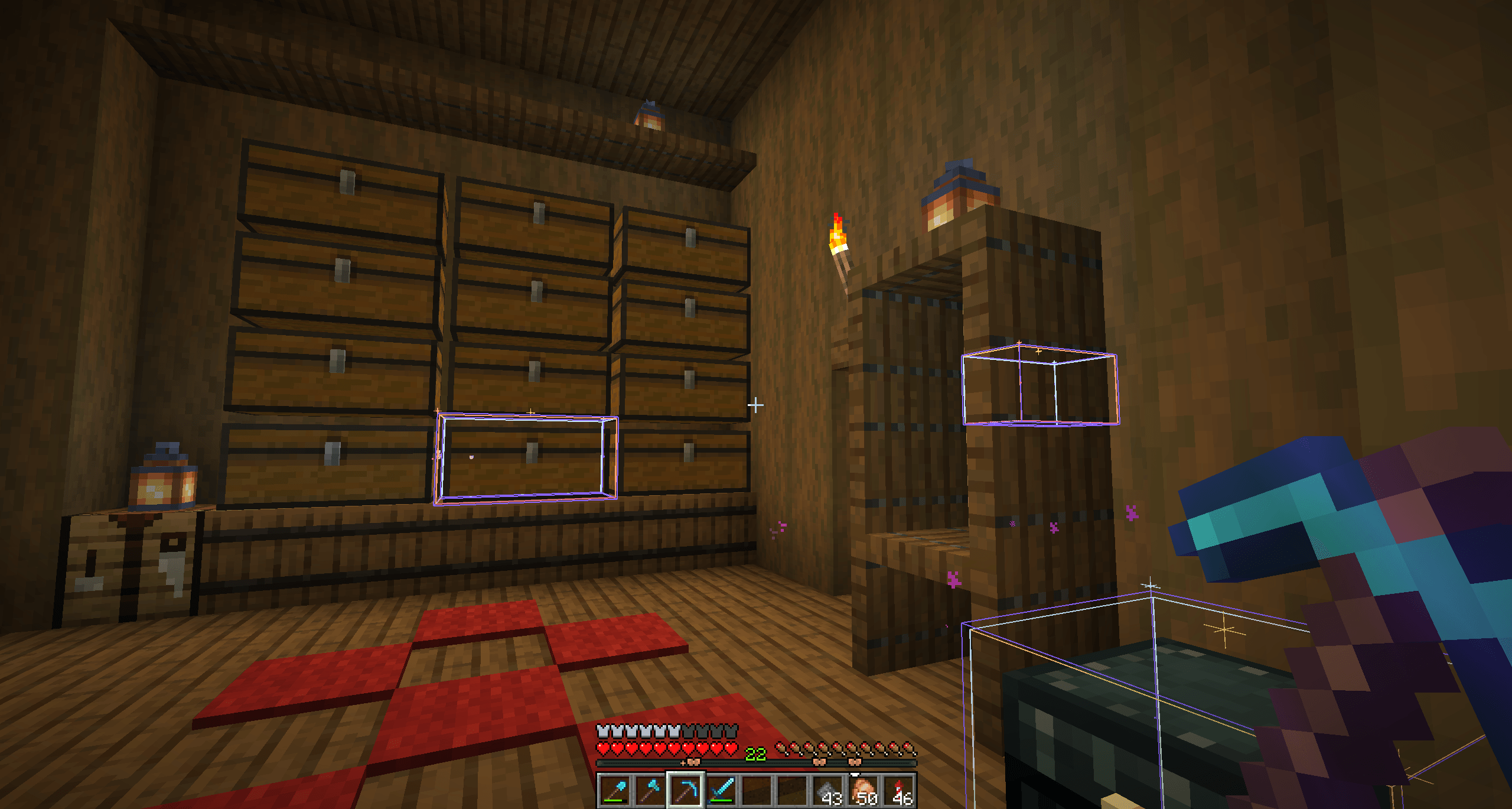
搜索结果可以在世界内高亮显示匹配的箱子。匹配的箱子也可以出现在 Minecraft 的定位条上,帮助你在远处也能找到储物箱。“Locate”聚焦于选定的箱子,而精确物品和变体选择可防止广泛搜索点亮无关的箱子。
主要特性
- 完全基于客户端,无需安装服务器端
- 适用于单人和多玩家服务器
- 支持 Fabric 和 NeoForge
- 游戏内储物 GUI
- 由 Minecraft 托管的嵌入式 Web 仪表板
- 分组的存储物品列表及物品数量
- “附近的存储物品”范围过滤器
- 精确的箱子位置列表
- 从点击的存储物品实现的精确物品和变体箱子高亮
- 世界内箱子高亮
- Minecraft 定位条标记
- 用于高亮和标记的位置范围滑块
- 用于选定箱子位置的“注视目标”按钮
- 按距离和数量排序
- 感知附魔的工具变体
- 持久化的游戏内 GUI 搜索状态
/InvS命令别名- 默认
I热键打开储物 GUI - 默认
Backspace清除搜索热键
工作原理
- 打开基地周围的储物箱,以便 InvSearch 构建其本地客户端索引。
- 从游戏内 GUI、仪表板、命令或热键进行搜索。
- 点击物品以获取精确物品的箱子高亮,然后在需要时使用范围控件缩小结果范围。
- 跟随高亮显示、定位条标记、距离读数、“定位”操作或“注视目标”按钮前往正确的箱子。
命令
/InvS gui打开游戏内储物 GUI。/InvS search dirt搜索匹配的存储物品。/InvS search dirt!填充搜索栏并使用精确/最接近结果的后缀行为。/InvS search clear清除当前搜索。/InvS materials highlight高亮包含当前 StrutrAape 建造所需材料的箱子。/InvS materials clear清除所需材料的箱子高亮。
热键
默认情况下,I 打开游戏内储物 GUI。Backspace 清除搜索。两者都在 Minecraft 的按键绑定设置中归入 InvSearch 组。
社区
InvSearch 在 Web UI 仪表板和游戏内 GUI 中包含用于 Discord 的社区链接。
致谢
InvSearch 由 Masteraapjes (AapeWorks) 制作。
InvSearch - Minecraft storage search
Find any item in your base before your patience despawns.
InvSearch is a fully client-sided Minecraft storage search mod for Fabric and NeoForge that indexes your chests, groups stored items, shows where every result is located, and helps you walk straight to the right container. It works in singleplayer and on multiplayer servers without needing the server to install anything. It includes an in-game storage GUI and an embedded web dashboard hosted directly by Minecraft, so you can search your storage without running a separate web app.
What It Does
Large bases are fun until every chest becomes a mystery box. InvSearch turns your storage room into a searchable inventory network. Open storage around your base, let the mod build its local client-side index, then search by item name, enchantment, or component data to see where everything is stored.
Storage Dashboard
The embedded dashboard shows grouped stored items, item counts, sorting controls, and the current indexed chest total. You can sort stored items alphabetically or by amount, then choose an item to inspect its locations.
In-Game Storage GUI
InvSearch also includes a Minecraft client GUI, so you can browse your storage without leaving the game. Open it with the default I hotkey or /InvS gui, then search items, click results, inspect chest locations, use Locate, adjust settings, and open the community Discord directly from the mod UI.
Typing in the search box still works as a broad search. Clicking a stored item switches to exact item highlighting, so searching for stone can show every matching stored item, then clicking Stone highlights only chests that actually contain Stone. Enchanted and component-based variants stay separated when relevant.
The GUI remembers the active search or selected item when you reopen it. The settings menu also includes a Stored Items range slider, so the stored item grid can show only items from indexed chests near the player when you want a local view of your storage.
(
Exact Chest Locations
Selecting an item opens its location list. InvSearch shows the chest location, distance from the player, amount stored, enchantment details when relevant, and a Locate action for the exact chest.
The location panel includes a range slider for limiting visible locations, in-world highlights, and locator-bar markers by distance. The Look button turns your player toward the selected target so it is easier to spot.
Highlights And Locator Bar
Search results can highlight matching chests in-world. Matching chests can also appear on Minecraft's locator bar, helping you find storage even from far away. Locate focuses the selected chest, while exact item and variant selection keeps broad searches from lighting up unrelated chests.
Key Features
- Fully client-sided, no server install required
- Works in singleplayer and on multiplayer servers
- Fabric and NeoForge support
- In-game storage GUI
- Embedded web dashboard hosted by Minecraft
- Grouped stored item list with item counts
- Stored Items nearby-range filter
- Exact chest location lists
- Exact item and variant chest highlights from clicked stored items
- In-world chest highlights
- Minecraft locator bar markers
- Location range slider for highlights and markers
- Look at target button for selected chest locations
- Distance and amount sorting
- Enchantment-aware tool variants
- Persistent in-game GUI search state
/InvScommand aliasIhotkey to open the storage GUIBackspaceclear-search hotkey
How It Works
- Open storage around your base so InvSearch can build its local client-side index.
- Search from the in-game GUI, dashboard, commands, or hotkeys.
- Click an item for exact-item chest highlights, then narrow results with range controls when needed.
- Follow the highlight, locator bar marker, distance readout, Locate action, or Look button to the right chest.
Commands
/InvS guiopens the in-game storage GUI./InvS search dirtsearches for matching stored items./InvS search dirt!fills the search bar and uses the exact/closest-result suffix behavior./InvS search clearclears the current search./InvS materials highlighthighlights chests that contain materials still needed for the current StrutrAape build./InvS materials clearclears the needed-material chest highlight.
Hotkeys
I opens the in-game storage GUI by default. Backspace clears the search by default. Both are grouped under InvSearch in Minecraft's keybind settings.
Community
InvSearch includes community links for Discord on the Web UI dashboard and in-game GUI.
Credits
InvSearch is made by Masteraapjes (AapeWorks).

下载 InvSearch
需要联机服务器吗?
稳定流畅、一键部署,几分钟即可和朋友联机开服
最低仅需 8 元/月 即可畅快联机
下载 InvSearch
需要联机服务器吗?
稳定流畅、一键部署,几分钟即可和朋友联机开服
最低仅需 8 元/月 即可畅快联机
下载 InvSearch
下载 InvSearch
下载 InvSearch
下载 InvSearch
下载 InvSearch
需要联机服务器吗?
稳定流畅、一键部署,几分钟即可和朋友联机开服
最低仅需 8 元/月 即可畅快联机
下载 InvSearch
需要联机服务器吗?
稳定流畅、一键部署,几分钟即可和朋友联机开服
最低仅需 8 元/月 即可畅快联机
下载 InvSearch
下载 InvSearch
这是 InvSearch 1.3.3(适用于 Forge 1.20.1)中的一个渲染错误。
- 添加了
/InvS factoryreset确认命令,用于重置所有 InvSearch 设置和索引存储。 - 添加了
/InvS factoryreset预览功能,可在不更改数据的情况下预览重置操作。 - 在重置前自动备份现有的配置文件和索引文件。
- 支持在损坏的索引文件导致初始化失败时进行恢复。
- 无需重启 Minecraft 即可重新加载索引和控制台面板(Dashboard)。
- 在聊天栏中显示备份位置和控制台面板(Dashboard)的 URL。
- 清除待处理的扫描/材料请求,并改进启动时的错误日志记录。
关于这个资源的讨论、问题反馈与使用心得
还没有讨论,来发第一帖吧
你是这个资源的作者?登录后可认领此资源。
相似资源
 模组

显示你正在注视的方块的信息。(适用于 Minecraft 1.16+ 的 Hwyla/Waila 分支)
 模组

查看物品与配方
 模组
在游戏画面角落显示附近世界地形、玩家、生物和实体的地图。可创建路径点,帮助你找到标记过的位置。
 模组
使用 JavaScript 编辑配方、添加自定义物品、编写世界事件!
 模组
添加区块认领和玩家组队功能,并与 Xaero's Minimap 和 World Map 集成
 模组
添加全屏世界地图,显示你在世界中已探索的区域。与 Xaero's Minimap 搭配使用效果极佳。
评论 0
登录后参与评分
还没有评论,来抢沙发吧