Iron Crate 是一款多功能且极具沉浸感的 Minecraft 模组,引入了由游戏中所有木材类型制作的各式木箱。对于希望扩展存储空间、提升基地美观度或为我的世界增添一丝真实感的玩家来说,这款模组将为你的 Minecraft 冒险带来全新的组织体验。
特性:
多样木材类型:使用包括橡木、云杉、白桦、丛林、金合欢、深色橡木、红树、樱桃、竹子等在内的所有木材类型制作箱子。这确保你的箱子能匹配任何你喜欢的建筑风格或生物群系主题。
独特视觉效果:每个箱子都设计成反映其相应木材类型的独特纹理和颜色,提供视觉上独特的存储选项,完美补充你的建筑。
多种尺寸:从小型到中型再到大型箱子,满足你的存储需求。无论是囤积圆石还是珍贵的钻石,总有一个箱子适合存放物品。
可堆叠设计:通过类似桶的可堆叠箱子节省储物空间。此功能非常适合创建紧凑高效的存储解决方案。
简单合成配方:合成箱子非常直接,只需木板和棍即可,使它们在游戏早期就能轻松获得。
可升级箱子:你可以使用铁、金、钻石、绿宝石、下界合金、黑曜石等材料对箱子进行升级,增强其存储能力。
无缝兼容性:与许多流行的 Minecraft 模组完全兼容,确保在你的模组化 Minecraft 世界中拥有流畅且整合的体验。
装饰元素:除了实用用途外,箱子还可以作为装饰性方块,为任何建筑增添乡村魅力和真实性,无论是中世纪城堡还是现代住宅。
使用方法:
制作箱子:打开工作台并使用所选木材类型的木板来制作箱子。每个箱子遵循简单的配方,让你能够快速高效地制作它们。
整理物品:右键点击以打开箱子的库存并开始整理物品。利用自定义标签功能追踪每个箱子内装有什么,让库存管理变得轻而易举。
堆叠与排列:通过垂直堆叠箱子或将它们并排摆放来优化存储空间。尝试不同的布局以适应你的审美偏好。
如何合成:
箱子合成:
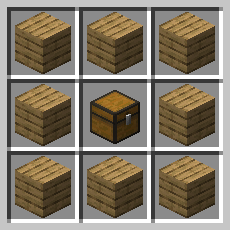
升级器合成:
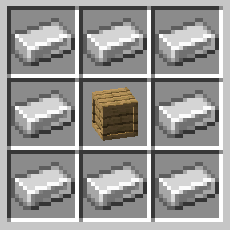
然后,只需用材料包围箱子即可。
你必须按顺序升级:木头,然后是铁,然后是金,等等。
安装方法:
要安装 Iron Crate,请从 Modrinth 下载并将其放入你的 Minecraft 'mods' 文件夹中。确保已安装 Neo Forge 以确保兼容性。用 Iron Crate 探索一个组织有序且美学提升的世界吧!
Iron Crate is a versatile and immersive Minecraft mod that introduces a wide array of wooden crates, crafted from every type of wood available in the game. Perfect for players looking to expand their storage options, enhance their base aesthetics, or add a touch of realism to their world, this mod brings a whole new level of organization to your Minecraft adventures.
Features:
Diverse Wood Types: Craft crates using all types of wood, including Oak, Spruce, Birch, Jungle, Acacia, Dark Oak, Mangrove, Cherry, Bamboo, and more. This ensures your crates match any build style or biome theme you prefer.
Unique Visuals: Each crate is designed to reflect the unique texture and color of its respective wood type, providing a visually distinct storage option that complements your builds perfectly.
Various Sizes: Choose from small, medium, and large crates to fit your storage needs. Whether you're hoarding cobblestones or precious diamonds, there's a crate for every item.
Stackable Design: Save space in your storage rooms with stackable crates, similar to barrels. This feature is ideal for creating compact and efficient storage solutions.
Easy Crafting Recipes: Crafting crates is straightforward and requires only planks and sticks, making them accessible early in your gameplay.
Upgradable Crate: You can upgrade crate storage with enhancements made from Iron, Gold, Diamond, Emerald, Netherite, Obsidian, and much more.
Seamless Compatibility: Fully compatible with other popular Minecraft mods, ensuring a smooth and integrated experience within your modded Minecraft world.
Decorative Elements: Beyond their practical use, crates serve as decorative blocks, adding a rustic charm and authenticity to any build, whether it’s a medieval castle or a modern home.
How to Use:
Crafting Crates: Open your crafting table and use planks of your chosen wood type to craft crates. Each crate follows a simple recipe, allowing you to create them quickly and efficiently.
Organizing Items: Right-click to open the crate's inventory and start organizing your items. Utilize the custom labeling feature to keep track of what each crate contains, making inventory management a breeze.
Stacking and Arranging: Optimize your storage space by stacking crates vertically or arranging them side by side. Experiment with different layouts to suit your aesthetic preferences.
How to Craft:
Crate Craft :
Upgrader Craft:
Then, you just have to surround the crate with the material.
You must upgrade in order: Wood, then Iron, then Gold, etc.
Installation:
To install Iron Crate, download it from Modrinth and place the downloaded file into your Minecraft 'mods' folder. Make sure you have Neo Forge installed for compatibility. Dive into a world of organized storage and improved aesthetics with Iron Crate!


 模组

 模组

 模组
 模组

 模组
 模组
评论 0
登录后参与评分
还没有评论,来抢沙发吧