

图标由 MarioKartWii 提供,表示感谢
Item Editor
一款基于 Fabric 加载器的 Minecraft: Java 版强大的客户端内置组件与 NBT 编辑器。
概述
Item Editor 为当前手持物品打开一个全面的图形用户界面(GUI),允许你在应用更改之前安全地在草稿中修改物品数据。作为传统原始 NBT 数据编辑器的现代替代方案,本模组利用 Minecraft 的现代数据组件系统,而非仅依赖过时的原始 NBT 工作流程。
它具备动态自定义 UI 编辑器,用于修改物品属性、元数据和组件,包括针对特殊物品类型的菜单,如书籍、旗帜、自定义烟花、容器、告示牌、药水等。
主要功能
- 优先草稿编辑 - 安全修改,支持实时预览
- 现代组件系统 - 原生支持 Minecraft 1.20.5+ 的数据组件
- 动态编辑器 - 针对书籍、旗帜、烟花、容器、村民交易、命令方块等的专用界面
- 原始 NBT 回退 - 带有语法高亮和验证功能的完整文本编辑器
- 内置存储 - 保存、搜索和整理物品,并支持从其他模组导入已保存的物品
- 兼容多人游戏 - 无需服务端插件即可运行,仅需创造模式。
安装
要求
- Minecraft Fabric(兼容版本)
- Fabric API
- owo-lib
步骤
- 安装 Fabric Loader
- 下载以下文件:
- Item Editor(本模组)
- Fabric API
- owo-lib
- 将所有
.jar文件放入你的mods文件夹 - 启动游戏
- 通过 控制 → Item Editor(默认按键:
I)打开编辑器
核心工作流
Item Editor 使用 优先草稿编辑 系统以确保安全、可预测的修改:
| 功能 | 描述 |
|---|---|
| 草稿编辑 | 所有编辑均在手持物品的临时副本上进行 |
| 实时反馈 | 编辑时预览更新,内联显示验证信息 |
| 安全应用 | 保存 / 应用 在提交前会显示差异/验证流程 |
| 丢弃安全 | 关闭/重置时在必要时请求确认 |
编辑器分类
常规 (General)
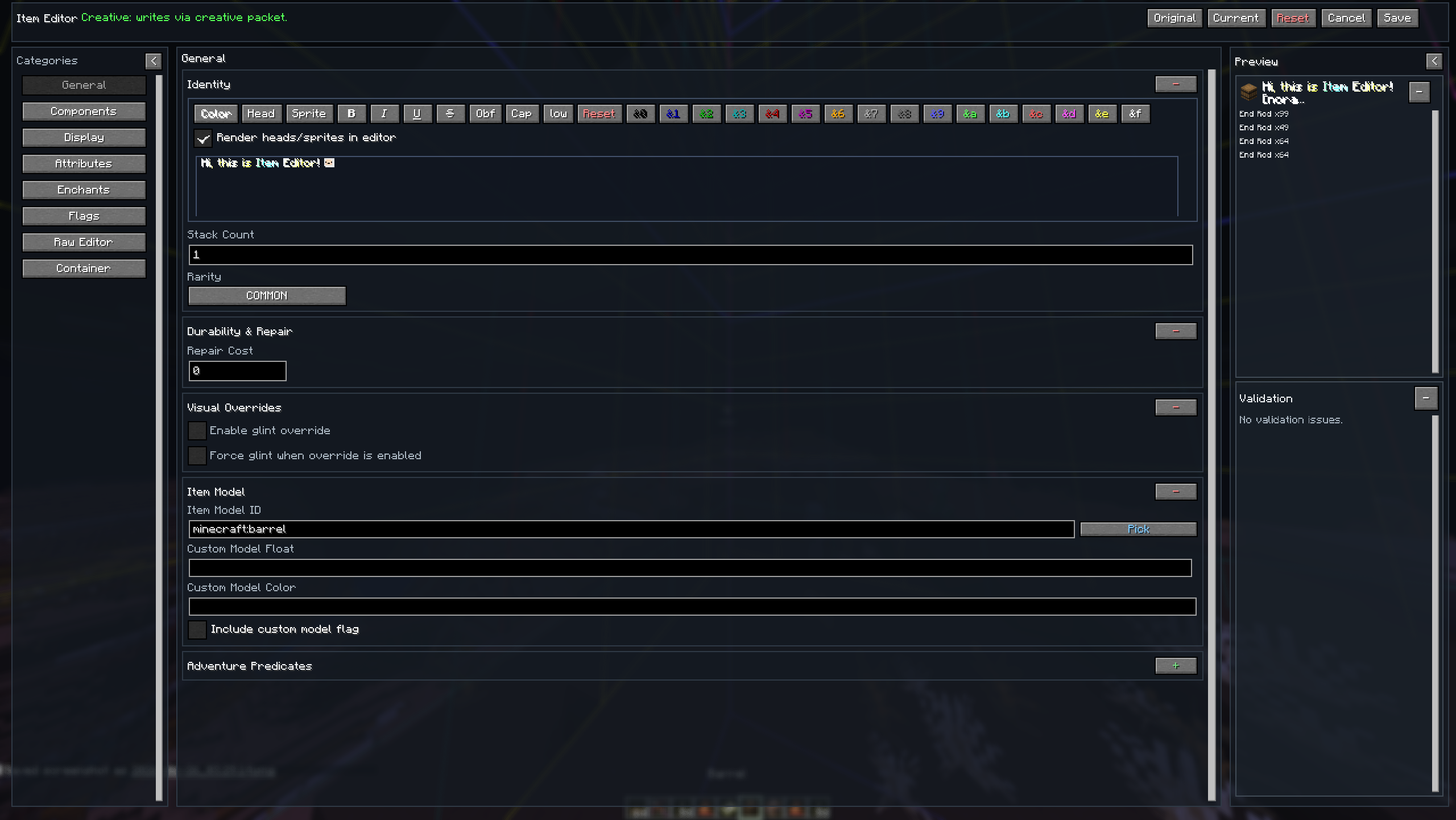
- 自定义名称编辑: 带预设、渐变和颜色选择器的样式化格式
- 核心数值: 数量、稀有度、耐久度/伤害值、修复成本、不可破坏
- 视觉/模型字段: 闪烁覆盖、物品模型、自定义模型数值
- 冒险谓词: 可破坏 / 可放置于,支持通过搜索选择方块
组件 (Components)
始终可用
- 名称/堆叠/标志: 物品名称、滑翔翼、死亡保护
- 食物/消耗品: 营养、饱和度、使用行为
- 战斗行为: 动画类型及时长、打击音效,支持通过搜索选择音效
- 注册表组件: 伤害类型、音符盒及破坏音效、画作变体
- 装备 / 战斗: 装备槽位、装备与剪毛音效、资产 ID、相机叠加层、武器与工具设置、攻击范围
- 方块攻击: 方块攻击计时、伤害减免、物品损坏
- 自定义数据: 用于自定义数据复合体的原始编辑器
特定物品
- 方块状态: 方块状态属性
- 带电投射物: 物品 ID、数量
- 地图元数据: 地图颜色、后处理(锁定/缩放)
- 高级地图: 地图 ID、装饰物、 lodestone 追踪器
- 容器元数据: 锁 ID、战利品表、蜜蜂居民、花盆装饰
显示 (Display)
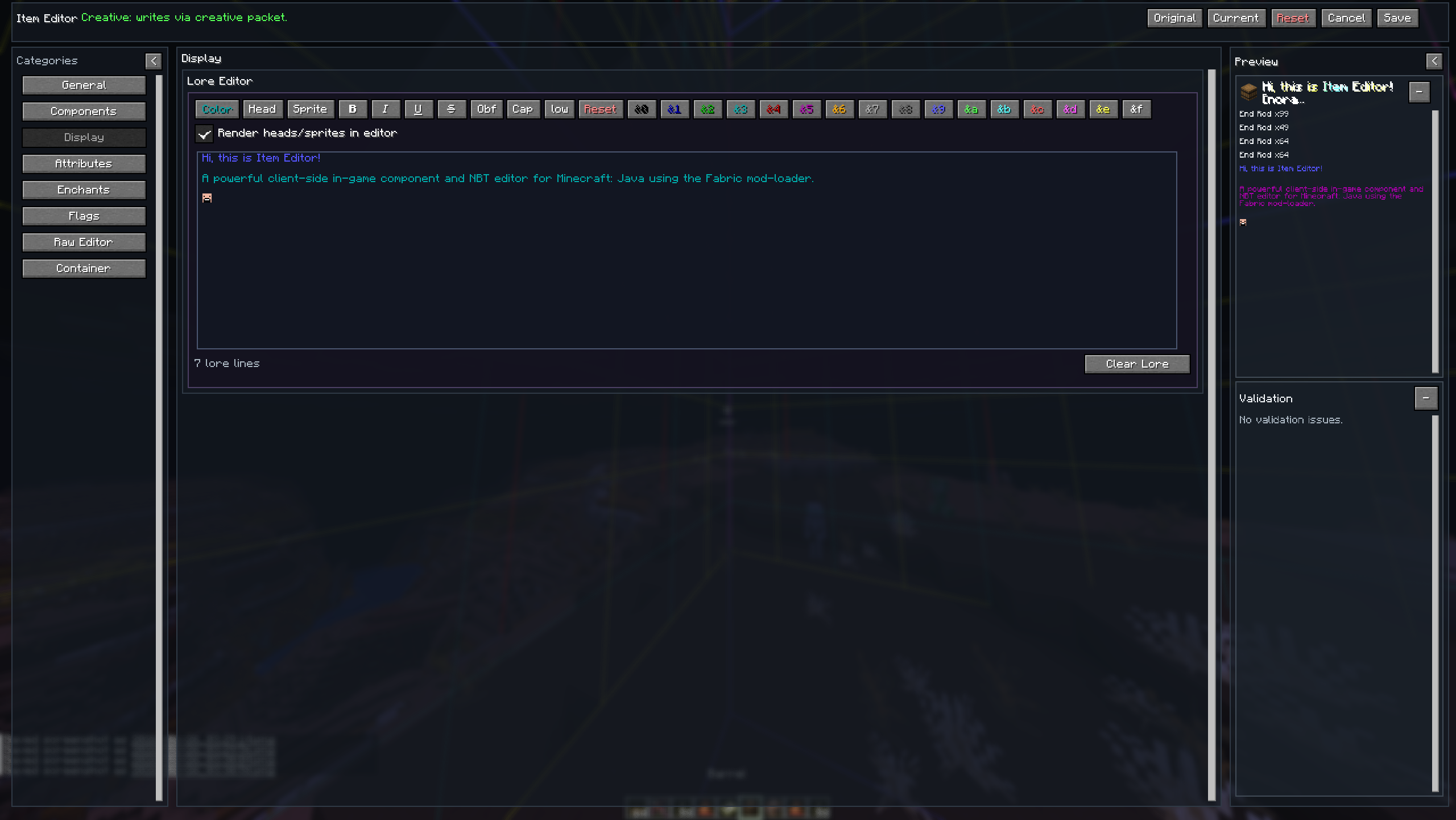
- 带有格式化工具栏的丰富多行编辑器
- 颜色/渐变样式、头颅与精灵图插入及渲染
- 保存你最喜欢的颜色、渐变和阴影的系统
属性 (Attributes)
- 添加、编辑或删除属性
- 每个属性的菜单,包含属性、数值、操作、槽位和修饰符 ID 字段
- 汇总当前属性值并允许重置为原始值
附魔 (Enchantments)
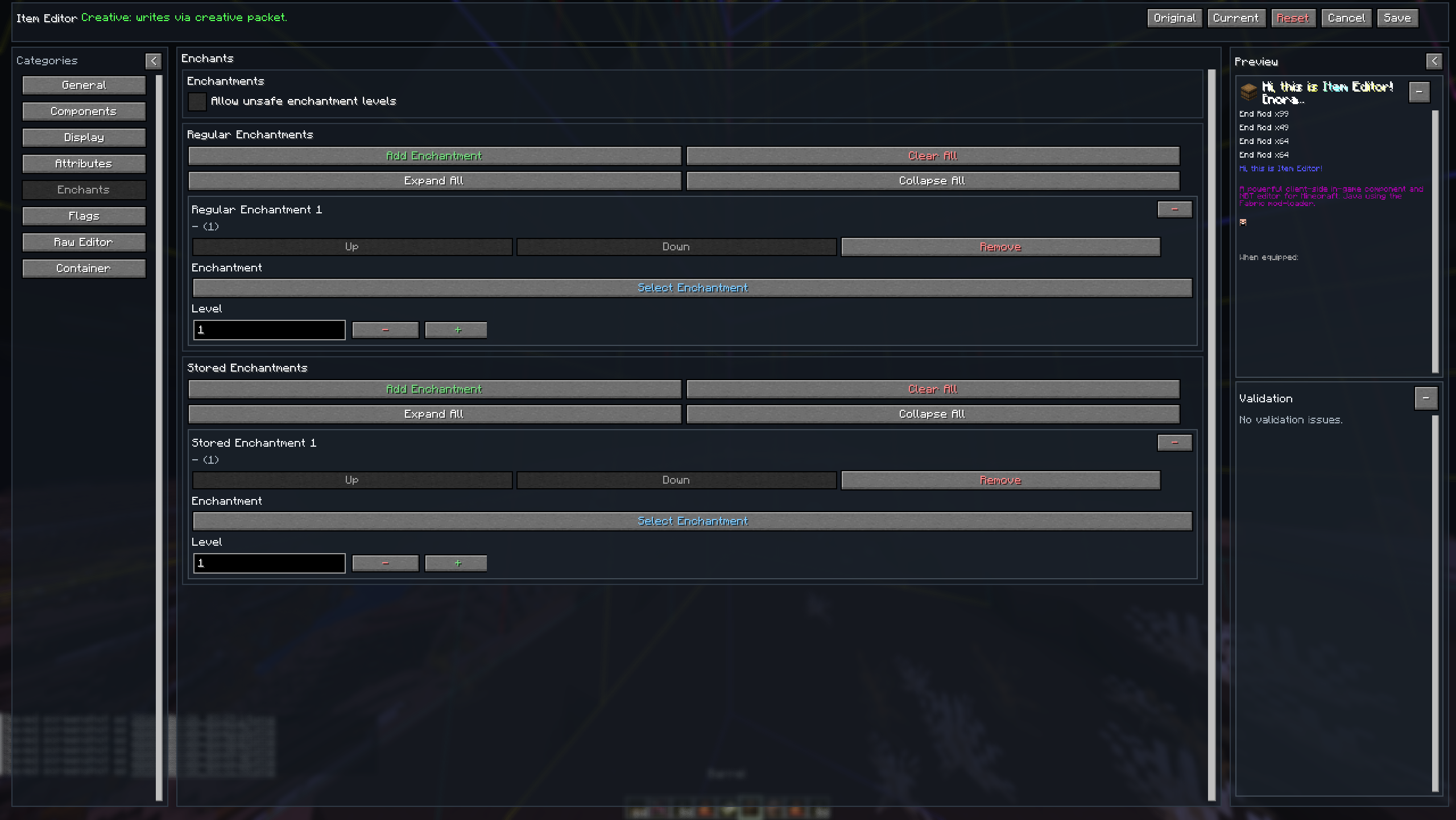
- 可搜索的附魔选择器和等级调整器
- 重新排序或移除附魔
- 允许“不安全”的附魔等级超过生存模式限制
标志 (Flags)
- 从工具提示中隐藏所有或特定组件,或隐藏整个工具提示
原始编辑器 (Raw Editor)
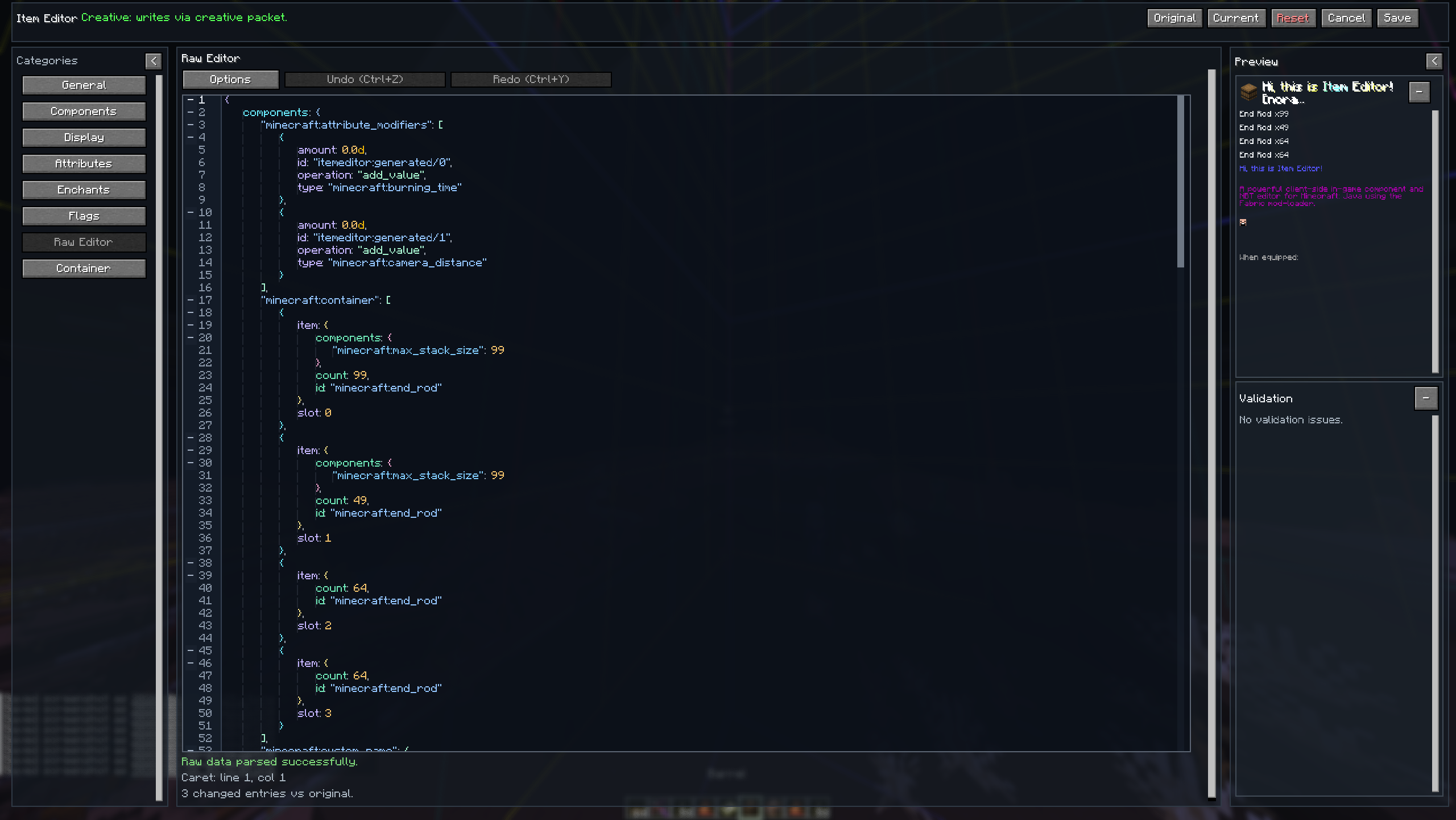
- 直接控制的完整原始文本编辑器
- 编辑器选项中的格式化/压缩工具
- 带有内联错误定位和验证的语法感知编辑
- 多层折叠组件
- 编辑时的智能建议
特殊数据
动态分类。仅对兼容的物品显示相关章节。
- 书与笔/书:支持格式化工具栏、插入操作和预览的丰富多行编辑器
- 药水/可疑 stew:药水 ID、颜色、自定义名称、自定义效果,并配备可搜索的选择器
- 烟花火箭爆炸效果:添加爆炸效果,编辑形状、材质、颜色、渐变色、轨迹和闪烁
- 旗帜/盾牌:提供图层选择器、颜色选择器和预览功能的创作工具
- 容器/绑定的箱子:添加和修改箱子、潜影盒和绑定的箱子的槽位
- 刷怪笼/刷怪蛋/桶:添加和修改实体数据
- 盔甲架:提供预设和预览的姿势功能、自定义名称、库存锁定、缩放
- 物品展示框:自定义名称、标志、物品旋转、掉落几率、朝向
- 命令方块:类型、指令、自定义名称、激活方式、输出/运行时状态
存储
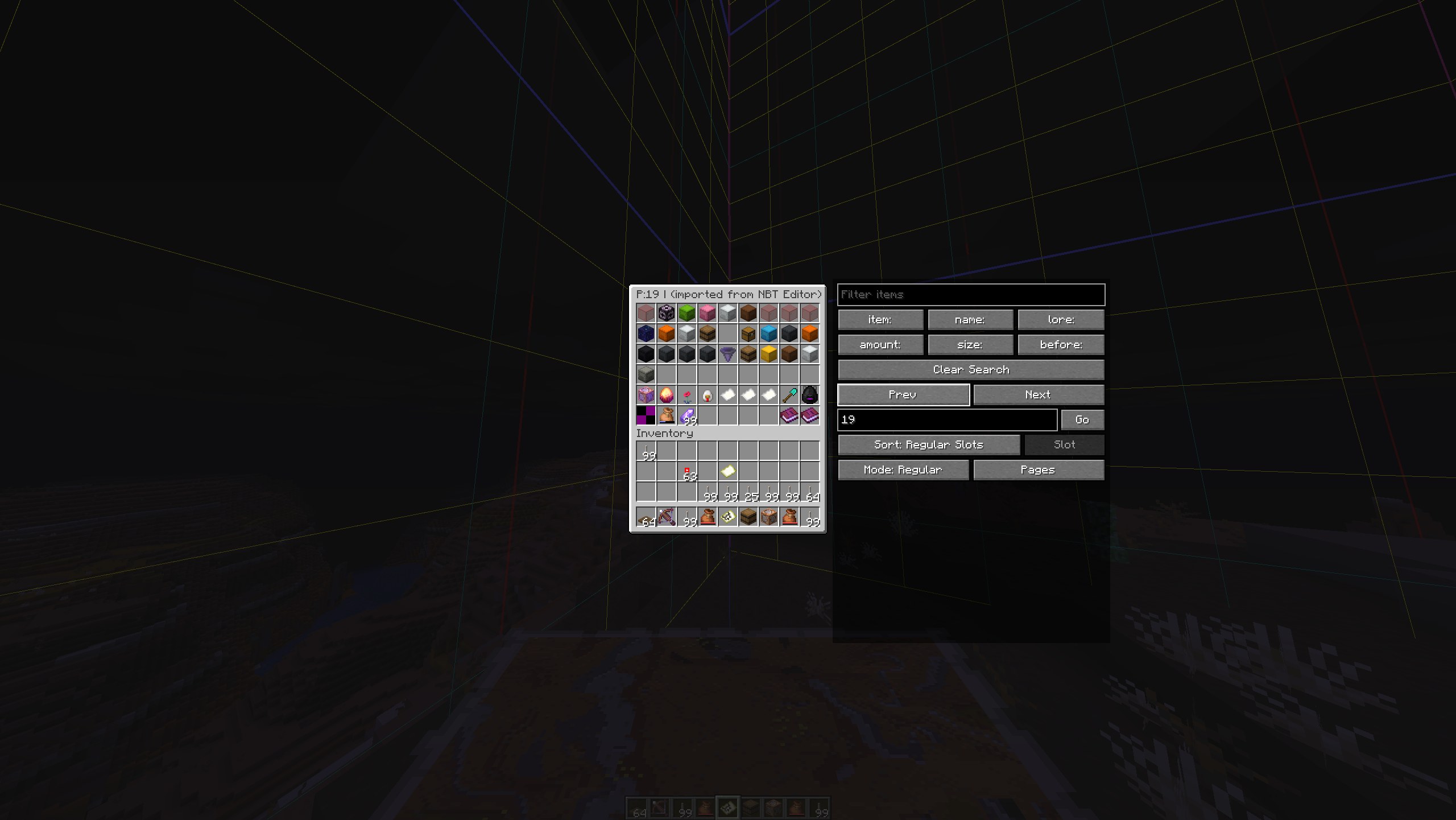
将物品保存到内置的存储菜单中:
- 浏览/搜索/排序:按物品、名称、描述、数量、大小和修改日期过滤已保存的物品
- 排序模式:常规槽位、保存时间、字母顺序、堆叠数量或大小
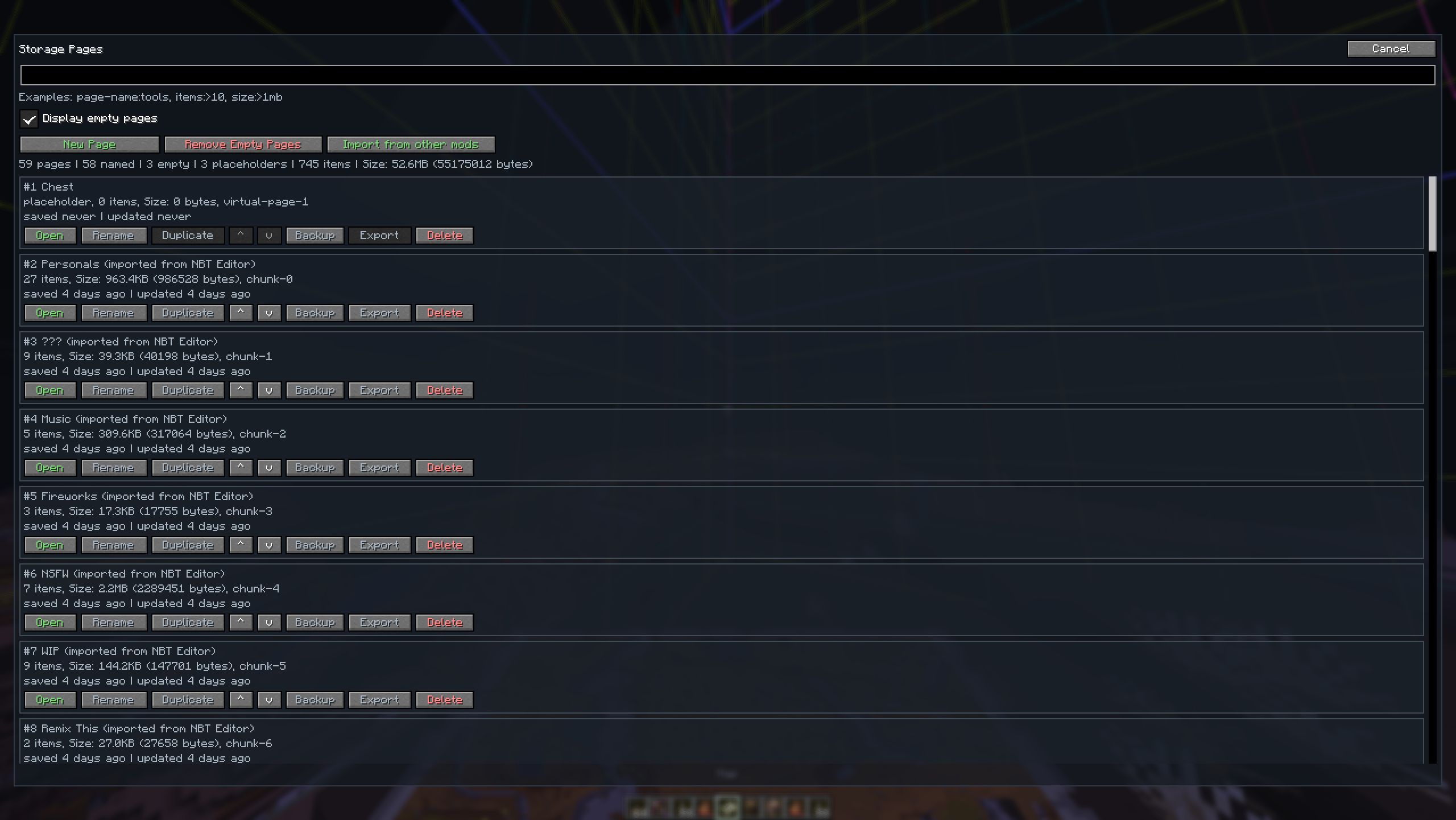
- 页面组织:设置自定义页面名称和顺序
- 导入:从其他模组(NBT Editor, Librarian)导入已保存的物品
- 访问:通过
/storage命令打开,或通过O键绑定打开(可重新绑定)
截图




支持的语言
| 语言 | 本地名称 | 代码 |
|---|---|---|
| 英语 | English | en_us |
| 日语 | 日本語 | ja_jp |
| 西班牙语 | Español | es_es |
| 俄语 | Русский | ru_ru |
| 乌克兰语 | Українська | uk_ua |
| 简体中文 | 简体中文 | zh_cn |
| 繁体中文 | 繁體中文 | zh_tw |
| 印地语 | हिन्दी | hi_in |
贡献
欢迎贡献!您可以自由参与以下活动:
- 通过 GitHub Issues 报告 bug
- 提交功能请求
- 加入 Discord 进行讨论
NBT Library
如果您对物品制作、NBT 等感兴趣,也可以查看 NBT Library。NBT Library 专注于“质量优于数量”的理念,为创意服务器和单人世界精心策划包含物品、套件、书籍等的完整快捷栏。
同时也非常感谢 Kaddicus 在开发此模组过程中提供的无数帮助,没有他,这个模组将只是一个简单的描述编辑器。
许可证
本项目根据 LICENSE 文件中指定的许可条款进行授权。
thanks to MarioKartWii for icon
Item Editor
A powerful client-side in-game component and NBT editor for Minecraft: Java using the Fabric mod-loader.
Overview
Item Editor opens a comprehensive GUI for the currently held item, allowing you to safely modify item data on a draft before applying changes. Designed as a modern alternative to traditional raw NBT data editors, this mod utilizes Minecraft's modern data component system instead of relying solely on outdated raw-NBT workflows.
It features dynamic custom UI editors for modifying item properties, metadata, and components, including menus for special item types such as books, banners, custom fireworks, containers, signs, potions, and more.
Key Features
- Draft-first Editing - Safe modifications with live preview
- Modern Component System - Native support for Minecraft 1.20.5+ data components
- Dynamic Editors - Specialized UIs for books, banners, fireworks, containers, villager trades, command blocks and more
- Raw NBT Fallback - Full text editor with syntax highlighting and validation
- Built-in Storage - Save, search, and organize items, and import saved items from other mods
- Multiplayer Compatible - Does not require a server-side plugin to function, only requires creative mode.
Installation
Requirements
- Minecraft Fabric (compatible version)
- Fabric API
- owo-lib
Steps
- Install Fabric Loader
- Download the following files:
- Item Editor (this mod)
- Fabric API
- owo-lib
- Place all
.jarfiles into yourmodsfolder - Launch the game
- Open the editor via Controls → Item Editor (default key:
I)
Core Workflow
Item Editor uses a draft-first editing system to ensure safe, predictable modifications:
| Feature | Description |
|---|---|
| Draft Editing | All edits are made on a temporary copy of the held item |
| Live Feedback | Preview updates while editing, with validation shown inline |
| Safe Apply | Save / Apply shows a diff/verification flow before committing |
| Discard Safety | Close/Reset asks for confirmation when needed |
Editor Categories
General
- Custom Name Editing: Styled formatting with presets, gradients, and color picker
- Core Values: Count, Rarity, Durability/Damage, Repair Cost, Unbreakable
- Visual/Model Fields: Glint override, Item Model, Custom Model values
- Adventure Predicates: Can Break / Can Place On with searchable block picking
Components
Always Available
- Name/Stack/Flags: Item Name, Glider, Death Protection
- Food/Consumable: Nutrition, Saturation, Use Behavior
- Combat Behavior: Animation Type & Duration, Hit Sounds with searchable sound picking
- Registry Components: Damage Type, Note Block & Break Sound, Painting Variant
- Equipment / Combat: Equipment Slot, Equip and Shearing Sounds, Asset ID, Camera Overlay, Weapon & Tool settings, Attack Range
- Block Attacks: Block Attacks timings, Damage Reduction, Item Damage
- Custom Data: Raw Editor for Custom Data compounds
Item Specific
- Block State: Block State properties
- Charged Projectiles: Item ID, Count
- Map Metadata: Map Color, Post-Processing (Lock/Scale)
- Advanced Map: Map ID, Decorations, Lodestone Tracker
- Container Metadata: Lock ID, Loot Table, Bee Occupants, Pot Decorations
Display
- Rich multi-line editor with formatting toolbar
- Color/Gradient styling, Head & Sprite insertion and rendering
- Save system for your favorite colors, gradients and shadows
Attributes
- Add, Edit or Remove Attributes
- Menu for each Attribute, with Attribute, Amount, Operation, Slot, and Modifier ID fields
- Summarizes current attribute values and allows resetting to original
Enchantments
- Searchable Enchantment picker and Level adjuster
- Reorder or remove Enchantments
- Allow "unsafe" enchantment levels over the survival limit
Flags
- Hide all or specific components from the tooltip or hide the entire tooltip
Raw Editor
- Full raw text editor for direct control
- Format/Minify tools in editor options
- Syntax-aware editing with inline error targeting and validation
- Collapse components at multiple levels
- Smart suggestions while editing
Special Data
Dynamic category. Sections appear only for compatible items.
- Written Book/Writable Book/Sign: Rich multi-line editor with formatting toolbar, even insertion, and preview
- Potion/Suspicious Stew: Potion ID, Color, Custom Name, Custom Effect with searchable picker
- Firework Explosion: Add Explosions, editing Shape, Material, Colors, Fade Colors, Trail and Twinkle
- Banner/Shield: Creator with Layer Picker, Color Picker, and Preview
- Container/Bundle: Add and Modify Slots of Chests, Shulkers and Bundles
- Spawner/Spawn Egg/Bucket: Add and Modify Entity Data
- Armor Stand: Pose with Presets and Preview, Custom Name, Inventory Locks, Scale
- Item Frame: Custom Name, Flags, Item Rotation, Drop Chance, Facing
- Command Block: Type, Command, Custom Name, Activation, Output / Runtime State
Storage
Save items into a built-in storage menu:
- Browse/Search/Sort: Filter saved items by Item, Name, Lore, Amount, Size, and Modification Date
- Sort Modes: Regular Slot, Saved Time, Alphabetical, Stack Count, or Size
- Page Organization: Set custom page names and orders
- Import: Bring saved items from other mods (NBT Editor, Librarian)
- Access: Open via
/storagecommand, or viaOkeybind (rebindable)
Screenshots
Supported Languages
| Language | Native name | Code |
|---|---|---|
| English | English | en_us |
| Japanese | 日本語 | ja_jp |
| Spanish | Español | es_es |
| Russian | Русский | ru_ru |
| Ukrainian | Українська | uk_ua |
| Simplified Chinese | 简体中文 | zh_cn |
| Traditional Chinese | 繁體中文 | zh_tw |
| Hindi | हिन्दी | hi_in |
Contributing
Contributions are welcome! Please feel free to:
- Report bugs via GitHub Issues
- Submit feature requests
- Join the Discord for discussion
NBT Library
If you are interested in item making, NBT etc, also check out NBT Library. The NBT Library is focused on a "quality over quantity" approach, providing meticulously curated hotbars full of items, kits, books, and more for your creative servers and single-player worlds.
Also thanks a lot to Kaddicus for his countless helps while developing this mod, without him this mod would be a simple Lore Editor.
License
This project is licensed under the terms of the license specified in the LICENSE file.
下载 Item Editor - 组件与 NBT
下载 Item Editor - 组件与 NBT
需要联机服务器吗?
稳定流畅、一键部署,几分钟即可和朋友联机开服
最低仅需 8 元/月 即可畅快联机
下载 Item Editor - 组件与 NBT
下载 Item Editor - 组件与 NBT
下载 Item Editor - 组件与 NBT
下载 Item Editor - 组件与 NBT
下载 Item Editor - 组件与 NBT
需要联机服务器吗?
稳定流畅、一键部署,几分钟即可和朋友联机开服
最低仅需 8 元/月 即可畅快联机
下载 Item Editor - 组件与 NBT
下载 Item Editor - 组件与 NBT
下载 Item Editor - 组件与 NBT
需要联机服务器吗?
稳定流畅、一键部署,几分钟即可和朋友联机开服
最低仅需 8 元/月 即可畅快联机
build-25
- 为原始编辑器添加了聚焦模式,并内置了查找/替换功能,同时对其进行了多项更改和改进
- 改进了命令方块编辑器,新增了语法高亮、建议提示、错误导航以及众多其他功能^^
- 在整个编辑器中添加了变更字段标记
- 添加了样式(即同时保存阴影颜色和文本颜色,但可作为一个整体进行保存)
- 添加了导入预览、重复检测以及进度反馈
- 改进了颜色编辑器,现在支持预览文本和阴影颜色
- 更改/改进了物品选择器
- 修复了文本字段中的撤销/重做问题
- 修复了在锁定模式下存储阻止键盘输入的问题
- 修复了多个小窗口溢出、滚动以及富文本选择问题
- 修复了若干与 owo-lib 相关的问题(仅适用于 26.3)
- 一如既往,还有更多我忘记记录的更改
关于这个资源的讨论、问题反馈与使用心得
还没有讨论,来发第一帖吧
你是这个资源的作者?登录后可认领此资源。
相似资源
 模组

可定制的鞘翅模组,支持装饰纹饰、旗帜图案等更多功能!
 模组

显示你正在注视的方块的信息。(适用于 Minecraft 1.16+ 的 Hwyla/Waila 分支)
 模组
使用 JavaScript 编辑配方、添加自定义物品、编写世界事件!
 模组

查看物品与配方
 模组
在游戏画面角落显示附近世界地形、玩家、生物和实体的地图。可创建路径点,帮助你找到标记过的位置。
 模组
AE2:一款流行的自动化与存储模组
评论 0
登录后参与评分
还没有评论,来抢沙发吧