
物品免疫 - 附魔
一款轻量且必备的数据包或模组,引入了 不可磨灭 (Immutable) 附魔。从此再也不用担心因意外环境危害而损失你辛苦获得的终局装备、潜影盒或稀有物品了!
✨ 特性
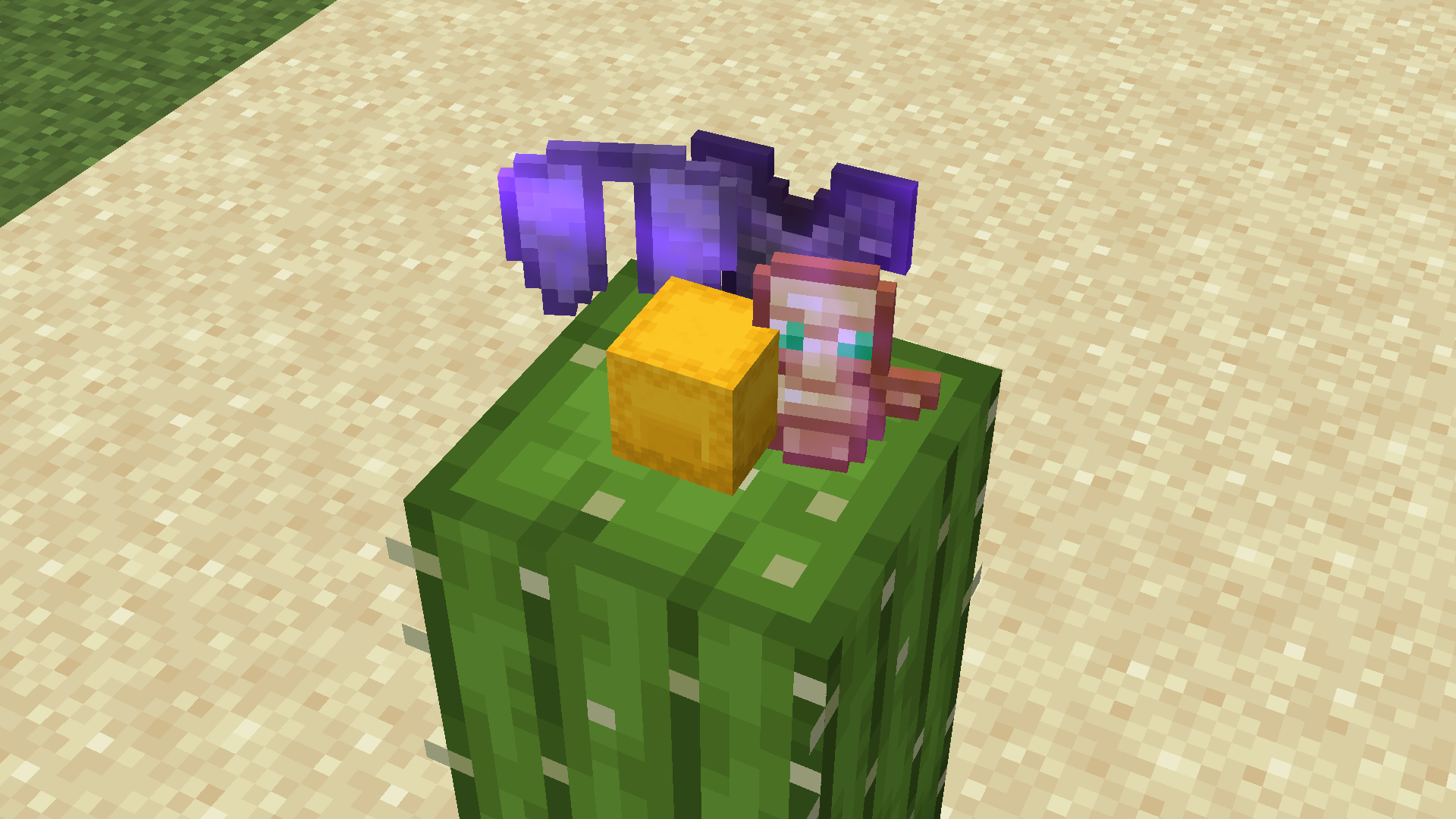
不可磨灭 (Immutable) 附魔能完全保护地面上的掉落物免受以下原版危害的破坏:
熔岩与火焰免疫
物品会安全地漂浮在熔岩上或停留在火焰中,不会被烧毁。

爆炸免疫
苦力怕或 TNT 爆炸时掉落的方块和物品将保持完好无损。

仙人掌免疫
再也不用担心把物品掉落在仙人掌旁导致物品被意外销毁了。
关于潜影盒与末影箱(视觉闪烁限制)的说明
你可能会注意到,附魔过的 潜影盒 和 末影箱 在你的背包中或地面上不会显示典型的紫色附魔闪烁效果(旋转特效)。
为什么会这样?
- 原版渲染引擎: Minecraft 使用专用的 3D 实体渲染器 (
BlockEntityWithoutLevelRenderer) 来渲染潜影盒和末影箱,而不是标准的物品渲染器。 - 绕过了闪烁渲染通道: 原版客户端故意在这些自定义 3D 模型上跳过附魔闪烁渲染通道,以防止纹理故障、UV 映射错误和视觉杂乱。
请放心,附魔已完全生效! 尽管缺少视觉效果,Immutable 保护功能仍在幕后按预期工作。
在哪里获取?
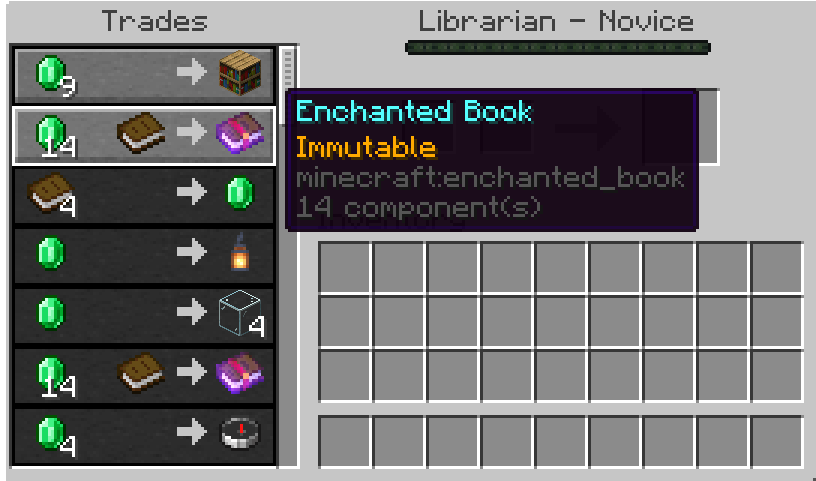
不可磨灭 (Immutable) 附魔书是一种稀有且珍贵的宝物。你可以通过以下方式获得它:
- 村民交易:作为图书管理员村民的稀有交易商品出售。
- 废弃矿井:出现在矿车宝箱中
?️ 支持的物品
你可以通过在铁砧上使用 不可磨灭 (Immutable) 附魔应用到几乎所有贵重物品上,仅支持单个物品,但 不支持堆叠物品 的附魔(例如 2x - 64x 金苹果)。支持物品的列表如下:
| 类别 | 装备与工具 |
|---|---|
| 装备与武器 | 所有护甲、武器、工具、盾牌、三叉戟、战锤、弓、弩、钓鱼竿、剪刀、胡萝卜/诡异真菌钓竿 |
| 存储工具 | 潜影盒(所有颜色)、聚珍包(所有颜色)、末影箱 |
| 高价值物品 | 不死图腾、金苹果、附魔金苹果 |
⚙️ 默认配置
- 最大等级: I (1)
- 附魔权重: 1 (非常稀有)
- 互斥性: 默认与 消失诅咒 (
minecraft:vanishing_curse) 冲突。
安装方法
Windows
作为数据包
- 按下
Win + R,输入%appdata%\.minecraft,然后按 回车。 - 进入文件夹
saves>[你的世界名称]>datapacks。 - 将
.zip文件放入其中。
作为模组
- 按下
Win + R,输入%appdata%\.minecraft,然后按 回车。 - 进入文件夹
mods。 - 将
.jar文件放入其中。
MacOS
作为数据包
- 打开 访达 (Finder),按下
Cmd + Shift + G。 - 输入路径:
~/Library/Application Support/minecraft。 - 进入文件夹
saves>[你的世界名称]>datapacks,并将.zip文件放入其中。
作为模组
- 打开 访达 (Finder),按下
Cmd + Shift + G。 - 输入路径:
~/Library/Application Support/minecraft。 - 进入文件夹
mods,并将.jar文件放入其中。
Linux
作为数据包
- 打开
~/.minecraft/saves/[你的世界名称]/datapacks。 - 将
.zip文件移入该文件夹。
作为模组
- 打开
~/.minecraft/mods。 - 将
.jar文件移入该文件夹。
Item Immunity - Enchantment
A lightweight and essential datapack or mod that introduces the Immutable enchantment. Never lose your hard-earned endgame gear, shulker boxes, or rare items to accidental environmental hazards ever again!
✨ Features
The Immutable enchantment fully safeguards dropped items on the ground from being destroyed by the following vanilla hazards:
Lava & Fire Immunity
Items will float safely on lava or sit in fire without burning up.
Explosion Immunity
Blocks and items dropped during creeper or TNT blasts remain completely intact.
Cactus Immunity
No more accidental item deletion when dropping items next to cacti.
Note on Shulker Boxes & Ender Chests (Visual Glint Limitations)
You may notice that enchanted Shulker Boxes and Ender Chests do not display the typical purple enchantment glint (swirling effect) in your inventory or on the ground.
Why does this happen?
- Vanilla Rendering Engine: Minecraft renders Shulker Boxes and Ender Chests using a dedicated 3D Block Entity renderer (
BlockEntityWithoutLevelRenderer) rather than the standard item renderer. - Bypassed Glint Pass: The vanilla client intentionally bypasses the enchantment glint pass on these custom 3D models to prevent texture glitches, UV-mapping bugs, and visual clutter.
Rest assured, the enchantment is fully active! The Immutable protection works as intended behind the scenes despite the missing visual glint.
Where to Find It?
The Immutable book is a rare and valuable treasure. You can obtain it through these methods:
- Villager Trading: Available as a rare trade from Librarian Villagers.
- Mineshaft: Available on a minecart chests
?️ Supported Items
You can apply the Immutable enchantment to almost any valuable item via an Anvil, supported for single item, but enchanting for stacked items unsupported (e.g. 2x - 64x Golden Apples). Supported items include:
| Category | Equipment & Tools |
|---|---|
| Gear & Weapons | All Armors, Weapons, Tools, Shield, Trident, Mace, Bow, Crossbow, Fishing Rod, Shears, Carrot/Warped Fungus on a Stick |
| Storage Utilities | Shulker Box (All Colors), Bundle (All Colors), Ender Chest |
| High-Value Items | Totem of Undying, Golden Apple, Enchanted Golden Apple |
⚙️ Default Configuration
- Max Level: I (1)
- Enchantment Weight: 1 (Very Rare)
- Exclusivity: Conflicts with the Vanishing Curse (
minecraft:vanishing_curse) by default.
How to Install
Windows
As a datapack
- Press
Win + R, search%appdata%\.minecraft, then Enter. - Go to the folder
saves>[Your World Name]>datapacks. - Place the
.ziphere.
As a mod
- Press
Win + R, search%appdata%\.minecraft, then Enter. - Go to the folder
mods. - Place the
.jarhere.
MacOS
As a datapack
- Open Finder, press
Cmd + Shift + G. - Put a path:
~/Library/Application Support/minecraft. - Go to the folder
saves>[Your World Name]>datapacksand place the.ziphere.
As a mod
- Open Finder, press
Cmd + Shift + G. - Put a path:
~/Library/Application Support/minecraft. - Go to the folder
modsand place the.jarhere.
Linux
As a datapack
- Open
~/.minecraft/saves/[Your World Name]/datapacks. - Move the
.zipto the folder.
As a mod
- Open
~/.minecraft/mods. - Move the
.jarto the folder.

下载 Item Immunity
需要联机服务器吗?
稳定流畅、一键部署,几分钟即可和朋友联机开服
最低仅需 8 元/月 即可畅快联机
下载 Item Immunity
下载 Item Immunity
需要联机服务器吗?
稳定流畅、一键部署,几分钟即可和朋友联机开服
最低仅需 8 元/月 即可畅快联机
下载 Item Immunity
需要联机服务器吗?
稳定流畅、一键部署,几分钟即可和朋友联机开服
最低仅需 8 元/月 即可畅快联机
下载 Item Immunity
下载 Item Immunity
需要联机服务器吗?
稳定流畅、一键部署,几分钟即可和朋友联机开服
最低仅需 8 元/月 即可畅快联机
下载 Item Immunity
需要联机服务器吗?
稳定流畅、一键部署,几分钟即可和朋友联机开服
最低仅需 8 元/月 即可畅快联机
下载 Item Immunity
需要联机服务器吗?
稳定流畅、一键部署,几分钟即可和朋友联机开服
最低仅需 8 元/月 即可畅快联机
下载 Item Immunity
需要联机服务器吗?
稳定流畅、一键部署,几分钟即可和朋友联机开服
最低仅需 8 元/月 即可畅快联机
下载 Item Immunity
从远古城市删除
关于这个资源的讨论、问题反馈与使用心得
还没有讨论,来发第一帖吧
你是这个资源的作者?登录后可认领此资源。
相似资源
 模组

可定制的鞘翅模组,支持装饰纹饰、旗帜图案等更多功能!
 模组

显示你正在注视的方块的信息。(适用于 Minecraft 1.16+ 的 Hwyla/Waila 分支)
 模组
在游戏画面角落显示附近世界地形、玩家、生物和实体的地图。可创建路径点,帮助你找到标记过的位置。
 模组

查看物品与配方
 模组
使用 JavaScript 编辑配方、添加自定义物品、编写世界事件!
 模组
AE2:一款流行的自动化与存储模组
评论 0
登录后参与评分
还没有评论,来抢沙发吧