物品搜索栏
在一整面墙的半透明箱子中找一个物品堆,意味着要逐个打开并查看内容。
Inventory Search(物品库存搜索) 会在每个容器界面添加一个搜索栏:输入你想找的内容,匹配的物品会高亮显示,而其他物品则变暗淡化。
查询条件会保留下来。关闭箱子,走到下一个箱子前并打开它——高亮效果已经存在,无需重新输入。
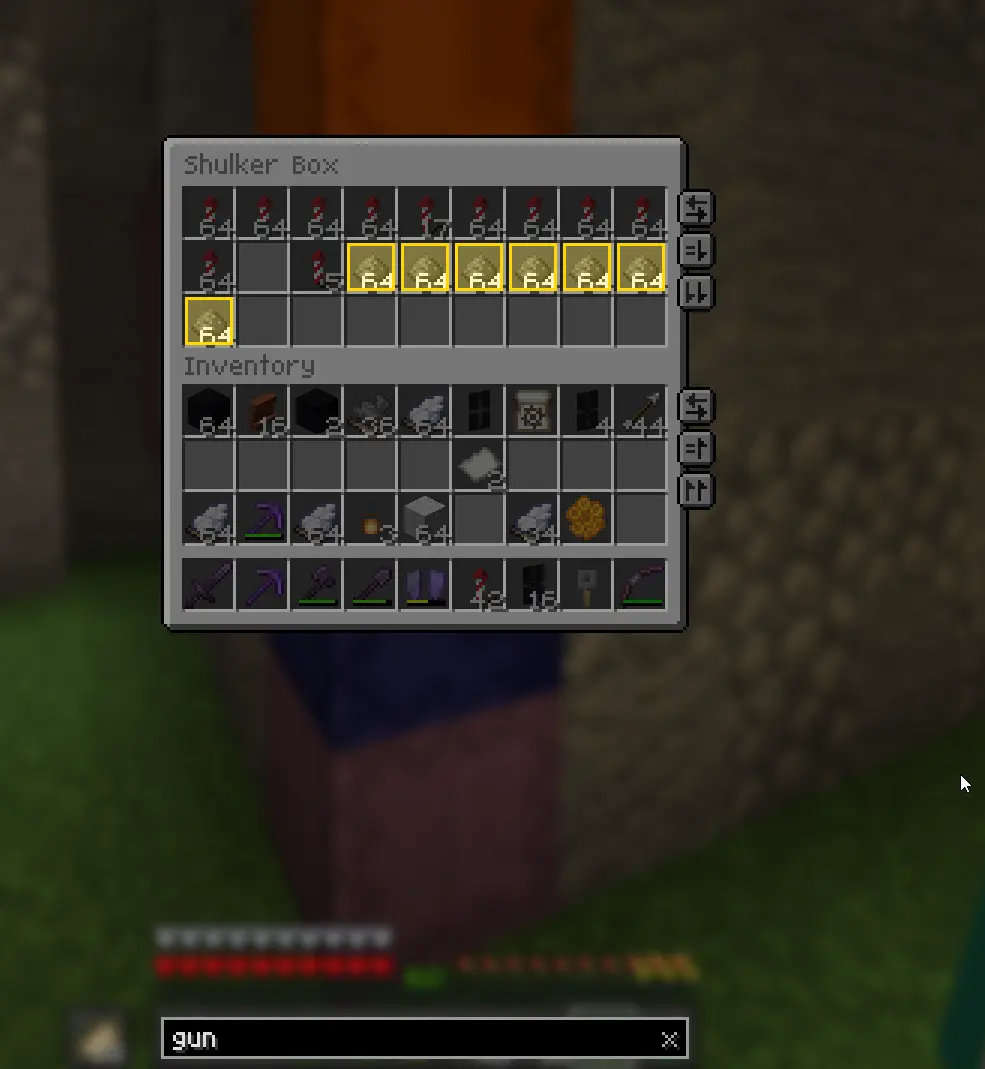
功能特性
- 适用于所有容器 —— 玩家背包、箱子、桶、潜影盒、末影箱、熔炉、铁砧、附魔台、酿造台、漏斗、发射器、村民交易界面、信标、织布机、锻造台、切石机、马匹背包,以及基于相同基础类构建的模组界面。
- 查询跨界面持久化。除非你手动清除,否则查询条件不会消失。
- 高亮整个屏幕,包括箱子下方的玩家背包行。
- 搜索运算符 ——
@modid、#tag、!negation(取反)、"quoted phrases"(精确短语),以及多个词项进行 AND 逻辑组合。
- 不仅搜索名称 —— 默认情况下按注册表 ID 搜索,还可选择性地搜索描述文本(lore)、附魔和完整的工具提示文本。
- 外观完全可配置 —— 高亮颜色和粗细、变暗颜色和透明度、可选的背景填充、可选的脉冲动画、搜索栏位于顶部或底部。
- 无硬依赖,仅需 Fabric API。配置文件为纯 JSON 格式,并提供
/invsearch 客户端命令用于常用切换操作。
- 无需服务端安装。该模组从不发送数据包。
查询语法
| 输入 |
含义 |
stone |
子字符串匹配,不区分大小写 |
stone brick |
必须同时匹配这两个词 |
"stone brick" |
精确匹配包含空格的子字符串 |
@minecraft |
仅来自该模组的物品 |
#logs |
仅在该物品标签内的物品 |
!gunpowder |
排除匹配项 |
空查询会使界面渲染效果与原版完全一致。
按键控制
| 按键 |
动作 |
| 聚焦搜索栏 |
默认未绑定,可在控制设置中自定义 |
| 清除搜索 |
默认未绑定 |
点击搜索栏 / x 按钮 |
聚焦 / 清除 |
Esc |
第一次按下取消聚焦,第二次关闭界面 |
Enter |
取消聚焦,但保留查询条件 |
当搜索栏处于聚焦状态时,按 E 键会输入字母而不是关闭界面。当未聚焦时,快捷栏按键和 Shift+点击等操作与原版完全一致。
命令
/invsearch toggle、/invsearch autofocus、/invsearch creative、
/invsearch clear、/invsearch reload —— 均为客户端命令。
要求
- Fabric Loader 0.19.3 或更高版本
- Fabric API
多人游戏
在服务器上安全运行,包括原版服务器。该模组仅装饰你自己的界面,且不发送或需要任何自定义数据包。
备注
- 设置保存在
config/invsearch.json;创意模式背包默认被跳过,因为它自带搜索字段。
- 工具提示搜索默认关闭——这是唯一性能开销较大的匹配模式。
- 查询条件仅存在于内存中,重启游戏后不会保留。
由 Sebi 制作。采用 MIT 许可证授权。
Item Searchbar
Finding one stack in a wall of double chests means opening each one and reading it.
Inventory Search puts a search bar on every container screen: type what you are
after, and matching items light up while everything else fades back.
The query sticks around. Close the chest, walk to the next one, open it — the
highlights are already there, with no retyping.

Features
- Works on every container — player inventory, chests, barrels, shulkers, ender
chests, furnaces, anvil, enchanting table, brewing stand, hoppers, dispensers,
villager trading, beacon, loom, smithing table, stonecutter, horse inventory, and
modded screens built on the same base class.
- The query persists across screens. It is only cleared when you clear it.
- Highlights the whole screen, including the player inventory rows below a chest.
- Search operators —
@modid, #tag, !negation, "quoted phrases", and
multiple terms ANDed together.
- Search more than names — registry ids by default, plus optional lore,
enchantments and full tooltip text.
- Fully configurable look — highlight colour and thickness, dim colour and
opacity, optional fill, optional pulse, bar at the top or the bottom.
- No hard dependencies beyond Fabric API. Config is plain JSON, with a
/invsearch client command for the common toggles.
- No server install. The mod never sends a packet.
Query syntax
| Input |
Meaning |
stone |
substring match, case-insensitive |
stone brick |
both terms must match |
"stone brick" |
one exact substring, spaces included |
@minecraft |
only items from that mod |
#logs |
only items in that item tag |
!gunpowder |
exclude matches |
An empty query renders the screen exactly like vanilla.
Controls
| Key |
Action |
| Focus search bar |
unbound by default, set it under Controls |
| Clear search |
unbound by default |
Click the bar / the x |
focus / clear |
Esc |
first press unfocuses, second closes the screen |
Enter |
unfocus, keep the query |
While the bar is focused, E types a letter instead of closing the screen. When it is
not focused, hotbar keys and shift-click work exactly as in vanilla.
Commands
/invsearch toggle, /invsearch autofocus, /invsearch creative,
/invsearch clear, /invsearch reload — all client-side.
Requirements
- Fabric Loader 0.19.3 or newer
- Fabric API
Multiplayer
Safe on servers, including vanilla ones. The mod only decorates your own screen and
never sends or requires a custom packet.
Notes
- Settings live in
config/invsearch.json; the creative inventory is skipped by
default because it has its own search field.
- Tooltip search is off by default — it is the only expensive matching mode.
- The query is memory only and does not survive a game restart.
Made by Sebi. Licensed under MIT.
评论 0
登录后参与评分
还没有评论,来抢沙发吧
