
物品提示
Item Tooltips 旨在成为满足玩家、整合包以及模组开发者在工具提示(Tooltip)方面常见需求的综合性解决方案。因此,本模组包含了大量新颖的工具提示功能——从耐久度、属性到自定义物品描述、附魔描述等等。Item Tooltips 高度重视可配置性,允许你通过自定义颜色、文本样式等轻松为每个功能创建独特的视觉风格,这是其他项目往往无法提供的细致程度,且各项设置均可单独调整。
哦,对了,我们还提供了可配置的工具提示换行功能以适配上述内容。
耐久度与属性提示
耐久度提示
Item Tooltips 拥有简单可配置的耐久度提示,根据你选择的配置样式显示当前耐久度和最大耐久度。提示的颜色可以更改为你想要的任何颜色,而耐久度数字本身则直接沿用原版耐久条的颜色以保持视觉一致性。
挖掘速度
默认情况下,会添加一个绿色的属性提示用于显示工具的挖掘速度,这与原版中攻击伤害和攻击速度提示的样式相匹配。虽然我们可以过滤掉大多数不应显示此提示的物品,但还有一个额外的物品标签 #item_tooltips:hidden_mining_speed 可用于将指定物品加入黑名单,从而阻止其显示挖掘速度。
物品描述

添加物品描述
只需将你希望添加描述的方块/物品添加到 #item_tooltips:has_description 标签中即可。翻译键只需在原物品名称末尾加上 ".desc",与其他现有的附魔描述模组做法一致。
例如,若“不死图腾”被标记在 #item_tooltips:has_description 中,其描述翻译键将为 item.minecraft.totem_of_undying.desc
需要注意的是,如果没有整合包或模组开发者实际使用此功能,该功能本身不会生效——上面的 GIF 仅作为示例展示。
屏蔽物品描述
任何添加到物品标签 #item_tooltips:util/description_blacklist 中的物品都将被排除在描述之外,无论其是否属于其他标签。这对于整合包开发者来说非常有用。
移除 Shift 提示
任何添加到物品标签 #item_tooltips:util/no_shift_notice 中的物品都不会再显示 Shift 提示,无论模组配置如何。这对于为那些已由其他模组添加了 Shift 提示的物品增加额外提示特别有用。
关于描述配置的详细信息请参见下文。
在整合包中的使用
Item Tooltips 可作为整合包开发的实用辅助模组。只需将任意物品添加到标签中,编写相应的翻译,即可投入使用!为此,建议使用 Simple Resource Loader 这样的模组来加载你的自定义数据/资源。
示例数据包和资源包格式可在此处找到。
附魔描述
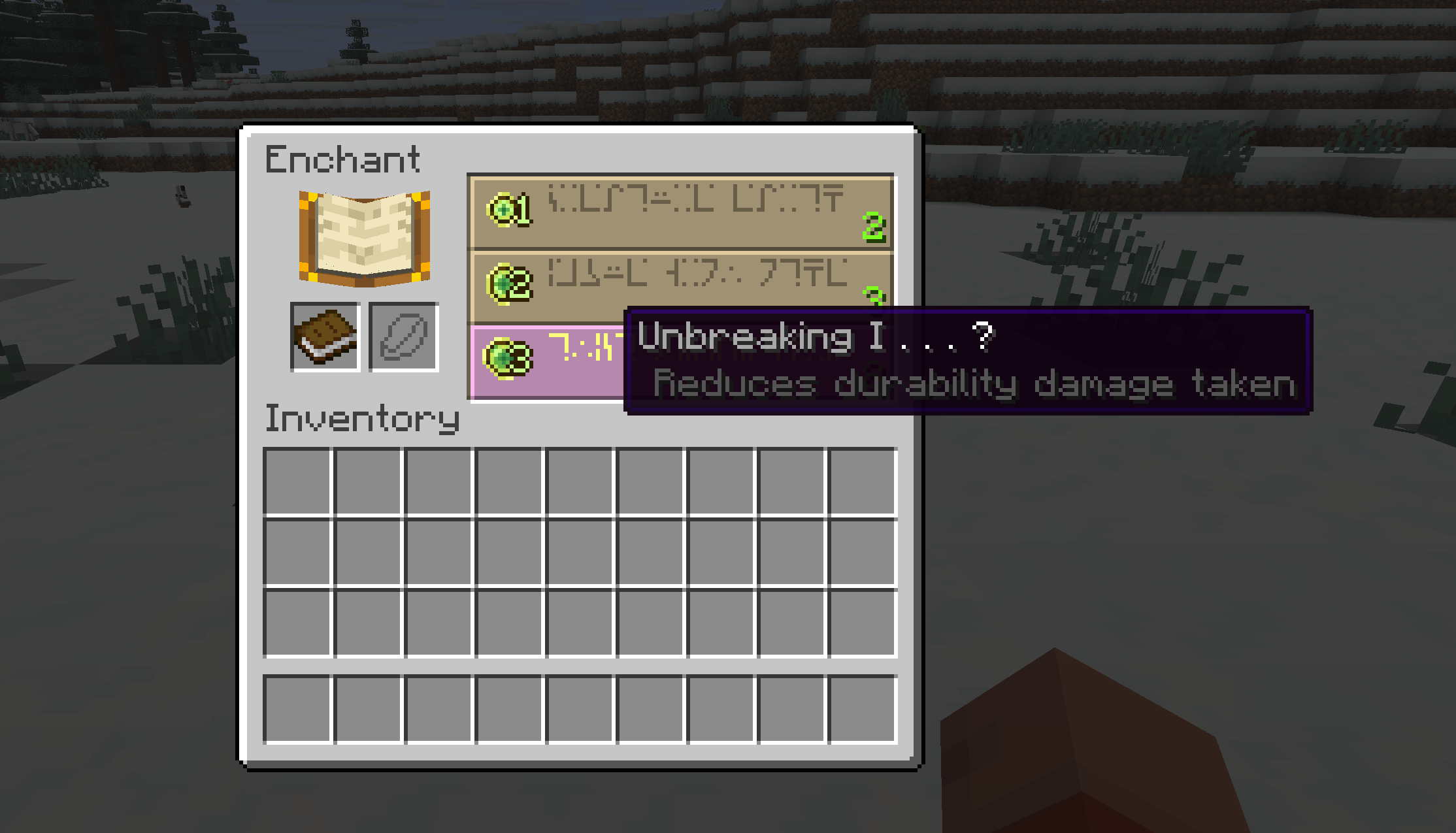
内置所有原版附魔的描述,并使用通用的 enchantment.namespace.item_name.desc 语言键,这意味着许多第三方附魔无需额外配置即可直接使用。
与许多其他附魔描述模组不同,Item Tooltips 会将提示同时应用于物品栏内的物品和附魔台界面。
与本项目的所有其他模块一样,附魔描述完全可配置,包括颜色、前缀等。
文本换行
Item Tooltips 添加了文本换行功能(源自 Adaptive Tooltips / Better Tooltips),当文本过长时会自动将其移动到下一行。
有关工具提示配置的详细信息请参见下文。
配置
Item Tooltips 的配置文件位于 config/item_tooltips.json5
如果在 Fabric 上安装了 Mod Menu,你也可以在游戏中编辑配置文件。
物品
enum DurabilityTooltip {
  ALWAYS, // 始终显示提示
  DAMAGED, // 仅在物品未处于满耐久时显示提示
  HOLD_KEY, // 仅在按住指定按键时显示提示
  NONE // 完全禁用此功能
}
durability.durability_tooltip - 默认为 ALWAYS。根据 DurabilityTooltip 枚举定义的方式显示耐久度
durability.max_durability_tooltip - 默认为 DAMAGED。根据 DurabilityTooltip 枚举定义的方式显示最大耐久度
durability.division_text - 默认为 /。在当前耐久度和最大耐久度之间插入的分隔符
durability.color - 默认为 11184810。用于耐久度提示的颜色——唯一例外是当前耐久度数字,它使用耐久条的颜色
mining_speed_tooltip - 是否显示挖掘速度提示。这使用与原版攻击伤害和攻击速度提示相同的样式。默认为 true
描述
add_descriptions - 默认为 true。决定是否为已标记的方块/物品添加物品描述。如果你只想使用工具提示换行功能,可以禁用此项。
require_key_hold - 默认为 true。指示是否需要按住设定的按键才能显示物品描述。
key_hold_notice - 默认为 true。指示是否在带有描述的物品上显示小型提示,告知玩家按住 Shift 键。
color - 显示的工具提示的颜色十进制值。默认值为 5592405
prefix.text - 默认为空,此字符串的内容将添加在任何描述之前,例如,可用于在所有物品描述前添加缩进或加号。
prefix.align_wrapped_text - 默认为 true。换行后的文本行是否与设定的前缀对齐
prefix.color - 显示的工具提示前缀的颜色十进制值。默认值为 13027014
如果您需要帮助选择颜色,可以使用 这里 的十六进制转十进制转换器。
附魔
enchantment_descriptions - 默认为 true。决定是否在所有附魔物品上添加附魔描述。
enchanting_table_descriptions - 默认为 true。决定是否在附魔台的附魔中显示附魔描述。无论玩家是否按住 Shift 键,这些描述都会显示,且不受 auto_disable 选项的影响。
auto_disable - 默认为 true。如果检测到其他添加了附魔描述的模组,是否自动禁用物品的附魔描述。
require_key_hold - 默认为 true。指示是否需要按住设定的按键才能显示附魔描述。
key_hold_notice - 默认为 true。指示是否在附魔物品上显示一个小工具提示,提醒玩家按住 Shift 键。
color - 显示的附魔工具提示的颜色十进制值。默认值为 5592405
prefix.text - 默认为一个简单的 " ",此字符串的内容将添加在所有附魔描述之前。
prefix.align_wrapped_text - 默认为 true。换行后的文本行是否与设定的前缀对齐
prefix.color - 显示的附魔工具提示前缀的颜色十进制值。默认值为 13027014
如果您需要帮助选择颜色,可以使用 这里 的十六进制转十进制转换器。
工具提示
required_key - 默认为 SHIFT。确定必须按住哪个键才能显示相关的工具提示。可以是 SHIFT、ALT 或 CTRL
wrap_text - 默认为 true。是否对文本进行换行。如果您有其他处理文本换行的模组,可以禁用此选项。
retain_empty_space - 是否应用修复以强制保留原版工具提示的空间不消失。默认为 true
length - 一个静态数值,决定工具提示在换行前的最大长度。当禁用时,换行仅依赖于长度上限。默认为 -1
length_cap - 工具提示在换行前所覆盖的游戏窗口长度的百分比。这也用于限制静态长度配置值,以防其过长。默认为 50
依赖模组
您可以在自己的项目中依赖或集成 Item Tooltips。请确保在 gradle.properties 中将版本号和服务端加载器更改为正确的值。
build.gradle
repositories {
	maven { url = "https://api.modrinth.com/maven" }
}
dependencies {
	modImplementation("maven.modrinth:item-tooltips:$tooltips_version")
}
gradle.properties
tooltips_version=26.1-r2.0-fabric
Item Tooltips
The goal of Item Tooltips is to be the most comprehensive solution to common player, modpack and mod developer needs in regards to tooltips. Therefore, a substantial variety of new tooltip features are contained within this mod - from durability, to attributes, to custom item descriptions, to enchantment descriptions and more. Item Tooltips places a significant emphasis on configurability, allowing you to easily create custom visual styles for each feature to an extent often not provided by other projects, through custom colors, text styles and more which can be changed individually per-feature.
Oh, and we have configurable tooltip wrapping to accomodate the above, too.
Durability & Attribute Tooltips
Durability Tooltips
Item Tooltips has simply configurable durability tooltips, which show the current and max durability based on the configuration style you've selected. The color for the tooltip can be changed to whatever you desire, and the durability number itself pulls its color straight from the vanilla durability bar for consistency.
Mining Speed
By default, a green attribute tooltip is added for tool mining speed, matching the attack damage and attack speed tooltips present in vanilla. Whilst we are able to filter out most items which shouldn't have the tooltip, there is an additional item tag (#item_tooltips:hidden_mining_speed) which can be used to blacklist provided items from displaying a mining speed.
Item Descriptions
Adding Item Descriptions
Simply add any blocks / items you'd like to add descriptions to to the #item_tooltips:has_description tag. The translation keys simply add a ".desc" onto the end of the original item name, as with other existing enchantment description mods.
For example, the description translation key for the Totem of Undying, if tagged in #item_tooltips:has_description, would be item.minecraft.totem_of_undying.desc
It is important to note that this feature does nothing on its own without a modpack or mod developer using it themselves - the above GIF is simply an example.
Blacklisting Item Descriptions
Any item added to the item tag #item_tooltips:util/description_blacklist will be excluded from having a description, regardless of other tags. Particularly useful for modpack developers.
Removing Shift Notices
Any item added to the item tag #item_tooltips:util/no_shift_notice will not have a shift notice, regardless of the mod config. This is particularly useful for adding tooltips to items which already have a shift notice added by another mod.
Details on description configuration options can be found further below.
Use in Modpacks
Item Tooltips can serve as a handy utility mod for modpack development. Simply add any items you want to the tag, write a translation, and you're good to go! For this purpose, I'd suggest a mod such as Simple Resource Loader in order to load your custom data/resources.
An example datapack and resourcepack format can be found here.
Enchantment Descriptions
Comes with enchantment descriptions for all vanilla enchantments, and uses the common enchantment.namespace.item_name.desc language key, which means many modded enchantments will work out-of-the-box.
Unlike many other enchantment description mods, Item Tooltips applies its tooltips to both the item and the enchanting table screen.
As with all other modules of this project, enchantment descriptions are fully configurable, including colors, prefixes and more.
Wrapping Text
Item Tooltips adds text wrapping (ported from Adaptive Tooltips / Better Tooltips), which automatically moves descriptions to the next line should text get too long.
Details on tooltip configuration options can be found further below.
Configuration
Item Tooltips has a configuration file located at config/item_tooltips.json5
If Mod Menu is installed on Fabric, you can also edit the config file in-game.
Items
enum DurabilityTooltip {
  ALWAYS, // always shows the tooltip
  DAMAGED, // only shows the tooltip when the item is not at full durability
  HOLD_KEY, // only shows the tooltip when the specified key is held
  NONE // disables the feature entirely
}
durability.durability_tooltip - defaults to ALWAYS. How durability should be shown, as according to the DurabilityToolip enum
durability.max_durability_tooltip - defaults to DAMAGED. How max durability should be shown, as according to the DurabilityToolip enum
durability.division_text - defaults to /. What should be put in the interval between current and max durability
durability.color - defaults to 11184810. The color to be used for the durability tooltip - with the sole exception of the current durability number, which uses the durability bar color
mining_speed_tooltip - whether the mining speed tooltip should be shown. This uses the same style as vanilla's attack damage and attack speed tooltips. Defaults to true
Descriptions
add_descriptions - defaults to true. Dictates whether item descriptions are added to tagged blocks / items. This can be disabled should you only want the tooltip wrapping functionality.
require_key_hold - defaults to true. Indicates whether or not the set key must be held for item descriptions to be shown.
key_hold_notice - defaults to true. Indicates whether or not there should be a small tooltip indicating to the player to hold the shift key on items with a description.
color - the decimal colour value of displayed tooltips. The default value is 5592405
prefix.text - empty by default, the contents of this string are added before any description, for example, this could be used to add indentation or a plus symbol before all item descriptions.
prefix.align_wrapped_text - defaults to true. Whether wrapped text lines should line up with the set prefix
prefix.color - the decimal color value of displayed tooltip prefixes. The default value is 13027014
If you'd like help picking colors, a good hexadecimal to decimal converter can be found here.
Enchantments
enchantment_descriptions - defaults to true. Dictates whether enchantment descriptions are added to all enchanted items.
enchanting_table_descriptions - defaults to true. Dictates whether enchantment descriptions are added to enchantments in the enchanting table. These show up regardless of whether the player is holding shift, and are not affected by the auto_disable option.
auto_disable - defaults to true. Dictates whether enchantment descriptions for items should be automatically disabled if another mod which adds enchantment descriptions is detected.
require_key_hold - defaults to true. Indicates whether or not the set key must be held for enchantment descriptions to be shown.
key_hold_notice - defaults to true. Indicates whether or not there should be a small tooltip indicating to the player to hold the shift key on enchanted items.
color - the decimal colour value of displayed enchantment tooltips. The default value is 5592405
prefix.text - by default a simple " ", the contents of this string are added before all enchantment descriptions.
prefix.align_wrapped_text - defaults to true. Whether wrapped text lines should line up with the set prefix
prefix.color - the decimal color value of displayed enchantment tooltip prefixes. The default value is 13027014
If you'd like help picking colors, a good hexadecimal to decimal converter can be found here.
Tooltips
required_key - defaults to SHIFT. Determines what key must be held to show related tooltips. Can be either SHIFT, ALT or CTRL
wrap_text - defaults to true. Whether text should be wrapped. You can disable this if you have another mod which handles text wrapping.
retain_empty_space - whether a fix should be applied to force the vanilla tooltip space to not disappear. Defaults to true
length - a static number value which dictates the maximum length of a tooltip before wrapping. When disabled, wrapping relies solely on the length cap. Defaults to -1
length_cap - the percentage length of the game window a tooltip will cover before wrapping. This also serves to cap the static length config value, should it get too long. Defaults to 50
Depending in a Mod
You may depend on / integrate with Item Tooltips within your own projects. Make sure to change the version number and modloader to the correct ones in your gradle.properties
build.gradle
repositories {
	maven { url = "https://api.modrinth.com/maven" }
}
dependencies {
	modImplementation("maven.modrinth:item-tooltips:$tooltips_version")
}
gradle.properties
tooltips_version=26.1-r2.0-fabric

下载 Item Tooltips
下载 Item Tooltips
下载 Item Tooltips
下载 Item Tooltips
下载 Item Tooltips
需要联机服务器吗?
稳定流畅、一键部署,几分钟即可和朋友联机开服
最低仅需 8 元/月 即可畅快联机
下载 Item Tooltips
需要联机服务器吗?
稳定流畅、一键部署,几分钟即可和朋友联机开服
最低仅需 8 元/月 即可畅快联机
下载 Item Tooltips
下载 Item Tooltips
下载 Item Tooltips
需要联机服务器吗?
稳定流畅、一键部署,几分钟即可和朋友联机开服
最低仅需 8 元/月 即可畅快联机
下载 Item Tooltips
需要联机服务器吗?
稳定流畅、一键部署,几分钟即可和朋友联机开服
最低仅需 8 元/月 即可畅快联机
- 移植到 26.3
关于这个资源的讨论、问题反馈与使用心得
还没有讨论,来发第一帖吧
你是这个资源的作者?登录后可认领此资源。
相似资源
 模组

可定制的鞘翅模组,支持装饰纹饰、旗帜图案等更多功能!
 模组
缓冲的原始输入和线程化的事件轮询
 模组

一个用于收集生物掉落物的多区块模组。
 模组

显示你正在注视的方块的信息。(适用于 Minecraft 1.16+ 的 Hwyla/Waila 分支)
 模组

原版世界生成优化模组
 模组
使用 JavaScript 编辑配方、添加自定义物品、编写世界事件!
评论 0
登录后参与评分
还没有评论,来抢沙发吧