
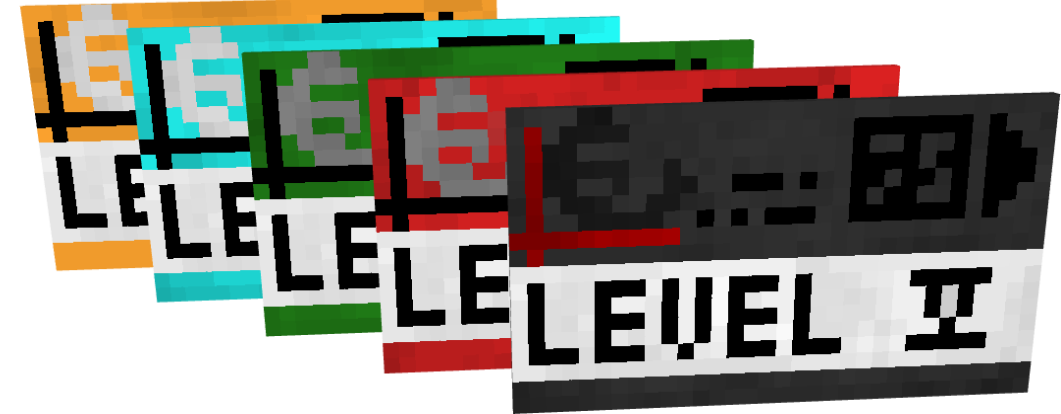
本模组添加了一套通过安全系统网络验证的钥匙门和门禁卡系统,允许在单个世界中创建具有不同网络的多个设施。此外,模组还添加了多种功能性和装饰性方块。
网络 (Networks)
网络功能允许创建拥有不同门禁卡的自治设施。
特性:
- 角色 (Roles)
- 访问等级 (Access levels)
- UUID 验证
角色允许执行特定操作:添加用户、配置钥匙门、管理门禁卡等级等。
角色:
- 创始人 (Founder)
- 管理员 (Admin)
- 版主 (Moderator)
- 用户 (User)
门禁卡 (Keycards)
门禁卡可激活不同的机制:钥匙门或门禁卡接口。门禁卡的等级并不绑定其实际纹理。你可以设置任意等级。 特性:
- 独立名称
- UUID 验证(将于 0.8 版本加入)
- 访问等级
- 所属网络
门 (Doors)
模组添加了钥匙门和密码门。钥匙门可以通过门禁卡打开,而密码门只能通过输入密码开启。 所有门都会在短暂延迟后关闭,但 这可以在门的设置中禁用。
你可以为钥匙门设置任意等级:从 0 到台球级(billiards)。 密码门的密码长度不能超过 9 个字符。
装饰方块 (Decorations)
目前装饰性方块不多,未来更新会增加更多。 有建议吗?请在 Discord 服务器 留言!
P.S. 如果你是设计师——请通过 Discord 私聊我以改进视觉效果。我不擅长这个……
使用方法
要设置门,你首先需要创建一个网络。使用门禁卡编程器。
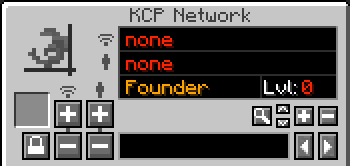
首先你会看到网络名称。

当前选中的用户。

但是如何添加网络和用户呢? 在底部的框中输入网络名称以设置名称。

然后点击左侧的“添加”按钮。 减号按钮用于删除网络。

现在你的菜单已更改,你将看到类似以下内容。
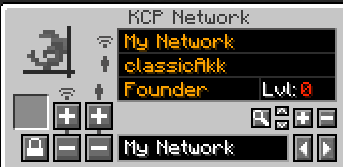
要添加用户,你需要在下方的框中输入用户名(替换你的网络名称),然后点击这些按钮之一,就像上面的网络管理一样。

现在你可以查看该用户的设置:他的角色和访问等级。但你如何管理它呢?
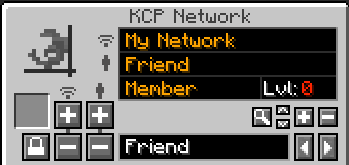
右侧有几个按钮。

箭头按钮用于更改用户角色:成员 / 版主 / 管理员 / 创始人。 加号和减号按钮用于管理用户等级。
放大镜按钮用于查找玩家。例如,如果你想更改某人的属性,你可以在下方的框中输入他的名字并点击此按钮。系统将在选定的网络中找到该用户。
那么为什么我们需要用户等级和角色呢? 现在让我们转到门禁卡菜单。
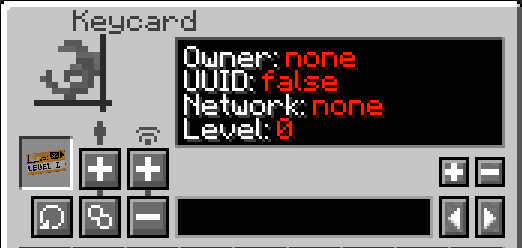
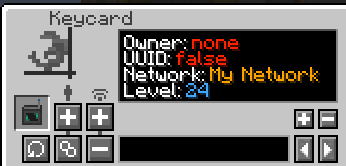
在这里你可以查看门禁卡的属性。首先,你需要将门禁卡绑定到网络。为此,你至少需要版主角色。 添加网络与我们之前进行的网络创建类似。
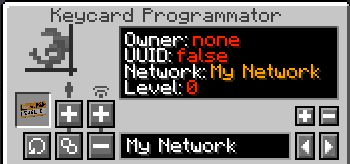
现在你可以更改门禁卡属性。要设置等级,右侧有按钮可用。只有版主及以上权限才能更改等级。但如果用户在网络配置中的用户等级更高,版主也可以修改等级。 例如:用户等级:5;用户角色:版主;这意味着该用户可以将门禁卡等级设置为最高 5 级; 管理员和创始人在管理方面没有限制。
你可能注意到了这些按钮。它们管理门禁卡的前两个参数。

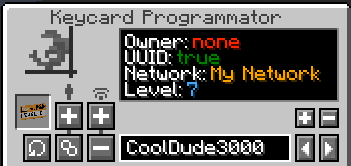
门禁卡配置的最终形态。
如何添加钥匙门?
你需要门编程器。
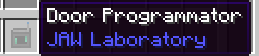
首先,像配置门禁卡一样设置它的配置。
然后点击钥匙门并管理其配置。
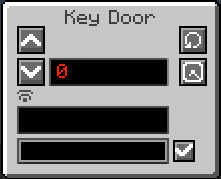
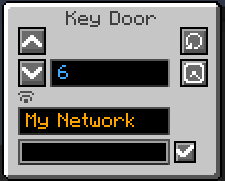
!! 警告 !! 设置网络后,你需要重新打开 GUI。
此按钮设置自动关闭。默认情况下,钥匙门会在几秒后关闭。但如果切换其模式,它将保持打开状态,直到你用空手点击它为止。

大多数素材属于 [Nazzy](本模组也受其其中一个项目启发)()
This mod adds a key door system with a keycards system verificated via networks with security systems that gives ability to create multiple facilities with different networks in single world. Also mod adds many functional and decorative blocks
Networks
Networks gives ability to create many autonomic facilities with diffirent keycards.
Features:
- Roles
- Access levels
- UUID verification
Roles allows to do specific actions: adding users, configurate keydoors, manage keycards level e.t.c
Roles:
- Founder
- Admin
- Moderator
- User
Keycards
Keycards activates different mechanisms: key doors or keycard interfaces. Keycard level is not binded to it's actual texture. You can set any level Features:
- Individual name
- UUID verification (coming in 0.8)
- Access level
- Network
Doors
Mod adds key doors and code doors. Key doors can be opened via keycards, code doors can be only open by providing password. All the doors closes after a small delay but this can be disabled in door settings
To the key doors you can set any level: from 0 to billiards Code doors password cannot be longer than 9 symbols
Decorations
Currently there aren't many decoration block, more will be added in future updates Want to suggest an idea? Leave it in discord server!
P.S if you are a designer - dm me in discord to improve visual. I'm bad at this...
Usage
To set up door you first need to create network. Use keycard programmator.
First you see a network name
Currently selected user
But how to add Network and User? Type Network Name at the bottom box to set a name
Then click add button at the left Minus button deletes network
Now your menu changed and you will see something like this
To add user you need to type a username at box below (replace your network name) and then click one of these buttons as like network management above
Now you can view this user settings: his role and access level. But how do you manage it?
There are a few buttons on the right
Arrows changes user role: member / moderator / admin / founder Plus and minus buttons manages user level
Magnifying glass button used to find players. For example if you want to chage someones properties you can type his name at box below and click this button. System will found this user in selected network
But why do we need user level and roles? Now let's move to Keycard menu
Here you can view keycard's properties. First of all you need to bind your keycard to network. To do this you need a role at least moderator. Adding networks is similar to the network creation we did before
Now you can change keycard properties. To set level you have a buttons on the right. Level can be changed only by moderators and higher. But moderators can modify level in case their user level we changed in network configuration is higher. For example: User level: 5; User Role: Moderator; That means this user can set keycard level up to 5; Admins and Founder has no restrictions in management.
You propably noticed these buttons. They are manages first two parameters of keycard.
Final variant of the keycard configuration
How to add keydoors?
You need Door Programmator
First of all set it's configuration as well as your keycards
Then click on KeyDoor and manage it's configuration
!! Warning !! After setting network you need to re-open GUI
This button sets auto closing. By default keydoor closes in few seconds. But if you switch it's mode it will kept opened untill you click it with hand.
Most of the assets belongs to [Nazzy] (also mod inspired from one of his project)()

下载 JAW Lab
需要联机服务器吗?
稳定流畅、一键部署,几分钟即可和朋友联机开服
最低仅需 8 元/月 即可畅快联机
下载 JAW Lab
下载 JAW Lab
下载 JAW Lab
下载 JAW Lab
下载 JAW Lab
需要联机服务器吗?
稳定流畅、一键部署,几分钟即可和朋友联机开服
最低仅需 8 元/月 即可畅快联机
下载 JAW Lab
需要联机服务器吗?
稳定流畅、一键部署,几分钟即可和朋友联机开服
最低仅需 8 元/月 即可畅快联机
- 重写网络代码
- 修复了 bug
- 系统输出已更改为 LOGGER.error();
- 移除了冗余的调试输出
- 修复了钥匙卡所有者更新问题
- 修复了钥匙门开启检查
关于这个资源的讨论、问题反馈与使用心得
还没有讨论,来发第一帖吧
你是这个资源的作者?登录后可认领此资源。
相似资源
 模组

可定制的鞘翅模组,支持装饰纹饰、旗帜图案等更多功能!
 模组

一个用于收集生物掉落物的多区块模组。
 模组
AE2:一款流行的自动化与存储模组
 模组

适用于 MC 1.18+ 的 Effekseer 加载器
 模组

新增 50+ 个独特生物群系,为你的世界增添新树木、花卉等更多元素!
 模组

基于 GTCEu 1.12.2 的现代 GregTech
评论 0
登录后参与评分
还没有评论,来抢沙发吧