
钥匙
锁定你的容器和门,以保护物品和建筑免受其他玩家以及爬行者(Creepers)的侵害。按住 Shift 并右键点击方块即可锁定或解锁它。
功能(斜体部分需在配置中启用):
- 锁定容器、门、活板门和栅栏门,甚至支持来自模组的方块
- 基于玩家和_钥匙名称_进行锁定
- 自动解锁
- 锁定的容器可以设为不可破坏或_显示为全息图_
- 钥匙具有耐久度,可以进行修复和附魔
- 管理员钥匙(Admin Key)
- 可定义每个玩家及全服最大锁定方块数量
对应的资源包可在相应版本的补充资源部分找到。
合成
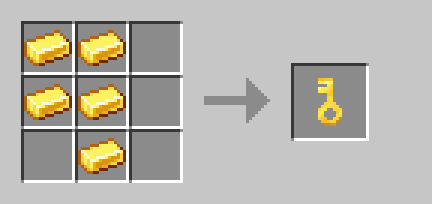
[1.20.2 - 1.20.4] 工作台将显示一本知识之书作为结果。合成后,知识之书将被替换为钥匙。
每次锁定一个方块时,钥匙都会受损。此功能可以在数据包的设置中进行更改。伤害也可能在解锁时发生,或者每次使用钥匙时发生,也可以完全禁用。为了提高其耐久度,可以使用“经验修补”(Mending)或“耐久”(Unbreaking)对其进行附魔。
[1.21.2 +] 钥匙默认耐久度为 400,可以在铁砧中使用金锭进行修复。耐久度可以在 我的网站 上更改。
[1.20.2 - 1.21.1] 钥匙的耐久度为 100,可以通过将其与金锭一起丢向铁砧来进行修复。
锁定与设置
如果一名玩家锁定了容器或门,只有该玩家才能再次解锁它。在此过程中,钥匙本身并不重要,因为锁只记住玩家。
此外,你可以在设置中允许使用钥匙的名称作为密码。这允许所有使用正确密码的玩家解锁锁。为了防止忘记密码,最后锁定容器或门的玩家拥有该锁,因此也可以使用任何钥匙按照上述描述进行解锁。
如果需要,可以在设置中定义每个玩家的最大锁定方块数量以及全服总数。
你可以使用以下命令打开设置菜单:
/function keylock:settings/menu
使用以下命令将最大数量设置为无限制:
/scoreboard players reset #max_player keylock
/scoreboard players reset #max_world keylock
锁定的容器
一旦容器被锁定,其中的物品将无法再被访问,即使破坏容器或在下方放置漏斗也不行。
这也意味着锁定的熔炉和其他类似方块无法处理其中的物品,且当前正在使用的燃料不会被保留。如果通过漏斗将物品放入锁定的容器中,当容器解锁时,这些物品将会掉落。
设置菜单:
- 可以激活容器的自动解锁。这将导致玩家周围指定半径内的所有容器都被解锁,前提是玩家是容器的所有者,或者快捷栏中选中的钥匙带有正确的密码。在玩家离开后,容器会自动重新锁定。
- 可以更改锁定容器的行为。锁定的容器可以设为不可破坏,或由全息图替换。此外,容器也可以保持为实体方块,仅在销毁时才被替换为全息图。 全息图是锁定容器的可视化表示。玩家可以毫无阻力地穿过它,并在其中放置和破坏方块。
锁定的门和栅栏门(默认禁用)
所有锁定的门、活板门和栅栏门都是不可破坏的,也无法打开。但是,如果移除了普通门的支撑方块,锁定的门也会随之破坏。
如果双扇门被锁定,两扇门扇都会被锁定。
设置菜单:
- 可以激活双扇门的自动开启。此设置适用于所有门,无论是否被锁定。
- 可以激活门的自动开启。如果启用了此功能,玩家前方三个方块内的所有门都会自动打开。在玩家离开后,门会自动关闭。
- 可以激活门的自动解锁。这将解锁并打开玩家前方三个方块内的所有门,前提是玩家是门的拥有者,或者快捷栏中选中的钥匙带有正确的密码。在玩家离开后,门会自动关闭并重新锁定。
重要的技术信息
请注意,其他更改容器和门功能的数据包和模组可能会干扰本数据包的操作。对于容器而言,这可能导致物品丢失。
切勿杀死世界中的所有实体,因为方块的锁定状态存储在特殊实体中。
服务器管理员可以使用管理员钥匙解锁其他玩家的锁定方块:
/function keylock:admin_key
如果容器或门无法再被解锁,应首先尝试破坏它。如果锁定的方块自我替换,则可以使用管理员钥匙进行解锁。如果锁定的容器不再自我替换,则必须先重新放置原始容器。然后可以使用以下命令恢复容器中的物品:
/function keylock:container/repair with block <container position>
如果容器在同一位置再次被锁定并包含新物品,则不能使用此命令。这将覆盖该位置的数据。
物品本身并不保存在特殊实体中,而是保存在命令存储中。该文件位于你世界的 data 文件夹中,名为 command_storage_keylock.dat。
调整可锁定方块
选择可锁定方块最简单的方式是访问我的个人网站。当然,你也可以在 Modrinth 上下载预置版本,这将通过 Modrinth 的创作者变现计划支持我。
如果需要在首次下载后更改可锁定的方块,必须先解压数据包。所有可锁定的方块均在 data/tags/blocks 文件夹下定义。
所有可锁定的容器都存储在 containers.json 文件中。以下原版方块若在此文件中定义,即可被锁定:
barrel、blast_furnace、brewing_stand、chest、dispenser、dropper、furnace、hopper、smoker、trapped_chest 以及所有颜色的 shulker_box 变体。
如果某个容器在被破坏时不会掉落其内容物(例如潜影盒),则必须在 keep_inventory.json 文件中列出该容器。否则,在容器处于锁定状态时放入其中的物品将会丢失。
所有可锁定的门都存储在 doors.json 文件中。以下原版门若在此文件中定义,即可被锁定。
所有可锁定的陷阱门和栅栏门都存储在 trapgate.json 文件中。以下原版陷阱门和栅栏门若在此文件中定义,即可被锁定。
还可以添加来自模组的方块。为此,需将方块 ID 添加到最合适的方块标签 JSON 文件中。此外,使用前必须始终检查锁定功能是否正常工作。
Key
Lock your containers and doors to protect your items and buildings from other players and Creepers. Press shift and right-click on the block to lock or unlock it.
Features (italic ones must be turned on):
- Locking containers, doors, trapdoors and fence gates, even from mods
- Locking based on player and key name
- Automatic unlocking
- Locked containers can be unbreakable or displayed as hologram
- Keys can have a durability, be repaired and enchanted
- Admin Key
- Definable max locked blocks per player and in the world
The matching resource pack can be found in the supplementary resources section of the respective version.
Crafting
[1.20.2 - 1.20.4] The Crafting Table will show a Knowledge Book as the result. This will be replaced by the Key after crafting.
The Key is damaged every time a block is locked. This functionality can be changed in the settings of the Data Pack. The damage can also occur when unlocking, every time the Key is used or be completely deactivated. To increase its durability, it can also be enchanted with Unbreaking or Mending.
[1.21.2 +] The Key has a default durability of 400 and can be repaired with a Gold Ingot in the Anvil. The durability can be changed on my own website.
[1.20.2 - 1.21.1] The Key has a durability of 100 and can be repaired by dropping it with a Gold Ingot onto an Anvil.
Locking and settings
If a player locks a container or door, only that player can unlock it again. The Key itself doesn't matter in this process, as the lock only remembers the player.
In addition, you can allow the name of the Key to be used as password in the settings. This allows all players who use the right password to unlock the lock. To prevent forgotten passwords, the last player to lock the container or door owns it and can therefore also unlock it with any Key as described above.
If desired, the maximum number of locked blocks per player and the total in the world can be defined in the settings.
You can open the settings with the following command:
/function keylock:settings/menu
Use the follwing command to set the maximum numbers to unlimited:
/scoreboard players reset #max_player keylock
/scoreboard players reset #max_world keylock
Locked containers
Once a container has been locked, the items inside can no longer be accessed, even by breaking it or placing a hopper underneath it.
This also means that locked furnaces and similar blocks cannot process the items inside and the fuel currently in use is not preserved. If items are placed in a locked container via a hopper, they will be dropped when the container is unlocked.
Settings Menu:
- The automatic unlocking of containers can be activated. This causes all containers within a defined radius around the player to be unlocked, as long as the player is the owner of the container or has the correct Key with password selected in their hotbar. After the player has moved away, the container is automatically locked again.
- The behaviour of locked containers can be changed. Locked containers can either be made unbreakable or replaced by holograms. Furthermore, the container can also remain as a block and only be replaced by a hologram once it has been destroyed. A hologram is a visualisation of the locked container. A player can walk through it without resistance and place and break blocks in it.
Locked doors and fence gates (disabled by default)
All locked doors, trapdoors and fence gates are unbreakable and cannot be opened. However, if the support block is removed from normal doors, locked doors will also break.
If a double door is locked, both door leaves are locked.
Settings Menu:
- The automatic opening of double doors can be activated. This setting applies to all doors, regardless of whether they are locked.
- The automatic opening of doors can be activated. If this is activated, all doors that are three blocks in front of the player are opened. After the player has moved away, the door is automatically closed again.
- The automatic unlocking of doors can be activated. This will unlock and open all doors that are three blocks in front of the player, provided the player is the owner of the door or has selected the correct key and password in their hotbar. After the player has moved away, the door is automatically closed and locked again.
Important technical stuff
Be aware that other Data Packs and mods that change the functionality of containers and doors can interrupt the operation of this pack. In the case of containers, this could result in the loss of items.
Never kill all entities in the world, as the lock status of the block is stored in special entities.
A server admin can use an Admin Key to unlock the locked blocks of another player:
/function keylock:admin_key
If a container or door can no longer be unlocked, an attempt should first be made to break it. If the locked block replaces itself, an Admin Key can be used to unlock it. If a locked container no longer replaces itself, the original container must be placed again first. The following command can then be used to restore the items in the container:
/function keylock:container/repair with block <container position>
This command cannot be used if a container has been locked again at the same position with new items in it. This will overwrite the data at this position.
The items themselves are not saved in the special entity, but in the command storage. The file is located in the data folder of your world and is called command_storage_keylock.dat.
Adjust lockable Blocks
The easiest way to select the lockable blocks is on my own website. You can of course also download the premade version on modrinth, which would support me thanks to modrinth's Creator Monetisation Program.
If the lockable blocks need to be changed after the first download, the Data Pack must first be unzipped. All lockable blocks are defined under the folder data/tags/blocks.
All lockable containers are stored in the containers.json file. The following blocks from Vanilla can be locked when defined in this file:
barrel, blast_furnace, brewing_stand, chest, dispenser, dropper, furnace, hopper, smoker, trapped_chest and all colour variants of the shulker_box
If a container doesn't drop its content when broken (like shulker boxes) the container must be listed in the keep_inventory.json file. If this is not done, the items placed in the container while it is locked will be lost.
All lockable doors are stored in the doors.json file. All doors from Vanilla can be locked when defined in this file.
All lockable trapdoors and fence gates are stored in the trapgate.json file. All trapdoors and fence gates from Vanilla can be locked when defined in this file.
It is also possible to add blocks from mods. To do this, the block ID is stored in the most fitting block tag json file. In addition, it is always necessary to check whether the locking works correctly before using it.

下载 Key - 锁定箱子、其他容器和门
需要联机服务器吗?
稳定流畅、一键部署,几分钟即可和朋友联机开服
最低仅需 8 元/月 即可畅快联机
下载 Key - 锁定箱子、其他容器和门
需要联机服务器吗?
稳定流畅、一键部署,几分钟即可和朋友联机开服
最低仅需 8 元/月 即可畅快联机
下载 Key - 锁定箱子、其他容器和门
需要联机服务器吗?
稳定流畅、一键部署,几分钟即可和朋友联机开服
最低仅需 8 元/月 即可畅快联机
下载 Key - 锁定箱子、其他容器和门
需要联机服务器吗?
稳定流畅、一键部署,几分钟即可和朋友联机开服
最低仅需 8 元/月 即可畅快联机
下载 Key - 锁定箱子、其他容器和门
需要联机服务器吗?
稳定流畅、一键部署,几分钟即可和朋友联机开服
最低仅需 8 元/月 即可畅快联机
下载 Key - 锁定箱子、其他容器和门
需要联机服务器吗?
稳定流畅、一键部署,几分钟即可和朋友联机开服
最低仅需 8 元/月 即可畅快联机
下载 Key - 锁定箱子、其他容器和门
需要联机服务器吗?
稳定流畅、一键部署,几分钟即可和朋友联机开服
最低仅需 8 元/月 即可畅快联机
下载 Key - 锁定箱子、其他容器和门
需要联机服务器吗?
稳定流畅、一键部署,几分钟即可和朋友联机开服
最低仅需 8 元/月 即可畅快联机
下载 Key - 锁定箱子、其他容器和门
需要联机服务器吗?
稳定流畅、一键部署,几分钟即可和朋友联机开服
最低仅需 8 元/月 即可畅快联机
下载 Key - 锁定箱子、其他容器和门
需要联机服务器吗?
稳定流畅、一键部署,几分钟即可和朋友联机开服
最低仅需 8 元/月 即可畅快联机
修复 Admin Key 错误
关于这个资源的讨论、问题反馈与使用心得
还没有讨论,来发第一帖吧
你是这个资源的作者?登录后可认领此资源。
相似资源
 模组

显示你正在注视的方块的信息。(适用于 Minecraft 1.16+ 的 Hwyla/Waila 分支)
 模组

查看物品与配方
 模组
在游戏画面角落显示附近世界地形、玩家、生物和实体的地图。可创建路径点,帮助你找到标记过的位置。
 模组
使用 JavaScript 编辑配方、添加自定义物品、编写世界事件!
 模组
添加区块认领和玩家组队功能,并与 Xaero's Minimap 和 World Map 集成
 模组
添加全屏世界地图,显示你在世界中已探索的区域。与 Xaero's Minimap 搭配使用效果极佳。
评论 0
登录后参与评分
还没有评论,来抢沙发吧