
按键太多,物理按键却不够用?是否厌倦了频繁将很少使用的按键重新绑定到其他键位?是否难以记住每个按键的功能?那么这款模组正是为你而设。
该模组添加了“按键组合”(key bundles),本质上是将多个按键绑定整合到同一个按键上。
创建组合
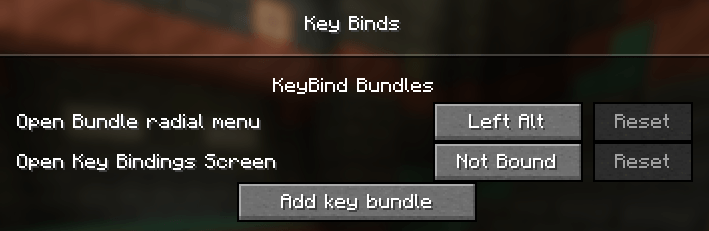
要创建新的组合,请打开按键绑定界面,在“KeyBind Bundles”类别下(通常为首个类别)点击 Add key bundle 按钮,然后为你的组合输入一个名称。
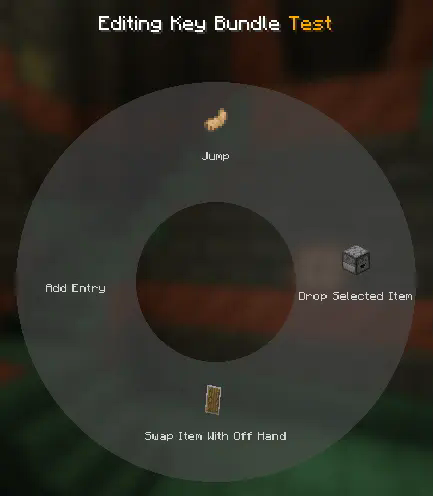
之后,点击组合旁的 Edit 按钮。在新界面中,将鼠标悬停在中间的环形菜单上并点击 Add entry。这将再次打开按键绑定界面,此时每个按键绑定旁都会出现一个选择按钮。你可以在这里选择希望添加到该组合中的绑定。
选定绑定后,你还可以在环形菜单中编辑各个条目,为其设置自定义名称和物品图标。
使用组合
按 Escape 退出编辑菜单,并将该组合绑定到一个按键上。随后在游戏中,按住你分配给该组合的按键即可呼出环形菜单。将鼠标悬停并在某个条目上左键单击,即可触发对应的按键绑定。就是这么简单!
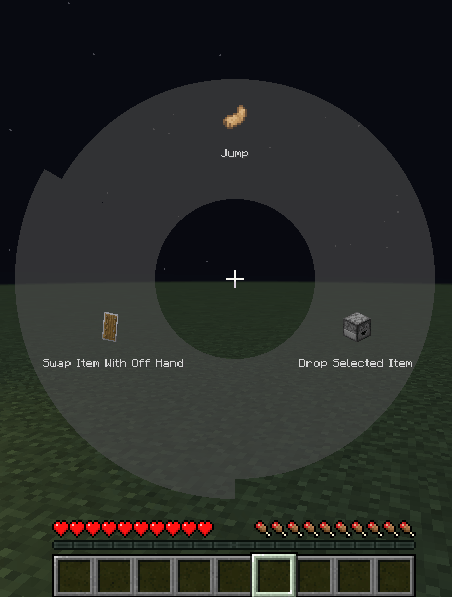
你也可以通过右键点击来收藏某个按键映射。被收藏后,按下分配给该组合的按键将直接触发该映射,无需打开环形菜单。当某个按键被收藏时,可通过按住 Radial menu modifier(默认为左 Alt)再次打开环形菜单。当前收藏的按键在环形菜单中将以红色高亮显示。
本模组与 Controlling 兼容
Do you have too many keybinds but not enough physical keys for all of them? Are you tired of constantly changing rarely used keys to other bindings? Is it too hard to remember what each key does? Then this mod is for you.
This mod adds key bundles, which are basically multiple keybinds in one key.
Creating bundles
To create a new bundle, open the keybinds screen and under the KeyBind Bundles category (which should be the first) click the Add key bundle button, and then enter a name for your bundle.
After that, click the Edit button on the bundle. In the new screen hover over the radial menu in the middle and click on Add entry. This will open the keybinds screen again but now each keybind has a select button. Here you can select the bindings you want to add to the bundle.
After selecting the bindings you may edit each entry in the radial menu and give it a custom name and item icon.
Using bundles
Exit the edit menu by pressing escape and bind the bundle to a key. Afterwards, while in-game you can press and hold the key you assigned to bring up the radial menu. Hover and left click over an entry to trigger that keybind. It's that simple!
You can also bookmark a key mapping by right clicking it. Once bookmarked, pressing the key assigned to the bundle will immediately trigger that mapping without opening the radial menu. When a key is bookmarked, the radial menu can be opened again by holding the Radial menu modifier, which is Left alt by default. The current bookmarked key will be highlighted red in the radial menu.
This mod is compatible with Controlling

下载 KeyBind Bundles
下载 KeyBind Bundles
下载 KeyBind Bundles
下载 KeyBind Bundles
下载 KeyBind Bundles
需要联机服务器吗?
稳定流畅、一键部署,几分钟即可和朋友联机开服
最低仅需 8 元/月 即可畅快联机
下载 KeyBind Bundles
- 使字体大小可配置,并略微增加默认值,将按键绑定名称分行显示
修复通过按键绑定打开选项屏幕时,如果另一个屏幕已打开导致的崩溃问题
关于这个资源的讨论、问题反馈与使用心得
还没有讨论,来发第一帖吧
你是这个资源的作者?登录后可认领此资源。
相似资源
 模组

可定制的鞘翅模组,支持装饰纹饰、旗帜图案等更多功能!
 模组

显示你正在注视的方块的信息。(适用于 Minecraft 1.16+ 的 Hwyla/Waila 分支)
 模组
使用 JavaScript 编辑配方、添加自定义物品、编写世界事件!
 模组

查看物品与配方
 模组
在游戏画面角落显示附近世界地形、玩家、生物和实体的地图。可创建路径点,帮助你找到标记过的位置。
 模组
AE2:一款流行的自动化与存储模组
评论 0
登录后参与评分
还没有评论,来抢沙发吧