
Keymap 重写
这是 dust 对 Keymap 模组的二次分支的再分支。支持请加入我的 Discord 服务器。
Minecraft 可视化按键重映射模组
## 注意!目前与 Quilt 加载器 0.18.x 测试版不兼容(0.17.x 仍然正常),我正在寻找合适的解决方案,但在此期间,此处提到的解决方法应该可以解决问题。 编辑:一切正常
概览
最新动态
0.7.0
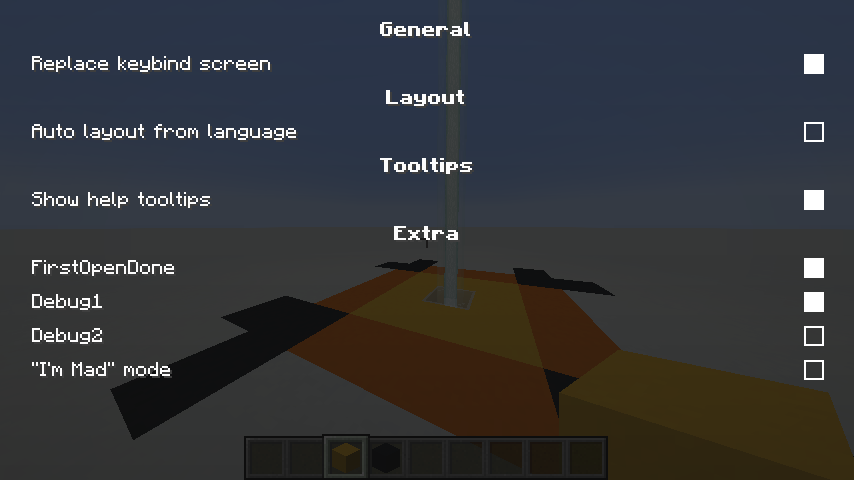
- 自定义配置界面,依赖更少,皆大欢喜!
- 添加了贡献者鸣谢界面 :D
- 添加了日语键位布局,感谢 BlueSheep2804!
- 添加了简体中文语言,感谢 DarkCrystalll!
重要事项
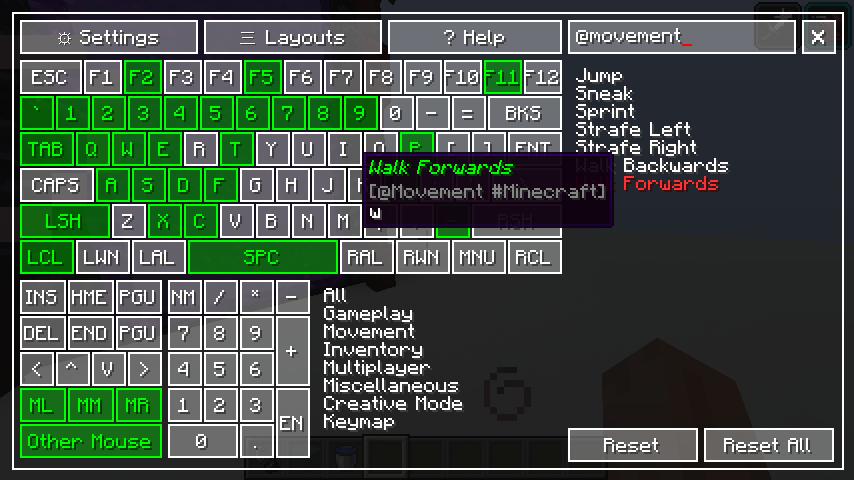
- 在游戏中按下
反引号/Backtick()`,或 Escape 键下方的按键以显示映射器 CTRL+F:聚焦搜索框- 通过直接点击
Other Mouse按钮来注册所有其他鼠标按键 - 你可以使用
CTRL、SHIFT和ALT作为键绑修饰符 - 修饰符系统不会阻止修饰键的默认用途,也就是说;
在行走时按下 CTRL+Q 会让你冲刺
- 按下
SHIFT+W会让你蹲下,但不会让你行走
你仍然可以正常地为修饰键本身分配按键 你不能将多个按键映射绑定到同一个组合上
颜色
颜色 图例
white
未分配
green
已分配
yellow
已选中
red
冲突
small yellow box
已分配的修饰符
查询语法
格式 效果
(sample text)
分类
@sample_text
分类(slug)
{sample text}
模组名称
#sample_text
模组名称(slug)
[sample text]
已绑定按键
$sample_text
已绑定按键(slug)
截图

支持
Keymap Rewrite
This is a fork of the fork by dust of the Keymap mod. Support is in my Discord server.
Visual key remapping mod for Minecraft
## Heads up!Currently not working w/ Quilt loader 0.18.x betas (0.17.x is still ok), I'm trying to find a proper solution, but in the meantime workaround mentioned Here should do. EDIT: all good
Overview
Latest news
0.7.0
- Custom Config screen, lesser dependencies, much happy!
- Added credits screen for contributors :D
- Added Japanese key layout, thanks BlueSheep2804!
- Added ZH_CN Language, thanks DarkCrystalll!
Important stuff
- Press the
Grave Accent/Backtick()`, or the key under the Escape key to show the mapper while playing CTRL+F: focus search box- Register all other mouse keys using the
Other Mousebutton by clicking directly on it - You can use
CTRL,SHIFTandALTas keybind modifiers - The modifier system does not block the default use of the modifier keys, that is to say;
Pressing CTRL+Q while walking, will make you sprint
- Pressing
SHIFT+Wwill make you crouch ,but will not make you walk
You can still assign modifier keys by themselves normally You cannot bind multiple keymaps to a single combination
Colors
Color Legend
white
Not Assigned
green
Assigned
yellow
Selected
red
Conflict
small yellow box
Modifier assigned
Queries
Format Effect
(sample text)
Category
@sample_text
Category (slug)
{sample text}
Mod name
#sample_text
Mod name (slug)
[sample text]
Bound key
$sample_text
Bound key (slug)
Screenshots
Support

下载 Keymap [Maintained]
下载 Keymap [Maintained]
下载 Keymap [Maintained]
下载 Keymap [Maintained]
下载 Keymap [Maintained]
下载 Keymap [Maintained]
下载 Keymap [Maintained]
下载 Keymap [Maintained]
下载 Keymap [Maintained]
下载 Keymap [Maintained]
- 新增了对 Minecraft 26.2 和 26.3 的支持
- 将 Minecraft 1.21.1 版本更新为该模组的最新版本
- 游戏内按键组合(如 Ctrl + G)从游戏启动起即可正常使用
- 现在可以在选择某个操作时按下鼠标侧键来绑定它们
- 修复了在 Forge/NeoForge 上“打开键位图”的按键在控制设置中不显示或无法保存的问题
- 修复了挪威键盘布局下
<键错误显示为鼠标左键绑定的问题 - 修复了 Colemak 和 Dvorak 布局下鼠标中键与右键互换的问题
- 修复了 1.20.1 版本缺少模组图标的问题
- 26.3:日语键盘按键(¥、ろ、無変換、変換、かな)现在可在虚拟键盘上使用
关于这个资源的讨论、问题反馈与使用心得
还没有讨论,来发第一帖吧
你是这个资源的作者?登录后可认领此资源。
相似资源
 模组

显示你正在注视的方块的信息。(适用于 Minecraft 1.16+ 的 Hwyla/Waila 分支)
 模组

查看物品与配方
 模组
在游戏画面角落显示附近世界地形、玩家、生物和实体的地图。可创建路径点,帮助你找到标记过的位置。
 模组
使用 JavaScript 编辑配方、添加自定义物品、编写世界事件!
 模组
添加区块认领和玩家组队功能,并与 Xaero's Minimap 和 World Map 集成
 模组
添加全屏世界地图,显示你在世界中已探索的区域。与 Xaero's Minimap 搭配使用效果极佳。
评论 0
登录后参与评分
还没有评论,来抢沙发吧