
L2Backpack
Discord:
依赖项:L2Library
(可选兼容性)它支持 Modular Golems,使得人形傀儡可以使用来自此模组的箭袋,但你需要确保 Modular Golem 的版本至少为 1.7.3。
内容
Backpack
展开
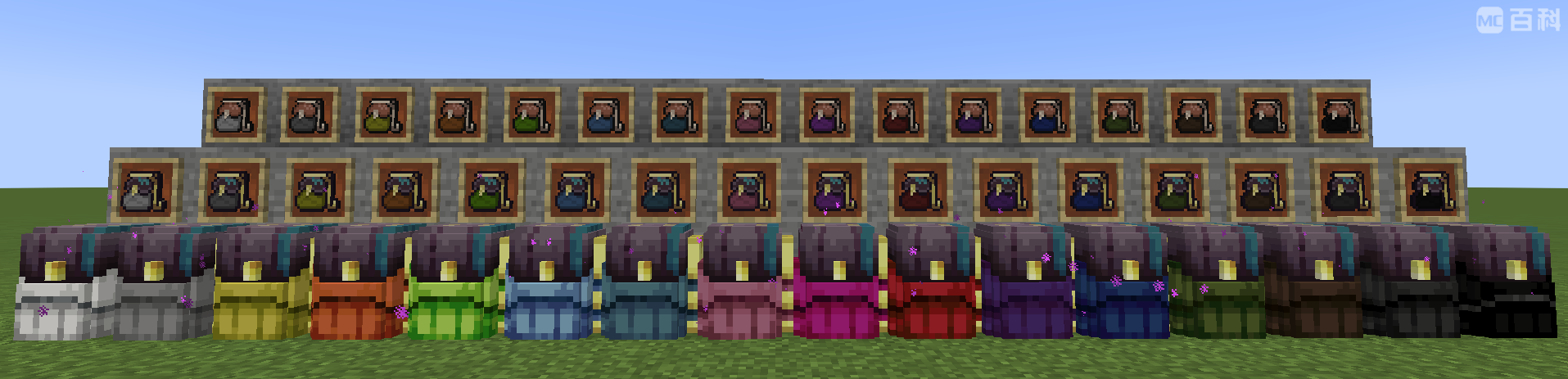
一个类似其他背包模组中常见背包的简单背包。你可以通过着色来区分它们,而无需悬停查看。它具备快速访问功能,使其区别于大多数其他背包模组。初始拥有 9 个槽位,并可使用末影口袋在锻造台中升级,最多可扩展至 54 个槽位(相当于大箱子)。 ### 特性 - **可穿戴**:可穿戴于护甲栏或 Curios 的背部栏位,并通过按键绑定打开(默认:B) - **快速访问**(受限):可持于右手打开,或在某些界面中直接通过右键点击该物品打开。支持的界面包括:玩家物品栏、末影箱、维度存储。 - **快速倾倒**:可通过按住 Shift 键右键点击容器方块(如箱子),将此背包中的所有物品倾倒进容器。 - **快速提取**:可通过按住 Shift 键左键点击容器方块,从容器中提取尽可能多的物品。 - **容器物品**:这是原版定义中的容器物品。这意味着它不能存在于其他容器物品(如潜影盒)中。此功能可防止可能导致服务器崩溃和区块损坏的 NBT 溢出问题。Ender Backpack
展开
一个便携式的末影箱。没什么特别的。 ### 特性 - **可穿戴**:可穿戴于护甲栏或 Curios 的背部栏位,并通过按键绑定打开(默认:B) - **快速访问**(完整):可持于右手打开,或在任何界面中直接通过右键点击该物品打开。 - **数据卸载**:这不是一个容器物品,因此你可以将背包放入其中,并将它放入其他背包中。数据存储在玩家身上。Dimensional Storage
展开
一个在末地维度存储物品的背包。维度存储必须与玩家绑定才能使用,且绑定到同一玩家且具有相同颜色的背包将共享同一个存储空间。一旦它与某玩家绑定,所有者可以将其交给他人,允许其他玩家访问该存储空间。但请注意:每个玩家仅有 16 个存储空间,每种颜色对应一个空间。此物品也可以放置在地面上。此时它充当跨维度物品传送箱,类似于 Ender Storage。这个箱子可以帮助你在一座工厂和另一座工厂之间传送物品,但它不会加载区块。
特性
- 可穿戴:可穿戴于护甲栏或 Curios 的背部栏位,并通过按键绑定打开(默认:B)
- 快速访问(完整):可持于右手打开,或在任何界面中直接通过右键点击该物品打开。
- 数据卸载:这不是一个容器物品,因此你可以将背包放入其中,并将它放入其他背包中。数据存储在世界中。
- 可放置:此物品可作为方块放置。要放置它,请按住 Shift 键右键点击。
Armor Bag / Book Bag
展开
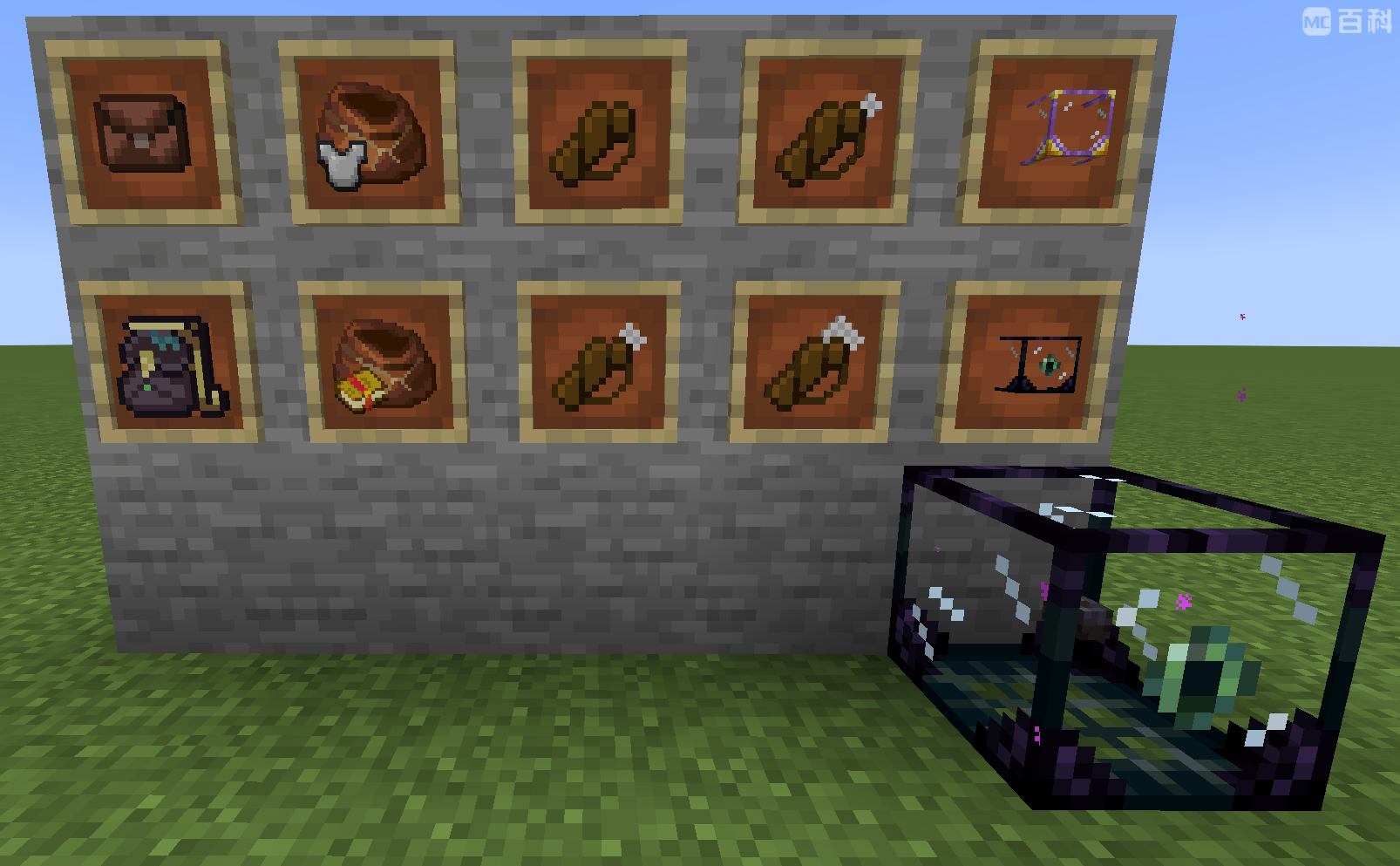
一个可存储多达 64 个不可堆叠物品的袋子。护甲袋用于存储带有耐久度的物品,而书籍袋用于存储附魔书。这是一种临时存储空间:它没有 GUI。相反,玩家手持它时右键点击即可收集所有匹配的物品进入袋中,按住 Shift 键右键点击则可倒出所有物品。这些袋子仅在 RPG 整合包中有用,在那里你可以获得大量装备或附魔书的战利品。它们会迅速填满你的物品栏。这些袋子可以帮助你在回家整理之前将它们存放在某处。为确保它不会拿走你的护甲/武器,它仅收集你物品栏中的物品,不包括快捷栏或护甲栏。
特性
- 快速倾倒:可通过按住 Shift 键右键点击容器方块(如箱子),将此袋中的所有物品倾倒进容器。
- 快速提取:可通过按住 Shift 键左键点击容器方块,从容器中提取尽可能多的物品。
- 快速收集:右键点击以从你的物品栏(不包括快捷栏)收集所有匹配的物品。
- 快速倒出:按住 Shift 键右键点击以倒出袋中的所有物品。
Quiver
展开
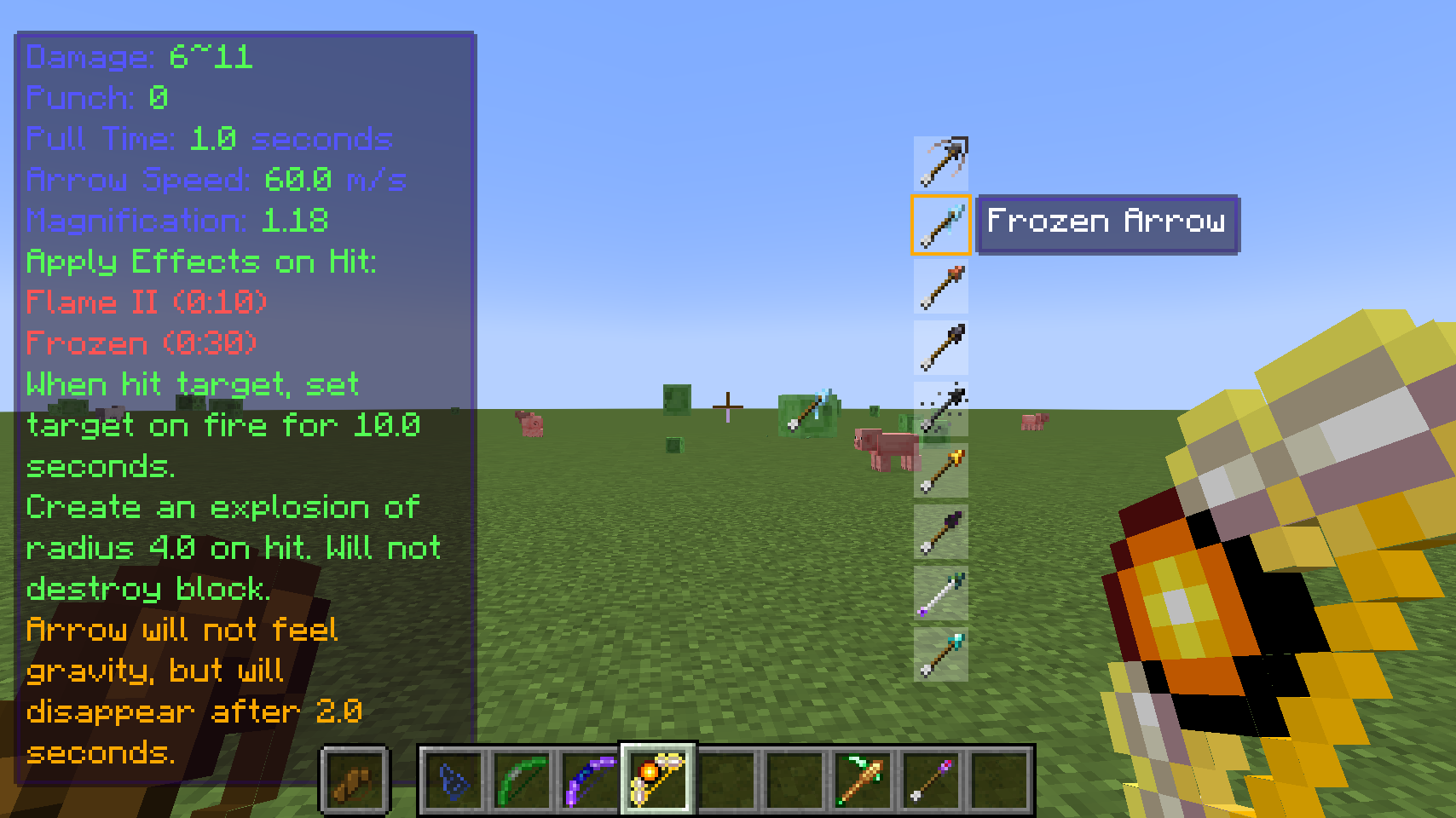
一个独特的背包,允许你在持弓状态下预览、选择并从 9 个候选项中射出箭矢。此功能使玩家能够无需切换物品或打开物品栏即可快速选择要射出的箭矢。箭袋仅有 9 个槽位且无法升级。要使用它,请将其置于副手栏、护甲栏或 Curios 的背部栏位。当持有弓时,玩家将看到箭袋中的所有箭矢、当前选中的箭矢,以及该箭矢是否被弓接受。按 Shift+数字键选择箭矢,或使用上/下键(可配置)切换箭矢。特性
- 可穿戴:可穿戴于护甲栏或 Curios 的背部栏位,并通过按键绑定打开(默认:B)
- 快速访问(受限):可持于右手打开,或在某些界面中直接通过右键点击该物品打开。支持的界面包括:玩家物品栏、末影箱、维度存储。
- 快速倾倒:可通过按住 Shift 键右键点击容器方块(如箱子),将此背包中的所有物品倾倒进容器。
- 快速提取:可通过按住 Shift 键左键点击容器方块,从容器中提取尽可能多的物品。
- 容器物品:这是原版定义中的容器物品。这意味着它不能存在于其他容器物品(如潜影盒)中。此功能可防止可能导致服务器崩溃和区块损坏的 NBT 溢出问题。
工具切换 / 护甲切换 / 组合切换
展开
类似于箭袋,这些切换功能允许你在不打开任何 GUI 的情况下预览、选择并从 9 个候选项中交换工具/护甲。此功能允许玩家在不打开背包的情况下快速切换挖掘/旅行/战斗装备。手持工具时,玩家将看到工具切换列表中的所有工具。按住 Shift + 数字键以选择工具,或使用上/下键(可配置)进行选择。然后按回车键将选中的工具与手中的工具进行交换。对于护甲,当主手为空时,会打开护甲列表。组合切换是箭袋、工具切换和护甲切换的组合版本。手持相应的物品以触发各自的功能。你也可以按住 Alt(可配置)在手中无物品时显示工具列表。
末影切换结合了组合切换和末影背包的功能,节省一个背包槽位。尽管物品仍然存储在物品本身中,而非末影箱库存内。
功能
- 可穿戴:它们可以佩戴在 Curios 的胸部或背部槽位中,并通过按键绑定(默认:B)打开。
- 快捷访问(有限):它们可以在副手打开,或者通过在 GUI 中右键点击该物品直接在某些库存中打开。支持的库存包括:玩家背包、末影箱、维度存储。
- 快捷倾倒:通过按住 Shift 并右键点击容器方块(如箱子),可以将此背包中的所有物品倾倒进容器方块中。
- 快捷提取:通过按住 Shift 并左键点击容器方块,可以从容器方块中提取尽可能多的物品。
- 容器物品:这是原版定义中的容器物品。这意味着它不能存在于其他容器物品中,例如潜影盒。此功能防止可能导致服务器崩溃和区块损坏的 NBT 溢出问题。
便携抽屉
展开
类似于抽屉模组中的抽屉。唯一的区别是它是便携式的!它只能存储一种物品,且该物品不能包含任何 NBT 数据,但可以存储最多 64 组。它不能被放置在地面上,玩家可以通过背包访问它。要放入物品,在任何 GUI 中,用想要存储的物品左键点击抽屉。要取出物品,在任何 GUI 中,右键点击它以取出一组。这也支持快捷倾倒和快捷提取功能,因此如果你安装了抽屉模组,你可以快速在一块抽屉方块之间传输物品。这也支持快捷收集和快捷提取功能,因此你可以在需要时清空背包中的圆石或快速取出一组物品。
功能
- 快捷倾倒:通过按住 Shift 并右键点击容器方块(如箱子),可以将此背包中的所有物品倾倒进容器方块中。
- 快捷提取:通过按住 Shift 并左键点击容器方块,可以从容器方块中提取尽可能多的物品。
- 快捷收集:右键点击以从你的背包(包括快捷栏)中收集所有匹配的物品。当它没有物品时,它将收集你背包中数量最多的那种物品。
- 快捷提取:按住 Shift 并右键点击以从抽屉中倒出一组物品。
末影抽屉
展开
一种便携式抽屉,但物品存储在末地维度中。你可以像使用简单的便携式抽屉一样访问它,但它不具备快捷倾倒和快捷提取功能。相反,它可以被放置为方块,并充当跨维度物品传送站。要使用它,首先用物品左键点击它以设置绑定。即使物品不包含任何内容,它也会绑定到该物品。类似于维度存储,它必须绑定到玩家才能生效。绑定到同一玩家且设置为相同物品的末影抽屉将绑定到相同的存储空间。但优于维度存储的是,玩家可以拥有任意数量的末影抽屉空间,每种物品对应一个空间。这在自动化生产线中非常强大。
对于末影抽屉方块,右键点击以存入或取出物品。要进行批量存入/取出,请使用便携抽屉进行快捷倾倒或快捷提取。
功能
- 快捷收集:右键点击以从你的背包(包括快捷栏)中收集所有匹配的物品。当它没有物品时,它将收集你背包中数量最多的那种物品。
- 快捷提取:按住 Shift 并右键点击以从抽屉中倒出一组物品。
- 可放置:此物品可以被放置为方块。要放置它,请按住 Shift 并右键点击。
L2Backpack
Discord:
Dependency: L2Library
(Optional Compatilibity) It supports Modular Golems in the way that humanoid golems can use quivers from this mod, but you need to make sure Modular Golem version is at least 1.7.3
Contents
Backpack
Expand
A simple backpack similar to backpacks in every backpack mod. You can color them to tell them apart from each other without hovering them. It has quick access support that differentiates itself from most other backpack mods. It has 9 slots at the beginning, and can be upgraded in smithing table using ender pocket, up to 54 slots (large chest). ### Features - **wearable**: They can be worn in chest slot or back slot of Curios, and opened with a key bind (default: B) - **quick-access**(limited): They can be opened in right hand, or in some inventories directly by right clicking this item in GUI. Supported inventories: player inventory, ender chest, dimensional storage. - **quick-dump**: You can dump all items in this backpack into block containers, such as chests, by shift-right clicking the container block. - **quick-load**: You can extract as much items as possible from a block container, by shift-LEFT clicking the container block. - **container-item**: This is a container item in vanilla definition. This means that it cannot exist in another container item, such as shulker box. This feature prevents NBT-overflow that can crash server and corrupt chunks.Ender Backpack
Expand
A portable ender chest. Nothing special. ### Features - **wearable**: They can be worn in chest slot or back slot of Curios, and opened with a key bind (default: B) - **quick-access**(full): They can be opened in right hand, or in any inventory directly by right clicking this item in GUI. - **off-loaded**: This is not a container item, so you can put backpacks in it and put it in backpacks. The data is stored on player.Dimensional Storage
Expand
A backpack that stores item in the end dimension. Dimensional Storage must be bind to a player to use, and the ones that bind to the same player and have the same color will bind to the same storage space. Once it's bound to a player, the owner can give it to others to allow other players to access this storage space. But note: one player only have 16 storage spaces, each corresponds to a color.This item can also be placed on ground. Then it acts as a cross-dimensional item teleport chest, similar to Ender Storage. This chest can help you to teleport items from one factory to another, but it does not load the chunk.
Features
- wearable: They can be worn in chest slot or back slot of Curios, and opened with a key bind (default: B)
- quick-access(full): They can be opened in right hand, or in any inventory directly by right clicking this item in GUI.
- off-loaded: This is not a container item, so you can put backpacks in it and put it in backpacks. The data is stored in the world.
- placeable: This item can be placed down as a block. To place it, do shift+right click.
Armor Bag / Book Bag
Expand
A bag that stores up to 64 unstackable items. Armor bag stores items with durability, and book bag stores enchanted books. This is a temporary storage space: It does not have a GUI. Instead, player right click with it to collect all matching items into this bag, and shift-right click with it to pour every out.These bags are useful only in RPG modpacks where you can get a lot of loots of equipments or enchanted books. They fills the inventory very quickly. These bags can help you to store them somewhere before you go back to home and sort them. To make sure it does not take your armor / weapon away, it only collect items in your inventory, not the hotbar or armor slots.
Features
- quick-dump: You can dump all items in this bag into block containers, such as chests, by shift-right clicking the container block.
- quick-load: You can extract as much items as possible from a block container, by shift-LEFT clicking the container block.
- quick-collect: Right click to collect all matching items from your inventory except the hotbar
- quick-extract: Shift-right click to pour out all items from the bag
Quiver
Expand
A unique backpack that allows you to preview, select, and shoot arrows from 9 candidates all while holding a bow. This feature allows players to quickly select arrows to shoot without switching items or open inventory. Quiver has 9 slot only and cannot be upgraded. To use it, put it in offhand, chest slot, or back slot of Curios. When holding a bow, player will see all arrows in the Quiver, the currently selected one, and whether this arrow is acceptable by the bow. Press shift+number key to select arrow, or up/down keys (configurable) to switch arrows.Features
- wearable: They can be worn in chest slot or back slot of Curios, and opened with a key bind (default: B)
- quick-access(limited): They can be opened in right hand, or in some inventories directly by right clicking this item in GUI. Supported inventories: player inventory, ender chest, dimensional storage.
- quick-dump: You can dump all items in this backpack into block containers, such as chests, by shift-right clicking the container block.
- quick-load: You can extract as much items as possible from a block container, by shift-LEFT clicking the container block.
- container-item: This is a container item in vanilla definition. This means that it cannot exist in another container item, such as shulker box. This feature prevents NBT-overflow that can crash server and corrupt chunks.
Tool Swap / Armor Swap / Combined Swap
Expand
Similar to quiver, these swaps allow you to preview, select, swap tools/armors from 9 candidates without opening any GUI. This feature allows players to quickly switch between mining/travel/battle gears without open inventory. When holding a tool, player will see all tools in the tool swap. Press shift+number key to select tool, or up/down keys (configurable) to select. Then press return to swap the select tool with the tool in hand. For armors, having an empty main hand opens the list for armor.Combined Swap is the combined version of quiver, tool swap, and armor swap. Holding corresponding items to trigger each of them. You can also press alt (configurable) to show the tool list when holding nothing.
Ender Swap combines combined swap and ender backpack, saving one backpack slot. Though the items is swap are still stored on the item, not the ender chest inventory.
Features
- wearable: They can be worn in chest slot or back slot of Curios, and opened with a key bind (default: B)
- quick-access(limited): They can be opened in right hand, or in some inventories directly by right clicking this item in GUI. Supported inventories: player inventory, ender chest, dimensional storage.
- quick-dump: You can dump all items in this backpack into block containers, such as chests, by shift-right clicking the container block.
- quick-load: You can extract as much items as possible from a block container, by shift-LEFT clicking the container block.
- container-item: This is a container item in vanilla definition. This means that it cannot exist in another container item, such as shulker box. This feature prevents NBT-overflow that can crash server and corrupt chunks.
Portable Drawers
Expand
Similar to the drawers in drawer mod. The only difference is that it is portable! It can only store one kind of item and the item must not have any NBT, but can store up to 64 stacks. It cannot be placed down, and player can access it through inventory.To put items in, in any GUI, left click the drawer with the item you want to store in. To take items out, in any GUI, right click it to take out a stack. This also support quick-dump and quick-load, so you can fast transport items from one drawer block to another, if you have drawer mod installed. This also support quick-collect and quick-extract, so you can clear cobblestones in your inventory or take out a stack quickly when you need.
Features
- quick-dump: You can dump all items in this backpack into block containers, such as chests, by shift-right clicking the container block.
- quick-load: You can extract as much items as possible from a block container, by shift-LEFT clicking the container block.
- quick-collect: Right click to collect all matching items from your inventory including the hotbar. When it has no item, it will collect the kind of item that has the largest count in your inventory.
- quick-extract: Shift-right click to pour out one stack of items from the drawer
Ender Drawers
Expand
A portable drawer, but store items in the end dimension. You can access it as if it is a simple portable drawer, but it does not have the quick dump and quick load feature. Instead, it can be placed down as a block, and act as a cross-dimensional item teleport station. To use it, first left click it with an item to set its binding. It will bind to the item even it contains none.Similar to dimensional storage, it has to be bind to a player to be functional. ender drawers that binds to the same player and set with the same item will be bind to the same storage space. But better than dimensional storage, player can have as many ender drawer space as they want, one for each kind of item. This is very powerful in automated production lines
For ender drawer block, right click to store items or take items out. To bulk store / take, use portable drawer to quick-dump or quick-load
Features
- quick-collect: Right click to collect all matching items from your inventory including the hotbar. When it has no item, it will collect the kind of item that has the largest count in your inventory.
- quick-extract: Shift-right click to pour out one stack of items from the drawer
- placeable: This item can be placed down as a block. To place it, do shift+right click
下载 L2 Backpack
下载 L2 Backpack
下载 L2 Backpack
下载 L2 Backpack
下载 L2 Backpack
下载 L2 Backpack
下载 L2 Backpack
下载 L2 Backpack
下载 L2 Backpack
下载 L2 Backpack
3.1.5
- 修复 Jade - ModularGolem - L2Backpack 软崩溃导致的客户端日志刷屏问题
关于这个资源的讨论、问题反馈与使用心得
还没有讨论,来发第一帖吧
你是这个资源的作者?登录后可认领此资源。
相似资源
 模组

显示你正在注视的方块的信息。(适用于 Minecraft 1.16+ 的 Hwyla/Waila 分支)
 模组

查看物品与配方
 模组
在游戏画面角落显示附近世界地形、玩家、生物和实体的地图。可创建路径点,帮助你找到标记过的位置。
 模组
使用 JavaScript 编辑配方、添加自定义物品、编写世界事件!
 模组
添加区块认领和玩家组队功能,并与 Xaero's Minimap 和 World Map 集成
 模组
添加全屏世界地图,显示你在世界中已探索的区域。与 Xaero's Minimap 搭配使用效果极佳。
评论 0
登录后参与评分
还没有评论,来抢沙发吧