
 LangSwitch
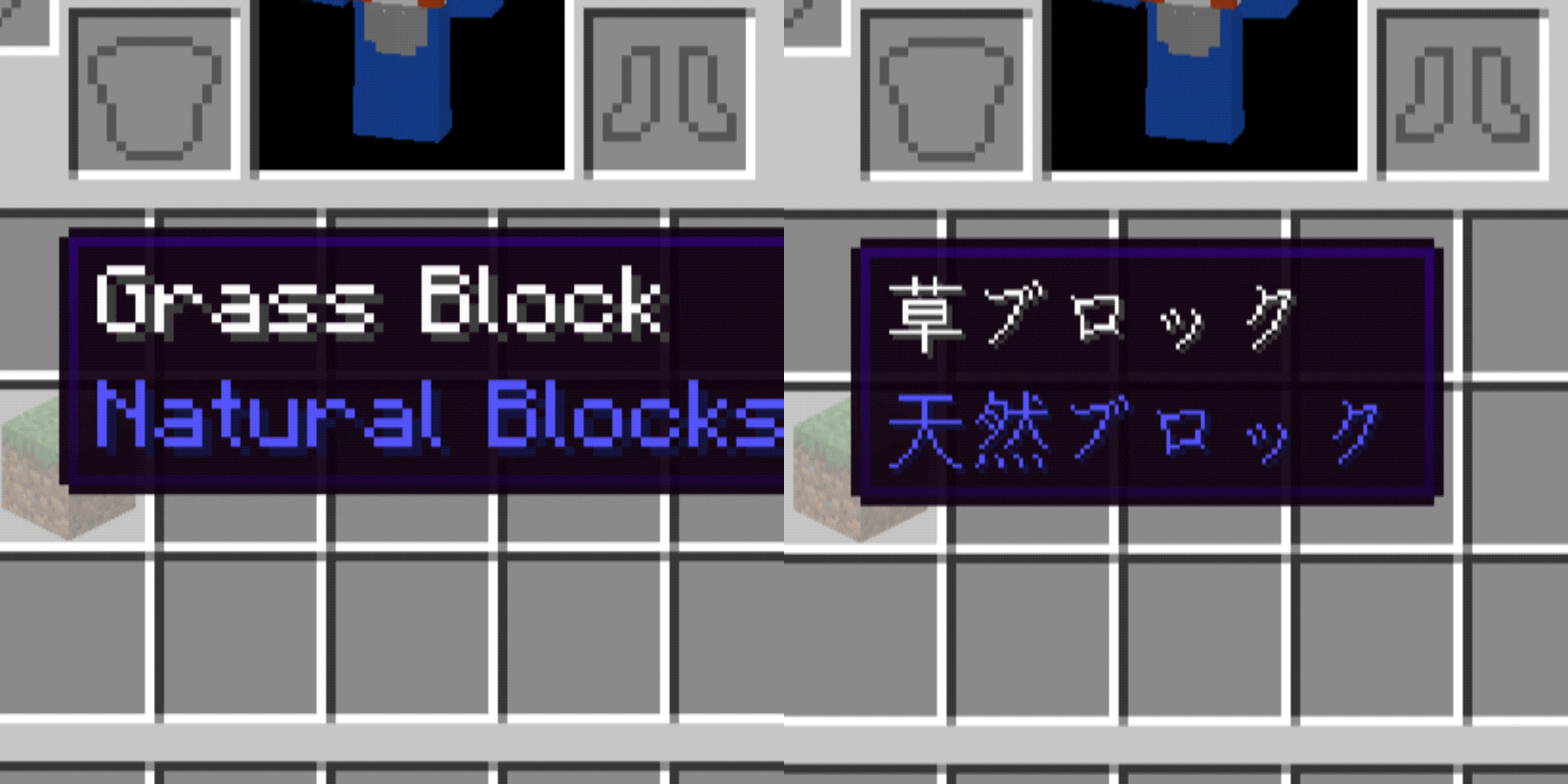
只需按下单个按键即可瞬间切换游戏的显示语言。
原版 Minecraft 的「选项 → 语言」菜单在每次切换时都会触发完整的资源重载,导致明显的数秒卡顿。LangSwitch 完全跳过了该重载步骤,因此语言能够瞬间更改,加载时间几乎为零。
功能特性
- 一键切换语言:按下你配置好的切换键,即可在你选定的目标语言和当前使用的语言之间进行切换
- 即时、无加载切换:仅直接交换语言数据,而不触发完整资源包重载,因此几乎没有延迟
- GUI 打开时仍可使用:即使在打开物品栏、书籍、箱子等界面时,切换键依然有效——非常适合在游戏过程中对比翻译(对语言学习非常理想)
- Ctrl 修饰符防止误触:切换键仅在按住 Ctrl 的同时按下才会触发,因此在聊天框或告示牌上打字时不会意外激活
- Google Translate 风格的搜索式语言选择器:从可搜索的列表中选择目标语言,无需手动查找原始语言代码
- 专用配置按键绑定:已注册到原版按键绑定菜单中,因此你可以随时重新打开设置屏幕来修改任何内容
使用方法
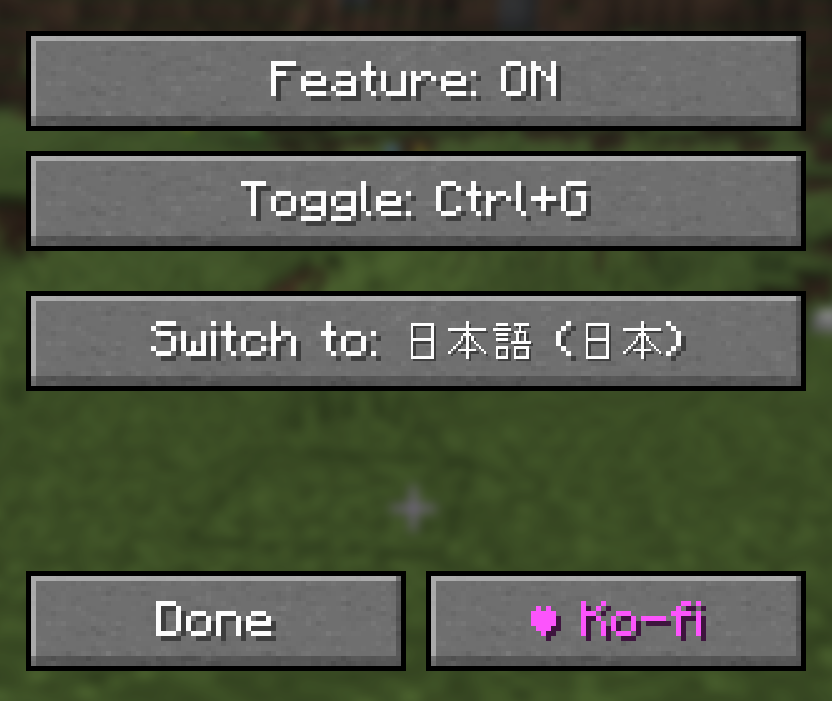
- 按下打开设置屏幕的按键(默认:J)
- 点击「切换键」(Toggle key)并按任意键以绑定它(触发方式为 Ctrl + 该按键)
- 点击「切换至」(Switch to)并搜索/选择你的目标语言
- 在游戏中,按住 Ctrl 并按下你绑定的按键,即可在你的目标语言和当前使用的语言之间瞬间切换
支持环境
- 仅限客户端(无需安装服务端模组)
- 支持的加载器:Forge / NeoForge / Fabric
- 支持版本:1.20.1 至 1.21.11
LangSwitch
Instantly switch the game's display language with a single key press.
Vanilla Minecraft's Options → Language menu triggers a full resource reload every time you switch, causing a noticeable multi-second stutter. LangSwitch skips that reload entirely, so the language changes instantly with effectively zero load time.
Features
- One-tap language toggle: press your configured toggle key to switch between your chosen target language and whichever language you were just using
- Instant, load-free switching: swaps only the language data directly instead of triggering a full resource-pack reload, so there's virtually no delay
- Works even with a GUI open: the toggle key still works while inventories, books, chests, etc. are open — great for comparing translations while playing (ideal for language learning)
- Ctrl-modifier to prevent misfires: the toggle key only fires when held together with Ctrl, so it won't accidentally trigger while typing in chat or on a sign
- Google Translate–style searchable language picker: pick your target language from a searchable list instead of hunting through raw language codes
- Dedicated config keybind: registered in the vanilla key-binding menu, so you can always reopen the settings screen to change anything
How to use
- Press the key that opens the settings screen (default: J)
- Click "Toggle key" and press any key to bind it (fires as Ctrl + that key)
- Click "Switch to" and search for/select your target language
- In-game, hold Ctrl and press your bound key to instantly toggle between your target language and whatever language you were using
Supported environment
- Client-side only (no server-side install required)
- Supported loaders: Forge / NeoForge / Fabric
- Supported versions: 1.20.1 through 1.21.11
版本游戏版本平台发布时间本站下载
正式版
1.0.0
LangSwitch 1.0.0
1.21.11 Fabric 4 个月前 ·
0
1.21.11
Fabric
4 个月前
0
下载 LangSwitch
正式版
1.0.0
LangSwitch 1.0.0
1.21.10 Fabric 4 个月前 ·
0
1.21.10
Fabric
4 个月前
0
下载 LangSwitch
正式版
1.0.0
LangSwitch 1.0.0
1.21.8 Fabric 4 个月前 ·
0
1.21.8
Fabric
4 个月前
0
下载 LangSwitch
正式版
1.0.0
LangSwitch 1.0.0
1.21.5 Fabric 4 个月前 ·
0
1.21.5
Fabric
4 个月前
0
下载 LangSwitch
正式版
1.0.0
LangSwitch 1.0.0
1.21.4 Fabric 4 个月前 ·
0
1.21.4
Fabric
4 个月前
0
下载 LangSwitch
正式版
1.0.0
LangSwitch 1.0.0
1.21.3 Fabric 4 个月前 ·
0
1.21.3
Fabric
4 个月前
0
下载 LangSwitch
正式版
1.0.0
LangSwitch 1.0.0
1.21.1 Fabric 4 个月前 ·
0
1.21.1
Fabric
4 个月前
0
下载 LangSwitch
正式版
1.0.0
LangSwitch 1.0.0
1.20.6 Fabric 4 个月前 ·
0
1.20.6
Fabric
4 个月前
0
下载 LangSwitch
正式版
1.0.0
LangSwitch 1.0.0
1.20.4 Fabric 4 个月前 ·
0
1.20.4
Fabric
4 个月前
0
下载 LangSwitch
正式版
1.0.0
LangSwitch 1.0.0
1.20.2 Fabric 4 个月前 ·
0
1.20.2
Fabric
4 个月前
0
下载 LangSwitch
暂无更新日志
关于这个资源的讨论、问题反馈与使用心得
还没有讨论,来发第一帖吧
你是这个资源的作者?登录后可认领此资源。
相似资源
 模组

玉Jade ?
Snownee
显示你正在注视的方块的信息。(适用于 Minecraft 1.16+ 的 Hwyla/Waila 分支)
实用前置
247
 模组

物品管理器Just Enough Items (JEI)
mezz
查看物品与配方
前置实用
229
 模组
Xaero的小地图
thexaero
在游戏画面角落显示附近世界地形、玩家、生物和实体的地图。可创建路径点,帮助你找到标记过的位置。
冒险交通
196
 模组
KubeJS
Lat
使用 JavaScript 编辑配方、添加自定义物品、编写世界事件!
前置实用
181
 模组
开放派对与认领Open Parties and Claims
thexaero
添加区块认领和玩家组队功能,并与 Xaero's Minimap 和 World Map 集成
前置实用
152
 模组
世界地图Xaero的世界地图
thexaero
添加全屏世界地图,显示你在世界中已探索的区域。与 Xaero's Minimap 搭配使用效果极佳。
冒险交通
129
评论 0
登录后参与评分
还没有评论,来抢沙发吧