Lazy Display Stand 2.0.0
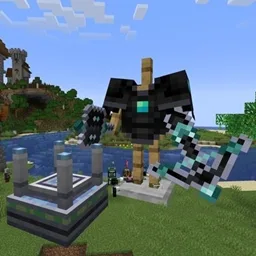
一款专注于物品展示的装饰模组。只需一个展示方块,即可满足你所有的展示与装饰需求。
| 获取该方块 |
详情 |
| 合成 |
1 玻璃板(无序合成) → 1 展示方块 |
| 创造模式 |
Minecraft 红石方块 标签页 |
右键点击打开显示设置界面。潜行时右键点击完全相同——本模组没有任何组合键或按键绑定。
| 位置 |
内容 |
| 顶部 |
三个标签页:方块 / 展示 / 动画 |
| 标签页右侧 |
重置按钮 —— 仅重置当前标签页 |
| 中间 |
3D 预览,实时更新;空槽位显示“3D Preview”占位文本 |
| 插槽 |
一个展示插槽:放入你想展示的物品的物品 |
标签页 · 方块 —— 主体本身

| 参数 |
类型 |
范围 |
默认值 |
效果 |
| 外观 |
循环切换 |
普通方块 / 模仿方块 / 盔甲架 |
普通方块 |
主体的外观样式 |
| 隐藏 |
开关 |
开启 / 关闭 |
关闭 |
掉落主体,保留展品 |
| 碰撞 |
开关 |
开启 / 关闭 |
开启 |
关闭允许玩家穿过;开启将实体推出单元格以防止窒息 |
| 缩放 |
滑块 |
0.1 – 10 |
1.00 |
主体大小 |
| X / Y / Z 旋转 |
滑块 |
-180° – 180° |
0° |
主体在各轴上的旋转角度 |
| X / Y / Z 偏移 |
滑块 |
-1.00 – 1.00 (方块) |
0.00 |
主体位置的微调 |
标签页 · 展示 —— 展品

| 参数 |
类型 |
范围 |
默认值 |
效果 |
| 外观 |
循环切换 |
物品 / 3D(方块模型) |
3D(方块模型) |
平面图标或实体模型 |
| 发光 |
开关 |
开启 / 关闭 |
关闭 |
展品边缘发光 |
| 高亮 |
开关 |
开启 / 关闭 |
关闭 |
忽略环境光(在黑暗房间中保持亮起) |
| 缩放 |
滑块 |
0.1 – 10 |
1.00 |
展品大小 |
| X / Y / Z 旋转 |
滑块 |
-180° – 180° |
0° |
展品在各轴上的旋转角度 |
| X / Y / Z 偏移 |
滑块 |
-1.00 – 1.00 (方块) |
0.00 |
展品位置;默认位于顶面 |
标签页 · 动画 —— 让它动起来

| 参数 |
类型 |
范围 |
默认值 |
效果 |
| 公转轴向 |
循环切换 |
X / Y / Z |
Y |
公转所围绕的轴 |
| 面向玩家 |
循环切换 |
关闭 / 仅偏航角 / 全向 |
关闭 |
展品是否转向面对玩家 |
| 自转速度 |
滑块 |
-720 – 720 (度/秒) |
0 |
展品自转,负值反向 |
| 浮动幅度 |
滑块 |
0 – 1 |
0.00 |
展品上下浮动 |
| 公转速度 |
滑块 |
-720 – 720 (度/秒) |
0 |
展品绕轴公转 |
| 公转半径 |
滑块 |
0 – 1 |
0.25 |
公转半径 |
| 主体自转 |
滑块 |
-720 – 720 (度/秒) |
0 |
主体自身自转 |
| 主体浮动 |
滑块 |
0 – 1 |
0.00 |
主体自身浮动 |
| 主体公转 |
滑块 |
-720 – 720 (度/秒) |
0 |
主体自身公转 |
| 主体公转半径 |
滑块 |
0 – 0.5 |
0.00 |
主体公转半径 |
- 前六个参数影响展品;四个以Body命名的参数影响方块本身。
- 动画由游戏时间驱动,因此所有玩家看到的相位一致——没有人会看到它处于不同的旋转角度。
- 速度为 0 表示停止运动。
兼容来自任何模组的物品和方块
- 任何物品均可展示——将展示标签页的外观设置为“物品”,原版物品模型渲染器将接管渲染。只要物品拥有模型,来自任何模组的任意物品都能正常显示。
- 将方块物品转化为真实的 3D 方块——将外观设置为“3D(方块模型)”,你将获得该物品放置时实际的方块模型。这需要静态方块模型;当没有可用模型时,它会回退到平面物品图标,而不是渲染为空。
使身体模仿下方的方块 — 将“方块”选项卡的“外观”设置为“模仿方块”,身体就会直接模仿其正下方的方块。如果下方是其他模组的机器,它也会模仿该机器——此模组完全不需要知道那个模组。
✅ 普通方块(石头、木材、花朵、大多数建筑方块)可完全模仿
⚠️ 熔炉 / 漏斗 / 刷怪笼:仅静态模型,动画不会跟随
❌ 箱子、潜影盒、床、告示牌和旗帜无法模仿——它们会自动回退到普通方块显示
❌ 空气、流体或缺失模型也会回退——绝不会渲染为空空间
Lazy Display Stand 2.0.0
A decoration mod focused on item display. Just one single display block fulfills all your display and decoration‑related needs.
| Getting the block |
Details |
| Crafting |
1 glass pane(shapeless) → 1 Display Block |
| Creative |
The Minecraft Redstone Blocks tab |
Right-click to open the Display Settings screen. Sneak-right-click does exactly the same thing — there are no modifier combos and no keybinds anywhere in this mod.
| Where |
What |
| Top |
Three tabs: Block / Display / Animation |
| Right of the tabs |
The Reset button — resets the current tab only |
| Middle |
3D Preview, updating live; an empty slot shows the "3D Preview" placeholder text |
| Slot |
One Display slot: put the item you want to show in it |
Tab · Block — the body itself
| Parameter |
Type |
Range |
Default |
Effect |
| Appearance |
cycle |
Normal Block / Mimic Block / Armor Stand |
Normal Block |
What the body looks like |
| Hidden |
toggle |
On / Off |
Off |
Drops the body, leaves the exhibit |
| Collision |
toggle |
On / Off |
On |
Off lets players walk through; On pushes entities out of the cell to prevent suffocation |
| Scale |
slider |
0.1 – 10 |
1.00 |
Body size |
| Rotation X / Y / Z |
slider |
-180° – 180° |
0° |
Body rotation on each axis |
| Offset X / Y / Z |
slider |
-1.00 – 1.00 (blocks) |
0.00 |
Body position fine-tuning |
Tab · Display — the exhibit
| Parameter |
Type |
Range |
Default |
Effect |
| Appearance |
cycle |
Item / 3D (Block Model) |
3D (Block Model) |
Flat icon or solid model |
| Glowing |
toggle |
On / Off |
Off |
Glowing outline on the exhibit |
| Highlight |
toggle |
On / Off |
Off |
Ignores ambient light (stays lit in a dark room) |
| Scale |
slider |
0.1 – 10 |
1.00 |
Exhibit size |
| Rotation X / Y / Z |
slider |
-180° – 180° |
0° |
Exhibit rotation on each axis |
| Offset X / Y / Z |
slider |
-1.00 – 1.00 (blocks) |
0.00 |
Exhibit position; by default it sits on the top face |
Tab · Animation — make it move
| Parameter |
Type |
Range |
Default |
Effect |
| Orbit Axis |
cycle |
X / Y / Z |
Y |
Axis the orbit turns around |
| Face Player |
cycle |
Off / Yaw Only / Full |
Off |
Whether the exhibit turns toward you |
| Spin Speed |
slider |
-720 – 720 (deg/s) |
0 |
Exhibit spin, negative reverses |
| Bob Amp |
slider |
0 – 1 |
0.00 |
Exhibit up/down bobbing |
| Orbit Speed |
slider |
-720 – 720 (deg/s) |
0 |
Exhibit orbits around the axis |
| Orbit Radius |
slider |
0 – 1 |
0.25 |
Orbit radius |
| Body Spin |
slider |
-720 – 720 (deg/s) |
0 |
The body itself spins |
| Body Bob |
slider |
0 – 1 |
0.00 |
The body itself bobs |
| Body Orbit |
slider |
-720 – 720 (deg/s) |
0 |
The body itself orbits |
| Body Radius |
slider |
0 – 0.5 |
0.00 |
Body orbit radius |
- The first six affect the exhibit; the four named Body affect the block itself.
- Animation is driven by game time, so every player sees the same phase — nobody sees it spinning at a different angle.
- Speed 0 means stopped.
Works with items and blocks from any mod
- Any item can be displayed — set the Display tab's Appearance to "Item" and the vanilla item model renderer takes over. Any item from any mod shows up as long as it has a model.
- Turn a block item into a real 3D block — set Appearance to "3D (Block Model)" and you get the actual block model that item would place. It requires a static block model; when no model is available it falls back to the flat item rather than rendering nothing.
- Make the body mimic the block below — set the Block tab's Appearance to "Mimic Block" and the body becomes whatever block sits directly underneath. If that is a machine from another mod, it mimics that machine — this mod does not need to know that mod at all.
- ✅ Normal blocks (stone, wood, flowers, most building blocks) mimic fully
- ⚠️ Furnaces / hoppers / spawners: static model only, animations do not follow
- ❌ Chests, shulker boxes, beds, signs and banners are out of reach — they fall back to the normal block automatically
- ❌ Air, fluids or a missing model also fall back — it never renders as empty space
 模组

 模组
 模组

 模组

 模组

 模组

评论 0
登录后参与评分
还没有评论,来抢沙发吧