
Leveling Bench
Leveling Bench 添加了等级提升台(Leveling Bench),这是一种特殊的工作站,允许你对工具、武器和盔甲上的附魔进行持续升级,突破 Minecraft 原版的上限(锋利 V、效率 III 等不再是极限)——使用矿物作为“燃料”来支付每次升级的费用。
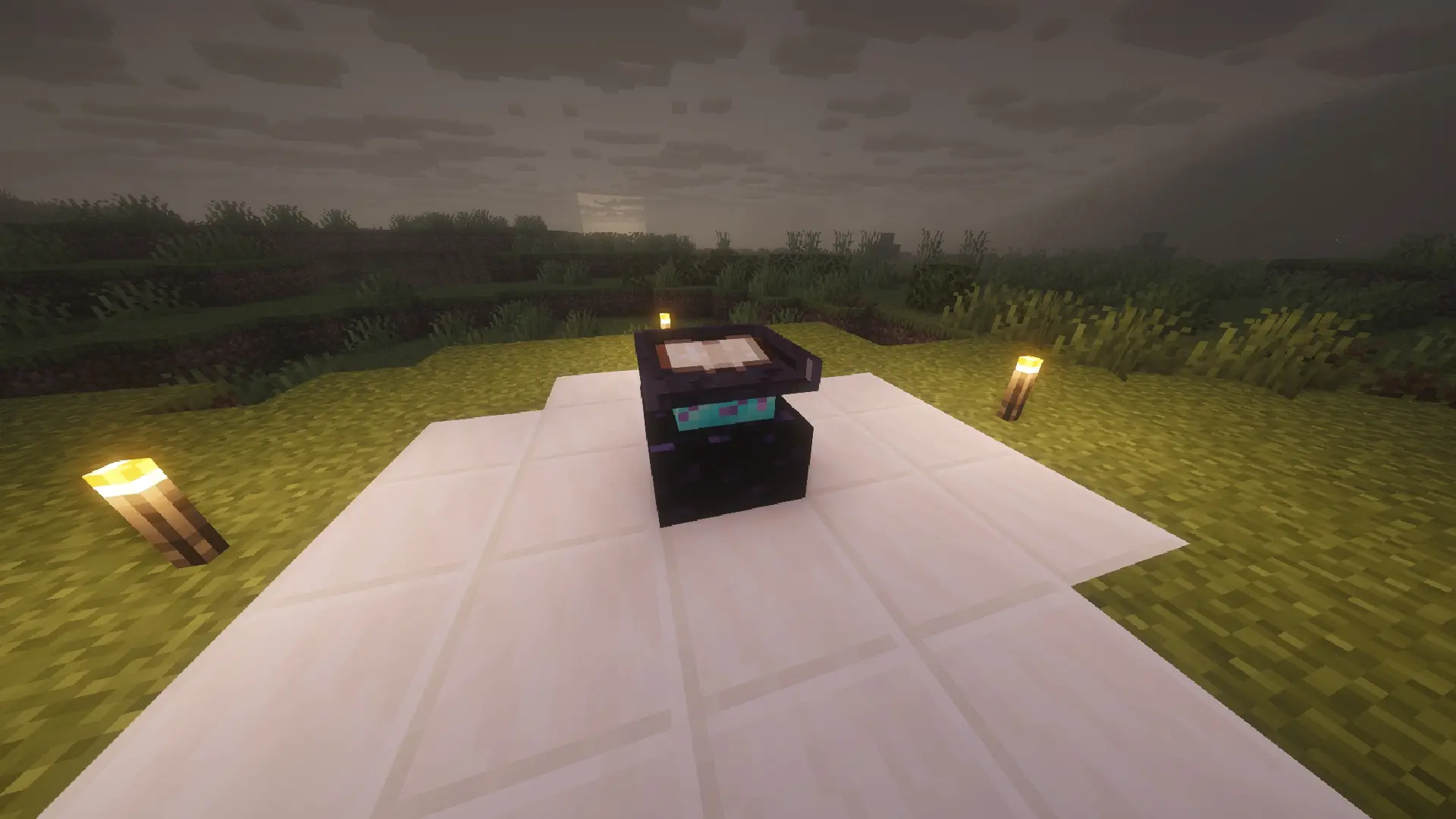
工作原理
使用强化材料合成等级提升台(配方见下文)并将其放置在世界中——它具有防爆特性(防 TNT 爆炸),并且只能用铁镐或更好的镐挖掘,就像铁砧一样。 点击打开其界面。 将一把附魔过的工具放入左侧的槽位——该工作台会自动读取其所有附魔,并在一个可滚动的列表中列出它们。 选择你想要升级的附魔。 在下方槽位中填入矿物——每种材料贡献不同数量的 PTS(点数)。 一旦收集到当前等级所需的足够 PTS,“确认升级”按钮将被激活。确认后,恰好消耗所需材料(不多不少),附魔等级提升。
随着等级升高,PTS 成本呈平滑曲线上升,因此从 1 级升到 2 级很便宜,但要一路提升到极端等级**(最高可达 255)**则需要大量的材料。
注意: 原版中上限为 1 级的附魔(经验修补、精准采集、无限箭矢、诅咒等)在列表中显示为锁定状态——进一步升级它们没有任何效果,因此甚至无法选中。
旧值 1.x.x
- 下界合金锭---100
- 钻石-----------86
- 绿宝石-----------71
- 金锭--------59
- 铁锭--------44
- 铜锭------24
- 煤炭--------------16
- 远古残骸----51
- 粗铁----------28
- 粗金----------36
- 粗铜--------12
新值 2.x.x
- 下界合金锭---300
- 钻石-----------130
- 绿宝石-----------71
- 金锭--------65
- 铁锭--------50
- 铜锭------24
- 煤炭--------------16
- 远古残骸----51
- 粗铁----------28
- 粗金----------36
- 粗铜--------12
按住 Shift + 点击可实现最大可能升级。
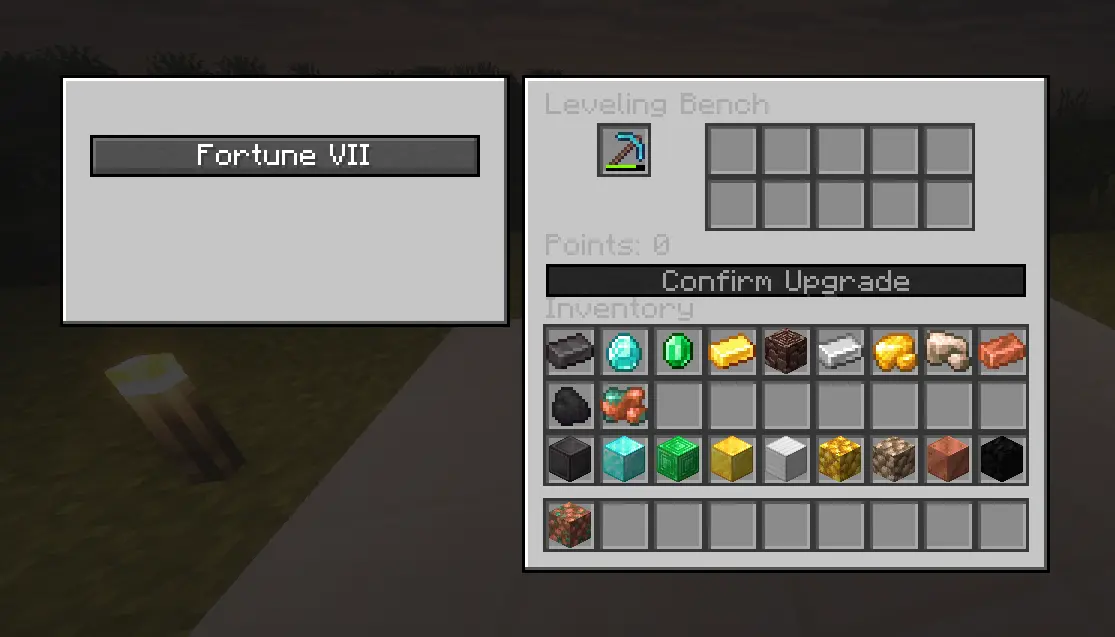
方块(钻石块、铁块等)的价值是其组成材料的 9 倍,以防你希望一次投入更少的物品。
新增物品与配方
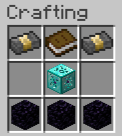
等级提升台(方块):强化下界合金锭位于左上角和右上角,书本位于顶部中间,仅在中心位置放置强化钻石块,底部一行放置 3 个黑曜石。 强化钻石块(物品,不可放置):8 颗钻石围绕中心的一颗哭泣的黑曜石。 强化下界合金锭(物品,不可放置):仅中间一行——下界合金锭、金块、下界合金锭。
所有 3 个配方均为标准原版格式配方,并会自动出现在 REI 或 JEI 等配方查看器模组中。
兼容其他模组 任何其他模组添加的附魔都会在等级提升台中自动生效,无需配置——它直接从工具上读取。
想要向 PTS 系统添加更多矿物? 可以通过数据包标签轻松扩展。
合成配方:
支持的语言
英语、西班牙语(西班牙、墨西哥、阿根廷)、葡萄牙语(巴西)、法语、德语、意大利语、俄语、简体中文、日语、韩语、波兰语、土耳其语和荷兰语。
需求
Minecraft: Java Edition Fabric Loader Fabric API:必需(没有它模组将无法加载) 必须在客户端和服务端都安装才能在多人游戏中游玩。
需要另一个版本?请在 Discord 告诉我
安装方法
从 fabricmc.net/use 安装 Minecraft 的 Fabric Loader(这会在启动器中创建一个新的配置文件)。
从 Modrinth 或 CurseForge 下载 Fabric API。
下载 Enchanting Leveler .jar 文件。
打开启动器的 .minecraft 文件夹(在 Windows 上为 %appdata%/.minecraft),然后进入 mods 文件夹(如果不存在则创建它)。
将两个 .jar 文件复制进去(Fabric API + Enchanting Leveler)。
打开 Minecraft 启动器,选择 Fabric 配置文件,然后开始游戏。
对于专用服务器,过程相同:两个 .jar 文件都放入服务器的 mods 文件夹中。
致谢
由 Cristian06kk 制作。
希望大家喜欢我的模组 :) GRACIAS
Leveling Bench
Leveling Bench adds the Leveling Bench, a special workstation that lets you keep leveling up the enchantments on your tools, weapons, and armor beyond Minecraft's normal cap (Sharpness V, Fortune III, etc. are no longer the ceiling) — using minerals as "fuel" to pay for each upgrade.
How it works
Craft the Leveling Bench using the reinforced materials (recipes below) and place it in the world — it's blast-resistant (TNT-proof) and can only be mined with an iron pickaxe or better, just like an anvil. Click to open its interface. Put an enchanted tool in the slot on the left — the bench automatically reads all of its enchantments and lists them in a scrollable list. Pick which enchantment you want to upgrade. Fill the slots below with minerals — each material contributes a different amount of PTS (points). Once you've gathered enough PTS for the current level, the Confirm Upgrade button activates. Confirming it consumes exactly the materials needed (not a single extra item) and the enchantment levels up.
The Points cost rises along a smooth curve as the level gets higher, so going from level 1 to 2 is cheap, but pushing all the way up to extreme levels (up to 255) takes serious amounts of material.
Note: enchantments that are capped at level 1 in vanilla (Mending, Silk Touch, Infinity, curses, etc.) show up locked in the list — leveling them further wouldn't do anything, so they can't even be selected.
Old Values 1.x.x
- Netherite Ingot---100
- Diamond-----------86
- Emerald-----------71
- Gold Ingot--------59
- Iron Ingot--------44
- Copper Ingot------24
- Coal--------------16
- Ancient Debris----51
- Raw Iron----------28
- Raw Gold----------36
- Raw Copper--------12
New Values 2.x.x
- Netherite Ingot---300
- Diamond-----------130
- Emerald-----------71
- Gold Ingot--------65
- Iron Ingot--------50
- Copper Ingot------24
- Coal--------------16
- Ancient Debris----51
- Raw Iron----------28
- Raw Gold----------36
- Raw Copper--------12
Shift + click for max. upgrade possible.
Blocks (Block of Diamond, Block of Iron, etc.) are worth 9x the material they're made of, in case you'd rather feed in fewer items at a time.
New items and recipes
Leveling Bench (block): Reinforced Netherite Ingot in the top corners, a book in the top-middle, Reinforced Diamond Block only in the center, and 3 Obsidian along the bottom row. Reinforced Diamond Block (item, not placeable): 8 Diamonds surrounding a Crying Obsidian in the center. Reinforced Netherite Ingot (item, not placeable): middle row only — Netherite Ingot, Block of Gold, Netherite Ingot.
All 3 recipes are standard vanilla-format recipes and show up automatically in recipe viewer mods like REI or JEI.
Compatible with other mods Any enchantment added by another mod works automatically in the Leveling Bench, no configuration needed — it's read directly off the tool.
Want to add more minerals to the PTS system? It's easily extendable through a datapack tag.
Crafting Recipe:
Supported languages
English, Spanish (Spain, Mexico, Argentina), Portuguese (Brazil), French, German, Italian, Russian, Simplified Chinese, Japanese, Korean, Polish, Turkish, and Dutch.
Requirements
Minecraft: Java Edition Fabric Loader Fabric API: required (the mod won't load without it) Must be installed on both the client and the server to play in multiplayer.
Need another version?, tell me in the discord
Installation
Install Fabric Loader for Minecraft from fabricmc.net/use (this creates a new profile in your launcher).
Download Fabric API from Modrinth or CurseForge.
Download the Enchanting Leveler .jar.
Open your launcher's .minecraft folder (on Windows: %appdata%/.minecraft) and go into the mods folder (create it if it doesn't exist).
Copy both .jar files in there (Fabric API + Enchanting Leveler).
Open the Minecraft launcher, select the Fabric profile, and play.
For dedicated servers, the process is the same: both .jar files go in the server's mods folder.
Credits
Created by Cristian06kk.
Hope you all enjoy my mod :) GRACIAS

下载 Leveling Bench
下载 Leveling Bench
下载 Leveling Bench
下载 Leveling Bench
下载 Leveling Bench
下载 Leveling Bench
下载 Leveling Bench
下载 Leveling Bench
下载 Leveling Bench
下载 Leveling Bench
新数值
Shift + 点击可升级至最大可用值
修复
最高等级提升至 255
关于这个资源的讨论、问题反馈与使用心得
还没有讨论,来发第一帖吧
你是这个资源的作者?登录后可认领此资源。
相似资源
 模组

可定制的鞘翅模组,支持装饰纹饰、旗帜图案等更多功能!
 模组

显示你正在注视的方块的信息。(适用于 Minecraft 1.16+ 的 Hwyla/Waila 分支)
 模组

查看物品与配方
 模组
在游戏画面角落显示附近世界地形、玩家、生物和实体的地图。可创建路径点,帮助你找到标记过的位置。
 模组
使用 JavaScript 编辑配方、添加自定义物品、编写世界事件!
 模组
AE2:一款流行的自动化与存储模组
评论 0
登录后参与评分
还没有评论,来抢沙发吧