
LootRun 模组:硬核战利品搜集与撤离体验
LootRun 是一款面向 Minecraft 1.20.1 Forge 的战利品撤离玩法模组,灵感源自《Delta Force: Hawk Ops》和《Escape from Tarkov》等硬核撤离射击游戏。
在避难所中做好准备,接受任务合约,加入限时突袭以进入随机或自定义维度,搜寻物资、战斗、完成目标,并在时间耗尽前抵达撤离点。成功撤离的物品将保存至你的永久全局储物箱中。失败则意味着失去大部分搜刮到的物品,除非它们受到保险保护。
第一部分:玩家必备要素
避难所 (Hideout)
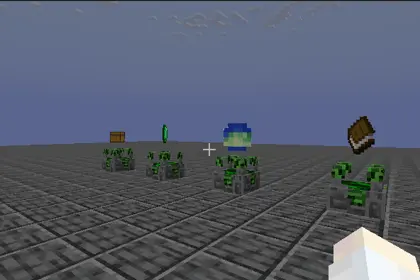
这是你进行交易、存储、选择合约以及地图的基地。避难所锁定在白天且天气晴朗。饥饿值和饱和度会自动恢复,并阻止敌对生物生成及玩家对战伤害。
全局储物箱 (Global Stash)
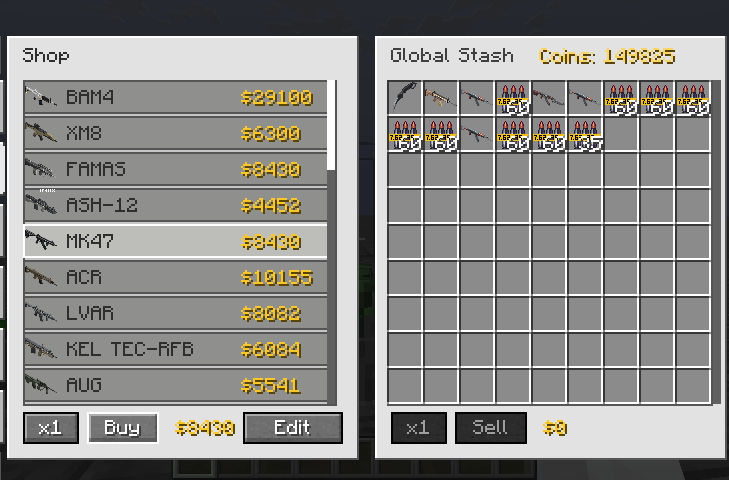
这是所有已撤离装备和战利品的永久存储空间。它支持存入、取出、排序、分类和过滤功能。你还可以为最多四个物品组购买保险。即使突袭失败,受保装备也会返还到你的储物箱中。
合约(任务系统)
在突袭开始前,你可以在任务终端接受最多五个支线合约。进入突袭后,会自动分配一个主要主任务。任务类型多样,包括击杀特定实体、收集特定物品、探索目标地点、防守阵地、激活方块以及猎杀精英 Boss。只有成功撤离后才能获得奖励。
地图选择与难度等级
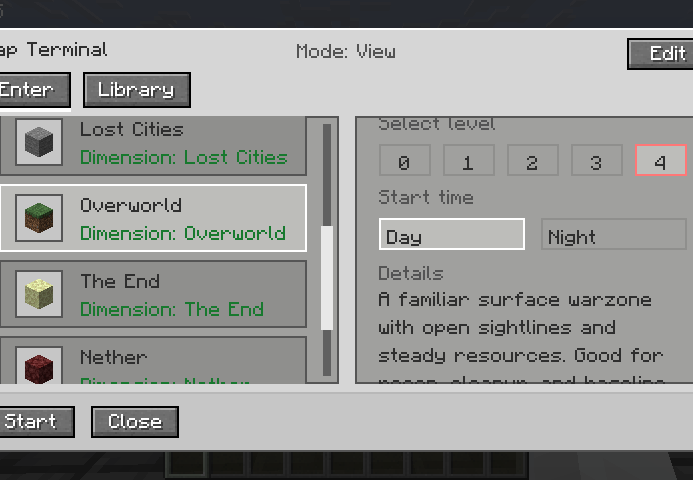
你可以选择原版维度(如主世界、下界和末地)、兼容模组维度(如暮色森林和失落之城),或导入自定义地图。难度等级从 0 到 4。更高等级会增加突袭区域大小并提供更高的任务奖励倍率,最高可达三倍。等级 0 和 1 只有一个撤离点且没有守卫,而等级 2 到 4 拥有多个撤离点,并可能生成撤离守卫。
撤离规则
跟随红色 X 标记和信标光束找到撤离点。站在红地毯圈内等待倒计时结束,默认设置为 10 秒。离开圆圈会立即重置倒计时,因此你必须持续停留在圈内。每次突袭中每个撤离点只能使用一次。
战术终端(突袭内追踪与导航)
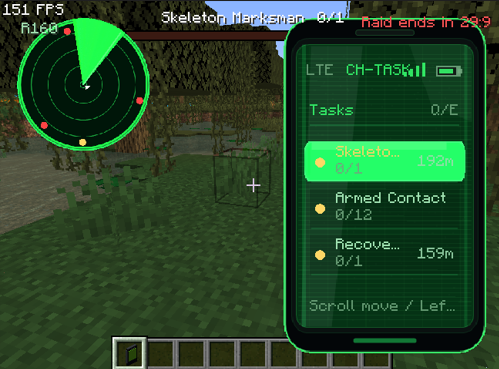
进入突袭后,你会获得一个临时的战术终端物品。这是你在突袭期间进行导航和目标追踪的主要工具。
- 手持终端时右键点击可打开追踪列表,在其中查看任务、队友和撤离点。
- 按住 Shift 键并右键点击可切换屏幕左上角的小地图显示。
- 在追踪列表中,按 Q 或 E 键可在任务、玩家、撤离点和地图工具页面之间切换。
- 使用鼠标滚轮高亮不同条目,然后左击高亮条目以手动追踪该目标。
- 一旦目标被追踪,其方向、距离和名称将显示在抬头显示器上。
- 战术终端是临时的。它不能存入储物箱、投保或出售,并在突袭结束时自动消失。
死亡与保险
在突袭中死亡会导致你掉落所有在突袭期间获得的物品。然而,你带入突袭的装备可以得到保护。这可以通过原版的 keepInventory 规则实现,也可以通过 LootRun 的保险系统实现,该系统覆盖最多四个物品组。如果突袭失败,受保护的装备将返还到你的全局储物箱中。
组队系统
最多四名玩家可以组成一队。队长提议地图和难度等级,所有成员必须在突袭开始前确认就绪。队员共享任务进度,必须一起完成目标并撤离。
第二部分:兼容性与模组集成
JEI 集成允许 LootRun 自动读取所有配方并递归计算物品价格,从而生成完整的价格库。整合包作者只需配置一次。此后,玩家无需安装 JEI 即可使用生成的定价系统。
支持 Lost Cities 模组,提供自动化的城市突袭维度,并调整世界生成为更好地融入突袭玩法。
Timeless and Classics Zero 的支持确保了枪械、弹药和配件通过稳定的 ID 区分,使每种变体拥有独立的价格,防止因 NBT 差异导致的混淆。
其他模组通过 Forge 注册表、配方和 JEI 获得通用支持。只要自定义机器正确暴露其配方,其产品也可以定价。
为 The Twilight Forest、Ice and Fire、Create、Cataclysm、SearchCarefully 和 Simple Enemy Mod 等模组提供了额外的任务和机制支持。
第三部分:整合包作者与服务器管理员指南
设置价格与生成经济库
首先,以操作员权限级别 2 进入创造模式。然后打开交易终端并切换到编辑模式。为原材料设置商店价格。系统将自动计算其基础价值,作为配方衍生的种子。点击“扫描 JEI 价格”,LootRun 将递归计算所有配方的价格,生成以下两个文件:config/lootrun/trade_config.json 和 config/lootrun/generated_recipe_prices.json。
自定义任务
使用游戏内的任务编辑模式创建新任务,并将其保存到 config/lootrun/tasks/ 目录。task_overrides.json 文件允许你隐藏或禁用内置任务,并调整它们的权重、类别和可见性。
自定义地图
将 1.20.1 Java 版的世界文件夹放入 lootrun/maps/imports/。然后使用游戏内的地图编辑器设置出生点、撤离点、战利品箱子和任务位置。编辑完成后,地图会存储在 lootrun/maps/library/ 中,并可打包用于分发。
调整服务器配置
编辑位于 worldfolder/serverconfig/lootrun-server.json 的文件以配置突袭持续时间(默认为 30 分钟)、撤离倒计时时间(默认为 10 秒)、撤离点数量、守卫生成几率与最大数量、可投保物品堆叠的最大数量、入口区块加载数量以及物品黑名单。
分发你的整合包
在你的整合包中包含生成的 config/lootrun/ 文件夹(其中包含所有价格和数据),如果你有自定义地图,也请包含 lootrun/maps/。玩家不需要安装 JEI,因为价格库已经内置。
第四部分:免责声明与重要提示
本模组由个人开发。尽管经过广泛测试,但仍可能存在未发现的漏洞、兼容性问题或平衡性不足。
请务必备份你的世界文件和配置文件。自定义地图必须是 Java 1.20.1 格式。基岩版世界或来自较新版本的世界可能无法加载。大型整合包可能导致较长的 JEI 扫描或地图预加载时间,请耐心等待。首次进入新世界时,藏身处可能在加载过程中出现短暂卡顿,这是预热过程的正常现象。
如果你遇到问题,请检查日志或向社区报告。我会尽力修复问题,但无法保证与每个模组的完美兼容。使用本模组即表示你已阅读并接受这些风险。
感谢所有测试者和社区成员提供的反馈。祝你在搜刮中好运,撤离时注意安全。 github
LootRun Mod: Hardcore Loot-and-Extract Experience
LootRun is a loot-extraction gameplay mod for Minecraft 1.20.1 Forge, inspired by hardcore extraction shooters such as Delta Force: Hawk Ops and Escape from Tarkov.
Prepare in your hideout, accept contracts, join timed raids into random or custom dimensions, scavenge, fight, complete objectives, and reach the extraction point before time runs out. Successfully extracted items are saved to your persistent global stash. Failure means losing most of what you found, unless protected by insurance.
Part One: Player Essentials
Hideout
This is your base for trading, storage, contract selection, and map choice. The hideout is locked to daytime with clear weather. Hunger and saturation are automatically restored, and hostile mob spawning as well as player-versus-player damage are prevented.
Global Stash
This is the permanent storage space for all extracted gear and loot. It supports depositing, withdrawing, sorting, categorising, and filtering. You can also purchase insurance for up to four item stacks. Even if a raid fails, insured equipment will be returned to your stash.
Contracts (Quest System)
Before a raid, you can accept up to five side contracts at the quest terminal. Upon entering a raid, a primary main task is automatically assigned. Quest types are varied and include killing specific entities, collecting certain items, exploring target locations, defending positions, activating blocks, and hunting elite bosses. Rewards are granted only upon successful extraction.
Map Selection and Difficulty Levels
You can choose between vanilla dimensions such as the Overworld, the Nether, and the End, compatible mod dimensions like the Twilight Forest and the Lost Cities, or custom imported maps. Difficulty levels range from 0 to 4. Higher levels increase the raid area size and provide higher quest reward multipliers, up to three times. Levels 0 and 1 have only one extraction point and no guards, while levels 2 to 4 feature multiple extraction points and may spawn extraction guards.
Extraction Rules
Follow the red X marker and the beacon beam of light to locate the extraction point. Stand inside the red carpet ring and wait for the countdown to finish, which is set to 10 seconds by default. Leaving the ring immediately resets the countdown, so you must remain inside continuously. Each extraction point can only be used once per raid.
Tactical Terminal (In-Raid Tracking and Navigation)
Upon entering a raid, you receive a temporary tactical terminal item. This is your primary tool for navigation and target tracking during the raid.
- Right-click while holding the terminal to open the tracking list, where you can view tasks, teammates, and extraction points.
- Shift-right-click to toggle the minimap display in the top-left corner of your screen.
- In the tracking list, press Q or E to switch between the task, player, extraction, and map tool pages.
- Use the mouse wheel to highlight different entries, then left-click a highlighted entry to manually track that target.
- Once a target is tracked, its direction, distance, and name are shown on the heads-up display.
- The tactical terminal is temporary. It cannot be deposited into the stash, insured, or sold, and it disappears automatically when the raid ends.
Death and Insurance
Dying in a raid causes you to drop all items that were acquired during the raid. However, equipment that you brought into the raid can be protected. This can be done either through the vanilla keepInventory rule or through LootRun's insurance system, which covers up to four stacks. Protected gear is returned to your global stash upon raid failure.
Party System
Up to four players can form a party. The party leader proposes a map and difficulty level, and all members must confirm their readiness before the raid begins. Party members share quest progress and must complete objectives and extract together.
Part Two: Compatibility and Mod Integration
JEI integration allows LootRun to automatically read all recipes and recursively calculate item prices, generating a complete price library. The modpack author needs to configure this only once. After that, players do not need JEI installed to use the generated pricing system.
The Lost Cities mod is supported with an automatic City Raid dimension, and world generation is adjusted to better integrate with the raid gameplay.
Timeless and Classics Zero support ensures that guns, ammunition, and attachments are distinguished by stable IDs, giving each variant an independent price and preventing confusion caused by NBT differences.
Other mods receive general support through the Forge registry, recipes, and JEI. As long as a custom machine correctly exposes its recipes, its products can also be priced.
Additional task and mechanic support is provided for mods such as The Twilight Forest, Ice and Fire, Create, Cataclysm, SearchCarefully, and Simple Enemy Mod.
Part Three: Guide for Modpack Authors and Server Owners
Setting Prices and Generating the Economy Library
First, enter Creative mode with operator permission level 2. Then open the trade terminal and switch to edit mode. Set a shop price for raw materials. The system will automatically calculate its base value, which serves as the seed for recipe derivation. Click Scan JEI Prices, and LootRun will recursively compute prices for all recipes, generating these two files: config/lootrun/trade_config.json and config/lootrun/generated_recipe_prices.json.
Custom Quests
Use the in-game task author mode to create new quests and save them to config/lootrun/tasks/. The task_overrides.json file allows you to hide or disable built-in tasks, as well as adjust their weights, categories, and visibility.
Custom Maps
Place a 1.20.1 Java edition world folder into lootrun/maps/imports/. Then use the in-game map editor to set spawn points, extraction points, loot chests, and task locations. Once edited, the map is stored in lootrun/maps/library/ and can be packaged for distribution.
Adjusting Server Configuration
Edit the file at worldfolder/serverconfig/lootrun-server.json to configure raid duration, which is 30 minutes by default, extraction countdown time, which is 10 seconds by default, number of extraction points, guard spawn chances and maximum counts, maximum insurable item stacks, entry chunk loading count, and item blacklists.
Distributing Your Modpack
Include the generated config/lootrun/ folder containing all price and quest data, as well as lootrun/maps/ if you have custom maps, in your modpack. Players do not need JEI installed, because the price library is already built in.
Part Four: Disclaimer and Important Notes
This mod is developed by an individual. Although it has been extensively tested, there may still be undiscovered bugs, compatibility issues, or balance imperfections.
Please be sure to back up your worlds and configuration files. Custom maps must be in Java 1.20.1 format. Bedrock worlds or worlds from newer versions may fail to load. Large modpacks may cause long JEI scanning or map preloading times, so please be patient. The first time you enter a new world, the hideout may experience a brief stutter during loading. This is a normal part of the warm-up process.
If you encounter issues, check the logs or report them to the community. I will try to fix problems, but I cannot guarantee perfect compatibility with every mod. By using this mod, you acknowledge that you have read and accept these risks.
Thank you to all testers and community members for your feedback. Good luck with your looting and stay safe on extraction. github

下载 LootRun
需要联机服务器吗?
稳定流畅、一键部署,几分钟即可和朋友联机开服
最低仅需 8 元/月 即可畅快联机
下载 LootRun
需要联机服务器吗?
稳定流畅、一键部署,几分钟即可和朋友联机开服
最低仅需 8 元/月 即可畅快联机
下载 LootRun
需要联机服务器吗?
稳定流畅、一键部署,几分钟即可和朋友联机开服
最低仅需 8 元/月 即可畅快联机
下载 LootRun
需要联机服务器吗?
稳定流畅、一键部署,几分钟即可和朋友联机开服
最低仅需 8 元/月 即可畅快联机
下载 LootRun
需要联机服务器吗?
稳定流畅、一键部署,几分钟即可和朋友联机开服
最低仅需 8 元/月 即可畅快联机
下载 LootRun
需要联机服务器吗?
稳定流畅、一键部署,几分钟即可和朋友联机开服
最低仅需 8 元/月 即可畅快联机
下载 LootRun
需要联机服务器吗?
稳定流畅、一键部署,几分钟即可和朋友联机开服
最低仅需 8 元/月 即可畅快联机
下载 LootRun
需要联机服务器吗?
稳定流畅、一键部署,几分钟即可和朋友联机开服
最低仅需 8 元/月 即可畅快联机
下载 LootRun
需要联机服务器吗?
稳定流畅、一键部署,几分钟即可和朋友联机开服
最低仅需 8 元/月 即可畅快联机
下载 LootRun
需要联机服务器吗?
稳定流畅、一键部署,几分钟即可和朋友联机开服
最低仅需 8 元/月 即可畅快联机
暂无更新日志
关于这个资源的讨论、问题反馈与使用心得
还没有讨论,来发第一帖吧
你是这个资源的作者?登录后可认领此资源。
相似资源
 模组
在游戏画面角落显示附近世界地形、玩家、生物和实体的地图。可创建路径点,帮助你找到标记过的位置。
 模组
AE2:一款流行的自动化与存储模组
 模组

新增 50+ 个独特生物群系,为你的世界增添新树木、花卉等更多元素!
 模组
添加全屏世界地图,显示你在世界中已探索的区域。与 Xaero's Minimap 搭配使用效果极佳。
 模组

基于 GTCEu 1.12.2 的现代 GregTech
 模组

让你能够在世界中的任何位置定位结构。
评论 0
登录后参与评分
还没有评论,来抢沙发吧