


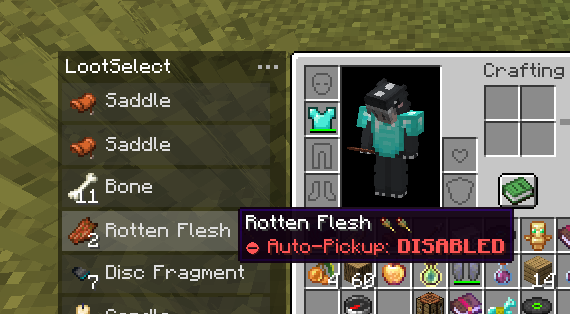
当你的物品栏已满,而地上散落着各种战利品时,不断丢弃物品以拾取你想要的东西非常麻烦。LootSelect 通过在背包界面旁边添加一个简洁的可滚动列表来解决这个问题,该列表显示所有可触及的物品,并允许你直接从列表中拾取你需要的物品。
需求与推荐
Fabric: Fabric API
Forge (1.20.1/1.21.1): Sinytra Connector + Forgified Fabric API
推荐: InvMove, Stxck
主要功能
-
拾取与交换:点击列表中的任意物品即可“抓取”它。你可以将其直接放入空槽位,或与背包中的现有物品进行交换。
-
自动拾取切换:使用面板上的切换按钮或快捷键(默认:
P)轻松开启或关闭原版自动拾取功能。禁用后,物品只能通过 LootSelect 面板收集。 -
最小化/最大化切换:使用面板上的按钮轻松切换面板大小。
-
半量拾取:在列表中对物品执行
右键单击,可以只获取堆叠的一半数量,而不是全部。 -
丢弃:对物品执行
鼠标中键单击,可直接从地面上丢弃该物品。 -
快速收集:使用
Shift+单击可将地面上的物品瞬间移动到你的背包中。这对于快速装备盔甲、盾牌或不死图腾非常有用。 -
悬停项粘性定位:当物品列表更新时,滚动位置会智能调整,尽可能保持你悬停的物品位于光标下方。
-
快捷栏交换:在悬停于某个物品时按下
Ctrl + 1-9,可快速将其交换到快捷栏。 -
副手交换:在悬停于某个物品时按下
F键,可立即将其与副手槽位交换。 -
详细工具提示:将鼠标悬停在列表中的物品上即可查看完整的工具提示,包括附魔、药水效果和耐久度——无需先拾取它们。
模组兼容性
LootSelect 与多个流行模组无缝集成,以提升你的拾取体验:
-
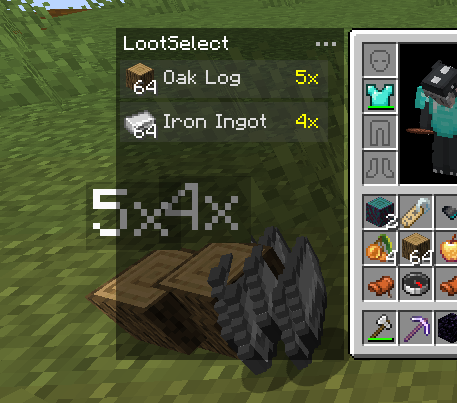
Staaaaaaaaaaaack (Stxck):分组的实体物品会在列表中正确反映。当地面上堆叠物品时,列表会以黄色显示总数量(例如“2x”、“12x”),与该模组的叠加层一致。
-
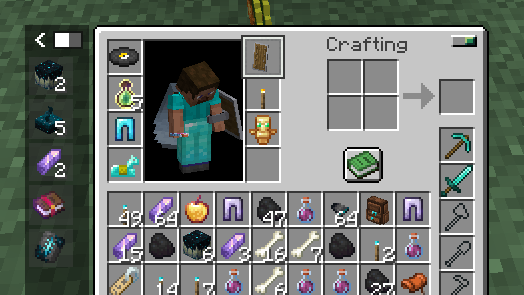
Inventorio:在使用 Shift+单击 或 F 键时,智能地将工具和副手物品分类到正确的工具腰带或实用腰带槽位。它会优先选择当前选定的实用槽位,并尊重 Inventorio 的 UI 切换状态。
-
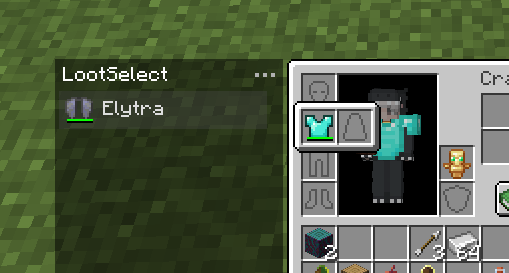
Elytra Slot & Charm of Undying:在使用 Shift+单击 拾取物品时,LootSelect 会智能地优先将鞘翅和不死图腾移动到这些模组提供的专用槽位中。
-
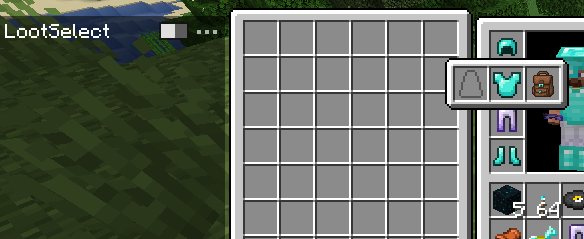
YyzsBackpack:完全支持动态库存布局。当背包装备或打开时,LootSelect 的面板会自动调整其位置。此外,来自此模组(及其他模组)的物品在使用 Shift+单击 时会智能地优先 Trinkets 或 Curios 槽位。
-
Auto Pickup Filter:配置为“自动拾取:禁用”的物品只能通过 LootSelect 列表收集。你可以直接在列表中按下 “I” 键快速切换任何物品的自动拾取状态。
整合包
欢迎在整合包中使用 LootSelect。
When your inventory is full and the ground is littered with loot, constantly dropping items to pick up the ones you want is a hassle. LootSelect solves this by adding a sleek, scrollable list next to your inventory screen, showing all items within reach and allowing you to pick up just the ones you want directly from there.
Requirements & Recommendations
Fabric: Fabric API
Forge (1.20.1/1.21.1): Sinytra Connector + Forgified Fabric API
Recommended: InvMove, Stxck
Key Features
-
Pick & Swap: Click any item in the list to "grab" it. You can place it directly into an empty slot or swap it with an existing item in your inventory.
-
Auto-Pickup Toggle: Easily switch vanilla auto-pickup on or off using the toggle button in the panel or shortcut (Default:
P). While disabled, item can only be collectible via the LootSelect panel. -
Minimize/Maximize Toggle: Easily switch the panel size using the button in the panel.
-
Half Pickup:
Right-clickan item in the list to take half of the stack instead of the full amount. -
Dispose:
Middle-clickan item to discard it directly from the ground. -
Rapid Collection: Use
Shift-Clickto instantly move items from the ground into your bags. This is useful for quickly equipping armor, shields, or totem. -
Sticky Item Hovering: The scroll position intelligently adjusts when the item list updates, keeping your hovered item under the cursor whenever possible.
-
Hotbar Swap: Pressing
Ctrl + 1-9while hovering over an item allows quick-swapping to your hotbar. -
Offhand Swap: Press the
Fkey while hovering over an item to instantly swap it with your offhand slot. -
Detailed Tooltips: Hover over items in the list to view full tooltips, including enchantments, potion effects, and durability—no need to pick them up first.
Mod Compatibility
LootSelect features seamless integration with several popular mods to enhance your looting experience:
-
Staaaaaaaaaaaack (Stxck): Grouped item entities are correctly reflected in the list. When items are stacked on the ground, the list displays the total quantity (e.g., "2x", "12x") in yellow, matching the mod's overlay.
-
Inventorio: Smartly sorts tools and off-hand items into the correct Toolbelt or Utility Belt slots when using Shift-Click or F key. It prioritizes the currently selected utility slot and respects Inventorio's UI toggle states.
-
Elytra Slot & Charm of Undying: When using Shift-Click to pick up items, LootSelect intelligently prioritizes moving Elytras and Totems of Undying into the dedicated slots provided by these mods.
-
YyzsBackpack: Full integration for dynamic inventory layouts. LootSelect's panel automatically adjusts its position when the backpack is equipped or opened. Additionally, items from this mod (and others) intelligently prioritize Trinkets or Curios slots when using Shift-Click.
-
Auto Pickup Filter: Items you've configured to "Auto-Pickup: DISABLED" will only be collectible via the LootSelect list. You can quickly toggle the auto-pickup status for any item directly in the list by pressing the "I" key.
Modpacks
Feel free to include LootSelect in modpacks.

下载 LootSelect
需要联机服务器吗?
稳定流畅、一键部署,几分钟即可和朋友联机开服
最低仅需 8 元/月 即可畅快联机
下载 LootSelect
需要联机服务器吗?
稳定流畅、一键部署,几分钟即可和朋友联机开服
最低仅需 8 元/月 即可畅快联机
下载 LootSelect
下载 LootSelect
下载 LootSelect
需要联机服务器吗?
稳定流畅、一键部署,几分钟即可和朋友联机开服
最低仅需 8 元/月 即可畅快联机
下载 LootSelect
需要联机服务器吗?
稳定流畅、一键部署,几分钟即可和朋友联机开服
最低仅需 8 元/月 即可畅快联机
下载 LootSelect
下载 LootSelect
需要联机服务器吗?
稳定流畅、一键部署,几分钟即可和朋友联机开服
最低仅需 8 元/月 即可畅快联机
下载 LootSelect
需要联机服务器吗?
稳定流畅、一键部署,几分钟即可和朋友联机开服
最低仅需 8 元/月 即可畅快联机
下载 LootSelect
需要联机服务器吗?
稳定流畅、一键部署,几分钟即可和朋友联机开服
最低仅需 8 元/月 即可畅快联机
其他模组兼容性更新:仅在面板内处理滚动,在渲染物品之前先渲染面板,且不取消原版功能。
关于这个资源的讨论、问题反馈与使用心得
还没有讨论,来发第一帖吧
你是这个资源的作者?登录后可认领此资源。
相似资源
 模组

一个用于收集生物掉落物的多区块模组。
 模组

显示你正在注视的方块的信息。(适用于 Minecraft 1.16+ 的 Hwyla/Waila 分支)
 模组

查看物品与配方
 模组
在游戏画面角落显示附近世界地形、玩家、生物和实体的地图。可创建路径点,帮助你找到标记过的位置。
 模组
使用 JavaScript 编辑配方、添加自定义物品、编写世界事件!
 模组

适用于 MC 1.18+ 的 Effekseer 加载器
评论 0
登录后参与评分
还没有评论,来抢沙发吧