
? 模组已重置。旧版本不再受支持。背包存储格式已更改。请在升级至新版本前清空背包,否则所有物品将会丢失。
简介
Yyz’s Backpack 是一款轻量、便捷的背包模组,旨在提供高效的物品管理体验,同时保持原版 UI 风格。该背包可直接在各类界面(如工作台、箱子、熔炉等)中打开,并支持合成、整理、快速移动等操作。
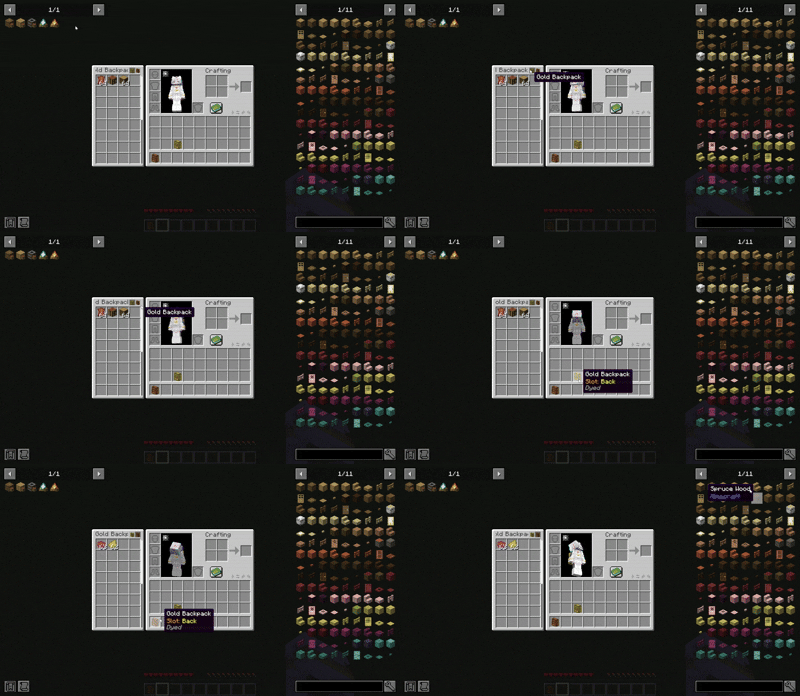
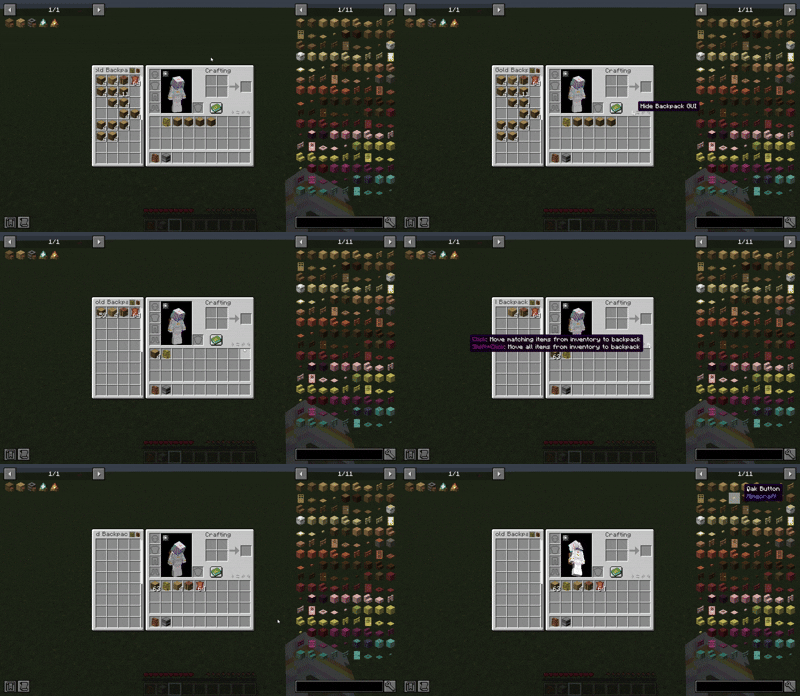
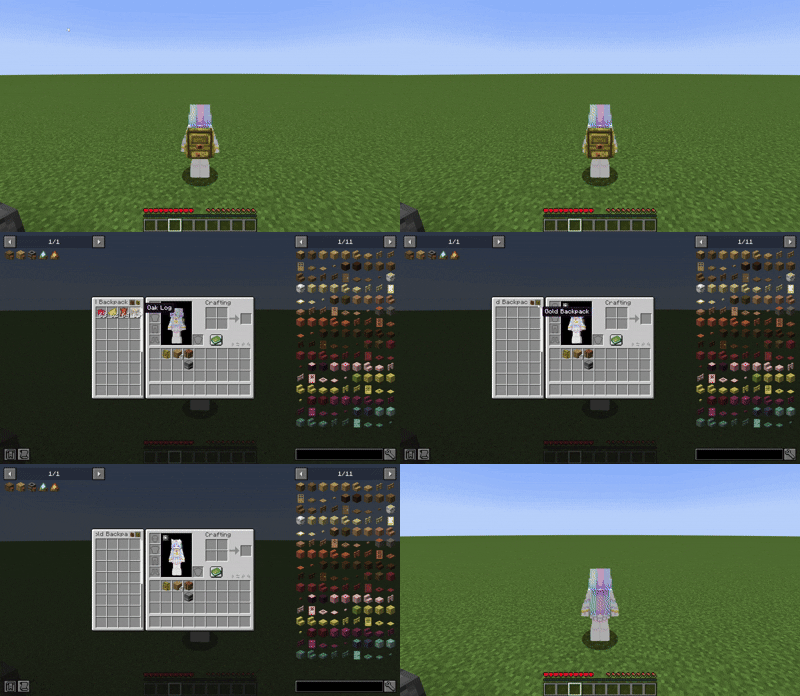
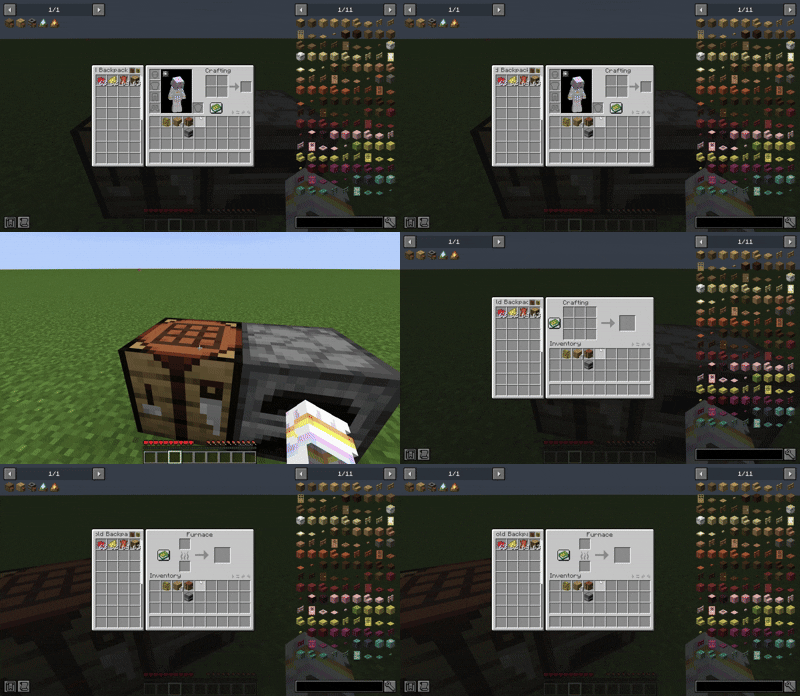
✨ 特性
- 随处访问:背包 UI 直接显示在容器屏幕上,无需切换屏幕即可存取物品。
- 合成辅助:支持使用背包中的物品进行合成,兼容配方书和 JEI,并支持点击快速填充。
- 染色系统:背包可像皮革护甲一样进行染色,让你自定义其外观。
- 背包模型:装备背包时,玩家身上会显示 3D 模型,可通过配置隐藏。
- 点击整理:内置物品整理功能。点击整理按钮或按下自定义按键(默认未绑定)即可整理,通过滚动整理按钮可切换多种整理模式(创造模式物品栏顺序、名称、数量、ID 等)。
- 快速移动:按住 Alt + 点击可将物品快速存入背包;Shift/Alt + 点击可将物品取出并移至其他位置。还提供按钮用于批量快速移动,支持移动匹配物品或移动所有物品。
- 快速切换:点击背包上方的标签页可快速切换背包;标签页显示背包名称和外观。也可按下快捷键(默认为
B)打开鼠标光标下方的背包。 - 自动收集:当你的物品栏已满时,新获得的物品会自动进入背包。
- 负重系统:携带多个背包(默认 3 个或以上)时会施加“沉重”效果,降低移动速度和跳跃高度。
? 背包等级
| 背包类型 | 额外格子 | 特殊能力 |
|---|---|---|
| 铁 | +18 | 基础容量 |
| 金 | +36 | 基础容量 |
| 钻石 | +54 | 基础容量 |
| 下界合金 | +54 | 免疫被火焰和岩浆摧毁 |
?️ 合成配方
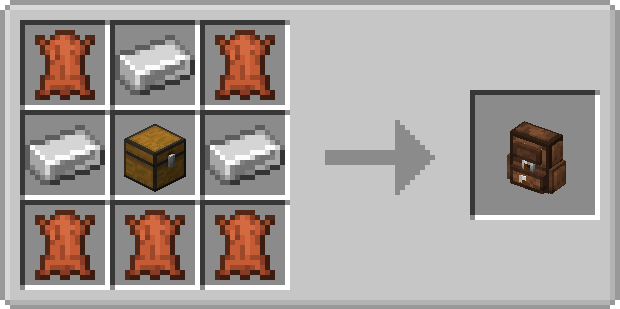
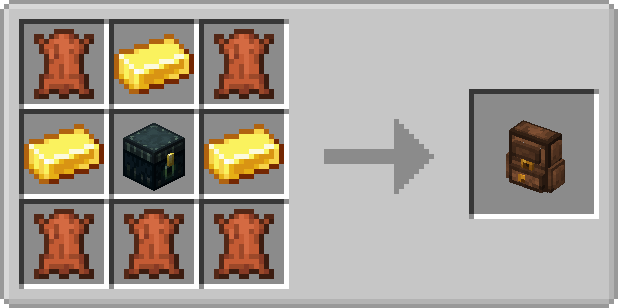
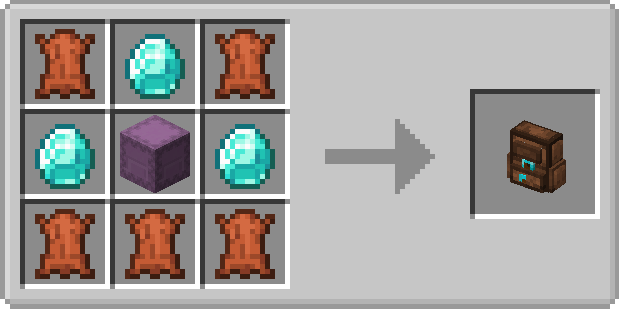
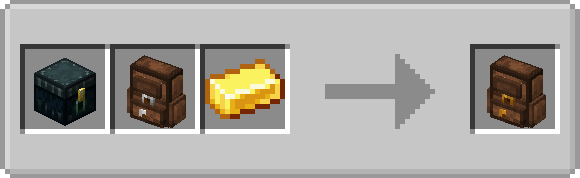
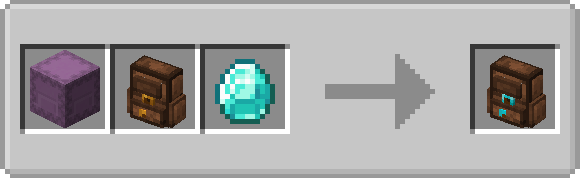
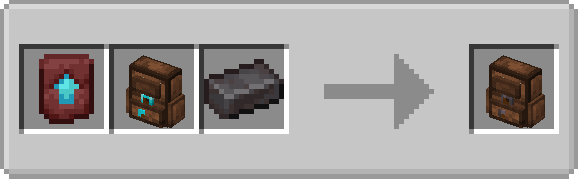
? 安装与使用
- 为你的 Minecraft 版本安装合适的加载器(Fabric、Forge 或 NeoForge)。
- 下载模组
.jar文件并将其放入游戏目录下的mods文件夹中。 - 启动游戏,并将背包放置在你的物品栏任意位置。如果你安装了相应的模组,也可以将其放置在饰品槽位中。
- 通过标签页或快捷键选择要使用的背包。
? 兼容性与集成
? 兼容与集成
?1.20.1 Forge
- JEI
- Curios
- Applied Energistics 2
- Inventorio
?1.20.1 Fabric
- JEI
- Trinkets
- Applied Energistics 2
- Inventorio
?1.21.1 NeoForge
- JEI
- Curios
- Applied Energistics 2
- Applied Energistics 2 Wireless Terminals
- Inventorio
- Tom's Simple Storage Mod
?1.21.1 Fabric
- JEI
- Trinkets
- Inventorio
?26.2 NeoForge
- JEI
- Curios
?26.2 Fabric
- JEI
- Trinkets Updated
❌ 不兼容
- 所有物品排序模组(例如 Inventory Tweaks、Mouse Tweaks 等):
- 症状:它们仅对原版物品栏进行排序,忽略背包;或将背包与物品栏混合在一起作为一个整体排序;或者完全失效,有时会导致崩溃。
- 原因:由于该模组的特殊实现方式,它与大多数排序模组不兼容,且尚未找到通用的修复方案。作为替代,该模组内置了功能齐全的整理系统,可满足日常需求。
- (更多待添加)
? 开发
- 支持更多 Minecraft 版本
- 支持更多模组 UI 界面
? 链接
? 衍生创作
- YYZ's Backpack Reimagined — by Lurcas
重新设计了铁 / 金 / 钻石 / 下界合金背包的模型。
? 自定义
模组配置
主配置文件 /config/yyzsbackpack.json
| 配置键 | 类型 | 描述 |
|---|---|---|
model |
boolean | 是否在玩家背部显示背包模型 |
heavy |
int | 携带多少个背包后获得“负重”效果 |
按钮位置配置 /config/yyzsbackpack/control/default.json
| 配置键 | 类型 | 描述 |
|---|---|---|
controlPoss |
object | 各种 UI 界面上排序、快速移动等按钮的坐标 |
UI 偏移配置 /config/yyzsbackpack/ui/default.json
| 配置键 | 类型 | 描述 |
|---|---|---|
uiOffsets |
object | 每个容器界面中背包 UI 的整体偏移量 |
背包自定义(资源包与数据包)
你可以完全重新定义背包的 GUI 布局、槽位位置和容量。详见模组文件或 GitHub 上的示例。
- 资源包路径:
assets/yyzsbackpack/backpacks/<filename>.json - 数据包路径:
data/yyzsbackpack/backpacks/<filename>.json
通用属性
| 属性 | 描述 |
|---|---|
type |
背包材质:iron、gold、diamond、netherite |
maxVisibleTabs |
同时可见的背包切换标签数量(超出部分可滚动) |
segments |
槽位布局分段列表 |
分段属性
| 属性 | 描述 |
|---|---|
startSlot, endSlot |
此分段的槽位索引范围 |
order |
"DEFAULT"(网格布局,从左到右,从上到下)或 "CUSTOM"(每个槽位的自定义坐标) |
startX, startY |
起始坐标(适用于 DEFAULT 模式) |
columns, rows |
网格列数和行数(适用于 DEFAULT 模式)。如果槽位超出网格范围,支持滚动。 |
customPositions |
每个槽位的 {"x": number, "y": number} 数组(适用于 CUSTOM 模式)。注意:CUSTOM 模式下不支持滚动。 |
guiTexture |
自定义 GUI 纹理路径 |
backgroundX, backgroundY |
背景相对于原始 GUI 左上角的偏移量 |
仅数据包可用的属性
| 属性 | 描述 |
|---|---|
size |
设置背包大小(最大值为 256)。在多人游戏中,仅服务器端设置生效。 |
force_server |
如果为 true,服务器将强制所有客户端使用此配置。 |
? The mod has been reset. Older versions are no longer supported.The backpack storage format has changed. Please empty your backpack before upgrading to the new version; otherwise, all items inside will be lost.
Introduction
Yyz’s Backpack is a lightweight, convenient backpack mod designed to provide a more efficient item management experience without breaking the vanilla UI style. The backpack can be opened directly in various interfaces (such as crafting tables, chests, furnaces, etc.) and supports crafting, sorting, quick moving, and other operations.
✨ Features
- Access Anywhere: The backpack UI is displayed directly on container screens, allowing you to take or put items without switching screens.
- Crafting Assistance: Supports crafting using items from the backpack, compatible with the recipe book and JEI, with click quick fill support.
- Dyeing System: The backpack can be dyed like leather armour, allowing you to personalise its appearance.
- Backpack Model: A 3D model is shown on the player when the backpack is equipped, which can be hidden via config.
- Click Sorting: Built‑in item sorting. Click the sort button or press a custom key (unbound by default) to sort, with multiple sort modes (Creative inventory order, name, count, ID, etc.) switchable by scrolling on the sort button.
- Quick Move: Alt + click to quickly deposit items into the backpack; Shift/Alt + click to take items out to different locations. Buttons are also available for bulk quick move, supporting moving matching items or moving all items.
- Quick Switch: Click tabs above the backpack to quickly switch between backpacks; tabs show the backpack’s name and appearance. You can also press the hotkey (default
B) to open the backpack currently under the mouse cursor. - Auto Collect: When your inventory is full, newly obtained items automatically go into the backpack.
- Encumbrance System: Carrying multiple backpacks (default 3 or more) applies an Heavy effect, reducing movement speed and jump height.
? Backpack Tiers
| Backpack Type | Extra Slots | Special Ability |
|---|---|---|
| Iron | +18 | Base capacity |
| Gold | +36 | Base capacity |
| Diamond | +54 | Base capacity |
| Netherite | +54 | Immune to being destroyed by fire and lava |
?️ Crafting Recipes
? Installation & Usage
- Install the appropriate mod loader (Fabric, Forge, or NeoForge) for your Minecraft version.
- Download the mod
.jarfile and place it into themodsfolder in your game directory. - Launch the game and place the backpack anywhere in your inventory. If you have the corresponding mod installed, you can also place it in the curio slot.
- Select the backpack to use via tabs or the hotkey.
? Compatibility & Integration
? Compatible & Integration
?1.20.1 Forge
- JEI
- Curios
- Applied Energistics 2
- Inventorio
?1.20.1 Fabric
- JEI
- Trinkets
- Applied Energistics 2
- Inventorio
?1.21.1 NeoForge
- JEI
- Curios
- Applied Energistics 2
- Applied Energistics 2 Wireless Terminals
- Inventorio
- Tom's Simple Storage Mod
?1.21.1 Fabric
- JEI
- Trinkets
- Inventorio
?26.2 NeoForge
- JEI
- Curios
?26.2 Fabric
- JEI
- Trinkets Updated
❌ Incompatible
- All inventory‑sorting mods (e.g., Inventory Tweaks, Mouse Tweaks, etc.):
- Symptoms: They only sort the vanilla inventory and ignore the backpack; or they mix the backpack and inventory together and sort them as one; or they fail completely, sometimes causing crashes.
- Reason: Due to the mod’s special implementation, it is not compatible with most sorting mods, and no universal fix has been found. As an alternative, the mod includes a full‑featured sorting system that meets daily needs.
- (More to be added)
? Development
- Support more Minecraft versions
- Support more mod UI screens
? Links
? Creations
- YYZ's Backpack Reimagined — by Lurcas
Reimagines the Iron / Gold / Diamond / Netherite backpack models.
? Customisation
Mod Configuration
Main Configuration /config/yyzsbackpack.json
| Config Key | Type | Description |
|---|---|---|
model |
boolean | Whether to show the backpack model on the player's back |
heavy |
int | How many backpacks carried before gaining the "encumbrance" effect |
Button Position Configuration /config/yyzsbackpack/control/default.json
| Config Key | Type | Description |
|---|---|---|
controlPoss |
object | Coordinates of sorting, quick-move and other buttons on various UI screens |
UI Offset Configuration /config/yyzsbackpack/ui/default.json
| Config Key | Type | Description |
|---|---|---|
uiOffsets |
object | Overall offset of the backpack UI on each container screen |
Backpack Customisation (Resource Packs & Data Packs)
You can completely redefine the backpack’s GUI layout, slot positions, and capacity. See the mod files or examples on GitHub for details.
- Resource pack path:
assets/yyzsbackpack/backpacks/<filename>.json - Data pack path:
data/yyzsbackpack/backpacks/<filename>.json
Common Properties
| Property | Description |
|---|---|
type |
Backpack material: iron, gold, diamond, netherite |
maxVisibleTabs |
Number of backpack switch tabs visible at once (excess can be scrolled) |
segments |
List of slot layout segments |
Segment Properties
| Property | Description |
|---|---|
startSlot, endSlot |
Slot index range for this segment |
order |
"DEFAULT" (grid layout, left‑to‑right, top‑to‑bottom) or "CUSTOM" (custom coordinates for each slot) |
startX, startY |
Starting coordinates (for DEFAULT mode) |
columns, rows |
Grid columns and rows (for DEFAULT mode). If slots exceed the grid, scrolling is supported. |
customPositions |
Array of {"x": number, "y": number} for each slot (for CUSTOM mode). Note: scrolling is not supported in CUSTOM mode. |
guiTexture |
Custom GUI texture path |
backgroundX, backgroundY |
Offset of the background relative to the top‑left of the original GUI |
Properties Available Only in Data Packs
| Property | Description |
|---|---|
size |
Sets the backpack size(max value is 256). In multiplayer, only the server setting takes effect. |
force_server |
If true, the server forces all clients to use this configuration. |

下载 yyz's backpack
需要联机服务器吗?
稳定流畅、一键部署,几分钟即可和朋友联机开服
最低仅需 8 元/月 即可畅快联机
下载 yyz's backpack
需要联机服务器吗?
稳定流畅、一键部署,几分钟即可和朋友联机开服
最低仅需 8 元/月 即可畅快联机
下载 yyz's backpack
需要联机服务器吗?
稳定流畅、一键部署,几分钟即可和朋友联机开服
最低仅需 8 元/月 即可畅快联机
下载 yyz's backpack
需要联机服务器吗?
稳定流畅、一键部署,几分钟即可和朋友联机开服
最低仅需 8 元/月 即可畅快联机
下载 yyz's backpack
需要联机服务器吗?
稳定流畅、一键部署,几分钟即可和朋友联机开服
最低仅需 8 元/月 即可畅快联机
下载 yyz's backpack
需要联机服务器吗?
稳定流畅、一键部署,几分钟即可和朋友联机开服
最低仅需 8 元/月 即可畅快联机
下载 yyz's backpack
下载 yyz's backpack
下载 yyz's backpack
下载 yyz's backpack
- 修复了创意模式物品栏在某些情况下可能无法正确同步背包内容的问题(例如,Curios 槽位中的背包内容)。
- 添加了 REI 支持。
- 添加了 EMI 支持。
- 添加了 Create 支持。
- 添加了 Quark 支持。
- 添加了 KubeJS 支持,用于注册新的背包。
关于这个资源的讨论、问题反馈与使用心得
还没有讨论,来发第一帖吧
你是这个资源的作者?登录后可认领此资源。
相似资源
 模组

可定制的鞘翅模组,支持装饰纹饰、旗帜图案等更多功能!
 模组

显示你正在注视的方块的信息。(适用于 Minecraft 1.16+ 的 Hwyla/Waila 分支)
 模组
在游戏画面角落显示附近世界地形、玩家、生物和实体的地图。可创建路径点,帮助你找到标记过的位置。
 模组

查看物品与配方
 模组
使用 JavaScript 编辑配方、添加自定义物品、编写世界事件!
 模组
AE2:一款流行的自动化与存储模组
评论 0
登录后参与评分
还没有评论,来抢沙发吧