
MacroGrid
Minecraft 的命令宏 —— 只需一次按键。
MacroGrid 是一款客户端 Fabric 模组,它添加了一个可自定义的游戏内按钮面板,用于即时运行命令和聊天消息 —— 再也不用一遍又一遍地重新输入同样的 /tp、/gamemode 或 /time set 了。
按下 G。点击一个按钮。(你可以在控制设置中更改此键位)
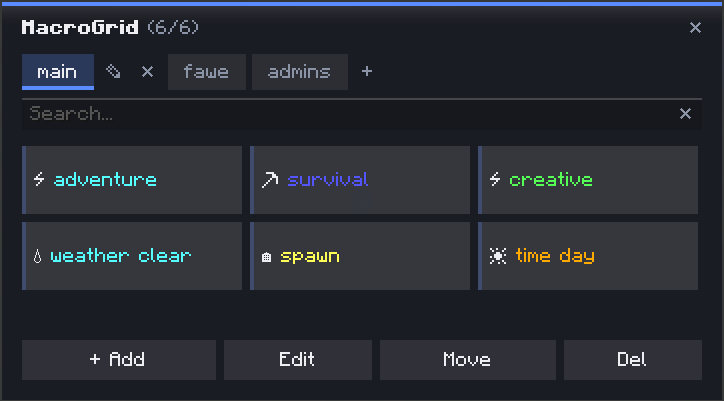
✨ 功能特性
- ➕ 添加 — 在几秒钟内创建一个按钮:名称、颜色、图标,完成
- ? 颜色与图标 — 提供 10 种颜色和 35 多种图标,让你一眼就能区分不同的按钮
- ? 多操作按钮 — 将多个命令 和 聊天消息链接到一个按钮上,按顺序执行
- ? 标签页 / 配置文件 — 将按钮组织到单独的标签页中(例如
main、fawe、admins)—— 可以自由创建、重命名和删除标签页 - ?️ 实时预览 — 在保存之前,查看按钮的确切外观(颜色 + 图标 + 名称)
- ✏️ 编辑 / ✋ 移动 / ❌ 删除 — 专用的工具栏模式用于管理你的网格;“移动”会交换两个按钮的位置,“删除”需要确认点击,以免意外丢失按钮
- ? 搜索栏 — 通过名称即时过滤按钮,即使是在大型网格中也能快速查找
- ? 持久化存储 — 按钮保存在
.minecraft/config文件夹中的 JSON 配置文件中,如果需要批量编辑,也可以手动修改
? 使用方法
- 按下
G打开 MacroGrid - 点击 + Add
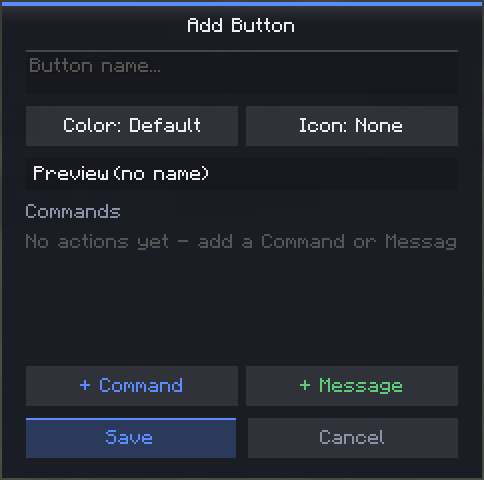
- 给它起个名字,选择颜色和图标,然后添加一个或多个命令/消息
- 点击 Save — 你的按钮即可使用
? 管理按钮与标签页
| 操作 | 方法 |
|---|---|
| 运行按钮 | 点击它(默认模式) |
| 编辑 | 工具栏 → Edit,然后点击一个按钮 |
| 移动 | 工具栏 → Move,点击一个按钮,然后点击另一个以交换位置 |
| 删除 | 工具栏 → Del,点击一个按钮,再次点击以确认 |
| 新建标签页 | 点击标签旁边的 + |
| 重命名标签页 | 点击活动标签上的铅笔图标 |
| 删除标签页 | 点击活动标签旁的 ✕(要求至少存在其他一个标签页) |
? 示例 —— 单个按钮上的多个操作
单个按钮可以按顺序执行多项操作 —— 例如一个“准备”按钮,同时设置游戏模式和时间:
/gamemode creative
/time set day
? 依赖项
- Fabric API
? 链接
MacroGrid
Command macros for Minecraft — one keypress away.
MacroGrid is a client-side Fabric mod that adds a customizable in-game button panel for running commands and chat messages instantly — no more retyping the same /tp, /gamemode or /time set over and over.
Press G. Click a button. (You can change this in the controls settings)
✨ Features
- ➕ Add — create a button in seconds: name, color, icon, done
- ? Colors & icons — 10 colors and 35+ icons to tell your buttons apart at a glance
- ? Multi-action buttons — chain multiple commands and chat messages on a single button, executed in order
- ? Tabs / profiles — organize buttons into separate tabs (e.g.
main,fawe,admins) — create, rename and delete tabs freely - ?️ Live preview — see exactly how a button will look (color + icon + name) before saving
- ✏️ Edit / ✋ Move / ❌ Del — dedicated toolbar modes for managing your grid; Move swaps two buttons' positions, Delete requires a confirmation click so you don't lose a button by accident
- ? Search bar — instantly filter buttons by name, even across a big grid
- ? Persistent — buttons are saved to a JSON config in your
.minecraft/configfolder, editable by hand if you want to bulk-edit
? How to use
- Press
Gto open MacroGrid - Click + Add
- Give it a name, pick a color and icon, then add one or more commands/messages
- Hit Save — your button is ready to use
? Managing buttons & tabs
| Action | How |
|---|---|
| Run a button | Click it (default mode) |
| Edit | Toolbar → Edit, then click a button |
| Move | Toolbar → Move, click one button, then another to swap positions |
| Delete | Toolbar → Del, click a button, click again to confirm |
| New tab | Click + next to the tabs |
| Rename tab | Click the pencil icon on the active tab |
| Delete tab | Click the ✕ next to the active tab (requires at least one other tab to exist) |
? Example — multiple actions on one button
A single button can run more than one thing, in order — for example a "Prep" button that sets gamemode and time together:
/gamemode creative
/time set day
? Requirements
- Fabric API
? Links

下载 MacroGrid
下载 MacroGrid
下载 MacroGrid
下载 MacroGrid
下载 MacroGrid
下载 MacroGrid
下载 MacroGrid
下载 MacroGrid
下载 MacroGrid
下载 MacroGrid
3.4 版本更新
- 适配 Minecraft 26.2
- 移除了 owo
- 用户界面已重新设计
关于这个资源的讨论、问题反馈与使用心得
还没有讨论,来发第一帖吧
你是这个资源的作者?登录后可认领此资源。
相似资源
 模组

显示你正在注视的方块的信息。(适用于 Minecraft 1.16+ 的 Hwyla/Waila 分支)
 模组

查看物品与配方
 模组
在游戏画面角落显示附近世界地形、玩家、生物和实体的地图。可创建路径点,帮助你找到标记过的位置。
 模组
使用 JavaScript 编辑配方、添加自定义物品、编写世界事件!
 模组
添加区块认领和玩家组队功能,并与 Xaero's Minimap 和 World Map 集成
 模组
添加全屏世界地图,显示你在世界中已探索的区域。与 Xaero's Minimap 搭配使用效果极佳。
评论 0
登录后参与评分
还没有评论,来抢沙发吧