
注意:这是 Map Atlases(仅限 Fabric)的原始版本。您可能对 多平台分支 感兴趣,它包含了更丰富的功能集。
一款原生友好的迷你地图/世界视图模组,使用原版地图引入了“图录”(Atlas)。

? 简介

可以通过组合以下物品来制作图录:
- 已填充的地图(源地图)
- 书
- 以及粘性物品(默认为粘液球或蜂蜜瓶)
源地图决定了图录的比例尺。谁能想到一直以来,想要获得迷你地图只需要把地图拍在书上?

- 您可以在合成界面中将已填充地图和空地图与图录一起放入,以将这两种类型的地图插入图录中。
- 制图台也可以用来添加已填充地图和空地图。
- 添加的已填充地图必须具有相同的比例尺。
- 每个图录最多可容纳 512 张地图(可配置/可开关)。
- 您可以在合成网格中使用图录和剪刀来移除图录中的地图。

- 当图录处于激活状态时(默认位于快捷栏或副手),如果图录中存在对应的当前所在位置地图,它将在 HUD 上渲染该地图。
- 图录内的已填充地图会继续更新您的位置和世界状态。
- 当您进入未探索区域时,空地图会被消耗并生成相应比例尺的新地图。
- 如果玩家处于创造模式,即使图录中没有空地图,未探索区域也会生成新地图。
- 如果已指定,可以禁用创建新区域所需的空地图条件。
- 图录支持跨维度工作。正如您所期望的那样,它们会在新的维度中创建新地图。
- 迷你地图支持显示您当前的 X、Y 和 Z 坐标以及当前的生物群系。
- 可选 Trinkets 支持:
- 安装 Trinkets 后,会出现一个新的图录插槽
- 图录在 Trinkets 插槽内将继续正常运行

- 图录还具备世界地图视图。要访问此功能,请右键点击图录或在图录位于快捷栏时按下 "m" 键。
- 世界地图为每个您已探索并创建了地图条目的维度提供可选标签页。
- 它还为您在每个维度中添加的旗帜提供可选标签页。点击这些标签页会将您的视图中心定位到包含该旗帜的地图上。
- 世界地图将显示鼠标悬停点的活跃 X 和 Z 坐标。
- 图录的世界视图支持缩放,并使用鼠标滚轮按奇数倍率(1x1, 3x3, 5x5, 7x7 等)进行缩放。
- 图录的世界视图也支持完全平移,您可以使用鼠标拖动世界地图。
- 图录还支持右键点击旗帜以添加“路标”,这些路标会同时显示在迷你地图和世界视图中。

- 图录可以在制图台上进行合并——只需将图录分别放入上下槽位,图录就会将其覆盖的区域相互合并!
- 图录支持讲台 - 通过将图录放在讲台上展示您的世界!
- 手持图录时右键点击讲台即可展示图录
- 根据图录所在的维度,其外观会有所不同——主世界、下界、末地和“其他”都有独特的纹理。
- 在 1.20+ 版本中,图录可以存储在雕花书架中
⚙️ 配置
本模组高度可配置,并提供通过 ModMenu 在游戏内编辑配置的功能。请参阅当前的配置 [选项] ()!
? 音效来源
- [图录打开音效] (),感谢 InspectorJ
- [图录翻页音效] (),感谢 flag2
- [图录新地图创建音效] (),感谢 Tomoyo Ichijouji
⛓️ 依赖项
- 必需:
- [Fabric API] ()
- [Cloth Config] ()
- 可选:
- [Mod Menu] ()
- [Trinkets] ()
⛔️ 已知不兼容项
- [Accurate Maps] () (待办事项:在此处修复或向其项目提交 PR)
- [Immersive Portals] ()
✅ 推荐添加项
- Better Nether Map - 使下界(及其他天花板维度)地图在玩家所在的 y 轴层级生成
- 更便宜的地图配方数据包 [1.19] - 为什么一张地图需要指南针?此数据包为空白地图添加了一个只需 1 张纸 + 1 个墨囊的无形状合成配方。
- 可选“现代”风格资源包 [1.19] - 此资源包为小地图和全图赋予了“现代”外观,放弃了原版地图风格的纹理。
? 更新日志
更新日志可在 GitHub Releases 页面 查看
? 媒体展示
照片!
合成地图集


当地图集位于快捷栏时,其中的地图会进行渲染

向地图集中添加更多地图

移动位置时会渲染当前地图

自定义工具提示

全图视图

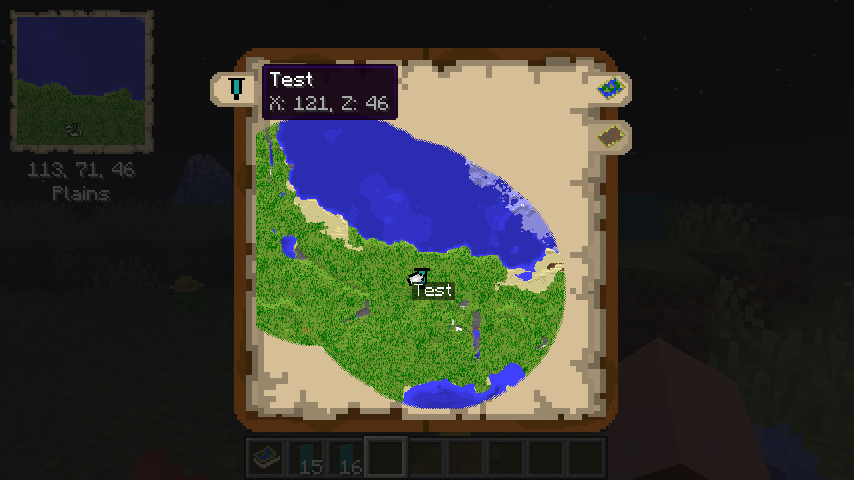

从地图集中取出地图

合并两个地图集

批量添加空白地图到地图集

Trinkets 模组支持

末地地图集小地图

末地地图集全图
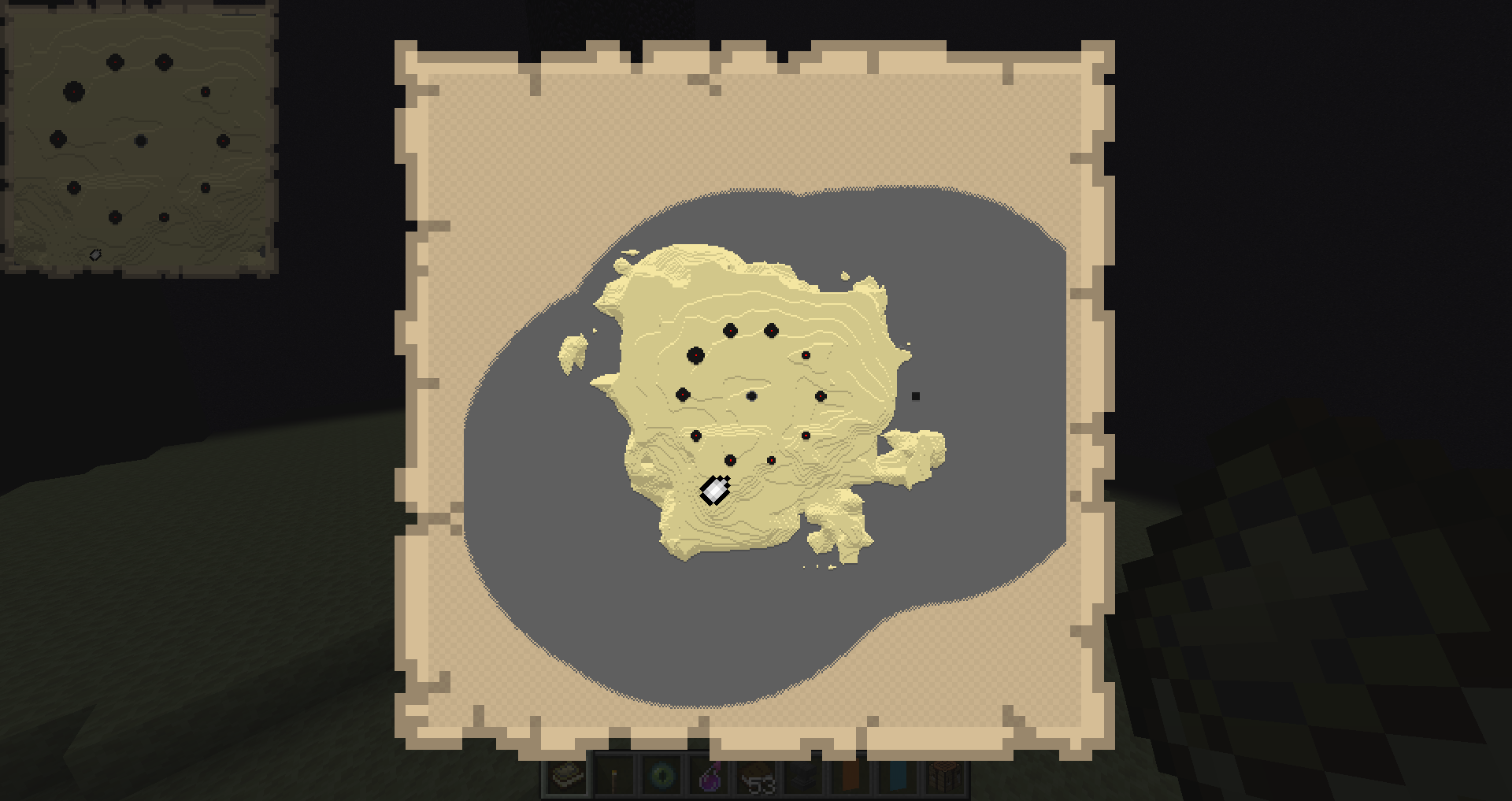
2.2.0 版本新增内容

“现代”资源包与 Better Nether Map 模组的照片


NOTE: This is the Original version of Map Atlases (Fabric only). You may be interested in the Multi-Platform fork which also contains a larger feature-set.
A vanilla-friendly mini-map/world-view mod using vanilla Maps, introducing the "Atlas".
? About
An Atlas can be crafted by combining a:
- Filled Map (the source map)
- Book
- And something sticky (Slimeball or Honey Bottle by default)
The source map determines the Atlas' scale. Who knew this whole time, all you had to do to get a mini-map was slap a map onto a book?
- You can put both Filled Maps and Empty Maps with an Atlas in a crafting inventory to insert either Map type into the Atlas.
- A Cartography Table can be used to add Filled Maps and Empty Maps as well.
- Filled Maps which are added must be of same Scale.
- There's a maximum of 512 Maps in each Atlas (configurable/togglable).
- You can use your Atlas and Shears in the Crafting Grid to remove Maps from the Atlas.
- When the Atlas is active (on your hot-bar or off-hand by default), it will render your current-position Map on the HUD if a such Map exists inside the Atlas.
- Filled Maps inside the Atlas will continue updating your location & world-state.
- Empty Maps are consumed when you enter an un-mapped region to generate a new Map of the corresponding Scale.
- If the player is in Creative, un-mapped regions will generate new Maps even if there's no Empty Maps in the Atlas.
- If specified, the requirement for having Empty Maps to create new regions can be disabled.
- Atlases do work inter-dimensionally. They create new Maps in new Dimensions as you'd expect.
- The mini-map supports the ability to display your current X, Y, & Z coordinates as well as your current Biome
- Optional Trinkets support:
- When Trinkets is installed, there will be a new Slot for an Atlas
- The Atlas will continue to function as normal inside the Trinkets slot

- The Atlas has a world map view as well. To access this, right-click the Atlas or press "m" while the Atlas is on your hot-bar.
- The world map has selectable tabs for each Dimension you've explored and created Map entries for.
- It also has selectable tabs for each Banner you've added in each Dimension. Clicking these will snap the center of your view to the map containing the Banner.
- The world map will display the active X & Z coordinates of the point your mouse is hovering over.
- The Atlas world view has zoom support & scales by odd numbers 1x1, 3x3, 5x5, 7x7, etc using your mouse scroll wheel.
- The Atlas world view has full pan support as well, using your mouse to drag the world map.
- Atlases also support right-clicking Banners to add "waypoints", which display in both the mini-map & world-view map.
- Atlases can be merged with a Cartography Table - simply put an Atlas in the top & bottom slots and the Atlases will combine their mapped regions with one-another!
- Atlases support Lecterns - Show off your world by putting an Atlas in a Lectern!
- Simply right click a Lectern while holding an Atlas to display the Lectern
- The Atlas will appear visually different depending on the Dimension its displayed in - there's a unique texture for the Overworld, Nether, End and "Other".
- Atlases can be stored in Chiseled Bookshelves in 1.20+
⚙️ Config
The mod is highly configurable and offers in-game config editing with ModMenu. See the current config options here!
? Sound Sources
- Atlas open sound, thanks to InspectorJ
- Atlas page flip sound, thanks to flag2
- Atlas new map creation sound, thanks to Tomoyo Ichijouji
⛓ Dependencies
- Required:
- Optional:
⛔️ Known Incompatiblities
- Accurate Maps (todo: fix here or submit PR to their project)
- Immersive Portals
✅ Recommended Additions
- Better Nether Map - Makes Nether (& other ceiling dimension) Maps create at y-level of player
- Cheaper Maps Recipe Data Pack [1.19] - Why would a Map require a Compass? This Data Pack adds a recipe for Empty Maps that's simply 1 Paper + 1 Ink Sac shapeless.
- Optional "Modern" Resource Pack [1.19] - This Resource Pack gives the Mini-map and World-map a "modern" look, abandoning the vanilla Map style textures.
? Changelog
Changelogs are available at the GitHub Releases section
? Media
Photos!
Crafting an Atlas
Maps inside the Atlas will render if the Atlas is on your hot-bar
Adding more Maps to an Atlas
Current Map is rendered when you move locations
Custom Tooltip
World Map View
Cutting a Map out of an Atlas
Merging 2 Atlases
Mass adding Empty Maps to Atlas
Trinkets support
End Atlas Mini-Map
End Atlas World-Map
New as of 2.2.0
Photo of "Modern" Resource Pack & Better Nether Map mod


下载 Map Atlases
下载 Map Atlases
下载 Map Atlases
下载 Map Atlases
下载 Map Atlases
下载 Map Atlases
下载 Map Atlases
下载 Map Atlases
下载 Map Atlases
下载 Map Atlases
- 移植至 26.1.2
- 请报告任何错误
关于这个资源的讨论、问题反馈与使用心得
还没有讨论,来发第一帖吧
你是这个资源的作者?登录后可认领此资源。
相似资源
 模组

可定制的鞘翅模组,支持装饰纹饰、旗帜图案等更多功能!
 模组

显示你正在注视的方块的信息。(适用于 Minecraft 1.16+ 的 Hwyla/Waila 分支)
 模组
使用 JavaScript 编辑配方、添加自定义物品、编写世界事件!
 模组

查看物品与配方
 模组
在游戏画面角落显示附近世界地形、玩家、生物和实体的地图。可创建路径点,帮助你找到标记过的位置。
 模组
AE2:一款流行的自动化与存储模组
评论 0
登录后参与评分
还没有评论,来抢沙发吧