
MapStitch
本模组使用原版地图实现世界地图和小地图功能,并通过新增的「图谱」物品使原版地图更廉价且易于管理。
与其他忽略原版地图并使其过时的世界地图/小地图模组不同,MapStitch 让原版地图的使用体验更加愉快,并将其转变为世界地图和小地图的核心组成部分。
依赖项:
- Fzzy Config
- Fabric API(仅限 Fabric)
世界地图
MapStitch 使用你背包中的图谱来创建世界地图,你可以随时按 M 键或在手持图谱时右键点击来打开它。
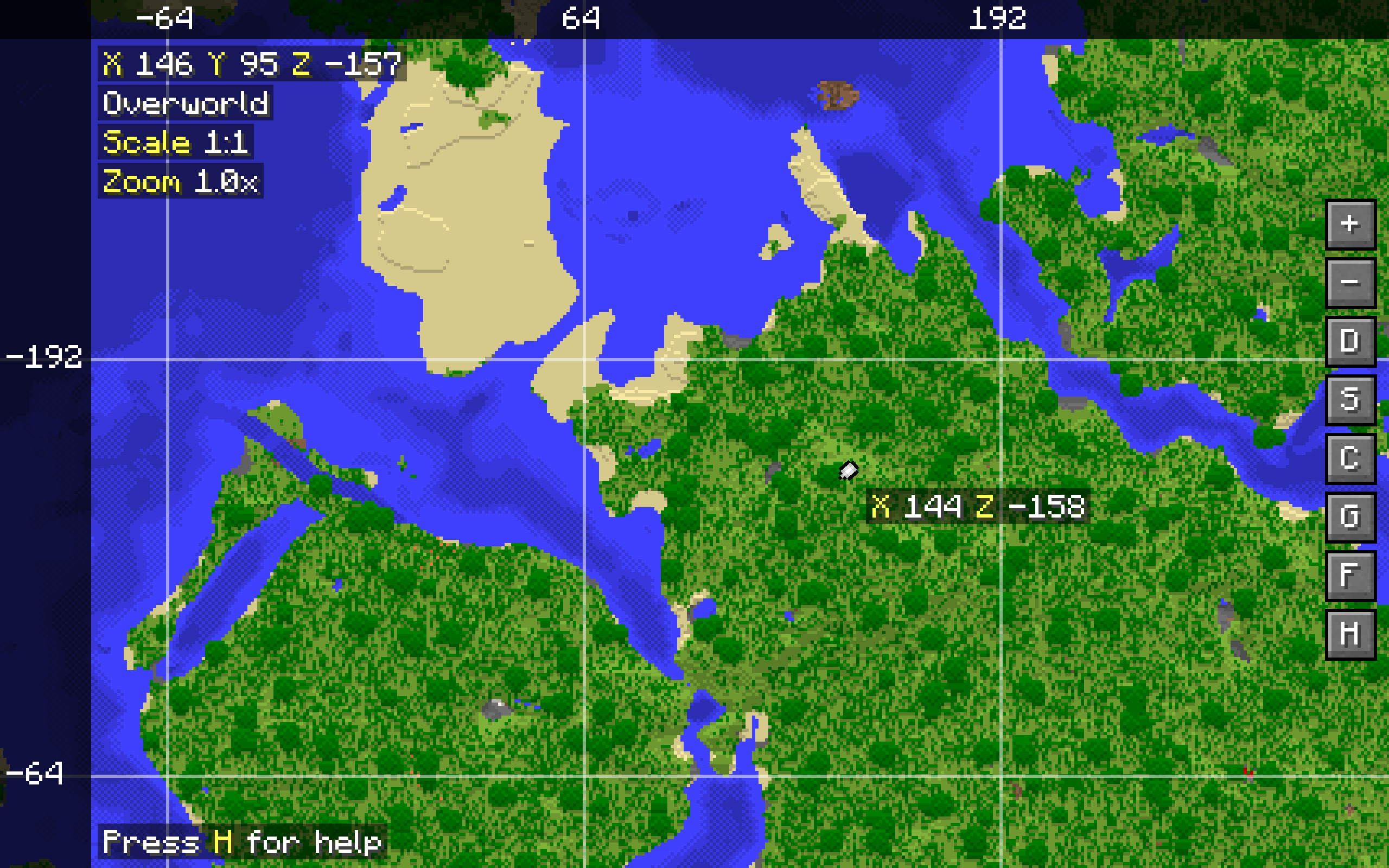
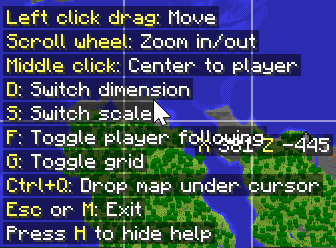
世界地图一次只能显示一个维度及其对应的缩放比例。你可以在世界地图界面中切换维度和缩放比例。支持基本的鼠标平移和缩放操作,以及可切换的玩家跟随和地图网格叠加层。随时按下 H 键可查看按键绑定参考。大多数按键绑定可以在原版的控制菜单中重新设置。
世界地图会显示所有在线玩家的自定义玩家标记。这些标记平滑动画,每个玩家标记都有独特的颜色,与定位器栏中的玩家标记样式一致。将鼠标悬停在玩家标记上会显示该玩家的名称。存储在地图本身上的标记也会显示出来,例如旗帜标记和探索标记。
图谱
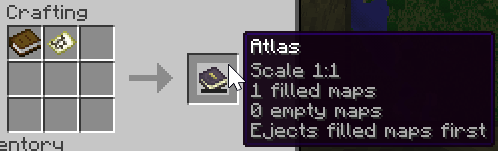
通过将一张已填充的地图与一本书合成为图谱。图谱可以像收纳袋一样使用,用于存储空地图和与创建图谱所用的已填充地图相同比例的已填充地图(总共最多容纳 16384 个物品,具体数量可在配置中调整)。
图谱中的地图将用于创建世界地图,当你进入未探索区域时,图谱会自动将其内部的空地图转换为已填充地图。
- 图谱可以在制图台中进行复制和合并。
- 图谱可以附魔「环球旅行家」(Globetrotter),这将使图谱在生成新地图时消耗纸张而非空地图。这是一种宝藏附魔,只能在要塞图书馆宝箱中找到。
- 将探险家地图或埋藏的宝藏地图添加到图谱中,会使目标标记在世界地图和小地图上可见。
- 当鼠标悬停在图谱上时滚动滚轮,可以切换优先弹出已填充地图还是空地图。
- 手持图谱瞄准旗帜时右键点击,会在当前激活的地图上创建旗帜标记,就像普通地图那样。
图谱图钉
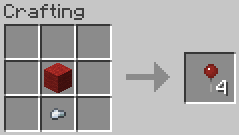
图谱图钉可用于在世界地图上放置位置标记。它们由羊毛和铁粒合成,染色方式与皮革盔甲相同,支持数百万种颜色组合。背包、收纳袋和潜影盒中的图谱图钉均可在世界地图中使用。在多人社服中,已放置的图钉可以与其他玩家共享。
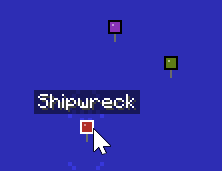
图钉放置:
- 在世界地图界面中,按 P 键开启图钉放置模式。
- 在世界地图的任何位置单击以打开图钉放置菜单。
- 在菜单中,设置图钉名称并从调色板中选择图钉颜色。
- 点击“确认”按钮,在点击的位置放置图钉,消耗对应颜色的图谱图钉。
- 按住 Ctrl 键点击现有图钉,可移除光标下的图钉并将其放回背包。
- 再次按 P 键关闭图钉放置模式。
图钉共享:
- 在非图钉放置模式下左击图钉,可将其分享给在线玩家。
- 共享图钉会消耗一个相似颜色的图谱图钉。
- 接收方会收到一条包含链接的聊天消息,用于接受该图钉。
- 如果请求在 60 秒内(可配置)未被接受,图谱图钉将被退还。
图谱图钉物品可以在配置文件中禁用。禁用后,放置和共享图钉无需消耗图谱图钉,可从 16 种基础染料颜色及现有图钉的颜色中进行选择。
小地图
将图谱放在快捷栏中,即可显示一个小地图,展示你当前所在的地图区域。
如果存在多个图谱,小地图会优先使用你手中的图谱;否则将使用第一个图谱。
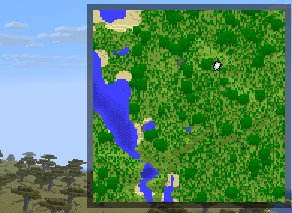
小地图显示的标记与世界地图相同。当玩家列表打开时(按住 Tab 键),会显示玩家标记的名称。
小地图下方可以显示一些基本信息,如现实时间、游戏时间、坐标、生物群系和天气,每项信息均可单独切换显示状态。默认情况下,这些信息均处于关闭状态。
下界地图支持
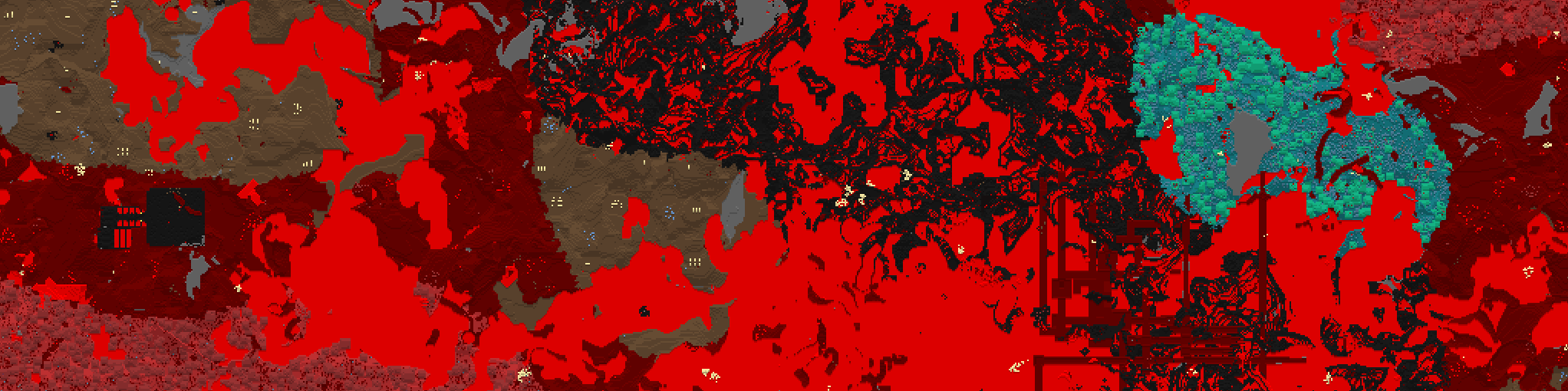
MapStitch 启用下界地图功能——无需其他模组。下界地图的显示方式可以进行配置,并且可以添加额外的天花板维度以在其中启用地图功能。
更廉价的地图
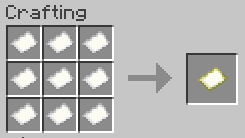
现在制作地图更加便宜,仅需 9 张纸,而不需要之前的 8 张纸加指南针,但除非你的背包中有指南针,否则地图不会显示你的位置。
模组集成
- Trinkets (Updated)、Ohmega、Curios API 或 Trinkets:允许将一本地图册作为饰品装备,它会像往常一样正常运行,并在小地图中优先显示
- Remapped:Fabric 模组,大幅改善地图颜色。MapStitch 无需任何配置即可与之配合使用,强烈推荐安装
配置
本模组的许多方面均可自定义。强烈建议使用游戏内的配置界面来设置模组。在 Fabric 上,你可以通过安装 Mod Menu 来访问该界面。在 NeoForge 上,你可以在加载器内置的模组菜单中进行配置。
如果安装了 Sodium,还可以从 Sodium 的视频设置界面中配置客户端侧的设置。
一些值得注意的设置包括:
- 自定义世界地图、小地图和下界地图的外观
- 精细控制使用某些功能所需的物品(例如,需要指南针才能显示玩家标记和坐标,需要时钟才能显示时间和天气等)
- 切换更便宜的合成配方,并决定是否替换原版配方
- 切换“环球旅行者”附魔,并调整其在要塞图书馆宝箱中出现的概率
- 切换死亡后是否保留地图册
- 在安装饰品模组时,切换各个饰品槽位的启用状态
MapStitch
This mod adds a world map and a minimap using vanilla maps and makes vanilla maps cheaper and easier to manage by using the new Atlas item.
Unlike other world map/minimap mods which ignore vanilla maps and make them obsolete, MapStitch makes them much more enjoyable to use and turns them into a core part of the world map and minimap.
Requires:
- Fzzy Config
- Fabric API (Fabric only)
World map
MapStitch uses atlases from your inventory to create a world map which you can open at any time by pressing M or right-clicking while holding an atlas.
The world map can only show one dimension and scale at once. These can be switched in the world map itself. There are basic controls like panning and zooming using the mouse, and toggleable player following and map grid overlay. A keybind reference can be brought up at any time by pressing H. Most of the keybinds can be rebound in the vanilla Controls menu.
The world map shows custom player markers for all online players. They're smoothly animated, and each player marker is uniquely colored, identically to locator bar player markers. Hovering over a player marker shows the player's name. Markers stored on the maps themselves are displayed too, such as banners and exploration markers.
Atlas
Create an atlas by combining a filled map and a book. The atlas can then be used like a bundle to store empty maps and filled maps matching the scale of the filled map used to create the atlas (up to 16384 items in total, configurable).
Maps from the atlas will be used to create the world map, and the atlas will automatically turn empty maps inside it into filled maps as you enter unmapped areas.
- Atlases can be copied and merged in the cartography table.
- Atlases can be enchanted with Globetrotter, which makes them consume paper instead of empty maps to create new maps. This is a treasure enchantment and can only be found in stronghold library chests.
- Adding an explorer map or buried treasure map to an atlas will make the target marker visible in the world map and minimap.
- Scrolling while hovering over an atlas will switch between ejecting filled or empty maps first.
- Right-clicking with an atlas in hand when targeting a banner will create a banner marker on the currently active map, just like regular maps do.
Atlas Pins
Atlas pins can be used in the world map to place location pins. They are crafted with wool and an iron nugget, and can be dyed the same way leather armor is dyed, supporting millions of color combinations. Atlas pins carried in your inventory, bundles, and shulker boxes will be available for use in the world map. Placed pins can be shared with other players on multiplayer servers.
Pin placement:
- In the world map screen, press P to turn on pin placement mode.
- Click anywhere on the world map to open the pin placement menu.
- In the menu, set the pin name and select the pin color from the palette.
- Press the "Confirm" button to place the pin on the clicked location, consuming the atlas pin of the matching color.
- Click on an existing pin while holding Ctrl to remove the pin under the cursor, placing it back into your inventory.
- Press P again to turn off pin placement mode.
Pin sharing:
- Left-click a pin outside of pin placement mode to share it with an online player.
- Sharing a pin consumes an atlas pin of a similar color.
- The receiving player gets a chat message with a link to accept the pin.
- If the request isn't accepted within 60 seconds (configurable), the atlas pin is refunded.
The atlas pin item can be disabled in the config. When disabled, pins can be placed and shared without atlas pins, choosing from the 16 base dye colors and the colors of existing pins.
Minimap
Having an atlas in the hotbar will display a minimap showing the map where you're currently located.
If multiple atlases are present, the minimap will prioritize the atlas in your hands, otherwise the first atlas will be used.
The minimap shows the same markers that the world map does. Player marker names are displayed while the player list is open (holding Tab).
Some basic information like real time, game time, coordinates, biome and weather can be displayed under the minimap, with each being toggleable. These are all disabled by default.
Working Nether maps
MapStitch enables maps in the Nether - no other mods required. The way Nether maps are displayed can be configured, and additional ceiling dimensions can be added to enable maps in them.
Cheaper maps
Making maps is now cheaper, requiring only 9 paper instead of 8 paper and a compass, but they won't show your position unless you have a compass in your inventory.
Mod integration
- Trinkets (Updated), Ohmega, Curios API, or Trinkets: Allows equipping one atlas as an accessory, from where it will function as usual and be prioritized for the minimap
- Remapped: Fabric mod that significantly improves map colors, MapStitch works with it out of the box without any configuration needed, highly recommended
Configuration
Many aspects of the mod are configurable. It's highly recommended to use the in-game configuration screen to configure the mod. On Fabric, you can access it by installing Mod Menu. On NeoForge, you can access it in the mod loader's built-in mod menu.
Client-side settings can also be configured from the Sodium video settings screen if Sodium is installed.
Some notable settings include:
- Customizing the appearance of the world map, minimap, and Nether maps
- Granular control over the requirement of items to use certain features (such as the compass being required for the player marker and coordinates, clock being required for time and weather etc.)
- Toggling the cheaper map recipe and whether it should replace the vanilla recipe
- Toggling the Globetrotter enchantment and adjusting the chance for it to appear in stronghold library chests
- Toggling whether to keep atlases on death
- Toggling each accessory slot when an accessory mod is installed

下载 MapStitch
下载 MapStitch
下载 MapStitch
下载 MapStitch
需要联机服务器吗?
稳定流畅、一键部署,几分钟即可和朋友联机开服
最低仅需 8 元/月 即可畅快联机
下载 MapStitch
需要联机服务器吗?
稳定流畅、一键部署,几分钟即可和朋友联机开服
最低仅需 8 元/月 即可畅快联机
下载 MapStitch
下载 MapStitch
需要联机服务器吗?
稳定流畅、一键部署,几分钟即可和朋友联机开服
最低仅需 8 元/月 即可畅快联机
下载 MapStitch
下载 MapStitch
需要联机服务器吗?
稳定流畅、一键部署,几分钟即可和朋友联机开服
最低仅需 8 元/月 即可畅快联机
下载 MapStitch
简介
我收到了一些抱怨,说我的模组过于偏向单人游戏。
- 图钉 - 使用羊毛和铁粒制作图钉,为其染色,在世界地图上标记位置,并与朋友分享已标记的位置。
- 玩家标记改进 - 在世界地图和小地图中,通过新的彩色、平滑动画的玩家标记看到你的朋友,每个玩家拥有独特的颜色,并支持队伍功能。
- 复制和合并地图册 - 在制图台处,可以复制你的地图册与朋友分享,也可以将你的地图册与朋友的地图册合并以共享进度。
- 居中小地图模式 - 这项前所未有的技术将你的玩家标记固定在中心,并让小地图内容围绕其移动。
- 所有物品需求现在默认禁用,因为显然没人会阅读模组说明。
- 一堆 bug 修复。
- 更新了俄语翻译(#39 by ShallIMove)。
- 添加了波兰语翻译(#41 by MisterFossil)。
完整更新日志
图钉
- 新增图钉物品:
- 通过将纸张、任意木板和一个铁锭组合,制作 16 个图钉。
- 可以将 2-8 个相同的图钉与一个或多个染料组合,批量为图钉染色,默认颜色为白色。
- 可以在背包、束口袋或潜影盒中携带图钉,以便在世界地图界面中使用。
- 放置图钉:
- 在世界地图界面,按 P 键开启图钉放置模式。
- 点击世界地图上的任意位置以打开图钉放置菜单。
- 在菜单中,设置图钉名称并从调色板中选择图钉颜色。
- 按下“确认”按钮,在点击的位置放置图钉,消耗对应颜色的图钉。
- 按住 Ctrl 键点击已有的图钉,移除光标下的图钉并将其放回背包。
- 再次按 P 键关闭图钉放置模式。
- 分享图钉:
- 在非图钉放置模式下左击图钉,将其分享给在线玩家。
- 分享图钉会消耗一个类似颜色的图钉。
- 接收方会收到一条包含接受图钉链接的聊天消息。
- 如果请求在 60 秒内(可配置)未被接受,图钉将被退还。
- 图钉物品可以在配置文件中禁用。禁用后,可以无需图钉即可放置和分享图钉,从 16 种基础染料颜色和现有图钉的颜色中进行选择。
居中小地图模式
- 新增一种“居中”小地图模式,将你的玩家标记锁定在中心,并让小地图内容围绕其移动。
- 新增“锁定玩家标记朝北”选项,在居中模式下将玩家标记锁定在北方,使地图围绕你的玩家标记旋转。默认关闭。
- 旧的小地图模式现称为“静态”。居中模式是新的默认模式。
玩家标记改进
- 其他玩家的玩家标记现在可以在世界地图和小地图中看到。
- 在世界地图中悬停在玩家标记上会显示玩家名称。
- 在小地图中,当玩家列表打开时,玩家标记会显示玩家名称。
- 玩家标记现在按照定位栏的方式着色(基于玩家 UUID)。
- 玩家标记现在移动和旋转更加平滑,没有任何卡顿。
- 可以配置是否显示其他玩家的玩家标记以及玩家标记颜色。
复制和合并地图册
- 制图台现在可以用于复制和合并地图册。
- 当两个地图册放置在制图台的输入槽中时,会出现一个按钮,点击可在复制和合并之间切换。
- 悬停在按钮上可查看无法复制或合并的原因。
- 复制:
- 将要复制的地图册(源地图册)放入顶部槽位。
- 将用于接收源地图册中地图的目标地图册(目标地图册)放入底部槽位。
- 目标地图册需要为源地图册中每个已填充的地图准备一张空白地图/纸张(如果目标地图册中尚不存在)。
- 从最右侧的槽位取出结果地图册。源地图册保持完好,而目标地图册将被消耗。
- 结果地图册保留目标地图册的所有内容,包括其名称和附魔,并添加源地图册中的已填充地图。
- 合并:
- 将两个地图册放入最左侧的两个槽位。结果地图册保留顶部地图册的名称和两个地图册的附魔。
- 从最右侧的槽位取出结果地图册。两个输入地图册都将被消耗。
- 结果地图册将包含两个地图册内容的合并,且必须适应地图册容量。
- 如果两个地图册都包含同一区域的地图,则保留探索度更高的地图,另一张变回空白地图/纸张。
- 持有不同比例尺已填充地图的地图册无法复制或合并。
翻译
其他更改
- 提高了地图渲染精度,消除了有时在世界地图界面中地图之间出现的接缝。
- 为世界地图界面的空白区域添加了棋盘格背景,可在配置中切换。
- 所有物品需求现在默认禁用。
- 所有小地图信息条目现在默认允许。
- 如果缺少某些操作所需的物品,该操作的按钮在世界地图界面中将变为灰色。
- 添加了配置选项“环球旅行者” → “战利品位置”,允许指定可以找到 Globetrotter 的战利品表,默认值为:
- 原版要塞图书馆宝箱
- Enderscape 要塞图书馆宝箱
- Dungeons and Taverns 要塞重制图书馆宝箱
关于这个资源的讨论、问题反馈与使用心得
还没有讨论,来发第一帖吧
你是这个资源的作者?登录后可认领此资源。
相似资源
 模组

显示你正在注视的方块的信息。(适用于 Minecraft 1.16+ 的 Hwyla/Waila 分支)
 模组

查看物品与配方
 模组
在游戏画面角落显示附近世界地形、玩家、生物和实体的地图。可创建路径点,帮助你找到标记过的位置。
 模组
使用 JavaScript 编辑配方、添加自定义物品、编写世界事件!
 模组
添加区块认领和玩家组队功能,并与 Xaero's Minimap 和 World Map 集成
 模组
添加全屏世界地图,显示你在世界中已探索的区域。与 Xaero's Minimap 搭配使用效果极佳。
评论 0
登录后参与评分
还没有评论,来抢沙发吧