MaterialMaps
让纹理看起来凹凸有致,而非平坦。无需光影包。
仅客户端 · 依赖 Sodium
在 Minecraft 中,每个方块面都是一个完美的平面正方形。
石头、砖块、砾石,纹理看起来粗糙,但表面本身是平滑的,因此光线以完全相同的方式照射到它们上面。这就是为什么方块看起来像贴纸的原因。
MaterialMaps 解决了这个问题。
许多高清资源包已经为每种纹理包含了一张额外的隐藏图像,指示“这个像素凸起,那个像素凹陷”。
通常情况下,只有光影包才能读取这些数据。
MaterialMaps 自行读取这些数据,因此每个凸起都能从正确的方向捕捉光线并投射出属于自己的微小阴影。石头看起来像是雕刻出来的。砖块看起来是堆叠的。砾石看起来就是真正的砾石。
- 无需光影包,不需要 Iris,不需要 OptiFine,也不会造成巨大的帧率损失
- 保持原版风格,没有泛光,没有颜色变化,没有花哨的天空。只有立体感
- 与你已有的资源包配合使用,如果你的资源包支持它,开启模组即可
我需要特殊的资源包吗?
是的,MaterialMaps 仅在资源包提供细节的地方添加细节。
像 Prime's HD Textures 这样的高清资源包就支持。
使用原版纯文本资源包时,不会有任何变化。
仍在积极开发中!
MaterialMaps 可以工作,但它还很年轻。尚未保证与大型渲染模组的兼容性。
非常欢迎提交 Bug 报告。
对比
截图使用了 Prime's HD Textures
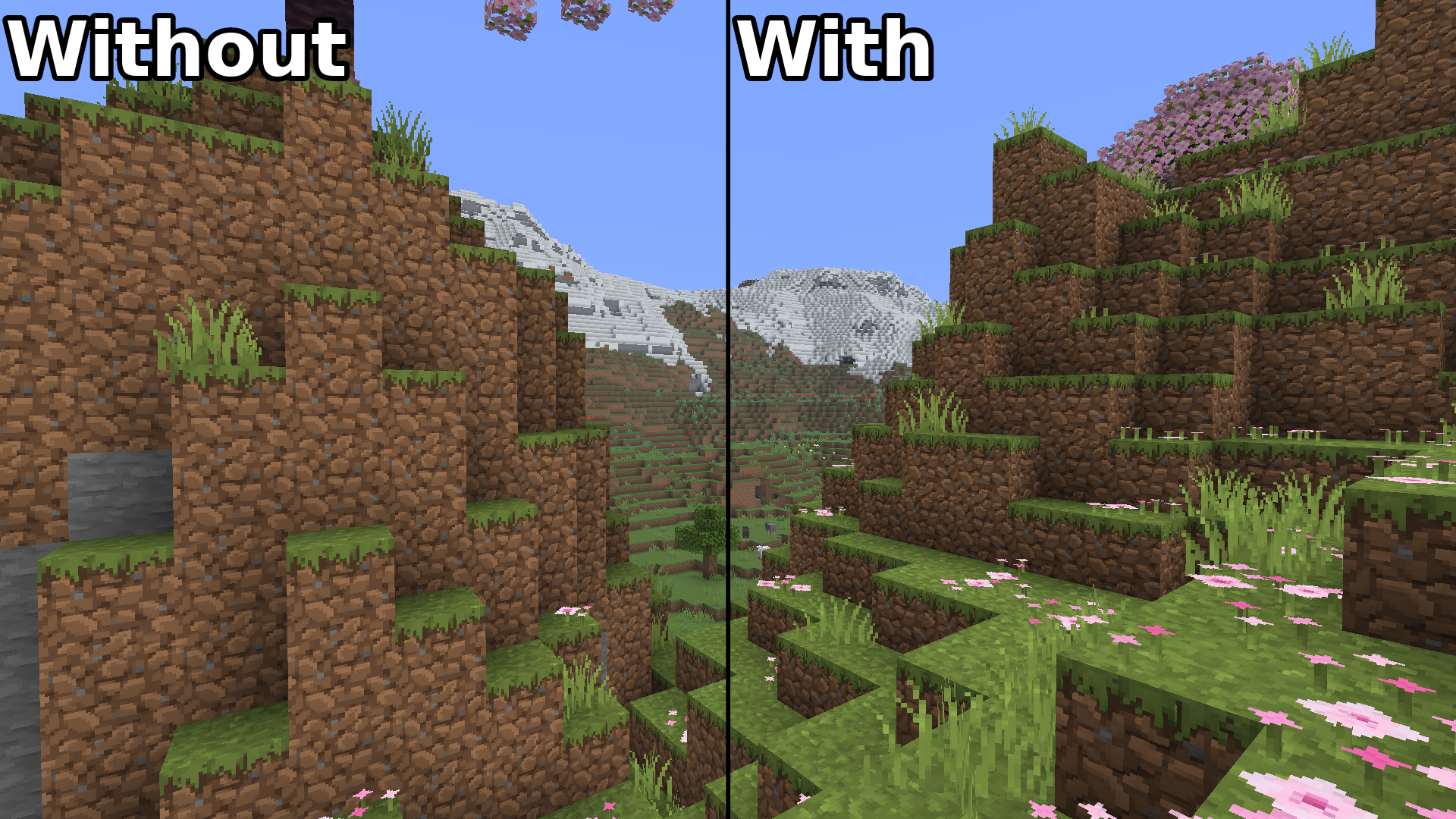
功能
- 方块法线贴图:通过专用的渲染路径直接应用于地形,因此原版区块几何体保持不变。
- 物品法线贴图:手持、掉落和物品栏中的物品也享受同样的处理。
- 高度图:当纹理具有
_h.png 但没有 _n.png 时,MaterialMaps 会在内存中于资源重载期间派生切线空间法线贴图。
- LabPBR 1.3 支持:识别配对的
_n.png 和 _s.png 贴图;法线 X/Y 和环境光遮蔽从 LabPBR 法线贴图中读取,其 Alpha 通道保留为嵌入的高度数据。
- 维度感知光照:太阳和月亮方向跟随你所在的维度。
- 实验性视差效果:对附近实体和镂空方块面进行有限的高度采样,可选凹边着色和类体素像素浮雕。
- 原版回退:MaterialMaps 无法安全渲染的任何内容都会直接交还给原版,并记录原因。
兼容性
| 模组 |
状态 |
| Sodium |
必需 |
| Iris |
可选。当启用 Iris 光影包时,MaterialMaps 会禁用自身以避免冲突。 |
| Fabric API |
必需 |
MaterialMaps 是仅客户端模组,你可以带着它加入任何服务器。
配置
从 ModMenu 打开设置,或在安装 Sodium 时从 视频设置 -> MaterialMaps 打开。
渲染:切换方块和物品法线贴图、高度图派生以及原版回退。
光照:Normal Strength(法线强度)控制法线贴图对表面的扰动程度,Ambient Strength(环境强度)设置最小细节光照,Directional Strength(方向强度)设置方向对比度。
实验性功能:视差效果、视差深度缩放、凹边和类体素像素浮雕。
调试:方块和物品的法线贴图、世界法线和光照调试视图,以及渲染统计信息。
命令
用于在游戏中诊断资源包:
/materialmaps summary [blocks|items]   概述检测到的内容
/materialmaps inspect <material>       显示一种纹理、方块或物品找到的贴图
/materialmaps validate                 列出资源包警告和错误
/materialmaps renderstats              渲染诊断
/materialmaps dump                     将完整材质索引写入文件
/materialmaps reload                   重建索引和法线图集
给资源包制作者
命名约定
将贴图放在基础纹理旁边,使用 _n 和 _h 后缀:
assets/minecraft/textures/block/stone.png
assets/minecraft/textures/block/stone_n.png
assets/minecraft/textures/block/stone_h.png

assets/minecraft/textures/item/iron_pickaxe.png
assets/minecraft/textures/item/iron_pickaxe_n.png
值得了解的规则:
- 显式法线贴图始终优先于高度图。
- 仅当启用
Height Maps(高度图)且不存在 _n.png 时,才使用高度图来派生法线。
- 贴图必须与其基础纹理的尺寸匹配,否则将被跳过。
- LabPBR 资源包可以提供
_n.png + _s.png 配对。
- 仅扫描
textures/block 和 textures/item。
运行 /materialmaps validate 可以在工作时捕获孤立贴图和维度不匹配问题,并在设置中启用 Strict Validation(严格验证)以将更多问题视为硬错误。
视差效果说明
实验性视差选项对附近实体和镂空方块面应用有限的高度采样。它在 24 到 32 个方块之间淡出,并为半透明层保持禁用。镂空方块保持其原始的 alpha 测试轮廓。这是一个轻量级原型——没有真正的几何体或轮廓置换。
测试资源包
仓库中包含一个小型开发用资源包 materialmaps-test-pack。启动客户端,在资源包界面启用它,然后检查钻石、铁锭或木棍,即可看到物品路径生效的效果。
要求
- Minecraft 26.2
- Fabric Loader 0.19.3+
- Fabric API
AI 使用
本项目中的每一行代码并非 100% 由人类编写
AI 被用作研究工具和编程辅助
MaterialMaps
Make your textures look bumpy instead of flat. No shader pack required.
Client-side · Sodium-dependent
In Minecraft, every block face is a perfectly flat square.
Stone, bricks, gravel, the texture looks rough, but the surface itself is smooth, so light hits all of it exactly the same way. That is why blocks can look like stickers.
MaterialMaps fixes that.
Many HD resource packs already include an extra hidden image for each texture that says "this pixel sticks out, that one is a dent".
Normally only a shader pack can read those.
MaterialMaps reads them itself, so every bump catches the light from the right side and casts its own little shadow. Stone looks carved. Bricks look stacked. Gravel looks like actual gravel.
- No shader pack needed, no Iris, no OptiFine, no giant FPS hit
- Still looks like vanilla, no bloom, no color changes, no fancy skies. Just depth
- Works with the packs you already have, if your pack supports it, turn the mod on and you're done
Do I need a special resource pack?
Yes, MaterialMaps only adds detail where the pack provides it.
HD packs like Prime's HD Textures do.
With a plain vanilla pack, nothing will change.
Still in heavy development !
MaterialMaps works, but it is young. Compatibility with large rendering mods is not guaranteed yet.
Bug reports are very welcome.
Comparison
Screenshots taken with Prime's HD Textures
Features
- Block normal maps: applied directly to terrain through a dedicated rendering path, so vanilla chunk geometry is left untouched.
- Item normal maps: held, dropped, and inventory items get the same treatment.
- Height maps: when a texture has an
_h.png but no _n.png, MaterialMaps derives a tangent-space normal map in memory during resource reload.
- LabPBR 1.3 support: paired
_n.png and _s.png maps are recognised; normal X/Y and ambient occlusion are read from the LabPBR normal map, and its alpha channel is preserved as embedded height data.
- Dimension-aware lighting: sun and moon direction follow the dimension you are in.
- Experimental parallax: bounded height sampling on nearby solid and cutout faces, with optional recess-edge shading and voxel-like texel relief.
- Vanilla fallback: anything MaterialMaps cannot render safely is handed straight back to vanilla, with the reason recorded.
Compatibility
| Mod |
Status |
| Sodium |
Required |
| Iris |
Optional. When an Iris shader pack is active, MaterialMaps disables itself to avoid conflicts. |
| Fabric API |
Required |
MaterialMaps is client-side only, you can join any server with it.
Configuration
Open the settings from ModMenu, or from Video Settings -> MaterialMaps when Sodium is installed.
Rendering : toggle block and item normal maps, height-map derivation, and the vanilla fallback.
Lighting : Normal Strength controls how strongly normal maps perturb the surface, Ambient Strength sets the minimum detail lighting, and Directional Strength sets the directional contrast.
Experimental : parallax, parallax depth scale, recess edges, and voxel-like texel relief.
Debug : normal-map, world-normal, and lighting debug views for blocks and items, plus render statistics.
Commands
For diagnosing a pack in-game:
/materialmaps summary [blocks|items]   overview of what was detected
/materialmaps inspect <material>       show the maps found for one texture, block, or item
/materialmaps validate                 list resource-pack warnings and errors
/materialmaps renderstats              rendering diagnostics
/materialmaps dump                     write the full material index to a file
/materialmaps reload                   rebuild the index and normal atlases
For pack creators
Naming convention
Place your maps next to the base texture, using the _n and _h suffixes:
assets/minecraft/textures/block/stone.png
assets/minecraft/textures/block/stone_n.png
assets/minecraft/textures/block/stone_h.png

assets/minecraft/textures/item/iron_pickaxe.png
assets/minecraft/textures/item/iron_pickaxe_n.png
Rules worth knowing:
- Explicit normal maps always take priority over height maps.
- Height maps are only used to derive normals when
Height Maps is enabled and no _n.png exists.
- A map must match its base texture's dimensions, or it is skipped.
- LabPBR packs can supply
_n.png + _s.png pairs.
- Only
textures/block and textures/item are scanned.
Run /materialmaps validate to catch orphan maps and dimension mismatches while you work, and enable Strict Validation in the settings to treat more problems as hard errors.
Parallax notes
The experimental parallax option applies bounded height sampling to nearby solid and cutout block faces. It fades out between 24 and 32 blocks and stays disabled for translucent layers. Cutout blocks keep their original alpha-tested silhouette. This is a lightweight prototype — there is no true geometry or silhouette displacement.
Test pack
A small development resource pack is included in the repository as materialmaps-test-pack. Run the client, enable it in the resource-pack screen, then inspect a diamond, an iron ingot, or a stick to see the item path at work.
Requirements
- Minecraft 26.2
- Fabric Loader 0.19.3+
- Fabric API
AI Usage
Not every line of code from this project is 100% human
AI has been used as a research tool and for programming assistance


 模组

 模组

 模组

 模组
 模组
 模组

评论 0
登录后参与评分
还没有评论,来抢沙发吧