
MazeWorld
一个向原版世界生成中添加无限迷宫的模组。包含多种配置选项和迷宫类型。
创建世界
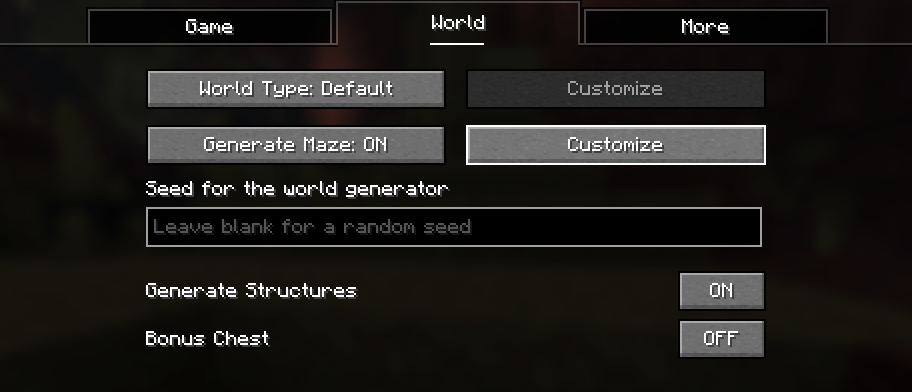
要创建 Mazeworld,你可以选择任意现有的世界预设。然后启用“Generate Maze”(生成迷宫),并点击其旁边的“Customize”(自定义)以调整迷宫设置。
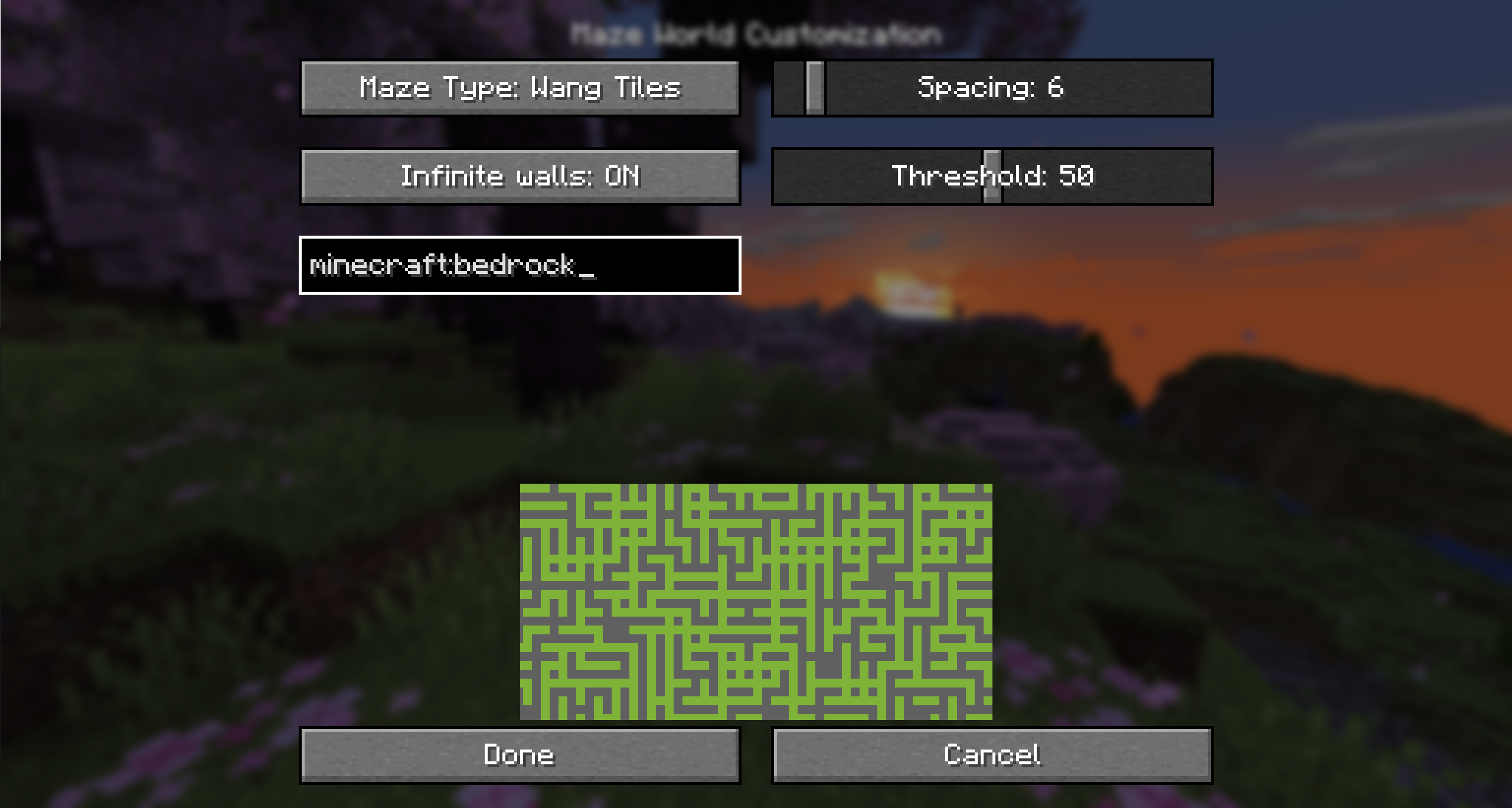
点击自定义后,你可以更改关于迷宫生成的各种设置。 下方是生成迷宫外观的预览。
自定义选项
迷宫墙壁方块
确定用于构建迷宫的世界方块。默认为基岩,但你可以将其更改为你也可以破坏的方块。
无限墙壁
防止玩家即使在高处或低处也能穿越墙壁。
最小 Y 坐标和最大 Y 坐标
设置迷宫生成的海拔高度。默认情况下,这将从基岩一直延伸到建筑限制高度。 你可以降低最大 Y 坐标,以避免迷宫一直生成到顶部。
替换方块
确定哪些方块会被迷宫替换。
- 全部(默认):所有方块都会被替换。这意味着你无法通过挖掘地面来穿过墙壁。
- 可替换:所有可替换的方块(空气、水、高草……)都将被迷宫替换。其他方块保持不变,因此你可以挖掘石头来绕过迷宫。
- 仅空气:仅替换空气,不替换任何现有方块。
结构体
确定如何处理结构体:
- 保留关键结构体(默认):这可以防止要塞中的末地传送门房间被迷宫切断。这是为了避免如果迷宫配置移除了每个要塞中的传送门框架,导致世界无法通关的情况。
- 保留全部:这使得所有结构体都不会被迷宫替换。它使用所有结构体部分的边界框作为不放置迷宫的区域。
- 替换全部:不考虑结构体,迷宫也可以生成在所有结构体内部。在某些迷宫配置下,这可能导致无法进入末地。
保留末地岛
启用后,会在末地维度留下一个 19x19 区块的空洞,以免干扰末地岛。
启用的维度
允许你单独切换哪些维度会生成迷宫。
迷宫类型
有不同的迷宫类型,使用不同的算法生成迷宫。
二叉树
参见 。
选项:
- Size(大小):每个单元格的大小
- Bias(偏置):走廊偏向垂直或水平的程度
Wang 瓦片
参见 。
这有矩形和圆角两种变体。
选项:
- Size(大小):每个瓦片的大小
- Wall width(墙壁宽度):墙壁占瓦片大小的比例
Simplex 噪声
参见 。
这有 2D 和 3D 两种变体。
选项:
- Size(大小):噪声的比例尺
- Threshold(阈值):用于比较噪声值的阈值,以确定某个方块是墙壁还是空气
在服务器上创建世界
要在服务器上创建世界,建议直接上传在客户端创建好的世界。
MazeWorld
A mod to add an infinite maze to vanilla world generation. There are many configuration options and maze types.
World creation
To create a mazeworld, you can choose any existing world preset. Then enable "Generate Maze" and click "Customize" next to that to adjust the maze settings.
After clicking on customize, you can change various settings about the maze generation. Below that is a preview of how the generated maze will look.
Customization options
Maze wall block
Determines which block is placed in the world to build the maze. By default this is bedrock, but you can change it to a block you can break too.
Infinite walls
Prevents players from crossing the walls even above or below build height.
Min Y and Max Y
Sets the height at which the maze will generate. By default, this is all the way from bedrock to the build limit. You can lower Max Y to not generate the maze all the way to the top.
Replace Blocks
Determines which blocks are replaced by the maze.
- All (Default): All blocks are replaced. This means you cannot dig through the ground to pass a wall.
- Replaceable: All blocks that are replaceable (Air, Water, Tall grass, ...) will be replaced by the maze. Other blocks are kept, and as such you can dig through stone to get around the maze.
- Air: Only air is replaced, no existing are replaced.
Structures
Determines how structures are handled:
- Preserve essential (Default): This prevents the end portal room in the stronghold from being cut through by the maze. This is to avoid the world being unbeatable if the maze configuration removed portal frames in every stronghold.
- Preserve all: This makes ALL structures not be replaced by the maze. It uses the bounding boxes of all structure pieces as areas where no maze is placed.
- Replace all: Structures are not considered and maze can be generated inside all structures too. This may make it impossible to enter the end in certain maze configurations.
Preserve End Island
When enabled, leaves a 19x19 chunk hole in the end dimension to not interfere with the end island.
Enabled dimensions
This allows you to toggle individually, which dimensions will generate a maze.
Maze Type
There are different maze types with different algorithms for generating the maze
Binary Tree
See .
Options:
- Size: How large each tile is
- Bias: How much the corridors will bias to being vertical or horizontal
Wang tiles
See .
This has a rectangular and a rounded variant.
Options:
- Size: How large each tile is
- Wall width: What ratio of the tile size is wall
Simplex noise
See .
This has a 2D and a 3D variant.
Options:
- Size: The scale of the noise
- Threshold: The threshold for comparing the noise value by, to determine if a block is a wall or air
World creation on a server
To create a world on a server, it is recommended to simply upload a world created on the client.
下载 Maze World
下载 Maze World
下载 Maze World
下载 Maze World
下载 Maze World
下载 Maze World
下载 Maze World
下载 Maze World
下载 Maze World
下载 Maze World
- 修复了“保留末地岛”按钮的错误提示
- 修复了“保留末地岛”选项始终处于启用状态的问题
关于这个资源的讨论、问题反馈与使用心得
还没有讨论,来发第一帖吧
你是这个资源的作者?登录后可认领此资源。
相似资源
 模组

原版世界生成优化模组
 模组
在游戏画面角落显示附近世界地形、玩家、生物和实体的地图。可创建路径点,帮助你找到标记过的位置。
 模组
添加全屏世界地图,显示你在世界中已探索的区域。与 Xaero's Minimap 搭配使用效果极佳。
 模组

让你能够在世界中的任何位置定位结构。
 模组

对 Minecraft 的沙漠神殿进行了全面重新设计!
 模组

感受痛苦!
评论 0
登录后参与评分
还没有评论,来抢沙发吧