MCAI - Minecraft (Character) Artificial Intelligence
(客户端版本)
你曾独自玩过 Minecraft 吗?好吧,让我告诉你——当你身处一个巨大的方块世界,而游戏中唯一像人的存在只会发出“嗯”和“啊”的声音时,孤独感会迅速袭来。这个模组旨在通过让你访问专属的人工智能(AI)来与你聊天,从而缓解这种孤独感。
设置
MCAI 需要正确设置才能正常工作。这是因为 c.ai 像大多数网站一样,在提供数据之前需要一个授权令牌(authorization token)。
幸运的是,获取你的授权令牌非常简单。
首先,前往 c.ai。登录或创建一个新账户。
然后,打开“检查元素”(Inspect Element),导航到“应用程序”(Application),找到“本地存储”(Local Storage)-> https://beta.character.ai
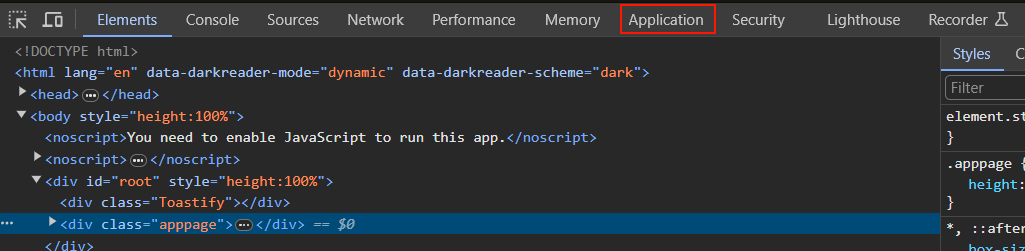

到达那里后,你需要找到一个名为 char_token 的键。这应该是一个包含两个键的 JSON 文件:value 和 ttl。你可以忽略 ttl 键;你只需要 value 键的值。
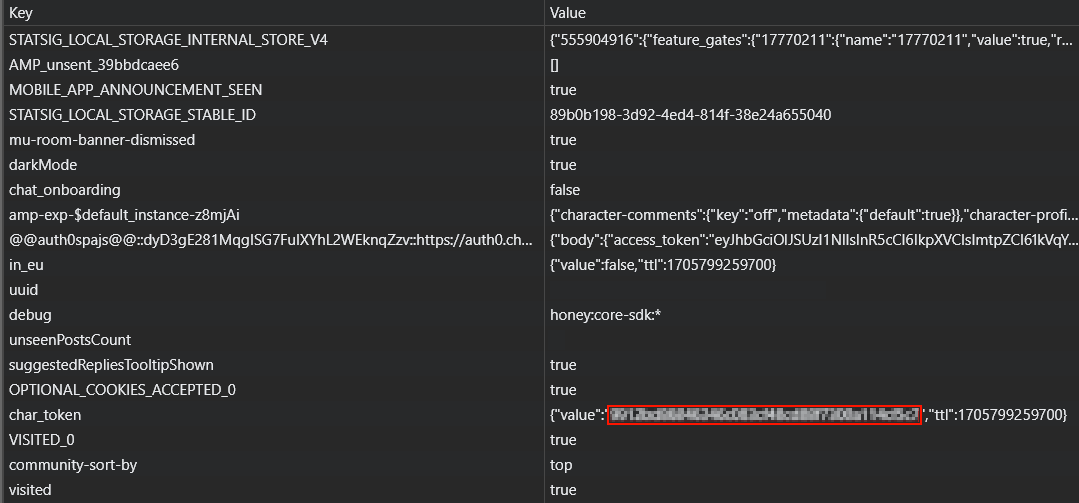
复制 value 键的值,进入模组配置(mcai.toml)并找到 [General] 部分,在那里你会找到 authorization 字段,你可以将 value 的值粘贴进去。这样就准备好了!或者,你也可以在游戏中使用 /ai authorize <token> 命令来自动更新配置文件。
要注册一个可以聊天的 AI,你可以手动编辑配置文件,也可以使用命令 /ai register <character id> <aliases (optional)>。aliases 字段是可选的,由空格分隔的备用名称列表,用于在聊天中 @ 提及该 AI,有点像给 AI 起的昵称系统。
character id 字段用于获取角色的基本信息(如其名字),也作为知道向哪个角色发送消息的方式。你可以通过前往 c.ai,打开与你想获取 ID 的角色之间的聊天,然后从 URL 中复制 char= 的值来获得角色的 ID。

与已注册的 AI 聊天
有两种方法与已注册的 AI 聊天——通过在消息中 @<AI 的名字/别名> 来 ping 它,或者使用 /ai talk <name> <text> 命令。
[在此处插入与 AI 聊天的 gif]
命令
/ai authorize <token> - 仅限管理员的命令,用于更改模组在游戏内与 c.ai 交互时使用的访问令牌。
/ai context <name> <broadcast (optional)> - 检索与 AI 聊天的最近几条消息。注意,更改 MCAI 配置中的 format 可能会导致在检索消息发送者名称时失败。由于该命令默认只提供上下文,broadcast 是管理员选项,可将最近几条消息广播给聊天中的所有玩家。
/ai disable <name> - 类似于 /ai unregister,但没那么永久。
/ai enable <name> - 撤销 /ai disable。
/ai list - 列出所有可用的 AI 及相关信息(例如它们是否启用,以及它们的别名)。
/ai register <character id> <aliases (optional)> - character ID 是从 c.ai 网站获得的 ID。注册一个 AI,以便你可以与之聊天。
/ai unregister <character id> - 永久移除一个 AI。
/ai reload - 重新加载模组的配置,这样使用外部工具进行的任何编辑都会被加载,而无需完全重启 Minecraft。
/ai reset <name> - 清除 AI 的记忆。
/ai talk <name> <text> - 替代 ping AI 的方法,虽然可能更繁琐一些。
常见问题
问:这个模组是客户端的吗?
答:是的!这是 MCAI 的客户端版本。
问:我如何与 AI 交谈?
答:阅读此处!
问:我不喜欢 AI 随机回复我的消息!我该如何阻止它们这样做?
答:你可以在配置的 general 部分中将 disableRandomResponses 切换为 true 来禁用随机回复。
问:你会制作 Forge 移植版吗?
答:不会!不过,如果你真的想在 Forge 上使用,欢迎你自己移植。
MCAI - Minecraft (Character) Artificial Intelligence
(client-side version)
Have you ever played Minecraft alone? Well, let me tell you something - it gets very lonely, very quickly when you're all alone in a vast blocky world and the only human-ish thing in the game just makes 'hrm' and 'huh' noises. This mod aims to alleviate that by providing you access to your very own AIs for you to chat with.
Setup
MCAI requires setup to work properly. This is because c.ai, like most websites, requires an authorization token before it gives you any data.
Luckily, obtaining your authorization token is simple.
First, head to c.ai. Log in or create a new account.
Then, open Inspect Element, navigate to Application, find Local Storage ->
Once you're there, you will need to find a key called char_token. This should be a JSON file with two keys; value and ttl. You can ignore the ttl key; you only need the value key.
Copy the value of the value key, go to either the mod config (mcai.toml) and locate [General], where you will find the authorization field in which you can paste the value of value. Then you're good to go! Alternatively, you can use the /ai authorize <token> command in-game to automatically update the configuration file.
To register an AI to chat with, you can manually edit the configuration file, or you can use the command /ai register <character id> <aliases (optional)>. The aliases field is an optional space-separated list of alternative names to ping the AI with in chat, sort of like a nicknames system for the AI.
The character id field is used to get basic information about the character (like their name) and also as a way to know which character to send messages to. You can obtain the character ID of a character by going to c.ai, opening a chat with the character you want the ID from, and then copying the value of char= from the URL.
Chatting with registered AIs
There are two methods to chat with registered AIs - pinging them in a message via @<AI's name/alias> or via the /ai talk <name> <text> command.
[insert gif of chatting with an AI here]
Commands
/ai authorize <token> - an admin-only command that changes the access token the mod uses to interface with c.ai in-game.
/ai context <name> <broadcast (optional)> - retrieves the last few messages from the chat with the AI. Note that changing the format in the MCAI config may or may not cause it to fail when retrieving the name of the message sender. As the command defaults to only giving you context, broadcast is an available option for admins to broadcast the last few messages to everyone in chat.
/ai disable <name> - like /ai unregister, but less permanent.
/ai enable <name> - undoes /ai disable.
/ai list - lists all available AIs and relevant information (such as whether they're enabled, and their aliases).
/ai register <character id> <aliases (optional)> - character ID is the ID obtained from the c.ai website. Registers an AI so that you can chat with 'em.
/ai unregister <character id> - permanently removes an AI.
/ai reload - reloads the mod's config so that any edits made with an external tool are loaded without requiring a complete restart of Minecraft.
/ai reset <name> - wipes the memory of an AI.
/ai talk <name> <text> - alternative to pinging the AI that's arguably more clunky.
FAQ
Q: Is this mod client-side?
A: Yes! This is the client side version of MCAI.
Q: How do I talk with an AI?
A: Read this!
Q: I don't like the AIs randomly responding to my messages! How do I stop them from doing that?
A: You can disable random responses by switching the disableRandomResponses to true in the config's general section.
Q: Will you make a Forge port?
A: Nope! You're welcome to port it yourself, if you really want it on Forge, though.


 模组

 模组

 模组
 模组

 模组
 模组
评论 0
登录后参与评分
还没有评论,来抢沙发吧